

Xeal EV Charging
- 65.00
- 3.0
- Installs
- 10.00K
- Price
- Free

Screenshots
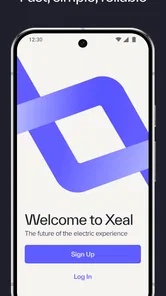
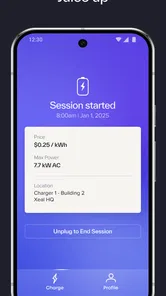
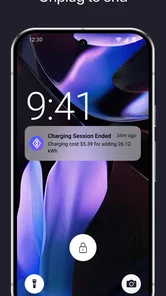
Analysis by Reviewed
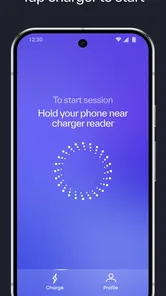
My first impression of Xeal EV Charging was that it tries to remove the most annoying part of using a public electric-vehicle charger: the awkward start. Instead of treating the phone as a place to search through menus, the app is built around tapping the phone on the charger. That makes the experience feel closer to using a contactless payment terminal than managing a complicated charging session.
That simplicity is the main reason to try it, but it is also the standard I used when judging the app beyond the first few uses. A quick interaction is valuable only if it remains dependable after the novelty disappears. In my experience, this is best understood as a focused EV charging app for people who regularly encounter compatible Xeal equipment, rather than a universal replacement for every charging service.
Xeal EV Charging sits in the Auto & Vehicles category and is developed by Eve Energy Ventures Inc. It is free to install, has an Everyone content rating, and supports Android 9 and later. The app reached the store on May 13, 2021, and the current version is 6.5.1. Those details matter because the app is aimed at an everyday transport task, where compatibility and a low-friction routine are more important than decorative extras.
What the first week feels like
The first-week appeal comes from the directness of the central action. When I am standing beside a charger with the cable ready, I do not want to spend time guessing which button begins the session. The tap-to-start approach gives the app a clear identity and makes the opening step easier to remember than a workflow built around several screens.
This is especially useful when I am charging away from home in a hurry. Picture arriving with a low battery after work, finding the charger, and wanting to get on with shopping or heading home. A process that begins with a phone tap can feel much less distracting than opening a general-purpose charging network app, browsing a map, selecting a station, and then looking for the start control.
The important qualification is that the convenience depends on the charger being part of the relevant Xeal setup. This is not a magic key for every public charger. If most of the stations I use belong to other networks, the app cannot replace those operators’ applications, payment methods, or account systems. That makes the first-week experience highly dependent on where I actually drive.
I also like the way the app’s purpose is easy to explain to another driver. There is no need to describe a large collection of unrelated tools. I can say that it is for starting a Xeal charging session by tapping the phone on the charger. That narrow focus can be a strength for someone who dislikes bloated apps, particularly if the local charging routine already revolves around Xeal equipment.
More From Our News Desk

 Gmail
GmailGmail in a Busy Inbox: Who Benefits Most?
From first account to crowded workday, Gmail earns its place through dependable search and flexible sorting—but its best fit depends on how much inbox maintenance you can tolerate.

 Prime Video
Switching to Prime Video: What Changes in Your Viewing Routine
Prime Video can make a compelling second home for streaming, but switching means learning a different catalog, rental layer, and route from browsing to playback.

 Universal TV Remote Control
Universal TV Remote Control Works Best as a Reliable Backup
A phone remote earns its place through quick setup and reliable habits. Here is how to get more from Universal TV Remote Control—and where its limits show.

 Weather - By Xiaomi
Weather by Xiaomi Review: Clear at a Glance, Less Clear Up Close
Xiaomi’s weather app makes everyday forecasts quick to scan, but its calm surface can leave useful details and recovery paths harder to find than they should be.

 X
XX Under Pressure: Can It Recover When Posting Goes Wrong?
A resilience-focused review of X, examining setup, mistaken posts, interruptions, weak connections, and the gaps that matter when recovery needs to be dependable.

 Clash of Clans
Clash of Clans Is Won Between the Battles
Its raids are quick; its community is a long-term project of coordination, teaching, rivalry, and shared responsibility—with all the friction that entails.
Latest News



At the same time, I would not install it merely because I own an electric vehicle. Ownership alone does not guarantee that the app will become part of my routine. Before making it a regular tool, I would look at where I normally charge and whether those locations use Xeal chargers. If home charging covers nearly every trip, the app may remain an occasional utility rather than a daily necessity.
The small habits that make it easier to use
The best way to judge a tap-based charging app is not by its first successful session, but by how little thought it requires during the tenth one. I found that the most useful habit is preparing before I am in a rush: keep the app available, make sure the phone is awake when approaching the charger, and avoid treating the tap as an afterthought. That preparation reduces the chance of fumbling beside the vehicle.
Another practical tip is to separate the physical charging problem from the app problem. If a session does not begin immediately, I would first check that the connector is properly positioned and that the phone is being presented to the intended contact point. Repeatedly tapping without checking the setup can turn a simple interaction into needless frustration. The app’s promise is speed, but the surrounding routine still matters.
I would also keep a backup plan for unfamiliar locations. A different charging network may require its own application or another method of starting a session, so relying on one tap-based tool everywhere would be unrealistic. This is one of the less obvious trade-offs: a specialized app can be quicker in its own environment while being less useful across a mixed charging landscape.
Why it may still matter after a month
After the initial novelty fades, the lasting value comes from repetition. If I pass Xeal chargers on a regular commute, use them near an apartment, or visit the same destination often, shaving friction from the start of each session can add up psychologically even when the individual interaction is brief. The app earns its place by becoming a familiar part of the route rather than something I open to explore.
This is where the free price helps. Since there is no purchase barrier, I can keep the app available for the occasions when a compatible charger appears without feeling that I have committed to a costly service. That does not make it essential, but it lowers the threshold for keeping it installed as a practical backup.
The app’s average rating is 3.0 from around 90 ratings, with roughly 64 written reviews. I read that as a reason to keep expectations measured. The concept is appealing, but a middling overall score suggests that the smoothness of the experience may not feel consistent for everyone. I would treat the app as a useful tool to test against my own charging pattern, not as a guarantee that every session will be effortless.
Its install base is over 10 thousand, which gives it some real-world presence without making it a universal charging standard. That distinction is important when comparing it with broader alternatives. A large multi-network app may be more useful for route planning or for drivers who travel between regions, while Xeal EV Charging can be the cleaner choice when the main task is starting a session at a familiar compatible charger.
For month-to-month use, I would ask three practical questions. Do I encounter Xeal chargers often enough to remember the app? Does the tap interaction save me time compared with the local alternative? And do I still need several other charging apps for the rest of my driving? If the answers are yes, yes, and yes, this app can still be worthwhile, but it should be viewed as one tool in a small kit rather than the only one.
Where it beats the usual alternatives
Compared with a general charging app, the strongest advantage is focus. Broader services often ask me to search, filter, inspect station details, and navigate through a network interface before I can begin. That is useful when I am planning a trip, but excessive when I am already parked at a known charger and only need to initiate charging.
Compared with using a physical card or another contactless method, the phone tap keeps the interaction inside a digital routine. Some drivers will prefer that because the phone is already in hand. Others may prefer a physical fallback because it avoids depending on the phone at the exact moment charging starts. Neither approach is automatically better; it depends on whether I value a phone-centered workflow or a separate, tangible backup.
Compared with a vehicle manufacturer’s charging application, this app is more narrowly tied to the charging operator rather than the car itself. A vehicle app may be better for checking car-specific information or managing broader ownership tasks, while Xeal EV Charging is more directly concerned with the charger interaction. I would not expect one to replace the other in a mixed setup.
One useful, non-obvious distinction is that a specialized start process can reduce decision fatigue without improving every part of a charging trip. It may make the first moment easier while leaving route planning, charger selection, and cross-network management to other tools. That is not a flaw by itself, but it prevents me from confusing a smoother start with a complete charging ecosystem.
Maintenance, friction, and the reasons it can become tiring
The maintenance burden is fairly light in principle, but it is not zero. I would keep the app updated, remember that its current version is 6.5.1, and make sure my phone remains compatible with Android 9 or newer. More importantly, I would maintain the habit of carrying an alternative way to deal with chargers outside the Xeal network. The app is easy to keep installed, but the wider charging routine still needs attention.
Phone dependence is the first possible source of fatigue. A tap-based process feels elegant when the phone is ready, but less elegant when the device is locked, unavailable, low on power, or being used for navigation. I would not want to discover at a busy charging stop that my preferred method depends entirely on a device I have just put away or handed to someone else.
Network dependence is the second. A driver who travels frequently may become tired of switching between operator apps, especially when each network has its own starting procedure. Xeal EV Charging does not solve that fragmentation. Its value is strongest in a repeated local pattern, while a roaming driver may prefer a service that covers more networks even if its interface takes longer to use.
The third source of fatigue is expectation. The store summary presents charging as fast, reliable, and easy, and the tap interaction certainly aims in that direction. In daily use, however, the app cannot control every factor around a session. The charger, connection, phone position, and local setup all influence whether the experience feels immediate. When a simple promise meets a complicated physical environment, even a small delay can feel disproportionately annoying.
I would also avoid judging the app solely by how quickly it opens. The real test is whether I can identify the correct charger, initiate the intended session, and leave confident that charging has started. A fast-looking interface that leaves me uncertain is less useful than a slightly slower one that clearly confirms what happened. This is a practical trade-off worth watching during the first few sessions.
Who should keep it installed
I would recommend trying it to an EV driver who regularly uses Xeal chargers and wants a short, memorable way to begin charging. It is also a sensible option for someone who dislikes managing a feature-heavy application when all they need is a quick station interaction. Because it is free and rated for Everyone, there is little commitment involved in testing whether it fits a particular route.
It may also suit drivers who share charging locations with family members or colleagues. A simple explanation of the tap workflow can be easier to pass on than a long set of instructions about searching for a station inside a large app. That does not eliminate the need for each person to understand their own charging arrangements, but it can make the starting ritual more approachable.
I would skip it, or at least postpone installing it, if my charging life is mostly at home, if I rarely encounter Xeal equipment, or if I need one application to manage many unrelated networks. I would also choose a broader alternative when route planning is more important to me than starting a session quickly. The app is not a poor choice in those cases; it is simply solving a narrower problem than I have.
For someone new to electric vehicles, I would not present this as the only app to learn. New drivers often need a clearer picture of their local charging options, backup networks, and travel habits before deciding which tools deserve permanent space. This one makes more sense after identifying a recurring Xeal use case, not before.
My long-term verdict
What remains after the first-week appeal is a focused convenience. Xeal EV Charging does not need to be opened constantly to be useful; it needs to remove hesitation at the chargers where it applies. That can be enough for a local driver, especially when the same locations appear repeatedly and the tap interaction becomes automatic.
My balanced view is that the app earns lasting space only when compatibility is part of my normal driving pattern. Its free availability and simple purpose make it easy to keep as a backup, but the middling 3.0 average means I would validate the experience personally rather than assume it will be flawless. The written feedback count also shows that people have had enough experience to comment, yet it does not change the basic conclusion that individual charging conditions matter.
The strongest reason to retain it is habit: arrive at a familiar Xeal charger, tap, connect, and move on. The strongest reason to remove it is fragmentation: if I constantly alternate among networks, the extra app may contribute to the very clutter it is meant to reduce. That tension defines the product more than any single feature.
In the end, I see it as a practical specialist rather than a complete EV companion. I would recommend it to a driver with regular Xeal access, while pairing it with a broader option for travel and unfamiliar stations. Its lasting value comes from dependable repetition, not from novelty. If the tap workflow genuinely shortens my routine, it deserves a place on my phone; if compatible chargers are rare in my life, I would leave the space for a more widely useful charging tool.
Xeal EV Charging Frequently Asked Questions
Is Xeal EV Charging free to download, and what devices does it support?
Xeal EV Charging is free to download and is intended for electric vehicle drivers using compatible Xeal charging stations. It is an Auto & Vehicles app developed by Eve Energy Ventures Inc. The app requires Android 9 or later, so check your device’s operating system before installing. Downloading the app is free, but charging sessions may have costs that depend on the station and applicable terms.
What is Xeal EV Charging and what can I use it for?
Xeal EV Charging is a mobile app designed to help electric vehicle drivers locate and use compatible Xeal charging stations. After creating an account, you can view available chargers, check station details, start or stop a charging session, and monitor charging progress. The app is particularly useful for drivers who want a convenient way to manage charging without relying on a separate physical payment terminal.
How do I find a Xeal charging station near me?
The app typically uses your device’s location to display nearby Xeal charging stations on an interactive map. You can select a station to review its address, connector information, availability, and other details before driving there. Availability can change quickly, especially in busy areas, so it is sensible to refresh the map and confirm the station status when you arrive.
Do I need an account to charge my electric vehicle with Xeal?
In most cases, you need to register or sign in to the Xeal EV Charging app before starting a charging session. Account setup generally involves providing basic information and adding an accepted payment method. Having an account allows the app to associate sessions with your vehicle, display charging history, and process charges. Requirements may vary depending on the station and location.
How do payments and charging costs work in the Xeal app?
Charging prices may differ according to the station, location, charging speed, duration, or energy consumed. The app may show pricing information before you begin, although taxes, idle fees, or other local charges can apply. You should review the displayed rate and any session terms carefully. A saved payment method is normally charged after the session ends or according to the applicable billing policy.
Pros
- Simple interface makes it easy to find nearby Xeal charging stations.
- Real-time station availability helps reduce unnecessary trips.
- Supports convenient in-app charging session management.
- Useful location details
- including charger access and station information.
- Can simplify payment and charging history in one place.
Cons
- Coverage is limited to areas served by the Xeal charging network.
- Station availability may change before you arrive.
- Some chargers may require account setup before use.
- Charging speeds depend on the vehicle and specific station.
- App usefulness is reduced when location or mobile data is unavailable.











