WRAL News App
- 4.12K
- 4.5
- Installs
- 100.00K
- Price
- Free

Screenshots

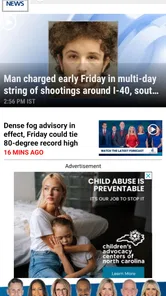
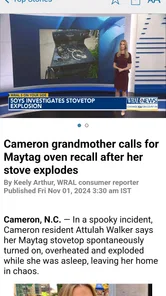
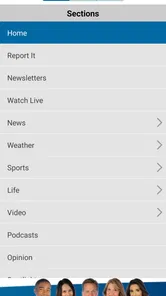
Analysis by Reviewed
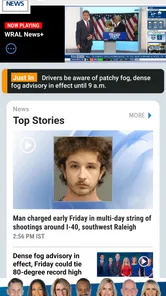
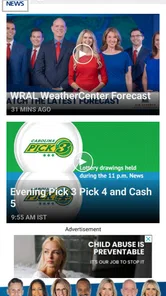
I spent time with WRAL News as a practical local-news app rather than treating it like a digital newspaper I would read from beginning to end. That distinction matters. Its value appears when I want a quick look at regional headlines, weather, sports, and developing stories in one place, especially when I am already reaching for my phone during a busy morning. Capitol Broadcasting Company has built it for everyday checking, and I found that its strongest quality is the way it brings several local information needs together without asking me to jump between unrelated apps.
The app is free, carries an Everyone age rating, and belongs to the News & Magazines category. It has been available since June 7, 2010, and its current version is 8.531 for devices running OS 9 or later. Those details make it accessible to a wide range of users, including people who do not want to pay for a news subscription just to follow local events. Its 4.5 average from around 15 thousand ratings and more than 100 thousand installs also suggest that it has found a steady audience, although popularity alone is not a substitute for deciding whether its coverage matches your needs.
How I use it for a dependable daily news routine
My baseline workflow is simple: I open the app when I want a quick sense of what is happening, scan the main headlines, and then choose only the stories that deserve more attention. This is more efficient than opening a general search engine and trying to separate useful local reporting from national results, opinion pieces, and social posts. The app makes the most sense as a first stop, not necessarily as the only source I use for every subject.
The combination of local news, weather, and sports is particularly useful because those subjects often affect the same day. I might check the weather before leaving, glance at headlines during a break, and look at sports updates later without installing separate specialist apps. That routine feels natural for someone who wants regional awareness rather than an endless stream of worldwide news.
One realistic example is a weekday morning when I am deciding whether to change my commute or weekend plans. I can check current conditions, look for a local headline that might affect roads or public events, and then read a fuller report if something matters. I still verify important travel or safety decisions through official sources, but WRAL News gives me a convenient starting point and helps me notice issues I might otherwise miss.
I also like using it in short sessions. Many news apps encourage long scrolling, but I get more value here by opening it with a question in mind: What is happening locally? Is there a weather development I should know about? Did anything change in the sports stories I follow? That approach keeps the app useful without turning it into a time-consuming habit.
What the app does better than broad news alternatives
Compared with a national news app, WRAL News feels more focused on the information that has immediate relevance to people in its coverage area. A general aggregator may offer more international variety, but it can bury local stories beneath national politics and viral content. I prefer WRAL News when the question is practical and regional rather than global.
More From Our News Desk

Weather by Xiaomi Review: Clear at a Glance, Less Clear Up Close

X Under Pressure: Can It Recover When Posting Goes Wrong?

Clash of Clans Is Won Between the Battles

Android Auto Makes the Case for Quieter Car Software

MobiOffice: Transforming Mobile Productivity with Seamless Integration

EA SPORTS FC™ Mobile Soccer: Redefining Mobile Sports Gaming
Compared with a mobile browser, the app removes some friction. I do not have to remember the right page, dismiss unrelated website elements, or repeatedly search for the same sections. That convenience is modest, but it adds up when I check several times during the day. A browser remains better when I want to compare many publishers or search broadly, while this app is better for a familiar, repeatable local-news loop.
It also differs from social media. Social feeds can surface breaking information quickly, but they mix reporting with reactions, reposts, speculation, and advertising. WRAL News gives me a more deliberate place to read news rather than relying on whatever happens to appear in a feed. I still would not use it as proof that every early report is complete; developing stories can change, and careful readers should watch for updates.
Settings and habits that make checking less distracting
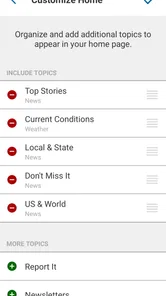
I recommend spending a few minutes reviewing the app’s available settings instead of accepting every default. The most important decision is how much interruption you actually want. News alerts can be helpful for major developments, but constant notifications can turn a useful information tool into background noise. I prefer keeping alerts limited to information I would genuinely want to know immediately and using ordinary app visits for routine headlines.
This is also where personal judgment matters. Someone who follows severe weather closely may reasonably want more immediate updates, while another reader may find frequent alerts stressful or unnecessary. The right setup is not the most active one; it is the one that delivers enough awareness without making every headline feel urgent.
I also suggest deciding when you will check the app. A morning scan, a midday glance, and an evening review are more manageable than opening it every few minutes. This habit improves the experience because I read with purpose instead of reacting to every new item. It also makes it easier to notice which subjects deserve deeper reading and which can wait.
When I am short on time, I use the headline view as a filter rather than trying to read every item. I look for stories with direct consequences for my area, then open only those. This is one of the simplest advanced habits, but it prevents the common mistake of confusing a long list of headlines with actual understanding.
A faster pattern for weather, headlines, and sports
Experienced use is mostly about sequence. I start with weather when I am planning the day, move to headlines when I want context, and leave sports for a separate check when that is what I came to see. Separating those purposes helps me avoid wandering through sections with no clear reason. It is a small workflow, but it makes the app feel faster because I am not asking one screen to answer every question at once.
I also use a two-pass reading method. On the first pass, I scan for names, places, and subjects that affect me directly. On the second, I open the most relevant story and read beyond the first paragraph. This matters with breaking news, where the initial headline may not include all the context. The app is convenient for discovery, but responsible reading still requires attention to the full report.
Another useful pattern is to compare the app’s weather information with the conditions outside before making a decision. A forecast is guidance, not a guarantee, and changing conditions can make a quick glance misleading. For important travel, outdoor work, or safety choices, I treat the app as an early warning and then consult the most appropriate official information.
For sports followers, the app can serve as a compact update source between games or during a busy day. I would not expect it to replace a dedicated league or team application for every statistic, schedule tool, or specialized feature. Its advantage is convenience: sports sit alongside the rest of the local coverage, so I can follow the broader news cycle without maintaining another daily destination.
Where I noticed friction and where another option wins
The main limitation is focus. WRAL News is a strong choice for readers who want its regional coverage, but it is not the best fit for someone seeking a balanced international news diet. If your priorities are world affairs, financial markets, deep investigative archives, or a large range of specialist publications, a broader news reader or several trusted sources will serve you better.
There is also a trade-off between speed and depth. The app helps me find relevant stories quickly, but a short mobile reading session can encourage shallow consumption. I have to make a conscious effort to open the full article and understand the context instead of stopping at the headline. That is not a flaw unique to this app, but it is important when the subject is complicated or emotionally charged.
Free access is another reason to try it, but free does not mean frictionless for every reader. A person who dislikes notifications, mobile news layouts, or frequent updates may prefer a browser bookmark or a traditional news source. Likewise, anyone outside the app’s natural regional audience should first ask whether the local emphasis will actually be useful in daily life.
I would also avoid treating a single news app as a complete verification system. When a story involves emergencies, school closures, transportation, health, or legal consequences, I use WRAL News to learn what may be happening and then check the relevant authority. That extra step is sensible regardless of the publisher and protects against acting on information while a story is still developing.
Who should install it, and who should skip it
I recommend WRAL News to people who want a straightforward local-news habit and who value having weather, headlines, and sports in one free app. It is especially suitable for readers who check information in short bursts, prefer a regional perspective, and do not want social media to be their main way of discovering news.
It is less suitable for someone who wants a customizable multi-source dashboard, extensive international reporting, or a specialist sports experience. Those users may be happier combining a broader aggregator with dedicated weather and sports tools. The extra apps create more clutter, but they can provide greater depth and control.
Families may also appreciate the Everyone rating, although parents should still decide how children consume news because age labels do not remove the possibility of upsetting or complex real-world stories. For older devices, the minimum OS requirement of 9 is worth checking before installation, particularly if the phone has not been updated in some time.
One practical advantage is that there is little commitment involved in trying it. Since the app is free, I can test it against my actual routine rather than making the decision based on a subscription price. I would give it several days of normal use, checking whether the local coverage is relevant and whether the alert behavior fits my preferences. If I keep opening it naturally, it has earned a place on my phone; if I never find useful stories, no amount of customization will fix that mismatch.
My verdict after building a repeatable routine
WRAL News works best when I treat it as a focused local information tool, not as an all-purpose replacement for every news source. Capitol Broadcasting Company has created an approachable option for checking the subjects that shape an ordinary day, and the free price makes experimentation easy. The strongest experience comes from using it with a plan: adjust alerts, scan deliberately, open full stories, and verify high-stakes information elsewhere when necessary.
Its weaknesses are equally clear. Readers outside its core coverage area may find the regional emphasis limiting, and people who want deep global or specialist reporting will need other sources. The app also rewards discipline because fast headline checking can become superficial if I never slow down to read context.
For my own use, the balance is favorable. I would keep it for quick local awareness, weather checks, and convenient sports updates, while pairing it with broader sources when I need national or international perspective. With that division of labor, it becomes a dependable part of a daily routine rather than an overstated one-app solution. The 4.5 average from roughly fifteen thousand ratings reflects solid user approval, and my experience explains why: it is practical, easy to approach, and most valuable when its regional focus matches the way you actually live.
WRAL News App Frequently Asked Questions
How much storage space does the WRAL News app need?
The app’s storage needs can depend on your device and how you use it, particularly if you watch videos or keep content open in the app. Before installing, check the available space on your phone and make room if needed. The app is intended to bring headlines, weather, sports, and other coverage together, so keeping it updated can also help you use its current features.
Who develops the WRAL News app?
The WRAL News app is developed by Capitol Broadcasting Company. It brings WRAL coverage to mobile devices, with a focus on news and information for people who follow the region. If you are deciding whether it fits your needs, consider whether WRAL’s reporting and the app’s mix of headlines, weather, sports, and other coverage match the topics you want to check regularly.
Can I watch video reports in the WRAL News app?
Yes, video reports are part of the app’s news experience. They provide another way to follow coverage alongside reading articles, and some video may be available live or on demand. Video playback generally uses an internet connection, so a reliable connection can make viewing smoother. If you mainly want written news, the app also offers article-based coverage and other sections.
Does the WRAL News app cover topics beyond local headlines?
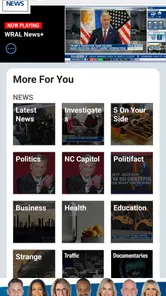
Yes. Along with regional reporting, the app brings together topics such as weather, sports, politics, lifestyle coverage, and broader headlines. Its local focus may be especially useful if you follow North Carolina and nearby communities, while the additional sections offer more to browse in one place. The mix can make it a convenient option for people who prefer a single news app.
Who publishes the WRAL News app, and who is it intended for?
WRAL News is published by Capitol Broadcasting Company and is a news app for people who want headlines, weather, sports, and other coverage in one place. Its focus on regional reporting makes it especially relevant to readers following North Carolina and nearby communities, while its broader headlines and topic sections may also interest people who want a wider mix of news.
Pros
- Fast access to breaking news and local updates across North Carolina.
- Live weather radar
- forecasts
- and severe weather alerts are easy to find.
- Video reports and live streams add useful context to major stories.
- Customizable notifications help users follow topics that matter most.
- Clear navigation makes switching between news
- weather
- and video simple.
Cons
- Some breaking-news notifications may feel frequent or repetitive.
- Advertising can interrupt browsing and reduce the reading space.
- Certain video reports may load slowly on weaker mobile connections.
- Coverage is primarily regional and may feel limited outside North Carolina.
- Some articles may require scrolling past promotional content before the story.











