World Monitor App
- 22.00
- 4.8
- Installs
- 10.00K
- Price
- Free

Screenshots
Analysis by Reviewed
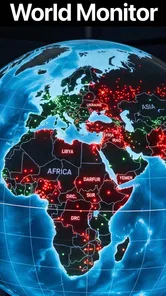
I found World Monitor most useful when I wanted a quick way to follow international developments without opening several news apps at once. It is a free News & Magazines app from Hypecent Limited, built around the idea of a world overview rather than a single publication’s front page. That difference matters: I approached it less like a traditional newspaper and more like a visual starting point for deciding what deserved a closer read.
The app has a 4.8 average from around two thousand ratings, and that level of approval matches my first impression: it is focused, modern and easy to understand at a glance. It has passed ten thousand installs, so it is not an unknown experiment, but it still feels more specialized than the large general-interest news services most people already have on their phones.
How World Monitor handles readability and navigation
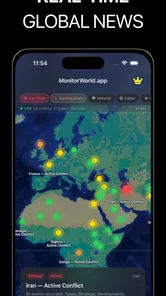
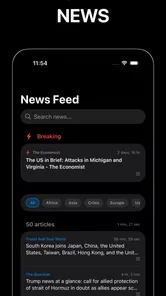
The strongest part of the experience is the way it encourages scanning. Instead of asking me to commit to one long article immediately, it presents the world as a collection of developing subjects. That makes it practical during short breaks, especially when I want context before deciding whether to read further elsewhere.
I also liked the mental shift from “What is my usual news source saying?” to “What is happening across different parts of the world?” A conventional news app often reflects its editorial priorities through a ranked feed. World Monitor feels better suited to noticing several regions or themes in parallel. For readers who dislike endless scrolling through repeated headlines, that broader framing can make a short session feel more purposeful.
Readability depends heavily on the amount of information visible at once. A global overview naturally has to show several signals, topics or locations, and that can make the screen feel busier than a simple article list. I found the app easiest to use when I slowed down for a moment, identified the main area I wanted to inspect, and then followed that thread rather than trying to absorb everything immediately.
That is an important distinction for people with different reading needs. Someone who prefers a clean, linear sequence may find a standard newspaper app calmer. Someone who benefits from visual grouping and quick comparisons may find this format more helpful. The app’s value is not just that it contains news; it is that it changes how I choose where to spend attention.
Useful habits for clearer sessions
My practical tip is to use World Monitor in two passes. First, take a fast look to identify the regions or subjects that matter that day. Then return to only one or two items for closer attention. This prevents the overview from becoming a wall of competing information and works particularly well when concentration is limited.
More From Our News Desk

Weather by Xiaomi Review: Clear at a Glance, Less Clear Up Close

X Under Pressure: Can It Recover When Posting Goes Wrong?

Clash of Clans Is Won Between the Battles

Android Auto Makes the Case for Quieter Car Software

MobiOffice: Transforming Mobile Productivity with Seamless Integration

EA SPORTS FC™ Mobile Soccer: Redefining Mobile Sports Gaming
I would also avoid judging a story solely by how prominent it appears in the first view. A global monitoring tool is most useful as a discovery layer, not as a replacement for careful reading. Once I noticed something important, I treated it as a prompt to investigate the details and source context rather than as a complete explanation by itself.
The current version is 1.2.6, and the app supports devices running Android 7.0 or later. That broad compatibility is helpful for people who keep an older phone because of budget, familiarity or a preference for a particular physical device. It also makes the app easier to consider in households where not everyone upgrades at the same time.
Motor and sensory considerations in everyday use
For motor access, a monitoring-style interface can be more forgiving than a dense article page because I can make decisions in stages: scan, pause, select and continue. I did not need to treat every visible item as something that required an immediate tap. That reduced the pressure of navigating quickly, which is useful for anyone who finds rapid interactions tiring or imprecise.
At the same time, a screen containing several information elements can create a different kind of challenge. If a user has difficulty with small touch targets, crowded layouts or repeated scrolling, the overview may require more deliberate control than a minimalist feed. I would recommend trying it with the device’s own display and text settings rather than assuming the experience will feel identical on every phone.
People who are sensitive to visual overload may appreciate the ability to use the app briefly instead of leaving a constantly updating news feed open. I found that a short, intentional check was less mentally draining than passively consuming headlines for a long time. The trade-off is that World Monitor’s central appeal is breadth, so users who need very low visual complexity may prefer a simpler reader.
For hearing-related needs, the core activity is reading and viewing information, so the app does not depend on listening to a broadcast to be useful. That makes it a reasonable option in quiet environments, shared spaces or places where audio would be inappropriate. I would still treat any media or external content reached from a news item according to its own presentation, rather than assuming every linked experience will offer the same level of convenience.
One non-obvious strength is that the app supports a low-commitment form of news use. I can open it, orient myself and leave without feeling that I have failed to finish a long article. That matters for users whose attention varies during the day, including people working in noisy environments, commuting between tasks or managing fatigue.
Who benefits from the global view?
World Monitor is especially appealing to internationally minded readers, students, travelers, researchers and anyone whose work crosses borders. It is also useful for a person who wants to challenge a narrow local news routine without subscribing to several separate publications. The app gives that person a starting point for wider awareness.
A realistic example is a morning planning session. Before work, I could spend a few minutes checking the broad international picture, note one development connected to a client or destination, and then move on with the day. The benefit is not that the app eliminates research; it helps me decide what research is worth doing.
It can also suit families or shared-device situations because the content rating is Everyone. That does not mean every news topic will be emotionally comfortable for every reader, but it does make the app less restricted as a general information tool. Adults should still use judgment when younger readers are nearby, since world news can involve serious events even when an app itself carries an Everyone rating.
Situational access: when the app fits and when it does not
The app makes the most sense when I have a few minutes and need orientation. It is less convincing when I already know the exact article, journalist or publication I want. In that situation, a dedicated newspaper app, RSS reader or direct source is usually faster because those tools are designed around known destinations rather than broad discovery.
It is also a better companion to focused news sources than a complete substitute for them. World Monitor helps answer “What should I look into?” A specialist publication is often better at answering “What are the verified details, history and implications?” Keeping those roles separate gave me a more reliable routine and prevented the overview from carrying more responsibility than it should.
Another useful trade-off concerns attention. A conventional feed can encourage habitual scrolling, while a world-monitoring interface can encourage comparison across subjects. That is positive when I want perspective, but it may feel less satisfying if I prefer a personalized stream that learns my exact interests. Readers who want deep customization, a saved reading library or a highly controlled publication list may be happier with a mature news aggregator.
The free price makes experimentation easy, which I appreciate. However, in-app purchases range from $4.99 to $99.99 per item. I would therefore check the purchase screen carefully before confirming anything, especially if the phone is shared or used by a younger family member. The app can be tried without an upfront charge, but “free” does not mean every possible part of the experience has the same cost structure.
That pricing detail also affects who should skip it. If you want a completely predictable, no-purchase reading tool, an app with no in-app transactions may be a more comfortable choice. If you are happy to explore a free product first and decide later whether optional paid elements are worthwhile, the arrangement is less concerning.
Using it in difficult environments
In a crowded train, a bright outdoor setting or a rushed work break, I would use World Monitor for orientation rather than detailed reading. The broad view is suitable for a quick check, but close reading still depends on the phone’s screen, lighting and the user’s ability to pause. A larger display or a calmer environment will naturally make dense information easier to process.
For people with limited data, battery or time, the sensible workflow is to open the app only when they can actually review the overview, then close it once they have identified the relevant topics. I would not leave any news app open purely out of fear of missing something. The value here comes from deliberate checking, not from turning the phone into a permanent alert panel.
Travelers may find the global perspective useful before making plans, but they should not confuse a broad news view with official travel guidance or emergency instructions. For urgent local decisions, government notices and authoritative local services remain the better choice. World Monitor can provide context around an event; it should not be the only source used for safety-critical action.
Remaining barriers and the limits of the experience
The biggest barrier is information density. A global product has an inherent tension: it must show enough to feel comprehensive, but too much can make the first screen demanding. I sometimes had to decide whether I was looking for a particular region, a developing event or a general sense of the day before the interface became truly efficient.
There is also a risk of shallow understanding. Quick summaries and visual overviews are excellent for finding direction, but they can flatten complicated stories. Political, humanitarian and economic events rarely fit neatly into a brief glance. I would not use this app alone for an academic assignment, professional briefing or important personal decision without checking fuller reporting.
Compared with a standard newspaper app, World Monitor is less about one publication’s voice and more about breadth. Compared with an RSS reader, it is less obviously built around a user-curated list of feeds. Compared with a social news feed, it can feel more intentional because I am not relying solely on a stream shaped by social reactions. None of those alternatives is universally better; the right choice depends on whether the reader values discovery, depth, control or speed.
Accessibility is another area where expectations should remain practical. The app is usable across a wide range of everyday situations, and its reading-first nature is helpful for some users, but I would not assume that every person will find the visual hierarchy, touch interaction or content presentation equally comfortable. Anyone relying on a particular assistive setup should test the app directly on their own device before making it part of a daily routine.
That is not a criticism unique to World Monitor. News interfaces change quickly, and a layout that feels clear to one reader can feel crowded to another. My advice is to judge it by a specific task: can you identify the information you need without rushing, and can you stop when you have enough? If the answer is yes, the app is doing its job for you.
My inclusive verdict on World Monitor
I recommend World Monitor to readers who want a broad international snapshot, especially those who find ordinary news feeds repetitive or too tied to one editorial viewpoint. Its greatest strength is the way it turns a short check into a map of possible stories. That makes it useful for people with limited time, changing attention or a genuine need to keep several regions in mind.
I would not recommend it as the sole source for detailed reporting, urgent instructions or readers who need a completely linear, highly personalized reading list. A specialist publication, a carefully configured reader or an official information service will be better in those situations. The app works best as the first layer of a sensible news routine, not the entire routine.
Hypecent Limited has made a focused product rather than another generic headline feed. The free entry point, Everyone age rating and support for Android 7.0 or later make it approachable, while the optional in-app purchases mean users should pay attention during checkout. Its audience response is encouraging, but my recommendation comes mainly from the practical experience: it helps me notice what matters before I decide where to spend more time.
If you approach it as a calm orientation tool, use short sessions and follow important stories through fuller sources, World Monitor earns a useful place on a phone. Its inclusive advantage is flexibility of attention, not a promise that every screen will suit every person. That honest limitation is also the key to using it well: start with the overview, adapt the session to your own needs, and choose another tool whenever depth, certainty or specialized accessibility matters more than global awareness.
World Monitor App Frequently Asked Questions
What devices and operating systems can run World Monitor?
World Monitor is available for Android and iOS, so it can suit users who want to follow global developments on a phone or tablet. On Android, the app requires Android 7.0 or later. Check that your device meets the relevant system requirement and has enough available storage before downloading, then keep the app updated to benefit from its current features.
Who develops World Monitor, and is it suitable for general audiences?
World Monitor is developed by Hypecent Limited and is categorized as a News & Magazines app. Its content rating is Everyone, making it suitable for a broad audience. As with any news and monitoring tool, some topics may involve serious world events, so parents and users can consider whether the app’s subject matter is appropriate for their needs.
What is the World Monitor app used for?
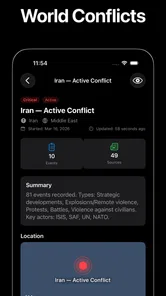
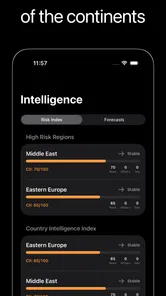
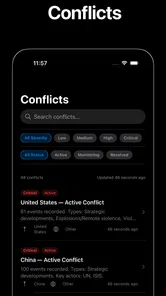
World Monitor is designed to help users follow important global developments from one place. It typically presents information about international news, conflicts, political events, security situations, disasters, and other major happenings through an interactive monitoring interface. It is most useful for people who want a broad overview of world events rather than relying on a single news source or manually checking many websites.
Does World Monitor provide live updates and reliable information?
The app is intended to offer frequently updated information, but the speed and accuracy of updates can vary depending on the event and the sources used. World Monitor should be treated as a monitoring and discovery tool, not as the only authority for urgent or sensitive information. For major decisions, users should open the linked reports and compare details with reputable official, local, and international news sources.
Is World Monitor free to download and use?
World Monitor is free to download, but it offers in-app purchases priced from $4.99 to $99.99 per item. The availability and cost of paid options can depend on what you choose to access, so check the purchase details in the app before confirming a transaction. Review any recurring payment terms carefully if they are presented, and use the free version first if it meets your needs.
Pros
- Tracks global conflicts
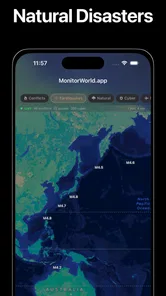
- disasters
- and geopolitical developments in one place.
- Interactive maps make complex international events easier to understand.
- Useful filters help users focus on specific regions or event categories.
- Regular updates can provide a quick overview of rapidly changing situations.
- Clean interface supports fast browsing on mobile devices.
Cons
- Some reports may lack detailed background or independent source verification.
- Frequent alerts can feel overwhelming during major world events.
- Coverage and update speed may vary significantly by region.
- Map-based information can be difficult to interpret on smaller screens.
- The app may consume extra battery and data when location features are active.











