Weather & News : Radar, Alerts
- 26.00
- 3.6
- Installs
- 50.00K
- Price
- Free
Screenshots

Analysis by Reviewed
I usually approach combined weather-and-news apps with some skepticism. They often feel useful during the first few days, then become another icon I stop opening once the novelty wears off. Weather & News : Radar, Alerts makes a reasonable first impression because it brings two everyday needs together: checking conditions before leaving home and finding out what is happening nearby. After spending time with it, I think its strongest appeal is convenience rather than depth. It can earn a place in a routine, but only for users who value a quick local snapshot more than a highly specialized weather station or a full news reader.
This is a free News & Magazines app from Doomob Labs, with a general-audience rating suitable for Everyone. Its store summary focuses on live forecasts, radar alerts, and breaking local news, while the short description keeps the idea very simple: Weather & News. That simplicity is important. The app is not trying to replace every weather tool and every newspaper at once; its practical role is to reduce the number of places I need to check during a normal day.
What the first week feels like
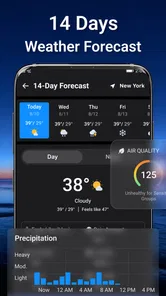
During the first week, the appeal is easy to understand. I can imagine opening the app before commuting, checking whether rain is likely, looking at radar activity, and then scanning local headlines without switching between separate services. That sequence is more useful than it sounds. Weather affects whether I walk, drive, carry an umbrella, or postpone an errand, while local news gives context about traffic, events, disruptions, and community issues. Putting both in one visit creates a small but believable daily habit.
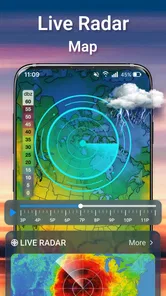
The most valuable part of the experience is the transition from a broad forecast to a more immediate decision. A forecast tells me what the day may look like; radar-style information helps me think about what is approaching and whether waiting a little might make sense. Alerts can also matter when I am not actively watching the screen. I would still treat any alert as a prompt to verify important conditions rather than as a complete safety briefing, but the combination gives the app a practical purpose beyond casual browsing.
One useful way to test it is to use it at three specific moments instead of opening it randomly. I would check it in the morning for planning, again before a longer trip, and once in the evening to see whether tomorrow needs different clothing or transport. This approach makes it easier to judge whether the app is genuinely saving time. If I only browse headlines or repeatedly refresh the forecast, the experience can quickly become passive scrolling.
The first-week advantage is especially clear for someone who currently uses a separate weather app and a general local-news source. The app reduces friction between those two checks. It is also approachable for family members who do not want to learn several interfaces. The Everyone content rating reinforces that broad accessibility, although adults looking for specialist meteorological tools or detailed journalism may want more control than this compact format is designed to provide.
There is also a useful trade-off in the combined design. Weather information is usually time-sensitive and location-dependent, while news is more editorial and often requires reading, comparison, and context. A single screen can make both feel equally urgent even when they are not. I found it better to use the weather portion for immediate decisions and the news portion for a short awareness check. Treating every headline like an alert would make the app feel noisier than it needs to be.
More From Our News Desk

Weather by Xiaomi Review: Clear at a Glance, Less Clear Up Close

X Under Pressure: Can It Recover When Posting Goes Wrong?

Clash of Clans Is Won Between the Battles

Android Auto Makes the Case for Quieter Car Software

MobiOffice: Transforming Mobile Productivity with Seamless Integration

EA SPORTS FC™ Mobile Soccer: Redefining Mobile Sports Gaming
Where it fits beside familiar alternatives
Compared with a dedicated weather app, this product is attractive when I want a fast overview rather than a deep set of meteorological tools. A specialist weather service may be preferable for outdoor work, travel planning, photography, boating, or anyone who needs extensive history and precise layers. The combined app makes more sense for ordinary routines: getting dressed, planning a school run, deciding whether to walk, or checking the local conversation after a storm.
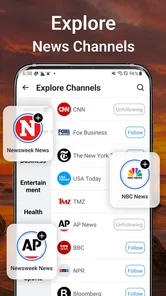
Compared with a traditional news app, its advantage is immediacy and focus. I am less likely to lose time in a large national feed when I only want a quick sense of what is happening nearby. The compromise is that a compact local-news view may not satisfy someone who expects broad international coverage, extensive topic filters, long-form reporting, or a carefully organized reading list. I would keep a dedicated news source alongside it if staying informed across several subjects were a priority.
That comparison leads to a practical recommendation: install it as a convenience layer, not necessarily as your only information source. It can be the first stop in the morning, while a more specialized service remains available for decisions where detail matters. This two-tool approach avoids asking one app to perform jobs it was not clearly built to handle.
Whether the habit survives beyond the first month
The real test is not whether the app looks useful on day one, but whether it continues to remove effort after the initial curiosity fades. For me, recurring value would come from three dependable behaviors: a quick morning weather check, a glance at local developments, and attention to relevant radar or alerts before making plans. If those actions become automatic, the combined format has a reason to stay installed.
A realistic example would be a weekday commute. I might open the app while having breakfast, notice that conditions are changing, check whether the rain pattern is moving toward my route, and scan local headlines for anything that could affect the journey. If the information is clear, I can choose a jacket, leave earlier, or use another route. The benefit is not that the app makes the decision for me; it puts the relevant prompts together before I leave.
Another use case is planning a weekend errand or a short outdoor activity. I would look at the broader forecast first, then use radar information to decide whether the timing is sensible. Local news can add a second layer of awareness, especially when an event, road issue, or neighborhood disruption changes the practical plan. The key insight is to use radar for timing and the forecast for general preparation. Mixing those purposes can lead to unnecessary checking.
For month-to-month use, alerts need discipline. I would enable only the notifications that help me act, then silence anything that merely encourages repeated checking. Too many interruptions can turn a useful utility into a source of background anxiety. I would also review the app after a few weeks and ask whether I am opening it because it solves a problem or because the notification has trained me to tap it. That small audit is one of the best ways to preserve the app’s value.
The app has a broad audience, reflected in its adoption of over 50 thousand installs and an average rating of 3.3 from 56 ratings. Those figures suggest interest, but they also tell me to keep expectations measured. I would not install it assuming it will become the definitive source for every forecast and every headline. I would install it to test whether combining these two checks is more convenient for my routine.
The current version is 1.1.08, so I would pay attention to how consistently it behaves over time rather than judging only the initial interface. A utility app earns trust through repeated, uneventful use. Clear information, timely updates, and notifications that remain relevant matter more to me than novelty. If the app becomes part of a morning ritual without demanding much attention, it has done its job.
What ongoing use asks from me
The maintenance burden is fairly easy to underestimate. A weather-and-news app depends on me keeping its location and notification choices useful. If I move between places, travel, or change my routine, I need to make sure the information I see still matches where I am and what I care about. I would not leave every alert enabled indefinitely. A quick settings review after installing, followed by another review when my schedule changes, is sensible.
There is also a mental maintenance cost. Combined feeds can blur the difference between information that needs immediate action and information that can wait. I would use a simple rule: weather alerts deserve attention when they affect a real plan, while headlines can be read later. This keeps the app from becoming a constant stream of demands. It also makes the useful items easier to notice.
The free entry point lowers the barrier to trying it, but in-app purchases range from $1.99 to $19.99 per item. That makes it important to understand whether the free experience already fits my needs before paying for anything. I would not spend money just to make the app feel more complete. I would first use it through different weather conditions and a normal news cycle, then decide whether any optional purchase provides a recurring benefit rather than a short-lived improvement.
That is particularly relevant for a utility that competes with free alternatives. A purchase can be reasonable if it removes a real annoyance or adds something I use repeatedly, but the value should be judged against the cost of keeping a separate weather or news service. I would also consider whether I need one combined app at all. If my existing tools already provide reliable forecasts and local reporting, this app must save noticeable time to justify adding another service to my routine.
Device compatibility is another practical point. The minimum operating system is Android 7.0, which makes the app accessible to a wide range of older Android devices. That is helpful for users who do not upgrade frequently. At the same time, older phones may make any information-heavy app feel less comfortable if screens are small or performance is limited. I would test the everyday reading experience on the device I actually use rather than assuming that broad compatibility guarantees the same level of comfort everywhere.
Where fatigue can set in
The biggest risk is notification fatigue. Weather alerts are useful when they are timely and relevant, but repeated interruptions can make me disable all notifications, including the ones I would have wanted. Local news can create the same problem if every developing story is presented with equal urgency. My recommendation is to start conservatively, allow only the categories that support a clear decision, and expand notifications only when the app proves that they are worthwhile.
A second source of fatigue is repetition. Weather information naturally changes gradually, and local news feeds can revisit the same developing event. If I open the app several times without a specific reason, I may see little that is meaningfully different. That is not necessarily a flaw in the concept, but it means the app works better as a scheduled check than as an endless feed.
The third issue is trust. I can accept a brief forecast for casual planning, but I would want to cross-check serious weather conditions through an official emergency source or a specialist service. The same principle applies to breaking news: a headline is a starting point, not always the full story. This is where the combined design has a limit. Convenience is valuable, but it should not replace verification when health, safety, travel, or major financial decisions are involved.
Some users should probably skip it. If you need detailed weather maps, professional-grade forecasting, extensive historical data, or highly customized scientific information, a dedicated weather product will likely serve you better. If you want deep reporting, multiple publications, saved articles, or broad international coverage, a full news reader is the stronger choice. I would also skip this app if I already have two trusted services and rarely need local updates; adding a third source could create more clutter than convenience.
On the other hand, it is a good candidate for people who want one quick check before work, school, errands, or a short trip. It may also suit users who frequently forget to check the weather until they are already heading out. The combined approach creates a useful prompt without requiring a complicated workflow. Its value is highest when the goal is awareness and preparation, not exhaustive research.
My long-term verdict
After the novelty fades, Weather & News : Radar, Alerts has a credible but specific role. I would keep it installed if I wanted a compact morning dashboard for local conditions and nearby headlines, especially if switching between separate apps was an annoyance. I would not make it my sole authority for severe weather or my only source for serious news. Its lasting value depends on whether it becomes a calm, repeatable habit rather than a noisy stream of alerts.
The best long-term workflow is simple. I would open it at a planned time, use the forecast for general preparation, use radar to judge timing, and read local headlines selectively. I would keep notifications limited, review them when my routine changes, and cross-check anything important. Those choices turn the app from a novelty into a practical utility. They also protect me from the most common problem with combined information apps: spending more attention on the feed than the information deserves.
Doomob Labs has positioned this as an accessible free app for everyday awareness, and that positioning makes sense. The Everyone age rating, Android 7.0 minimum, and broad install base make it easy to consider, while the 3.3 average rating encourages a realistic trial rather than blind confidence. I would judge it on my own local coverage and routine, because the usefulness of weather and news is naturally tied to where I live and what I need to know.
My recommendation is to try it as a lightweight daily companion, not as a replacement for specialist tools. The app earns lasting space when it saves me a few decisions each morning and delivers alerts I actually act on. If I find myself dismissing notifications, seeing too little fresh information, or needing another service for every important question, I would remove it without much regret. For users who want a quick combination of local weather, radar awareness, and nearby news, however, it is a sensible free experiment with enough recurring value to deserve a place on the home screen.
Weather & News : Radar, Alerts Frequently Asked Questions
Who develops Weather & News: Radar, Alerts, and what is its age rating?
Weather & News: Radar, Alerts is a news and weather app from Doomob Labs. Its content rating is Everyone, so it is presented as suitable for a general audience. It brings forecasts, radar alerts, and local news together, making it worth considering if you want those kinds of updates in one place. Check your device’s app store for the current compatibility details before downloading.
What is Weather & News: Radar, Alerts used for?
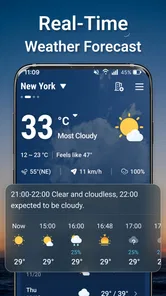
Weather & News: Radar, Alerts is designed to combine local weather information with news updates in one mobile app. After opening it, users can typically check current conditions, hourly and daily forecasts, radar imagery, severe-weather notifications, and selected headlines. It is useful for planning commutes, trips, outdoor activities, and daily routines without switching between several different applications.
Does Weather & News: Radar, Alerts provide accurate real-time weather information?
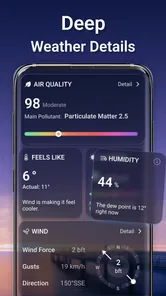
The app presents weather data collected from meteorological services and updates it regularly, including temperature, precipitation, wind, and storm conditions. Accuracy can vary depending on your location, the available weather provider, and how quickly conditions change. Radar and alerts should be treated as helpful guidance rather than a replacement for official emergency announcements or local authorities during dangerous weather.
Can I receive severe weather alerts and notifications?
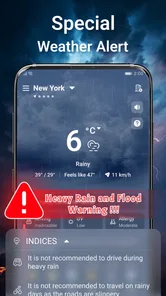
Yes, the application is intended to notify users about important weather developments, such as storms, heavy rain, strong winds, extreme temperatures, or other hazardous conditions. You normally need to allow notifications and location access for the feature to work properly. Before relying on alerts, review the app’s notification settings and also check official government warnings in your area.
Does the app require location access, mobile data, or an internet connection?
Weather & News: Radar, Alerts generally works best with an active internet connection because forecasts, radar maps, news stories, and warnings must be downloaded and refreshed. Location permission can help it automatically display conditions for your current area, although some versions may allow manual city selection. Mobile data usage may increase when loading animated radar, images, videos, or frequent updates.
Pros
- Live radar maps make it easy to track approaching rain and storms.
- Custom weather alerts help users prepare for severe conditions.
- Forecasts cover multiple locations for convenient trip planning.
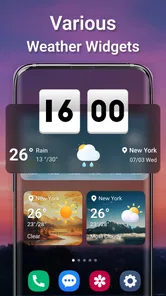
- Clean interface presents key weather details at a glance.
- News updates add useful local context to changing weather conditions.
Cons
- Some advanced radar layers may require a paid subscription.
- Frequent alerts can become distracting without careful customization.
- Forecast accuracy may vary significantly by location.
- The app may use considerable battery during background updates.
- Advertising can reduce the clarity of some screens.











