We Call - WiFi Calling
- 127.00
- 4.0
- Installs
- 1.00M
- Price
- Free

Screenshots


Analysis by Reviewed
When I tested We Call - WiFi Calling, I found a communication app with a very clear purpose: making internet-based calling feel straightforward rather than overloaded with extra tools. My overall impression is positive, but it comes with an important qualification. It is most appealing when you want a simple way to stay in contact through a Wi-Fi or mobile-data connection; it is less convincing if you already depend on a large messaging platform for group chats, file sharing, community features, and a complete social inbox.
The app is free to download, carries an Everyone age rating, and comes from Hangout Studio. Its store summary, “Experience Now, Communicate Without Worries,” points toward an uncomplicated calling experience, while the short description, “We Call,” keeps the focus narrow. That simplicity is its strongest identity. Rather than asking me to learn a complicated ecosystem, it presents itself as a practical communication option for people who mainly want to call.
How We Call feels in everyday use
The first thing I noticed is how easy it is to understand the app’s role. Many communication services try to be a phone replacement, a social network, a media-sharing platform, and a work tool at the same time. We Call - WiFi Calling takes a more focused route. I can imagine opening it when a regular mobile connection is inconvenient, when I am connected to reliable Wi-Fi, or when I want a separate calling option that does not feel tied to the usual all-purpose messenger.
That focus makes the app approachable for people who are not interested in complicated setup screens or a long list of social features. It also makes the experience easier to explain to a family member. If someone only needs a way to communicate over the internet, the basic idea is immediately understandable: connect through an available network and use the app for calling.
Still, internet calling is only as dependable as the connection underneath it. This is the first practical trade-off I would explain to a friend. A strong Wi-Fi connection can make the experience comfortable, but a crowded network, weak signal, or unstable mobile-data connection can affect call quality. The application cannot remove those network limitations. Anyone expecting it to behave exactly like a carrier call in every location should keep expectations realistic.
The clearest strength is its narrow purpose
My strongest evidence in favor of the app is not a flashy feature; it is the way its purpose remains easy to grasp. The category is Communication, and that description fits naturally. We Call - WiFi Calling does not need a long explanation before a new user understands why it might be useful. That matters for occasional callers, older relatives, travelers, and people who prefer a dedicated tool over an enormous messaging suite.
I also like the possibility of using it as a backup communication route. Imagine arriving at a hotel or visiting a building where your mobile signal is weak but the Wi-Fi is usable. In that situation, having a calling app ready can be more convenient than repeatedly walking outside to find a carrier signal. The same logic can help someone whose home has inconsistent cellular coverage but a dependable broadband connection.
You May Like

Clash of Clans Is Won Between the Battles

Android Auto Makes the Case for Quieter Car Software

MobiOffice: Transforming Mobile Productivity with Seamless Integration

EA SPORTS FC™ Mobile Soccer: Redefining Mobile Sports Gaming

How Microsoft OneDrive Became a Mobile Productivity Giant

How Google Translate Breaks Language Barriers Effortlessly
A less obvious advantage is separation. Some people do not want every conversation mixed into the same place as work groups, shopping messages, social updates, and media alerts. A focused calling app can reduce that clutter. I would not claim it replaces every communication service, but it can serve as a deliberately limited tool: open it when the goal is calling, then leave it alone when the conversation is finished.
Another useful workflow is preparing before an important call. I would connect to the most stable available network, close bandwidth-heavy activity on the same connection, and make a short test call before relying on the app for a time-sensitive conversation. That is not a special button or hidden setting; it is a practical habit that makes any Wi-Fi calling tool more reliable. With this app in particular, the habit is valuable because its central promise depends so heavily on connectivity.
What the current version tells me
The current version is 1.6.6, and the app has been available since April 3, 2024. It has reached over a million installs, with an average rating of 4.0 from around three thousand ratings and 127 written reviews. Those figures suggest that the service has attracted a meaningful audience while still leaving room for mixed experiences. I read that rating as encouraging rather than definitive: enough people are using it to establish a track record, but the score does not mean it will suit every phone, network, or calling habit.
Compatibility is also reasonably broad for older devices because it supports Android 6.0 and later. That is useful if you are trying to give a calling option to someone with an aging Android phone rather than a recent flagship. At the same time, older hardware and older network components can behave differently from newer devices, so I would test the app on the actual phone that will be used instead of assuming that broad operating-system support guarantees an identical experience everywhere.
The free entry point is another practical advantage. I can install it and decide whether it fits my routine without paying upfront. There are in-app purchases ranging from $0.99 to $19.99 per item, so I would still check the purchase screens carefully before confirming anything. The important point is that “free” does not necessarily mean every optional part of the experience is included at no cost. For a casual user, that may never become an issue; for a frequent caller, it is worth understanding what is available without spending.
Where it falls short compared with familiar alternatives
The meaningful weakness is that a focused calling application can feel limited beside established communication platforms. The usual alternatives often combine voice calls with text conversations, group coordination, photo sharing, file exchange, reactions, and desktop access. If your daily communication depends on those layers, We Call - WiFi Calling may feel like an additional app rather than a complete replacement.
That limitation is not automatically a flaw. In fact, it is the same simplicity that makes the app approachable. The problem appears when a user expects one tool to handle every conversation. I would choose a broader messenger for a family group planning a trip, a work team sharing documents, or a community that needs persistent chat history. I would choose this app instead when the main requirement is direct calling and the extra social machinery would only get in the way.
There is also a reliability trade-off between internet calling and ordinary carrier calling. A carrier call can remain useful in places where mobile data or Wi-Fi is not available, while this app depends on an internet connection. Conversely, Wi-Fi calling can be valuable in a building where cellular reception is poor but broadband is strong. The right choice depends less on which technology sounds newer and more on the places where you actually make calls.
I would also avoid treating the app as a guaranteed solution for emergencies or critical communication. Network availability can change suddenly, and an internet-based service should not be the only plan when immediate contact is essential. For everyday conversations, it can be convenient. For situations where failure would have serious consequences, I would keep a conventional calling option available as well.
Small habits that improve the experience
My first recommendation is to test the app from the locations where you will really use it. A connection that feels fast for browsing may still become unstable during a call if other people are streaming video or downloading large files. Try it from your home, workplace, or regular travel destination, and judge the result there rather than in an ideal test environment.
Second, decide whether you want this app to be your primary calling tool or a backup. That choice affects how much setup and adjustment is worthwhile. As a backup, it only needs to be installed, understood, and tested occasionally. As a primary option, I would pay closer attention to network consistency, battery behavior on the specific phone, and whether the people I call are comfortable using the same service.
Third, introduce it gradually to less technical users. I would install it with the person, explain its single main purpose, and make a short call together. That is more effective than simply sending them an app name and expecting them to discover the workflow alone. Its straightforward identity helps, but any communication tool becomes frustrating when the first call happens under pressure.
A fourth consideration is contact habits. If your contacts already live inside another messenger, moving everyone to a separate calling app may create friction. The app becomes more useful when the people you need to reach are willing to use it or when you specifically need an alternative connection method. This is why I see it as a targeted tool rather than a universal replacement for every contact list and conversation.
Who should install it, and who should skip it
I would recommend We Call - WiFi Calling to someone who wants a free communication app centered on calling, especially if Wi-Fi is more dependable than cellular reception in their usual places. It is also a sensible candidate for users with older Android phones, since Android 6.0 support keeps the compatibility range open. Families helping relatives with simple calling needs may appreciate the focused design more than a crowded platform full of unrelated features.
It can also suit travelers or people who regularly move between areas with uneven mobile coverage, provided they have dependable internet access when they need to call. I would describe it as a useful second route rather than a promise that every call will work anywhere. That distinction makes the recommendation more honest and more practical.
I would skip it if you want a single app for extensive messaging, large group conversations, media exchange, and a broad social network. I would also hesitate if your internet connection is frequently unstable or if most of your calls happen in places without reliable Wi-Fi or mobile data. In those cases, a traditional carrier service or a more established all-in-one messenger may be a better match.
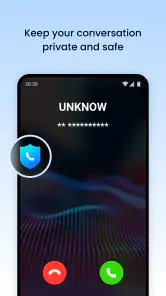
Privacy-conscious users should make their own careful decision after reviewing the app’s current permission and account screens on their device. I would not install any calling service casually on a phone used for sensitive conversations. The sensible approach is to understand what the app requests during setup, keep the application updated, and use it only for the kind of communication you are comfortable placing through that service.
My final verdict after using it
We Call - WiFi Calling succeeds because it does not hide its central idea behind a complicated identity. Hangout Studio has positioned it as a communication app for internet-based calling, and I found that focused approach more useful than a long feature list would have been. The free starting point, broad Android compatibility, and simple purpose make it easy to try, while its growing install base shows that the concept has found an audience.
My reservation is equally clear: this is not the best choice for everyone. Its usefulness rises with the quality of your internet connection and falls if you need a complete messaging ecosystem. The optional in-app purchases also mean that I would review any paid elements before making the app part of a regular calling routine.
For me, the right verdict is conditional but favorable. Choose it when dependable internet calling is the specific problem you want to solve, particularly in places where cellular reception is unreliable or where you prefer a separate, uncomplicated calling tool. Choose a broader messenger or conventional carrier calling when you need richer communication features or more consistent coverage across different conditions. If you understand that trade-off, this app is worth trying rather than dismissing as just another calling utility.
We Call - WiFi Calling Frequently Asked Questions
Is We Call - WiFi Calling compatible with my Android phone?
We Call - WiFi Calling is listed for Android devices running Android 6.0 or later, so check your phone’s operating system before downloading. It is a communication app from Hangout Studio, and compatibility alone does not guarantee that every feature will work identically on every device. A dependable internet connection is also important for using its calling features.
Is We Call - WiFi Calling free to download, and are there in-app purchases?
The app is free to download, but it also offers in-app purchases priced from $0.99 to $19.99 per item. Those purchases may be relevant to how you use its calling features, so review the options shown in the app before buying anything. Its free download does not necessarily mean every type of call or feature is free to use.
What is We Call - WiFi Calling, and how does it work?
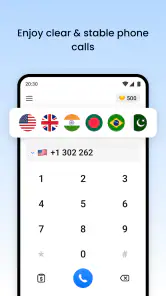
We Call - WiFi Calling is designed to help users place calls over an internet connection instead of relying entirely on a mobile network. After installing the app, you generally create or access an account, allow the required permissions, and use the in-app dialer or contact list. Call quality depends on your Wi-Fi or mobile data connection, the app’s service availability, and the recipient’s number or compatibility.
Can I make calls without a SIM card or mobile signal?
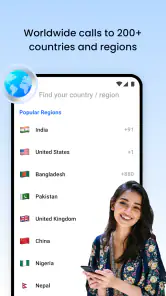
The app may allow calling when traditional cellular coverage is weak or unavailable, provided you have a stable Wi-Fi connection or sufficient mobile data. However, this does not necessarily mean every call is completely free or that a SIM card is never required. Availability can vary by country, phone model, account setup, and the type of number you are calling, so check the app’s current terms before relying on it.
Are calls made through We Call - WiFi Calling free?
Some app-to-app calls may be included at no additional charge, while calls to regular mobile or landline numbers can involve credits, subscriptions, advertising, or regional rates. The exact pricing structure may also change depending on your location and the destination country. Before placing an important or international call, review the displayed rates, available plans, and any in-app purchase information to avoid unexpected charges.
Pros
- Works over Wi‑Fi when cellular coverage is weak or unavailable.
- Can help reduce mobile-minute usage on compatible plans.
- Useful for calls in basements
- offices
- and other low-signal areas.
- May provide clearer audio than a congested cellular connection.
- Simple calling experience without needing a separate phone number.]
- contras:[
- Requires a stable Wi‑Fi connection for reliable call quality.
- Availability and features may depend on your carrier and device.
- Emergency calling support can be limited or handled differently.
- Calls may drop when switching between Wi‑Fi and mobile networks.
- Some features or usage may require a subscription or in-app purchase.
Cons
- Requires a stable Wi‑Fi connection for reliable call quality.
- Availability and features may depend on your carrier and device.
- Emergency calling support can be limited or handled differently.
- Calls may drop when switching between Wi‑Fi and mobile networks.
- Some features or usage may require a subscription or in-app purchase.

- Category
- Communication
- Version
- 1.6.6











