Watch Duty (Wildfire)
- 3.22K
- 4.8
- Installs
- 1.00M
- Price
- Free

Screenshots
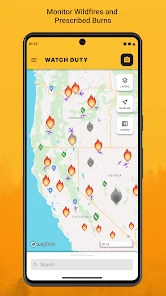
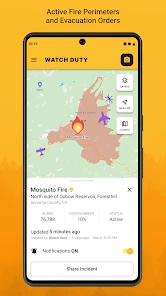
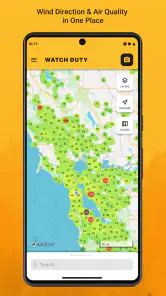
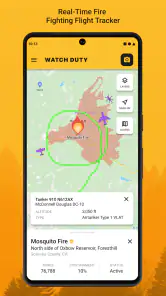
Analysis by Reviewed
Hey there, fellow app explorer! Ever found yourself anxiously checking the news during wildfire season, wishing there was a more straightforward way to stay updated? Enter Watch Duty (Wildfire), your trusty companion designed to keep you informed with real-time updates on wildfire situations, right from your pocket.
Before you rely on an alert
When an app is part of a safety routine, the first hurdle is often less dramatic than a fire: getting oriented before the moment you need it. I’d open Watch Duty while I have time, look at the map and the information available for my area, and make sure I understand how to return to that view quickly. A few calm minutes spent learning the layout are more useful than trying to work it out while juggling family messages or deciding whether to leave.
I would also treat alerts as prompts to check the situation, not as a substitute for an evacuation order or instructions from local authorities. A wildfire can change quickly, and an app view is only one part of making a decision. Keep a separate way to receive official emergency instructions, and don’t wait for a phone notification if you can see smoke, face immediate danger, or have been told to evacuate.
Small setup checks that matter
Notifications only help if they can reach you. If an alert seems absent, I’d first check that notifications for the app are enabled in the phone’s settings, then check the app’s own alert choices and any proximity preferences. A quiet or focus mode can also affect what appears on screen. These are ordinary phone checks rather than evidence that a fire report is missing, so I’d verify them before relying on a different source.
There is a practical trade-off in choosing how many alerts to receive. Broad coverage may help if you commute, care for someone in another area, or have relatives near a fire; tighter choices may make a busy phone easier to live with. I’d avoid tuning alerts so narrowly that a change just outside a familiar boundary becomes easy to overlook. When travelling, remember that the place you care about may not be the place where your phone is currently located.
First Impressions Count
Let me tell you, the first time I fired up Watch Duty (Wildfire), I was impressed by its sleek and simple interface. The developers clearly prioritized ease of use, which is crucial when you're in a hurry to get the latest updates. The app presents information in a clear, concise manner, and navigation is as smooth as butter. You won't find yourself lost or frustrated trying to figure out how to access different features. It's all laid out intuitively, which is a breath of fresh air!
Features That Stand Out
One of the standout features of this app is its real-time notifications. When a wildfire breaks out near you, instant alerts are sent directly to your phone. These alerts are not just timely; they’re incredibly detailed. You get updates on the fire's location, size, and the potential risks it poses. Plus, it includes evacuation routes and safety tips, which can be lifesaving. And if you're worried about getting overwhelmed by notifications, don't be! The app smartly allows you to customize which alerts to receive based on proximity and severity.
You May Like

Clash of Clans Is Won Between the Battles

Android Auto Makes the Case for Quieter Car Software

MobiOffice: Transforming Mobile Productivity with Seamless Integration

EA SPORTS FC™ Mobile Soccer: Redefining Mobile Sports Gaming

How Microsoft OneDrive Became a Mobile Productivity Giant

How Google Translate Breaks Language Barriers Effortlessly
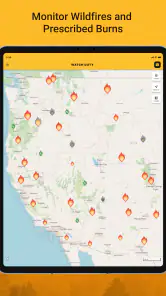
For a more useful routine, I’d check the map when a notification arrives, then compare the reported location with the places I actually need to keep in mind: home, work, school, or a relative’s neighborhood. That is more actionable than glancing at an alert and assuming it describes every part of a region equally. If I’m responsible for others, I’d share the relevant official instructions directly rather than asking everyone to interpret a map from memory.
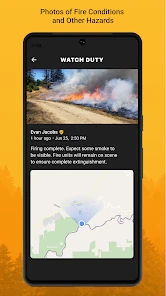
Another highlight is the community-driven updates. The app fosters a sense of community among users who can share real-time information and images, giving you a ground-level perspective of what's happening. This feature can be particularly helpful in assessing the situation from multiple angles, providing a comprehensive view that official sources alone might not capture.
Community reports can add context, but I wouldn’t treat every image or user observation as a verified instruction. Conditions vary by street, and a photo can become out of date as a fire moves. I find this kind of information most useful for understanding what people are seeing, while relying on official emergency directions for decisions about evacuation, road access, and personal safety.
Why You’ll Love It
Aside from its practical features, what I love about this app is its commitment to keeping you safe. The peace of mind it offers is priceless. Imagine having the ability to quickly check on the status of a wildfire while on the go, without having to scour through multiple news sites or social media feeds. It's like having a personal wildfire information hub right in your pocket.
A realistic use is a normal workday when smoke appears in the distance and a family member lives closer to the affected area. I’d use the map to get oriented, check for relevant alerts, and contact that person directly instead of forwarding a vague social post. For someone who travels through wildfire-prone areas, the same habit can help identify what to monitor before setting out. It does not replace route planning or real-time road guidance, though; a general navigation app may be the better tool for that specific task.
Compared with a general news app, Watch Duty is focused on wildfire information rather than broad headlines, which can make it easier to check a developing incident without sorting through unrelated stories. Social media may surface eyewitness material quickly, but it can mix old posts with current ones and leave readers to judge context. Official emergency channels remain essential for authoritative instructions. I see this app as a useful layer between those sources, not a replacement for them.
Moreover, the app is constantly updated with the latest technological advancements and user feedback, ensuring it remains a step ahead in providing the information you need. This commitment to improvement makes it a reliable choice for anyone living in wildfire-prone areas.
Who it suits—and when another tool is better
Watch Duty is most appealing if you live in or regularly visit an area where wildfire activity matters, or if you keep an eye on loved ones who do. It is free, developed by Watch Duty, and listed as a communication app. The audience rating is Everyone, and its average rating is 4.8 from around 10,000 ratings. It has more than a million installs, which suggests many people have made it part of how they follow fire activity.
The app is less useful if you want a general emergency-planning guide, turn-by-turn directions, or a source that covers every kind of local hazard. In those cases, I’d pair it with the appropriate official service or navigation tool rather than expect one wildfire-focused app to do everything. If you rarely encounter wildfire risk and already receive the local alerts you need, installing another source may add little to your routine.
If something looks out of date or an alert does not appear, I’d check the connection, reopen the app, and confirm the phone’s notification settings before drawing conclusions. If the map itself is slow, try again when connectivity improves and use other trusted channels for urgent instructions. A phone with limited signal, a disabled notification setting, or a quiet mode can interrupt the experience without indicating that the underlying incident has stopped changing.
Final Thoughts
In conclusion, Watch Duty (Wildfire) isn’t just an app; it’s a necessity for anyone living in areas susceptible to wildfires. Its user-friendly design, real-time updates, and community-driven information make it an essential tool for staying safe and informed. So, if you want to keep yourself and your loved ones safe during wildfire season, give this app a spin. Trust me; you’ll be glad you did!
My recommendation comes with one important qualification: use it as a practical way to follow wildfire activity, not as permission to delay action or ignore official instructions. The current version is 2025.11.26, and it supports devices running version 9 or later of its operating system. If you want focused wildfire updates and are willing to keep a second, authoritative source in your safety routine, I think it is a sensible app to have ready before fire season—not one to first explore in an emergency.
Watch Duty (Wildfire) Frequently Asked Questions
Is Watch Duty available for my phone, and what operating system does it support?
Watch Duty is available for Android and iOS, so it can be a useful addition to a phone you already carry. On Android, it requires version 9 or later. Before downloading, check your device’s operating system and make sure it meets that requirement. The app is free, and its content rating is Everyone.
Who makes Watch Duty, and is it widely used?
Watch Duty is developed by Watch Duty and is listed in the Communication category. It has an average rating of 4.8 from around 10,000 ratings, with around 3,200 reviews and over 1 million installs. Those figures give prospective users a sense of its reach, while the app’s wildfire maps and alerts are its central purpose.
What is Watch Duty and how does it work?
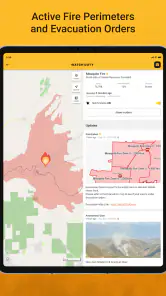
Watch Duty is a real-time wildfire tracking application designed to keep users informed about the current status of wildfires. It uses data from various reliable sources and provides timely alerts and updates directly to your smartphone. Users can view active fire perimeters, evacuation notices, and receive alerts about new wildfires in their area. The app is especially useful for individuals living in fire-prone areas, offering them crucial information to ensure their safety.
Is Watch Duty free to use or does it require a subscription?
Watch Duty is available as a free download on both Android and iOS platforms. The app offers essential features at no cost, allowing users to access wildfire updates and alerts without a subscription. However, there might be premium features or additional services offered through in-app purchases, providing enhanced functionalities for users seeking more detailed information or advanced capabilities.
How accurate is the information provided by Watch Duty?
The information on Watch Duty is sourced from multiple trusted channels, including government agencies and local fire departments. The app is designed to offer accurate and timely updates, but users should be aware that conditions can change rapidly in the case of wildfires. While Watch Duty strives for accuracy, it is always recommended to follow official channels and local authorities’ advice for the most reliable and current information.
Pros
- Real-time wildfire alerts
- User-friendly interface
- Covers multiple regions
- Detailed fire maps
- Community-driven data
Cons
- Requires internet connection
- Limited customization options
- Ads in free version
- Occasional alert delays
- No offline mode

- Category
- Communication
- Version
- 2025.11.26











