Visible mobile
- 12.20K
- 4.6
- Installs
- 1.00M
- Price
- Free

Screenshots
Analysis by Reviewed
I’d approach Visible as a carrier account app first, not as a magic fix for every phone-service problem. Its purpose is to help you get started with Visible and manage your service from your phone. If you’re comparing carriers, the useful question is not just whether the app looks simple; it’s whether the service fits how and where you use your phone. I’d check coverage in the places I rely on most before making a switch, then use the app as the place to handle the account side of that decision.
Getting Started with Visible Mobile
Before installing, I’d think about what a successful first day would look like for me. Perhaps I want to move my service, keep up with account tasks without calling, or simply understand whether this carrier’s app-based approach feels comfortable. Those are different goals, and the app is most useful when you know which one you’re testing. It is a communication app, but the important distinction is that it supports managing mobile service; it isn’t a substitute for checking whether the service itself works well in your usual locations.
Visible is free to download, and its Everyone age rating makes it broadly accessible. The app is developed by Visible Services, LLC. I’d still treat the app and the carrier decision as two connected but distinct things: installing it can show you how account management is organized, while reception and everyday network experience need to be judged where you actually use your phone.
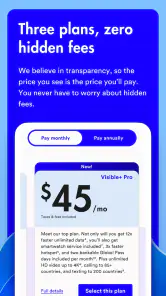
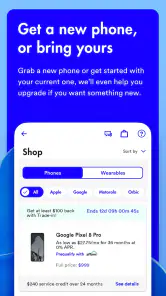
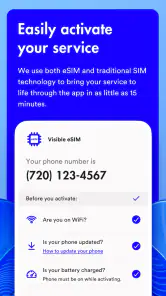
Once you’ve decided to give Visible Mobile a shot, the first thing you’ll notice is its straightforward setup process. You download the app, sign up, and bam! You’re ready to roll. It’s as if they’ve taken the fluff out of switching to a new mobile carrier. No contracts, no hidden fees, just a flat rate that’s refreshingly transparent. Honestly, it feels like Visible is on a mission to make things as uncomplicated as humanly possible.
Features That Stand Out
What really sets Visible Mobile apart is its unlimited plan. For a single flat fee, you get unlimited data, messages, and minutes. And I mean actual unlimited, not the throttled-down version some other carriers sneak in. This is a breath of fresh air for data hounds who are tired of counting megabytes like they’re on some kind of data diet.
Another cool feature is the Party Pay option. It’s like a family plan, but you don’t need to share your Netflix password. You can join up with friends or family and reduce your bill. The more people in the party, the less you pay. But here’s the kicker — you’re not tied to anyone. You can leave the party anytime without affecting others. It’s all the benefits of a group plan without the strings attached.
Making the First Setup Useful
For a first-time user, I’d take setup one step at a time rather than treating signup as proof that the whole switch is finished. Read the prompts carefully, keep any account details you need close by, and pause to confirm what each screen is asking before moving on. That simple habit helps avoid the common mistake of rushing through a carrier change and only later discovering that you had a question about your account or your existing service.
You May Like

Clash of Clans Is Won Between the Battles

Android Auto Makes the Case for Quieter Car Software

MobiOffice: Transforming Mobile Productivity with Seamless Integration

EA SPORTS FC™ Mobile Soccer: Redefining Mobile Sports Gaming

How Microsoft OneDrive Became a Mobile Productivity Giant

How Google Translate Breaks Language Barriers Effortlessly
Once you’re in, make a quick tour of the account area before you need it urgently. Find where routine account tasks live and where to start a support conversation. You don’t have to memorize every screen; the point is to know the first place you’d tap if something needs attention. I find that a two-minute orientation is more reassuring than waiting until a payment or service concern makes every unfamiliar menu feel stressful.
If you’re moving a number or changing phones, don’t assume that installing an account app alone completes every part of the transition. Follow the in-app instructions in order and wait for each step to finish before trying workarounds. A useful practical check is to make a call, send a message, and open a page using mobile data after setup. Those ordinary actions give you a clearer first confirmation than simply seeing an account screen load.
Performance and User Experience
Let’s talk about performance. Being on Verizon’s network, the coverage is pretty solid. I’ve taken it through cityscapes and into the countryside, and the signal held up admirably. Streaming videos, browsing social media, or just having a long chat with a friend, it all works seamlessly. It’s like having a trusty sidekick that’s there when you need it.
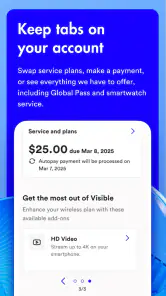
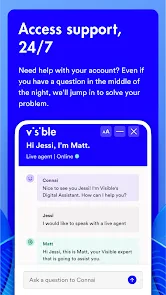
The app itself is pretty intuitive. Everything is right where you’d expect it to be, making it easy to manage your account, check usage, or pay bills. Plus, the customer service is entirely app-based, which might seem a bit unconventional, but it’s surprisingly efficient. You tap a few buttons, and you’re chatting with a human. No more being stuck in endless phone trees.
What a Normal Day Can Tell You
Imagine you rely on your phone for directions on the way to work, messages during the day, and a video or music stream on the trip home. A useful first test isn’t to run through every possible feature; it’s to notice whether the service behaves well at those specific points in your routine. Check reception at home, at work, and along your regular route, especially in places where you need your phone for something time-sensitive.
That kind of test also helps separate an app problem from a network problem. If the account screen is easy to use but mobile data is unreliable in a building you visit daily, the app may be doing its job while the service still isn’t right for you. Conversely, if reception is fine but you can’t quickly find an account control, that is a navigation or support concern. Keeping those questions separate makes your decision more grounded.
Visible’s reported average rating is 4.6, based on around 60,000 ratings, and it has more than one million installs. It was released on August 1, 2019; version 2.2.15 supports Android 7.0 and later. I’d read those figures as signs that the app has an established audience, not as a promise that every person will get the same coverage or support experience. The best evidence for your own decision is still how it handles your account and how the service performs in the places you depend on.
Choosing It for Your Routine
A practical first test is to keep the app handy while you move through an ordinary day: confirm that your account is set up, then try the routine tasks you care about, such as checking the account or getting help. That gives you a better sense of whether the app’s navigation works for you before you depend on it during a time-sensitive issue. I’d also avoid judging the service from one convenient location; a commute, workplace, or regular weekend destination may matter more than a strong signal at home.
Visible is a communication app from Visible Services, LLC. It is free to download, rated for Everyone, and has an average rating of 4.6 from around 60,000 ratings, with over one million installs. It first appeared on August 1, 2019, and version 2.2.15 supports Android 7.0 and later. Those figures suggest an established app, but they can’t tell you whether the carrier suits your specific routine. I’d treat the app and the network as related but separate decisions: a polished account experience is useful, yet coverage and plan fit should lead.
Common Points of Confusion
The first thing I’d keep straight is that a carrier app and mobile coverage answer different questions. A smooth account screen does not establish that calls or data will be dependable in every place you go. If you spend time in a basement office, on rural roads, or inside a particular building where reception matters, check those locations specifically before you make the service your only option. General impressions from a city center or your living room can be misleading.
It’s also easy to hear “unlimited” and assume that every kind of usage will feel identical everywhere. I wouldn’t make that leap. The useful question is how the service performs for your own habits and locations, not just how appealing the plan sounds. If you regularly depend on a stable connection for navigation, work calls, or hotspot use, test the exact situations you care about and review the plan details in the app before relying on assumptions.
For support, remember that the app-centered route may not suit everyone. If you prefer walking into a store, getting help face to face, or placing a phone call to explain a complicated issue, this approach can feel like extra friction. If you’re comfortable describing a problem in a chat and checking replies on your phone, it may be more convenient. I’d choose based on the kind of help I actually want, not on the assumption that digital support is automatically faster for every case.
Where the Trade-Offs Matter
The clearest difference from many traditional carrier apps is the emphasis on managing service digitally rather than calling a shop or working through a phone menu. That can be a real time-saver if you prefer handling account tasks on your own. It can also feel limiting if you want face-to-face help or prefer speaking by phone; app-based support is not automatically the best route for every customer, even when reaching a person is straightforward.
Unlimited service sounds especially appealing if you stream or use maps often, but I wouldn’t assume that the word alone guarantees the same experience everywhere. Network conditions vary by location, so test the places you actually visit and think about what matters most: predictable billing, dependable local reception, or a particular kind of support. If reliable service in a specific building is essential, checking that first is more useful than switching because of a broad coverage impression.
The group-payment idea described above also calls for a little practical thought. A shared discount may sound convenient, but it works best when everyone understands how their own account and bill are handled. Before inviting people, agree on who is joining and make sure nobody mistakes a group arrangement for a shared phone account or a requirement to stay together. The appeal is flexibility, but the useful habit is to confirm the details in the app rather than rely on assumptions.
Who Is Likely to Feel at Home
I’d put Visible on the shortlist for someone who likes controlling account tasks from a phone, wants a straightforward carrier experience, and is willing to verify coverage before making a change. It may also suit people who prefer to manage their own account rather than make routine calls. For a household or group considering the arrangement described above, the key is that each person understands the terms and is comfortable managing their own part of it.
I’d be more cautious if your phone is essential in a location where you cannot tolerate weak reception, if you need hands-on assistance, or if you prefer a traditional shop-and-phone-call support model. A larger carrier or another provider with a service option that better matches your location and support preferences may be the wiser choice. The right decision is not the one with the most appealing app; it’s the one that makes your everyday phone use dependable and manageable.
One practical tip is to write down the few things you need from a carrier before comparing options: where you need coverage, how often you use data, whether you want in-person help, and how much account management you’re comfortable doing yourself. Then use those criteria to judge Visible rather than being distracted by a single attractive feature. That checklist makes the comparison fairer against the carrier you already have and helps you spot a mismatch early.
My Take After the First Decision
For a first-time user, I’d make the first success small and concrete: get through signup, locate the account controls, and confirm you can reach support from the app. Then use the phone normally in the places that matter to you before deciding whether the service has earned a permanent place in your routine. That approach is less dramatic than switching everything at once, but it helps separate setup convenience from day-to-day network performance.
Visible is best suited to someone who wants a simpler, app-centered way to manage mobile service and is comfortable checking coverage before committing. It is less compelling for someone who depends on in-person assistance or cannot tolerate uncertainty about reception in a key location. Visible mobile, a service that's making waves in the cellular world, is all about simplicity and affordability. But does it really live up to the hype? Let’s dive into what makes this app a potential game-changer in the mobile network landscape.
My Bottom Line
In a nutshell, Visible Mobile is a solid option for anyone looking to cut down on their mobile expenses without sacrificing service quality. Its transparency and simplicity are genuinely refreshing in a market that often feels bogged down by complexity. It’s like Visible took a long hard look at what people hated about mobile plans and decided to do the exact opposite.
So, if you’re tired of the same old, same old from your mobile carrier, Visible might just be the change you need. It’s affordable, reliable, and just plain sensible. Who knew switching mobile carriers could be this easy?
My recommendation is to treat the first few days as a practical trial of fit, not just a tour of the interface. Use your phone as you normally would, note any spot where reception or support matters, and confirm that everyday account tasks feel manageable. If those checks go well, the app’s straightforward approach can make carrier management feel less of a chore. If they don’t, choosing a provider with stronger local performance or a support style you prefer is a sensible outcome, not a failure to make the app work.
Visible mobile Frequently Asked Questions
What does the Everyone content rating mean for the Visible app?
The Visible app has an Everyone age rating, so its content is considered suitable for a general audience. The app is a communication tool for managing Visible phone service, rather than a game or entertainment app. Parents and other users can still review the app’s permissions and features on their device before installing it, as they would with any account-management app.
Who develops the Visible app?
Visible Services, LLC develops the Visible app. It is designed to provide a mobile place for customers to manage Visible phone service. If you are considering downloading it, check that the developer name matches when you open the app’s page in your device’s app store. This is a helpful way to distinguish the official app from unrelated apps with similar names.
What is the Visible app used for?
Visible is a communication app from Visible Services, LLC, built to help customers manage their Visible phone service. The store describes it as “the future of phone service,” and the app provides a digital place to handle service-related tasks. It is free to download and is rated for everyone, making it a straightforward option for people who want to manage their account from a mobile device.
Which devices can install the Visible app?
The app supports devices running Android 7.0 or later. Before downloading, check that your device meets this minimum operating-system requirement and has enough space for installation. Visible is available as a mobile app, so it is intended for use on a compatible smartphone. The app’s current version is 2.2.15, and keeping an app updated can help you use its latest available release.
What is Visible Mobile and how does it work?
Visible Mobile is a wireless service provider operating on Verizon's 4G LTE and 5G networks. It offers a straightforward, no-contract plan with unlimited talk, text, and data. Users manage everything through the Visible app, where they can monitor usage, pay bills, and get customer support. The service is designed to be simple and affordable, appealing to users who seek flexibility without hidden fees.
Pros
- Affordable unlimited data plans
- No annual contracts required
- Strong nationwide 5G coverage
- Easy account management via app
- Flexible plan customization options
Cons
- Limited device compatibility
- No physical stores for support
- International roaming not available
- Data deprioritization during congestion
- No family plan discounts

- Category
- Communication
- Version
- 2.2.15











