

VIN Scanner
- 191.00
- 3.6
- Installs
- 100.00K
- Price
- Free

Screenshots
Analysis by Reviewed
Buying or appraising a used vehicle often means making a decision while standing beside a car, not sitting at a desk with plenty of time to compare notes. That is where VIN Scanner makes the most sense. I approached it as an Auto & Vehicles tool for quick identification and appraisal work, and I found its value tied closely to how well it fits into a connected, mobile workflow. It is free, aimed at Everyone, and developed by VIN Scanner, but it feels more focused than a casual car-shopping utility.
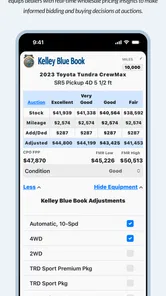
The app’s main appeal is its professional angle. Rather than treating a vehicle identification number as something you check once and forget, it presents the scan as a starting point for appraisals, run lists, market insight, and profit decisions. That makes it relevant to dealers, auction buyers, independent appraisers, and serious private buyers. I would not describe it as a complete replacement for a mechanical inspection or a full vehicle-history investigation, but it can help organize the first layer of a buying decision.
How the connected workflow feels in real use
I find the connected workflow most useful when I treat each scan as the start of a handoff: from the car itself, to an appraisal comparison, and then to the person making the buying decision. One small habit makes that chain clearer—keep the vehicle order consistent and verify the identifier before moving on, especially when several similar cars are being reviewed. That reduces mix-ups without asking the app to do the inspection for me.
Scanning is only the beginning
The most important thing to understand is that the useful moment is not simply capturing a VIN. The real benefit comes afterward, when that identification can support an appraisal or help place a vehicle in a larger run list. In a dealership or auction setting, this changes the role of the phone: it becomes a quick working tool rather than just a camera or note-taking device.
I can imagine using it while moving through several vehicles. Instead of writing a VIN on paper, returning to a computer, and trying to match each number to the correct car, I would use the app at the vehicle and continue the evaluation from there. That reduces one common source of human error: mixing up handwritten identifiers when several similar cars are being considered.
Connectivity shapes this experience. Any workflow that depends on market information, appraisal context, or profit calculations is more comfortable when the phone has a reliable connection. In a strong-signal dealership or auction environment, the process should feel much more natural than trying to remember identifiers and research them later. In a basement parking area, a crowded auction site, or a rural lot, the experience can become less predictable because the usefulness of the next step depends on what the app can reach at that moment.
I would therefore treat the scan as a checkpoint. Capture the vehicle identification, verify that it belongs to the car in front of you, and then give the app enough time to complete whatever connected work follows. Rushing away immediately after the scan defeats much of the reason to use a specialized tool.
More From Our News Desk

 Gmail
GmailGmail in a Busy Inbox: Who Benefits Most?
From first account to crowded workday, Gmail earns its place through dependable search and flexible sorting—but its best fit depends on how much inbox maintenance you can tolerate.

 Prime Video
Switching to Prime Video: What Changes in Your Viewing Routine
Prime Video can make a compelling second home for streaming, but switching means learning a different catalog, rental layer, and route from browsing to playback.

 Universal TV Remote Control
Universal TV Remote Control Works Best as a Reliable Backup
A phone remote earns its place through quick setup and reliable habits. Here is how to get more from Universal TV Remote Control—and where its limits show.

 Weather - By Xiaomi
Weather by Xiaomi Review: Clear at a Glance, Less Clear Up Close
Xiaomi’s weather app makes everyday forecasts quick to scan, but its calm surface can leave useful details and recovery paths harder to find than they should be.

 X
XX Under Pressure: Can It Recover When Posting Goes Wrong?
A resilience-focused review of X, examining setup, mistaken posts, interruptions, weak connections, and the gaps that matter when recovery needs to be dependable.

 Clash of Clans
Clash of Clans Is Won Between the Battles
Its raids are quick; its community is a long-term project of coordination, teaching, rivalry, and shared responsibility—with all the friction that entails.
Latest News



Why run lists matter more than a single lookup
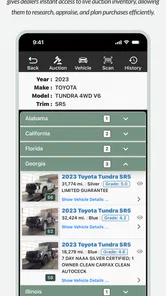
A single vehicle lookup is useful, but the run-list idea is where this app becomes more distinctive than a basic VIN reader. When several vehicles are being reviewed, the challenge is not only finding information; it is keeping the candidates separated and comparing them consistently. A structured list can help me remember which vehicle was promising, which needed a closer look, and which no longer made financial sense.
That is especially helpful when the vehicles are being considered in quick succession. I would use a repeatable routine: scan one vehicle, record the appraisal impression, note the likely buying position, and move to the next. The important discipline is to avoid treating the app’s output as an automatic buying recommendation. It is better used as a framework for comparing candidates than as a substitute for judgment.
A practical tip is to scan before becoming emotionally attached to a vehicle. Buyers often focus on color, trim, or visible condition and then unconsciously adjust their numbers to justify interest. Starting with identification and market context creates a more neutral baseline. After that, physical inspection, title checks, service records, and transport costs still need their own attention.
Market insight is useful, but not the whole market
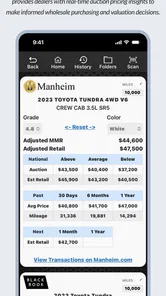
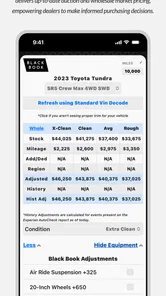
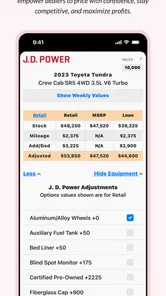
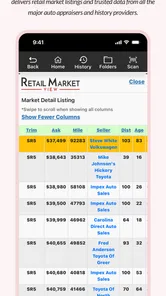
The store summary positions the app around market insights and profit, which tells me it is designed for decisions where margin matters. That is different from a consumer app intended only to decode a vehicle’s basic identity. For a professional buyer, even a small improvement in consistency can matter because the same process is repeated across many cars.
Still, market context should be read as guidance rather than certainty. A vehicle’s actual value can change with local demand, visible damage, tire condition, maintenance history, title status, accessories, and the cost of getting it ready for resale. A number that looks attractive inside an app may stop being attractive after transport, repairs, fees, and time are included.
My preferred workflow would be to use the app to establish a first estimate, then write down the assumptions behind that estimate. If I am allowing for cosmetic work, missing keys, worn tires, or a slow resale period, I would keep those deductions separate. This prevents the convenient connected result from becoming a false sense of precision.
Using it on a phone instead of at a desk
VIN Scanner is most naturally suited to people who work around vehicles. I can see the advantage when walking a lot, inspecting trade-ins, or preparing a group of cars for appraisal. A phone is already in hand, and the identifier is physically located on the vehicle, so the workflow does not require carrying a laptop between cars.
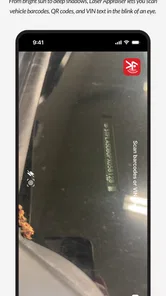
That mobile setting also creates friction. Bright sunlight, awkward windshield placement, glare, dirt, and cramped access can make scanning less comfortable than it sounds. If the first capture is not accepted, I would rather enter the identifier carefully than keep taking poor images from the same angle. A clean, deliberate scan is more useful than several rushed attempts.
For a private buyer viewing one vehicle, the value depends on how much structure they want. Someone who buys a car every few years may find a general vehicle-history service or a manufacturer-focused resource easier for a one-off check. Someone comparing many cars, negotiating from a margin, or maintaining a repeatable appraisal process is more likely to benefit from this app’s professional orientation.
What happens when the connection is weak
Connectivity is not a minor detail here. The app’s appeal involves information that extends beyond the characters printed on the vehicle, so a weak network can interrupt the part of the process that matters most. I would not plan a large appraisal session around the assumption that every result will appear instantly. Instead, I would build in a small verification step after each scan.
If a result takes longer than expected, the first recovery action is simple: check that the identifier was captured correctly and that the phone has a usable connection. A mistaken character can look like a network problem, while a poor signal can make a correct scan appear unsuccessful. Separating those two possibilities saves time.
I would also avoid repeatedly submitting the same scan without checking what has already happened. In a busy workflow, duplicate attempts can create confusion about which entry is current. A better habit is to pause, confirm whether the vehicle has already been added to the working list, and then continue only when the status is clear.
For an auction or dealership team, this suggests a useful fallback: keep a simple temporary record of the vehicle order and the last few characters of each identifier while working. That is not a replacement for the app, and I would not treat it as a permanent database. It is simply a recovery aid if the signal drops or the next connected step needs to be completed later.
Data-conscious use in a busy lot
Because this is a connected vehicle tool, I would use it deliberately rather than leaving it open and refreshing information without a reason. Scan the car you are actually evaluating, review the result, and close the loop before moving on. That keeps the workflow focused and avoids wasting mobile data during a long inspection session.
It is also sensible to separate essential information from optional research. The identification and appraisal context are central to the app’s purpose. Broader market comparisons can wait until the strongest candidates have been narrowed down, especially when the connection is slow or the session involves many vehicles.
Another practical habit is to review entries while the vehicle is still nearby. If I notice a mismatch between the scan and the car’s visible details, I can correct the situation immediately. Waiting until later makes it harder to know whether the problem came from the scan, the vehicle order, or my own notes.
I would be cautious about treating a phone screen as the final record for a transaction. For serious purchasing, I would preserve the relevant appraisal reasoning through the business’s normal record-keeping process. VIN Scanner can support the decision, but the decision should remain understandable to someone who was not standing beside the vehicle.
Version, longevity, and who it is really for
The app has been available since May 19, 2010, and its current version is 3.2.4. That long presence gives it a different feel from a brand-new utility built around a temporary trend. It suggests a product with a defined place in the vehicle-appraisal space, although longevity alone does not guarantee that every modern phone workflow will feel equally polished.
Its minimum operating system is Android 7.0, which makes the compatibility requirement relatively approachable for older Android devices. Even so, I would check the phone being used in the field before relying on it for a full day of appraisals. A compatible operating system does not automatically mean that an older handset will offer the same camera, speed, screen visibility, or network performance as a newer one.
The app has passed the one-hundred-thousand-install mark and holds a 3.6 average from around five hundred ratings. I read that as evidence of a real user base, but not as a reason to ignore the trade-offs. The rating feels consistent with a specialized tool that can be valuable in the right workflow while leaving some users dissatisfied when they expect a simple consumer lookup.
Its Everyone content rating is reassuring for mixed workplace use, but the audience is still better defined by purpose than by age. A teenager curious about a family car may find a simpler decoder more approachable. A professional or experienced buyer who needs appraisal structure is the person most likely to understand why this app exists.
Where it beats ordinary alternatives
The usual alternative is a general VIN decoder or a browser search. Those options can be perfectly adequate when I only need basic vehicle identification or a one-time check. They may also be easier for someone who does not want a specialized appraisal workflow.
VIN Scanner has a stronger case when the task involves repeated evaluations, run lists, market context, and profit thinking. Its advantage is not merely that it reads a VIN; it is that the identifier can become part of a broader decision process. That is a meaningful difference for a dealer or appraiser who needs consistency across a group of vehicles.
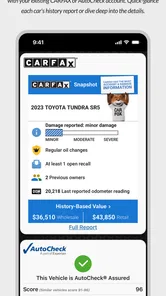
On the other hand, a dedicated vehicle-history provider may be the better choice when the main concern is accident history, ownership records, title events, or detailed maintenance information. A mechanic’s inspection is still better for judging hidden mechanical problems. A spreadsheet or dealership management system may be better for long-term inventory control. I would use this app alongside those tools, not pretend one mobile utility can cover every part of a used-car purchase.
A realistic buying scenario
Imagine I am reviewing several trade-ins before deciding which ones deserve a second inspection. I scan the first vehicle while standing beside it, check that the identifier matches the car, and place it into the working appraisal flow. I then look at the market and profit context, but I keep repair assumptions separate from the initial result.
The second vehicle has a cleaner exterior but noticeably worn tires. Its first impression is better, yet the actual margin may be weaker once preparation is included. The app helps me keep both vehicles in the same comparison process instead of letting appearance dominate the decision. I mark the tire cost as a separate concern, then continue to the next candidate.
Later, the connection becomes unreliable near the edge of the lot. Rather than repeatedly submitting scans, I keep the vehicle order clear, verify each identifier, and return to the connected steps when the signal improves. That small change in behavior prevents a network interruption from turning into a record-keeping mistake.
At the end, I do not simply choose the vehicle with the most attractive displayed result. I compare the app’s context with condition, paperwork, transport, preparation time, and expected demand. In that scenario, VIN Scanner earns its place by making the comparison more orderly, not by making the final judgment for me.
My overall verdict on the workflow
I like VIN Scanner most when I imagine it in the hands of someone who evaluates vehicles regularly. The combination of VIN capture, appraisal work, run-list thinking, market insight, and profit awareness gives it a clearer purpose than a generic scanner. It can reduce scattered notes and help a buyer make decisions while still standing beside the vehicle.
The main limitation is that the connected experience requires sensible field habits. Signal quality, correct scanning, careful verification, and disciplined record-keeping all matter. I would not rely on it as the only source for a high-value purchase, and I would not choose it if I only wanted a quick, casual vehicle lookup.
For a professional appraiser, dealer, auction buyer, or frequent used-car shopper, the free price makes it easy to test without committing money. The app is most convincing when several vehicles must be compared under time pressure. For occasional buyers, a broader history service or a simpler decoder may be less work.
My final recommendation is conditional but positive: use VIN Scanner as a connected appraisal companion, not as an all-knowing vehicle report. If you understand that distinction, its mobile workflow can bring useful structure to fast-moving buying decisions. If your priority is deep history, mechanical diagnosis, or a single uncomplicated lookup, another tool will probably serve you better.
After spending time considering how it fits into real vehicle work, I see VIN Scanner as a practical specialist rather than an app for everyone. Its strongest moments come when identification, comparison, and margin analysis need to happen together. Keep a backup habit for weak connectivity, verify every scan against the actual car, and let the app inform your judgment instead of replacing it.
VIN Scanner Frequently Asked Questions
Is VIN Scanner free to download, and are there costs to consider?
VIN Scanner is free to download, making it easy to try as an Auto & Vehicles app without an upfront purchase. Keep in mind that the cost of an app download does not necessarily cover every service it may offer. Before using any optional lookup or report feature, review the price shown in the app and check whether a charge is one-time or recurring.
What should I have ready before using VIN Scanner?
Have the vehicle’s VIN available before you start. It is usually a 17-character code, and you may find it on the vehicle or in its paperwork. Good lighting and a clear view of the number can make camera scanning easier; if the code is hard to read, entering it manually may be more practical. Check each character carefully before submitting it.
What is VIN Scanner and what does it do?
VIN Scanner is an app designed to read and interpret a vehicle identification number, commonly known as a VIN. After scanning or entering the 17-character code, it can help identify basic vehicle details such as the manufacturer, model, model year, body type, and country of origin. It is useful when checking a car before buying, comparing listings, or organizing vehicle information.
How do I scan a VIN with the app?
To scan a VIN, open the app and allow access to your device’s camera when requested. Position the vehicle’s VIN barcode or printed number inside the on-screen frame and keep the phone steady in good lighting. If the camera cannot recognize the code because it is damaged, dirty, reflective, or poorly positioned, you can usually enter the VIN manually instead.
Can VIN Scanner provide a complete vehicle history report?
VIN Scanner may identify vehicle specifications, but users should not automatically assume that every result includes a complete history report. Information such as accidents, title problems, theft records, mileage inconsistencies, recalls, or previous ownership may require access to separate databases or paid reports. Always review the app’s available data, pricing, and coverage before relying on its results.
Pros
- Quickly identifies many vehicles from their VIN number.
- Useful for checking basic vehicle details before a purchase.
- Simple interface that is easy for first-time users.
- Can help organize and review scanned vehicle information.
- Saves time compared with searching VIN details manually.
Cons
- Vehicle data may vary by country
- manufacturer
- and model year.
- Some scans may return incomplete or outdated information.
- A VIN scan does not replace a professional vehicle inspection.
- Advanced reports or features may require payment.
- Camera recognition can struggle with damaged or poorly printed VINs.











