

Vehicle Care by Assurant
- 34.00
- 3.0
- Installs
- 50.00K
- Price
- Free

Screenshots
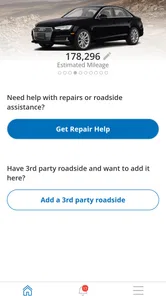
Analysis by Reviewed
I approached Vehicle Care by Assurant as a practical ownership companion rather than another app I would open every day. Its purpose is straightforward: to make routine vehicle care easier to organize from a phone. That sounds modest, but it matters when maintenance details are scattered across a glovebox, email inbox, dashboard reminders, and memory. My overall impression is that this app is most useful for people who want a central place to stay more deliberate about caring for a car, while users looking for a full driving platform or a highly customizable maintenance system may find its scope too narrow.
The app sits in the Auto & Vehicles category and is developed by Assurant, Inc. It is free to use, rated for Everyone, and has reached over fifty thousand installs. Its average rating is 3.0 from more than seventy ratings, with over thirty written reviews, so I would treat it as a relatively small and mixed user sample rather than a definitive verdict. It was released on October 3, 2020, and the current version is 3.3.0 for devices running OS 10 or later.
What Vehicle Care is really useful for
In my experience, the strongest idea behind Vehicle Care by Assurant is reducing the mental load around ownership. Most drivers do not need a complicated automotive dashboard; they need to remember what was done, what is due next, and where to look when a vehicle-related task appears. A focused care app can be helpful because it gives those reminders a dedicated home instead of leaving them mixed with unrelated calendar events or notes.
I would especially consider it for someone who has recently bought a used car, shares responsibility for a household vehicle, or tends to postpone maintenance until a dashboard light appears. It can also suit a driver who wants a more intentional routine without paying for a separate service. Because the app is free, the decision is less about subscription cost and more about whether its approach fits the way you already manage your car.
The best way to judge it is not by opening it once and expecting a complete diagnosis. I see it as a planning and organization layer. It should complement the vehicle’s manual, service invoices, mechanic’s advice, and dashboard warnings rather than replace them. That distinction is important: a care app can help you remember an oil change, inspection, tire check, or other ownership task, but it is not a substitute for professional inspection when something feels wrong.
A realistic everyday routine
Imagine that I have just returned from a service visit. Instead of putting the receipt in the center console and hoping I remember the next recommendation, I use the app to keep the follow-up visible. Later, when I am preparing for a long trip, I can use that organized record as a prompt to think about tires, fluids, lights, and any work the mechanic mentioned. The value is not dramatic automation; it is having a repeatable habit that prevents small responsibilities from disappearing.
That workflow is also useful for a family car. One person may drive it most of the week while another handles appointments and bills. A shared reference point can reduce the familiar “Was that already done?” conversation. I would still confirm important details against receipts and the service provider, but an app-based reminder is easier to consult than a stack of papers.
More From Our News Desk

 Gmail
GmailGmail in a Busy Inbox: Who Benefits Most?
From first account to crowded workday, Gmail earns its place through dependable search and flexible sorting—but its best fit depends on how much inbox maintenance you can tolerate.

 Prime Video
Switching to Prime Video: What Changes in Your Viewing Routine
Prime Video can make a compelling second home for streaming, but switching means learning a different catalog, rental layer, and route from browsing to playback.

 Universal TV Remote Control
Universal TV Remote Control Works Best as a Reliable Backup
A phone remote earns its place through quick setup and reliable habits. Here is how to get more from Universal TV Remote Control—and where its limits show.

 Weather - By Xiaomi
Weather by Xiaomi Review: Clear at a Glance, Less Clear Up Close
Xiaomi’s weather app makes everyday forecasts quick to scan, but its calm surface can leave useful details and recovery paths harder to find than they should be.

 X
XX Under Pressure: Can It Recover When Posting Goes Wrong?
A resilience-focused review of X, examining setup, mistaken posts, interruptions, weak connections, and the gaps that matter when recovery needs to be dependable.

 Clash of Clans
Clash of Clans Is Won Between the Battles
Its raids are quick; its community is a long-term project of coordination, teaching, rivalry, and shared responsibility—with all the friction that entails.
Latest News



Trust starts with what the app asks me to do
With a vehicle app, I pay attention to trust before convenience. Car ownership can involve identifying information, service history, location-related context, and account details. I do not want to assume that a polished interface automatically means careful handling of personal information. My approach is to look at the permissions requested during setup, read the privacy and account screens, and decide whether each requested access is necessary for the way I intend to use the app.
That is a useful discipline with Vehicle Care because the app’s basic purpose does not require me to surrender control of every part of my phone. If a permission appears, I would ask what task it enables and whether I can continue without granting it. A reminder-oriented experience should not be treated as a reason to approve access automatically. I prefer granting only what I understand, then revisiting those choices in the operating system settings if my use changes.
I also recommend checking the account flow before entering more information than necessary. If the app offers optional profile fields, vehicle details, or communication choices, I would separate what is needed to make the core experience work from what is merely convenient. That small distinction gives me a clearer sense of control and makes it easier to stop using the service later without feeling locked into it.
Account controls deserve a deliberate check
One question I would answer before relying on any care app is how easy it is to correct or remove my information. I would look for account settings, sign-out controls, ways to edit vehicle details, and any available process for deleting an account or requesting data-related assistance. I would also check whether notifications can be adjusted, because a useful reminder becomes irritating when it arrives at the wrong frequency or for a vehicle I no longer own.
I would not assume that uninstalling an app automatically removes an account or previously submitted information. Those are separate actions in many services, so I prefer to inspect the account area and any privacy documentation first. This is not a criticism unique to Vehicle Care; it is simply a sensible habit whenever a mobile app is connected to ownership records or personal details.
The same caution applies when changing phones. Before replacing a device, I would make sure I know how to sign back in, whether my vehicle information is associated with an account, and whether anything stored locally needs to be preserved separately. That preparation is more valuable than discovering after an upgrade that an important maintenance note was only available on the old handset.
Where data sensitivity matters most
The most sensitive moments are not necessarily when I am reading a reminder. They are when I create an account, add vehicle information, enter service history, enable notifications, or allow any connection with another service. At each point, I would pause and review the visible choices instead of tapping through setup as quickly as possible.
I would also avoid entering information that is irrelevant to my goal. If I only want a maintenance organizer, I would begin with the minimum vehicle details needed to make that useful. I would not add personal notes that reveal more than necessary, and I would avoid storing photographs of documents unless I had a clear reason to do so. This keeps the app’s role limited and makes my own information easier to manage.
Location deserves particular attention in any automotive context. A vehicle app may feel as though location access would be helpful, but I would not enable it simply because the app relates to driving. If a feature works without location, I would keep that permission off. If a feature genuinely depends on it, I would read the explanation and choose the least broad option offered by my device. That is a concrete way to balance convenience with privacy without abandoning the app altogether.
Notifications are another small but meaningful data point. A message appearing on a lock screen can reveal that I own a particular vehicle or have a service task pending. I would review notification previews and decide whether sensitive text should be visible when the phone is locked. For a shared household tablet or a phone that other people regularly see, that setting can matter more than the reminder itself.
What I would record, and what I would keep elsewhere
A practical approach is to use Vehicle Care for concise ownership prompts rather than treating it as the only archive of every document. I would keep receipts, warranty paperwork, inspection records, and mechanic notes in their original form or in a separate secure storage location. In the app, I would focus on information that helps me act: the task, the approximate timing, and a short note about what needs attention.
This division creates a useful backup strategy. If the app is unavailable, I still have the source documents. If a receipt is hard to find, the app can remind me what happened and when I should investigate further. It also prevents a common mistake: assuming that a reminder entry proves that a repair was completed. I would always verify major work against an invoice or service provider before making decisions about safety.
For a used vehicle, I would be especially careful to distinguish inherited history from work I personally arranged. A note such as “reported by previous owner” is more honest than treating an old claim as confirmed maintenance. That kind of labeling may seem minor, but it keeps future decisions grounded in what I actually know.
How it compares with the usual alternatives
The most obvious alternative is the built-in calendar. A calendar is excellent for a single recurring reminder and usually offers strong notification controls, but it does not naturally separate vehicle tasks from appointments, work deadlines, and birthdays. Vehicle Care has a clearer automotive focus, which may make ownership tasks easier to review as a group.
A notes app is more flexible than a dedicated care tool. I can create any format I want, attach a photo, and write detailed observations. The trade-off is that I must design and maintain the system myself. For someone who enjoys spreadsheets and custom templates, a notes app or spreadsheet may be better. For someone who wants a purpose-built place to begin, Vehicle Care is less demanding.
Mechanic or dealership apps can be stronger when the main goal is booking appointments with one provider or viewing that provider’s service history. Their limitation is that they may not reflect work completed elsewhere. A general vehicle-care app can make more sense for drivers who visit different garages, perform some maintenance themselves, or simply want an independent overview. I would choose the provider-specific option when scheduling and shop communication are the priority, and Vehicle Care when broader personal organization is the priority.
Dedicated diagnostic and telematics products are a different category altogether. They may offer live vehicle data, fault-code information, trip tracking, or hardware integration, depending on the product. I would not choose Vehicle Care expecting those capabilities. Its appeal is simplicity and ownership organization, not turning a phone into a professional scan tool or a live fleet monitor.
Who should use it, and who should skip it
I think Vehicle Care is a reasonable fit for a driver who wants a free, focused way to be more consistent with car responsibilities. It is particularly approachable for people who do not want to build a spreadsheet, do not want a mechanic-specific account, and appreciate having vehicle tasks separated from a general task list. New owners may also benefit from the structure because it encourages them to think ahead rather than react only when a warning light appears.
I would be more hesitant if I already maintain a detailed spreadsheet with receipts, dates, mileage, costs, and parts information. In that case, another place to enter the same facts could create duplication rather than clarity. I would also skip it as a primary tool if I need live diagnostics, advanced trip analysis, fleet management, or direct communication with a particular repair shop.
Drivers who strongly prefer not to create accounts or share any vehicle-related information should review the setup carefully and use the app only if its controls match their comfort level. The free price removes one barrier, but it does not remove the need to understand permissions, notifications, account handling, and privacy choices.
Small habits that make the experience better
My first tip is to set up the app when I am calm, not in a parking lot while trying to remember a mechanic’s instructions. I would gather the vehicle manual and recent service paperwork first, then enter only information I can verify. This reduces the chance of creating reminders based on guesses.
My second tip is to review the list at the start of a month or before a long journey, instead of waiting for a notification to surprise me. A reminder is most useful when it leads to planning: booking an appointment, buying a replacement item, or checking whether a task is actually necessary for my vehicle’s model and conditions.
My third tip is to use clear notes that will still make sense later. “Check car” is too vague. A short description such as “ask about uneven front tire wear” gives me a better starting point when I speak with a professional. I would avoid recording sensitive personal details in those notes, since the goal is useful context rather than a complete private diary.
Finally, I would periodically remove vehicles I no longer own and review notification settings. Keeping outdated cars in an ownership app can lead to wrong reminders and unnecessary information retention. A short cleanup is a practical form of user control, not just digital housekeeping.
My cautious verdict
Vehicle Care by Assurant makes sense to me as a simple ownership organizer, not as an all-in-one automotive command center. Its free access and focused purpose lower the barrier to building better maintenance habits, and the app may be especially helpful when vehicle responsibilities are otherwise spread across paper records, memory, and generic reminders.
At the same time, I would use it with sensible boundaries. I would inspect permissions, limit optional information, control notification visibility, and keep original service documents elsewhere. I would also verify important maintenance claims with a mechanic or receipt rather than treating an app entry as proof. Those steps preserve the convenience without giving the app more authority than it deserves.
The mixed average of 3.0 from a modest number of ratings makes me recommend trying it with realistic expectations rather than assuming it will suit everyone. If you want a dedicated place to organize routine vehicle care, it is worth exploring. If you need diagnostics, detailed cost accounting, or a direct connection to a repair network, a different tool will probably serve you better. My recommendation is cautious but positive: use it as a reminder and organization layer, while keeping control of your data and your authoritative vehicle records.
Vehicle Care by Assurant Frequently Asked Questions
What devices can run Vehicle Care by Assurant?
Vehicle Care by Assurant is available for Android devices running Android 10 or later. Before downloading, check your phone’s operating-system version in its settings to make sure it meets that requirement. The app is free to download, and its Everyone age rating makes it broadly suitable for users. Device compatibility is worth checking first so you can install and use the app without an avoidable setup issue.
Who develops Vehicle Care by Assurant, and what is the app for?
The app is developed by Assurant, Inc. and sits in the Auto & Vehicles category. Its purpose is to simplify vehicle ownership by bringing eligible vehicle-care and protection-plan services into a mobile app. It has been available since October 3, 2020, and its current version is 3.3.0. These details can help you identify the right app when searching for it in an app store.
What is Vehicle Care by Assurant?
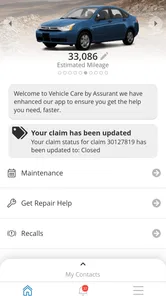
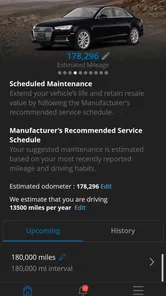
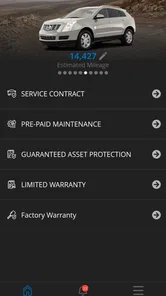
Vehicle Care by Assurant is a mobile app designed to help eligible vehicle owners manage protection-plan and vehicle-care services from their smartphone. Depending on the plan and market, it may provide access to coverage information, service details, claims or assistance options, maintenance-related resources, and account information. Available tools can vary, so users should confirm that their Assurant plan is supported before downloading.
Who can use Vehicle Care by Assurant?
The app is generally intended for customers who have an eligible vehicle protection, service contract, or related product administered by Assurant or one of its partners. Access may require policy, contract, account, or vehicle information, and some features can depend on the provider that sold the plan. If your coverage was purchased through a dealership, lender, insurer, or manufacturer, check your documents for app eligibility.
What can I do with Vehicle Care by Assurant?
After signing in, eligible users may be able to review plan or contract information, check available benefits, find contact details for support, request roadside or other covered assistance, and manage certain service-related tasks. The exact functions are not identical for every customer because Assurant offers different programs through different partners. Some options may only appear after your account and coverage are verified.
Pros
- Helps organize maintenance details in one convenient place.
- Useful reminders can reduce the chance of missed vehicle servicing.
- May simplify communication with participating dealerships or service providers.
- Can make vehicle-related information easier to access while traveling.
- Clean layout is generally approachable for users with limited technical experience.
Cons
- Many features may depend on support from your dealership or service provider.
- Some users may find account setup and vehicle verification time-consuming.
- Reminder usefulness depends on keeping mileage and vehicle details up to date.
- Not all vehicle makes
- models
- or service plans may be supported equally.
- The app may offer limited value if your provider does not fully integrate with it.











