

Veebs
- 289.00
- 1.9
- Installs
- 10.00K
- Price
- Free

Screenshots
Analysis by Reviewed
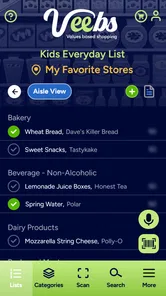
Shopping apps can save time, but they can also make a simple grocery trip feel more complicated when the connection is weak or the app does not explain what is happening. I spent time looking at how Veebs fits into that everyday gap between planning a shop and standing in a store with a phone in one hand. It is a free shopping app from VBS CORP LLC, focused on grocery shopping and scanning rather than trying to replace every part of a supermarket’s own service.
My first impression is that its idea is more practical than flashy. The useful question is not whether it looks impressive, but whether scanning and checking information on a mobile screen genuinely helps during a normal shopping run. That answer depends heavily on your routine, your patience with connectivity, and whether you want a focused grocery tool or a complete store ecosystem with delivery, loyalty rewards, payments, and live stock information.
How the grocery experience feels when the network matters
The most important thing to understand is that this is a connected experience. When I use a grocery scanning app, I expect the phone to communicate with a service while I search, scan, or review an item. That makes the quality of the experience dependent on more than the camera or the interface. A slow signal can turn a quick check into a pause, and a busy store can expose that weakness at exactly the wrong moment.
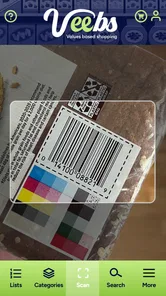
In a strong connection, the workflow feels straightforward: open the app, point the phone at a product when scanning is available, and use the result to support a shopping decision. The value is greatest when I am comparing products rather than simply collecting items from a prepared list. A scan can be a useful interruption to impulse buying because it gives me a reason to stop and inspect what I am holding.
That convenience should not be confused with a guarantee that every product decision becomes instant. Grocery shelves are messy environments. Packaging can be reflective, barcodes can be damaged, and fingers can cover part of the label. Even with a good network, scanning is not always a one-second action. I found it more useful as a deliberate checking step than as a way to race through a whole trolley.
Connectivity also affects confidence. If the app takes a moment to respond, I need a clear indication that it is working rather than wondering whether I missed the scan. Any mobile shopping tool benefits from visible feedback, because a user in an aisle is usually moving, carrying items, and dealing with other people. A silent delay creates uncertainty: should I scan again, wait longer, or put the product back?
For that reason, I would use the app most confidently before making a final choice, not as the only source of information in a fast-moving shop. I still check the physical packaging, especially for ingredients, allergens, size, and expiry information. A scanner can support attention; it should not replace reading the product in front of me.
More From Our News Desk

 Gmail
GmailGmail in a Busy Inbox: Who Benefits Most?
From first account to crowded workday, Gmail earns its place through dependable search and flexible sorting—but its best fit depends on how much inbox maintenance you can tolerate.

 Prime Video
Switching to Prime Video: What Changes in Your Viewing Routine
Prime Video can make a compelling second home for streaming, but switching means learning a different catalog, rental layer, and route from browsing to playback.

 Universal TV Remote Control
Universal TV Remote Control Works Best as a Reliable Backup
A phone remote earns its place through quick setup and reliable habits. Here is how to get more from Universal TV Remote Control—and where its limits show.

 Weather - By Xiaomi
Weather by Xiaomi Review: Clear at a Glance, Less Clear Up Close
Xiaomi’s weather app makes everyday forecasts quick to scan, but its calm surface can leave useful details and recovery paths harder to find than they should be.

 X
XX Under Pressure: Can It Recover When Posting Goes Wrong?
A resilience-focused review of X, examining setup, mistaken posts, interruptions, weak connections, and the gaps that matter when recovery needs to be dependable.

 Clash of Clans
Clash of Clans Is Won Between the Battles
Its raids are quick; its community is a long-term project of coordination, teaching, rivalry, and shared responsibility—with all the friction that entails.
Latest News



Where it fits during an ordinary shopping trip
Imagine I am buying snacks and household groceries after work. I have limited time, a crowded store around me, and two similar products in front of me. This is where the concept makes sense. I can use the phone to examine an item instead of trying to remember what I saw in an advertisement or relying on a hurried guess. If the connection responds quickly, the app becomes a small decision tool rather than another chore.
The same situation becomes less comfortable in a basement-level supermarket, a large building with patchy reception, or a store where the network keeps changing between mobile data and Wi-Fi. I would not plan an entire shopping trip around the assumption that every scan will work perfectly. A sensible habit is to decide the main items before entering the store and use the app for selected checks, not for every product.
That approach reveals one of the app’s practical trade-offs. Scanning can reduce uncertainty, but it can also slow down a trip if I use it indiscriminately. The best workflow is selective: scan unfamiliar products, compare close alternatives, and leave routine purchases alone. This is a more realistic use than treating the phone as a compulsory step for every item in the basket.
Mobile context matters in other ways too. A phone screen is smaller than a supermarket label, and glare can make careful reading tiring. If I am carrying bags or pushing a trolley, repeated phone handling becomes annoying. I would keep the device accessible, avoid unlocking it for every small decision, and use the app in short bursts. That sounds minor, but it makes the difference between a helpful tool and a distraction.
Using it before leaving home
The app is easier to appreciate when I use it as part of preparation rather than relying on it only at the shelf. Before leaving, I can think through which products deserve closer attention. That might include unfamiliar brands, items I am buying for someone with dietary preferences, or products where packaging makes comparison difficult.
Preparing this way also reduces the pressure on the connection. If the app is slow in the store, I have not made the mistake of depending on it for the whole trip. I can continue with the basics and return to the app when the signal improves. This is one of the more useful habits for any connected shopping application: treat it as an aid layered onto a plan, not as the plan itself.
There is another small but important advantage to this method. It makes the app easier to judge honestly. If I only open it when I am rushed, a single delay can make the entire experience feel poor. If I use it for specific questions, I can tell whether it is actually helping me make better choices. In my experience, focused use gives the scanning concept a fairer test.
What happens when scanning or loading does not go smoothly
Every scanner needs a recovery routine. When a barcode is not recognized, I would first reposition the phone, improve the light, and hold it steady rather than repeatedly tapping the screen. A damaged label or curved package may need a second attempt from a different angle. These are ordinary scanning problems, but they matter because a user can easily assume the app is broken when the real issue is the physical barcode.
If the scan appears to work but the result takes time to load, I would avoid immediately repeating the action. Duplicate attempts can make it harder to know which response belongs to which product. Waiting briefly, checking the connection, and then trying once more is a calmer workflow. In a crowded aisle, that discipline prevents a minor delay from becoming a confusing sequence of repeated scans.
A network failure requires a different response. I would not keep refreshing indefinitely or spend several minutes trying to force one result. Instead, I would note the product, check the packaging directly, and continue shopping. If the information is still important, I can try again later in a place with a better signal. This is especially useful when the app is being used for comparison rather than for a decision that must be made immediately.
That recovery approach is a genuine limitation as well as a tip. A connected scanner is only as dependable as the moment in which it is used. A traditional shopping list, the product label, or a store’s own established service may be faster for basic tasks. I would choose the app when its extra information is worth the possible interruption, not when I simply need to remember three items.
Another practical question is whether the app should be trusted as the final authority. My answer is no, and that is not a criticism unique to this product. Product packaging can change, information can be updated, and a scan may not reflect the exact variant in my hand if similar products are nearby. I would use the result as guidance and verify important details on the physical item.
Recovery is also about managing expectations after an interrupted session. If I close the app or lose the signal, I would reopen it calmly rather than assuming the previous action completed. I would check the current screen before scanning again and keep my own short mental note of what I was comparing. That simple backup prevents the app from becoming the sole record of my shopping decision.
Keeping mobile use sensible with limited data
Because the app is designed for mobile use, I would pay attention to when I use it over cellular data. Scanning itself may feel small, but repeated searches, loading product information, and refreshing screens can add up depending on how the service works in practice. I would avoid opening it for idle browsing while walking around the store and reserve it for products I am genuinely considering.
Wi-Fi can be useful before leaving home, but I would not assume that a store’s public network is always reliable or private enough for every situation. A better habit is to use a trusted connection when preparing and mobile data selectively in the aisle. I would also keep the phone charged, since camera use, screen brightness, and a weak signal can all make a shopping session less comfortable.
Data-conscious use is not only about saving a mobile allowance. It improves concentration. If I am constantly refreshing screens, I am less likely to notice the product label, the size, or the price on the shelf. The app works best when technology supports the physical shopping task rather than taking over my attention.
There is a cost angle to consider too. The app is free to download, while in-app purchases are listed from under a dollar to several dollars per item. That means I would look carefully at any purchase prompt and decide whether the added function is relevant to my shopping habits. Someone who only wants occasional grocery scanning may find the free starting point sufficient, while a frequent user should think about recurring value before spending.
I also appreciate that the app is aimed at a broad audience, with an Everyone content rating. That makes it approachable for households where different people share shopping responsibilities. Still, an age rating does not remove the need for ordinary judgment. A parent or caregiver would want to explain that app results should be checked against packaging, especially when a food choice involves allergies or other health concerns.
Who will get the most from it
I see the strongest fit for shoppers who like to investigate products in the aisle but do not want a complicated supermarket account. It may suit someone comparing unfamiliar groceries, a person trying to make more deliberate purchases, or a household member who wants a phone-based aid while shopping. The scanning focus gives the app a clearer purpose than a general shopping application packed with unrelated features.
It is less convincing for shoppers who already have a reliable routine built around a store’s own app. If I need delivery slots, loyalty points, digital coupons, live store inventory, payment, and order history in one place, a retailer’s application is usually the more complete alternative. A notes app may also be better when the only requirement is a simple list that works without extra interaction.
I would also hesitate to recommend it to someone who shops in places with consistently poor reception. The app’s usefulness is tied to the connected moment, and that is not something a clean interface can solve. In that case, writing down products, photographing labels, or using a familiar offline method may be less frustrating.
The current version is 26.1.13, and the app has been available since late December 2022. It has passed the early novelty stage, but its public reception remains a warning sign: the average rating is 1.9 from roughly four hundred ratings, with just under three hundred written reviews. I would not treat that score as a complete verdict, because ratings can reflect different expectations and device conditions, but I would take it seriously when deciding whether to make the app central to my shopping routine.
Its reach is still modest, with over ten thousand installs. That does not automatically make it poor, yet it does mean I would approach it as a focused tool to test rather than an established replacement for every shopping service. The sensible choice is to try it on a small, low-pressure trip first. If scanning feels quick and useful on my phone and in my usual stores, it may earn a regular place in my routine.
My connectivity verdict after using it as a shopping aid
What I like about Veebs is the clear everyday purpose. It takes the familiar act of examining groceries and gives it a mobile scanning layer. Used selectively, that can help me pause before buying, compare products, and investigate something unfamiliar without turning the whole trip into a research project.
What holds it back is the dependence on the conditions around me. A weak signal, a difficult barcode, a reflective package, or a rushed shopping trip can quickly reduce the benefit. The app is not the right choice when I need guaranteed speed, a complete retailer account, or a dependable replacement for a written list. In those situations, the usual alternative may be simpler and more reliable.
My recommendation is to treat it as a companion rather than the foundation of grocery shopping. Prepare the main list first, use a trusted connection when possible, scan only the products that need closer attention, and keep the physical label as the final reference. I would also watch purchase prompts carefully, since the free entry point does not mean every optional part is free.
For me, the deciding question is whether the app saves more uncertainty than it creates waiting. If the answer is yes in my usual stores, it has a worthwhile role. If the connection is poor or I rarely need product checks, I would skip it and stay with a list or a retailer’s established app. That makes this a useful but situational shopping tool: promising for focused grocery scanning, yet best approached with realistic expectations about mobile connectivity and recovery when things do not load.
Veebs Frequently Asked Questions
Which devices can run Veebs?
Veebs is a mobile shopping app for everyday grocery shopping and product scanning. It requires iOS 11 or later on Apple devices, so check your device’s operating system before downloading. If your phone meets that requirement, you can use Veebs to explore grocery products and their available information while shopping.
What is Veebs and what can I use it for?
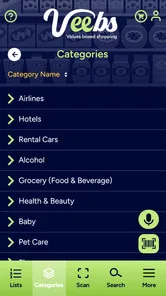
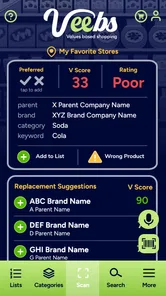
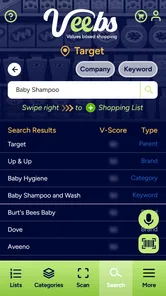
Veebs is designed to help users make more informed choices about the products they buy by providing information about ingredients, materials, brands, and potential concerns. After installing the app, you can typically search for or scan supported products and review the available details in a more convenient format. The usefulness of the results depends on the product database and the information supplied by manufacturers or other sources.
How does Veebs provide information about products?
Veebs generally organizes product information into easy-to-read categories, allowing you to explore details that may not be immediately obvious from packaging alone. Depending on the item, the app may highlight ingredients, product attributes, brand information, or specific concerns. It should be treated as a helpful research tool rather than a substitute for reading labels, checking official documentation, or consulting a qualified professional when health-related decisions are involved.
Is Veebs free to download and use?
Veebs is free to download, though some features may involve optional in-app purchases. These purchases range from 99 cents to $8.99 per item, so check the purchase details in your app store before buying anything. The app is developed by VBS CORP LLC, and reviewing the platform’s payment prompts can help you understand any costs before confirming a purchase.
Does Veebs support every product and brand?
No product-information app can guarantee complete coverage of every brand, retailer, or item, and Veebs may also have limitations. Some products may not appear in the database, while others may have incomplete or outdated information. If a scan or search produces no result, you may need to enter details manually, check the packaging yourself, or use the manufacturer’s website. Coverage can also differ between countries.
Pros
- Quickly creates short videos with simple editing tools.
- Offers templates that help beginners produce polished content.
- Supports sharing finished videos across popular social platforms.
- Clean interface makes core features easy to find.
- Useful for experimenting with trends and creative video ideas.
Cons
- Some advanced editing features may require in-app purchases.
- The app can feel limited for professional video production.
- Export quality and available formats may vary by device.
- Template-based content can look repetitive without customization.
- Performance may slow down when handling larger video projects.











