Tzofar - Red Alert | צופר
- 43.00
- 4.4
- Installs
- 1.00M
- Price
- Free

Screenshots
Analysis by Reviewed
I think a useful way to judge a warning app is to picture the moment you actually need it: you are busy, your phone is nearby, and you need to notice an alert without stopping to work out how the app operates. Tzofar - Red Alert | צופר is built for that narrow, important job. It is a free news and alerts app from RedAlert, and its focus is urgent warnings rather than the broad mix of headlines, analysis, and commentary I expect from a general news reader.
When a quick warning matters
That focus makes it most relevant to people who live in places where alarms may affect daily plans, or who need to stay aware while moving between locations. It can also help someone keep an eye on a relative’s area, provided they set up the app to follow the places they care about. If you only want a general news feed, though, this is not a replacement for a conventional news app: its value is the alert, not a rounded account of events.
For example, imagine I am preparing to leave home while a family member is elsewhere. A location-specific notification can make me pause and check what is happening before I continue with the plan. That does not decide what anyone should do; it gives a timely prompt to pay attention and follow official instructions. I would treat an app alert as one part of being prepared, not as a substitute for local emergency guidance.
It is also worth thinking through the handoff from phone to person. An alert is useful only if the sound or notification gets noticed, understood, and acted on. I would check that notifications are allowed and that the phone is not set to silence them in the situations where I rely on them. If I am responsible for someone who may not be watching a screen, I would agree in advance how we will check in rather than assuming the app automatically contacts them.
Tzofar is listed for Everyone, and it has a 4.5 average from around 2.7 thousand ratings. More than a million installs suggest it has reached a substantial audience, but those figures do not change the practical point: I would test the setup calmly before relying on it. The app is free, which makes trying it straightforward, while the choice to keep it installed should depend on whether its alert coverage fits your needs.
Its place is different from a siren, a government information channel, or a regular news service. A siren is an immediate local signal; official channels are where I would look for authoritative instructions; a news app helps explain broader developments. Tzofar can sit between those steps by bringing alerts onto a phone, but I would not ask it to do every job. Keeping a trusted official source accessible is a sensible companion workflow, especially when an alert needs context.
The practical trade-off is attention. A warning tool needs permission to notify you, yet frequent or irrelevant alerts can become distracting if the selected areas do not match where you actually need coverage. I would review those choices when my routine changes, such as travelling or spending more time in another place. That small check is more useful than leaving settings untouched and later discovering the app is watching the wrong area.
More From Our News Desk

Weather by Xiaomi Review: Clear at a Glance, Less Clear Up Close

X Under Pressure: Can It Recover When Posting Goes Wrong?

Clash of Clans Is Won Between the Battles

Android Auto Makes the Case for Quieter Car Software

MobiOffice: Transforming Mobile Productivity with Seamless Integration

EA SPORTS FC™ Mobile Soccer: Redefining Mobile Sports Gaming
For a commuter, the useful routine is to think through the day’s locations before setting off, rather than deciding what to follow during a stressful moment. If I move between home, work, and a relative’s neighborhood, I would check that the places I care about are represented and then keep the phone somewhere I can notice it. That is a modest preparation step, not a guarantee of coverage or a reason to ignore other safety information.
From notification to a sensible next step
One question worth settling early is what to do after a notification appears. I would first distinguish the alert from any interpretation I hear secondhand, then consult official instructions for the affected area. If a family member is involved, a brief agreed check-in can be more useful than a long group-chat discussion that mixes guesses with facts. The app’s role is to get my attention; the next steps still depend on the guidance and circumstances around me.
This handoff also matters when more than one person uses a household plan. Each person should know whether they are expected to check on someone, pass along confirmed instructions, or simply take care of their own immediate safety. I would not assume that one person’s installation or notification automatically informs everyone else. Treating the app as an individual alert channel keeps expectations realistic and makes the human part of the workflow clearer.
Choosing it alongside other information sources
Compared with a standard news app, Tzofar is narrower by design: I would reach for it to notice an alarm, not to follow a developing story or read background reporting. A siren can provide a direct local warning, while an official channel is better suited to authoritative instructions. Those options serve different purposes, so I see the app as a useful additional route to awareness rather than a replacement for either one.
It may be a good fit if local alerts affect your decisions, if you need to keep an eye on more than one place, and if you are comfortable maintaining the setup as your routine changes. It is less compelling if you mainly want general headlines, or if you cannot reliably hear or see phone notifications. In those cases, a news source or another dependable way to receive official alerts may fit the need better.
A practical question for anyone considering it is whether an older phone can run it. The minimum Android requirement is 4.4, and the current version is 20.6.7. Compatibility alone is only part of the answer: I would also check whether the phone remains dependable in daily use and whether its notification settings allow an alert to reach me. A supported device that is routinely muted or left behind does not solve the actual problem.
The app’s 4.5 average and reach of over a million installs offer some context about its adoption, but I would not use popularity as a substitute for a personal setup check. Warning apps are unusually dependent on the details of where someone goes and how they use their phone. I would install it, review the locations and notification behavior while calm, and decide whether the results suit my routine before relying on it.
Tzofar - Red Alert | צופר is an app designed to provide real-time alerts during emergency situations, particularly missile attacks. It’s a tool that can be crucial for anyone living in areas prone to such threats. Let me walk you through my experience with the app.
Getting Started with Tzofar - Red Alert
Installing Tzofar - Red Alert is a breeze. It’s available on both Android and iOS platforms, and I had it up and running in no time. The user interface is straightforward, which is something I appreciate. You don’t want to be fumbling around with complex menus when it comes to emergencies.
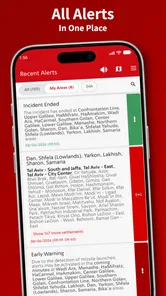
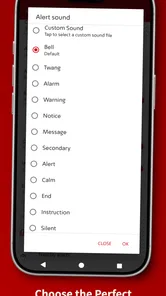
Once you fire it up, the app prompts you to allow notifications. This is a no-brainer since the whole point of Tzofar - Red Alert is to keep you informed. I found the alert tones to be distinct and attention-grabbing, ensuring you don’t miss any critical updates.
Features That Stand Out
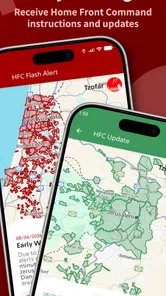
One of the standout features of this app is its real-time updates. The app taps into government and military feeds to provide up-to-the-minute alerts. During my test, the notifications were timely, often arriving before other news outlets reported the incidents.
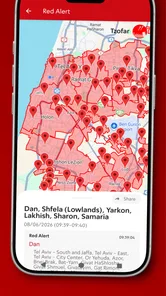
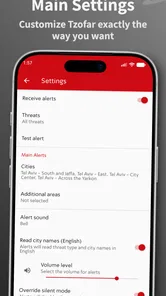
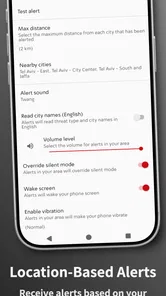
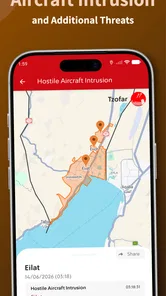
Another feature worth mentioning is the location-based alerts. The app lets you customize your settings to receive alerts specific to your area. This is particularly useful if you’re traveling or want to keep tabs on the safety of family members in different locations.
I also liked the community aspect of Tzofar. Users can report incidents, helping to create a more comprehensive picture of what’s happening on the ground. This crowd-sourced data adds an extra layer of reliability to the app.
Why You Should Consider It
Living in a region where missile attacks are a reality, having an app like Tzofar - Red Alert is almost essential. I found it to be a reliable companion during tense times. It’s like having a personal alert system right in your pocket.
The app isn’t just about doom and gloom. Its design is minimalistic yet informative, and it doesn’t drain your battery, which is a huge plus. And let’s face it, in an emergency, the last thing you want is a dead phone.
While there are other apps with similar functionalities, Tzofar stands out for its accuracy and user-friendly design. The developers have clearly put thought into making it as accessible as possible, even for those who aren’t tech-savvy.
Checking the setup before relying on it
There are a few practical questions I would settle while the situation is calm. First, does the app have permission to notify me, and can I hear its alert when my phone is where it usually sits? Second, have I selected the places that matter to my routine, rather than assuming one setting will cover every trip? Third, do the people I care about know how we will communicate if an alert affects their area? These checks turn a downloaded app into a more usable part of a personal routine.
I would also avoid treating any single phone notification as a complete explanation of an event. The alert can prompt me to respond, while an official source can provide instructions and a news outlet can add context later. That distinction is especially useful when several people are sharing updates in a group chat: a fast report is not automatically the same as confirmed guidance. Tzofar is most valuable when it helps me notice something promptly without encouraging me to guess what it means.
Who benefits, and where it may not fit
The app makes the most sense for someone whose safety decisions depend on awareness of alarms in particular locations. Its area-based approach can be useful for commuters and people checking on family, but that usefulness depends on keeping the selected areas relevant. Someone who rarely needs local emergency alerts may find a broad news service more useful for everyday reading, while someone who needs authoritative instructions should prioritize official channels alongside this app.
Version 20.6.7 is the current release, and the app supports Android 4.4 and later. That broad minimum makes it an option for some older Android devices, though I would still make sure the phone itself is dependable and able to deliver notifications. Tzofar was released on February 8, 2020; for a warning app, I care less about how long it has existed than whether it is configured correctly and fits the places I need to monitor.
There is a real trade-off between being informed and being interrupted. If I follow places that are not relevant, alerts may add noise instead of helping me act. If I rely on a phone that is muted, out of reach, or low on power, the app cannot make that device useful at the critical moment. I would keep the setup simple, revisit it after a move or a change in routine, and avoid assuming that installing the app alone is a preparedness plan.
In conclusion, if you’re in an area susceptible to missile threats, downloading Tzofar - Red Alert | צופר should be high on your list. It’s a small step that can make a significant difference in staying safe and informed. Plus, it gives you peace of mind, knowing that you’re prepared for whatever comes your way. Trust me, you’ll want this app on your side when things go south.
Tzofar - Red Alert | צופר Frequently Asked Questions
Is Tzofar - Red Alert suitable for visitors who do not speak Hebrew?
Tzofar - Red Alert is intended to help people stay aware of alarms across the country, which may make it useful to residents and visitors alike. Before relying on it, check that you can understand the alerts and any instructions shown in the app. For emergency decisions, follow official guidance and local authorities rather than treating an app as a substitute for safety instructions.
What devices can run Tzofar - Red Alert?
Tzofar - Red Alert is available for Android and iOS devices, so users can choose the version that matches their phone. On Android, the app supports devices running Android 4.4 or later. It is listed as an Everyone-rated app and is free to download, making it accessible to a wide range of users looking for alerts about alarms across the country.
What is Tzofar - Red Alert and how does it work?
Tzofar - Red Alert is a mobile application designed to provide real-time alerts for missile attacks and other security threats in Israel. It utilizes the official alert system to send notifications directly to your smartphone, ensuring that users receive immediate warnings to seek shelter. The app works by tapping into the country's alert infrastructure and pushes notifications based on your location settings, ensuring you stay informed and safe.
Is Tzofar - Red Alert available for both Android and iOS devices?
Yes, Tzofar - Red Alert is available for download on both Android and iOS platforms. Users can find the app on Google Play Store for Android devices and the Apple App Store for iOS devices. This cross-platform availability ensures that a broader audience can access these crucial alerts regardless of their device preference, enhancing community safety and preparedness.
How can I customize the alerts I receive from Tzofar - Red Alert?
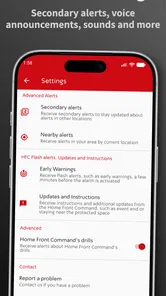
Tzofar - Red Alert allows users to customize the alerts they receive to best fit their needs. Once installed, users can set preferences for specific regions or types of alerts they wish to be notified about. This customization is crucial for those who want to stay informed about specific areas or types of threats, making the app versatile and adaptable to individual user needs.
Pros
- Real-time alerts for incoming threats.
- User-friendly and intuitive interface.
- Customizable alert settings.
- Multilingual support for diverse users.
- Low battery consumption.
Cons
- Requires constant internet connectivity.
- Limited offline functionalities.
- Notifications can be overwhelming.
- Only available in certain regions.
- App may crash on older devices.











