TYT - Home of Progressives
- 1.00K
- 3.7
- Installs
- 100.00K
- Price
- Free

Screenshots






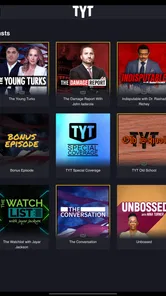

Analysis by Reviewed
I approached TYT - Home of Progressives as a news and magazines app rather than as a simple video player. Its purpose is to put progressive talk and news in one mobile destination, which makes it most interesting for people who already follow TYT and want a more direct way to keep up with its coverage. My experience is that its value depends less on having a huge number of tools and more on whether its point of view, presentation style, and access model suit the way you consume news.
The app is developed by TYT and is free to install, with optional in-app purchases ranging from $4.99 to $9.99 per item. It is rated for Everyone, so the basic audience is broad, although the political subject matter is naturally more relevant to adults and older teens who actively seek commentary and current affairs. With over 100 thousand installs, it has a meaningful mobile audience, while its average rating of 3.7 from around 2.4 thousand ratings suggests a mixed but generally usable experience rather than universal satisfaction.
How TYT fits into a careful news routine
I use TYT as one planned stop in a broader news routine, rather than letting a single perspective set the whole day’s agenda. In this section, I focus on how a small, repeatable check-in can help me follow its coverage while keeping time for independent verification. That routine becomes more useful when I first make a few deliberate choices about how the app reaches me.
A focused destination for progressive coverage
What separates this app from a general news reader is its editorial identity. Instead of asking me to assemble headlines from many unrelated publishers, it presents TYT’s own approach to progressive talk and news. That focus can be useful when I want commentary with a recognizable political perspective, especially during a commute, a lunch break, or a short window in which I do not want to browse several separate services.
That same focus is also the first important trade-off. I would not use it as my only source for complex or politically sensitive stories. A strongly defined editorial voice can make coverage easier to follow, but it can also narrow the range of framing I see. I get the most from it when I treat the app as one deliberate part of a wider news habit: use it for TYT’s analysis and discussion, then check primary reporting or another outlet when a decision depends on precise details.
For example, if I have ten minutes before work, I can open the app for a quick look at the issues TYT is emphasizing. Later, if a story affects travel, finances, voting, health, or work, I would verify the practical facts elsewhere. That workflow respects what the app is designed to provide without asking it to be a complete replacement for every kind of journalism.
What the rating tells me as a prospective user
The 3.7 average is useful context because it sets a realistic expectation. I would not install this expecting a flawless experience on every phone or a universally polished replacement for a major all-purpose news platform. The rating indicates that many people find value in the app, but that some users also encounter enough friction to lower their opinion.
More From Our News Desk

Weather by Xiaomi Review: Clear at a Glance, Less Clear Up Close

X Under Pressure: Can It Recover When Posting Goes Wrong?

Clash of Clans Is Won Between the Battles

Android Auto Makes the Case for Quieter Car Software

MobiOffice: Transforming Mobile Productivity with Seamless Integration

EA SPORTS FC™ Mobile Soccer: Redefining Mobile Sports Gaming
I read that as a reason to test the free experience before considering any optional purchase. Since the app costs nothing to install, a cautious user can judge the navigation, reading or viewing flow, account prompts, and overall fit without committing money immediately. The optional items between $4.99 and $9.99 make that check especially sensible for someone who is curious about deeper access but is not yet sure how often they will return.
Trust starts with visible choices, not the label alone
Political news is a data-sensitive category. I may be reading about elections, public officials, protests, or controversial policies, so I want to understand what I am doing inside the app before I create an account, accept a purchase, or share anything. The most trustworthy approach is to pause at each visible prompt and read its wording instead of assuming that a free download has no privacy or account implications.
I also avoid treating the developer name, the progressive identity, or the app’s popularity as proof of responsible data handling. Those details describe who made it and who uses it; they do not by themselves answer questions about permissions, retention, personalization, or account deletion. My practical advice is to inspect the permission request when it appears, deny anything that is not needed for the task I want to perform, and revisit the device’s app settings if my comfort level changes.
Permissions and account controls deserve a deliberate check
One of the first things I would do after installation is open the operating system’s permission manager and review what TYT can access. I would look for permissions related to notifications, microphone, camera, location, contacts, or files, and I would only enable an item when its purpose is clear from the screen asking for it. This is not a claim about which permissions the app requests; it is a sensible inspection routine for any news app that may be used frequently.
Notifications deserve special attention. Alerts can be helpful when I want timely updates, but they can also pull me into a constant stream of political headlines. I prefer to begin with notifications disabled or limited, use the app on my own schedule, and enable alerts only if they genuinely improve my routine. That small choice gives me more control over attention without requiring me to stop using the service.
If the app presents sign-in or subscription controls, I would read the account wording before continuing. I want to know which actions require an account, which content is available without one, and whether an optional purchase changes access or simply supports a particular part of the service. Because those details can change by platform or over time, the safest habit is to rely on the current in-app screen rather than an old explanation found elsewhere.
Where privacy matters most in everyday use
News consumption can reveal more about me than I intend. The topics I open repeatedly may disclose political interests, personal concerns, or reactions to current events. For that reason, I avoid using a shared device for sensitive browsing unless I am comfortable with the visible history and notifications. I also pay attention to whether a headline preview appears on the lock screen, since another person could see it even if the phone itself is protected.
When I am on mobile data, I think about the type of content I open and whether automatic playback or repeated refreshes could consume more of my plan than expected. I do not assume that a news app behaves like a lightweight text reader. If a story includes video or audio, I prefer a Wi-Fi connection when possible, and I close the app when I am finished rather than leaving it running in the background without a reason.
Another useful boundary is separating news use from identity-sensitive accounts. I would not reuse an important password for this app, and I would use the platform’s password manager to create a distinct one if registration is required. If I later stop using the service, I would check the account area for sign-out, subscription, or deletion options and also review any purchase settings through the relevant app store.
How I would use the free and optional parts
The free installation lowers the barrier to trying the app, but I would still distinguish between installing it and paying for something inside it. Before confirming an in-app purchase, I would identify exactly what the item unlocks, whether it is recurring or one-time, and which account receives the entitlement. The listed purchase range is enough to show that optional spending exists, so I would not tap through a payment screen casually.
I would also set purchase authentication on my phone, especially if children or other family members can access the device. The Everyone age rating makes the app broadly suitable from a content-rating perspective, but that does not eliminate the need to protect payment controls. A clear approval step is more useful than relying on memory after a trial or promotional screen.
My preferred test is simple: use the free portion during the kind of moment when I normally read news, then ask whether the app improves that routine enough to justify additional access. If I only open it during major events, a purchase may not make sense. If I return often and the paid option clearly matches the way I use TYT, the decision becomes easier, but I would still check the cancellation and billing details before confirming.
Strengths that become clearer with the right workflow
The strongest practical benefit is concentration. I can enter with a clear intention—catch up on TYT’s perspective, listen to discussion, or spend a short period with progressive news—and avoid the endless mixture of unrelated stories found in broad news aggregators. That is valuable when I want a specific editorial lens rather than a neutral-looking list that still requires me to open many sources.
A second benefit is habit formation. I can reserve one short session for commentary and another session for verification. This prevents analysis from blending too quickly with confirmed facts in my memory. I find that distinction especially useful with political coverage, where an energetic discussion can be memorable even when the underlying story still needs checking.
A third benefit is intentional filtering. Rather than following every breaking alert, I can choose a small number of topics that matter to me and use the app when I am ready to engage. This is a better fit for someone who wants political media on demand than for someone who expects a quiet, purely chronological wire service.
Limitations I would consider before installing
The focused editorial identity can feel restrictive if I want a broad mix of international reporting, local news, business coverage, science, sports, and culture in one place. A general news aggregator or a public broadcaster’s app may be a better primary tool for that purpose. TYT’s app makes more sense as a destination for its particular style and political coverage than as a universal news dashboard.
I would also be cautious if I dislike commentary-heavy formats or prefer articles that separate reporting from opinion with very little overlap. People who want several competing viewpoints presented side by side may need another app alongside this one. That is not a flaw for its intended audience, but it is an important mismatch for readers who are trying to minimize editorial framing.
The mixed rating also makes me wary of depending on it during a time-critical event without a backup. I would keep a browser or another trusted news source available for confirmation, especially if I need exact instructions, official statements, or rapidly changing practical information. A convenient mobile destination is helpful, but redundancy matters when accuracy and timing are more important than familiarity.
Who should try it, and who should skip it
I would recommend trying it to someone who already enjoys TYT’s progressive perspective, wants a dedicated mobile home for that coverage, and is comfortable making their own decisions about notifications, permissions, accounts, and optional purchases. It is also suitable for a reader who understands that commentary is most useful when paired with independent verification for consequential claims.
I would skip it as a first choice if I want politically neutral presentation, local reporting, a wide multi-source digest, or a minimalist text-only experience. I would also avoid making it my only news source if I tend to accept a familiar commentator’s interpretation without checking the original reporting. In those cases, a broader service will probably serve me better, with TYT used only when I specifically want its viewpoint.
My cautious verdict
TYT - Home of Progressives is worth a careful trial for the right audience, not a blanket recommendation for every news reader. Its free entry point makes evaluation easy, and its clear progressive identity gives it a purpose that differs from a generic headline aggregator. I appreciate the ability to build a focused news habit around one editorial voice, provided I keep the boundaries visible.
My final advice is to install it without rushing into optional purchases, review permissions and notification settings immediately, and notice how often the app genuinely helps you. Keep sensitive reading private, protect account and payment controls, and verify important claims through another source. With that approach, the app can be a useful TYT-centered companion for progressive news and talk. Without it, users seeking broad coverage or balanced source comparison may find a different news app more appropriate.
TYT - Home of Progressives Frequently Asked Questions
What does the TYT app offer, and who might enjoy it?
TYT is a news and magazines app for people interested in progressive talk, political commentary, and current events. Its focus is reflected in the tagline, “Progressive talk and news for the connected generation.” If you want mobile access to political discussion and a viewpoint-driven approach to the news, it may fit your interests. The app is free to download, with some in-app purchases available.
What is TYT – Home of Progressives?
TYT – Home of Progressives is a news and political commentary app from The Young Turks network. It provides access to progressive-focused shows, interviews, analysis, opinion segments, and other video content covering U.S. politics, current events, culture, and social issues. The app is designed for viewers who prefer independent commentary and want to follow TYT programming from a mobile device.
What kind of content can I watch in the TYT app?
The app typically includes live or on-demand access to TYT programs, political discussions, breaking-news coverage, interviews, podcasts, and clips from the network’s hosts and contributors. Content may vary by availability, region, and membership status. Because TYT combines reporting with commentary, users should distinguish factual news coverage from opinion-based analysis and consult additional sources when researching important topics.
Is TYT – Home of Progressives free to download and use?
Downloading the app is generally free, but access to every feature or program may depend on the current subscription and membership structure. Some videos or live content may be available without payment, while premium shows, archives, or additional benefits can require a paid TYT membership. Before subscribing, review the price, billing period, renewal terms, and cancellation options shown in your app store. In-app purchases are listed at $4.99 to $9.99 per item.
Does the app require an account or subscription?
You may be able to browse or watch selected content without creating an account, although certain features can require registration. An account may be needed to access member-only programming, personalize your viewing experience, synchronize access across devices, or participate in community features. Subscription requirements can change, so check the sign-in and membership information displayed inside the app before completing registration.
Pros
- Offers progressive political news and commentary in one dedicated app.
- Includes content from TYT hosts
- helping users follow familiar personalities.
- Video-focused coverage suits viewers who prefer watching over reading.
- Covers breaking political topics alongside opinion and analysis.
- Provides an alternative perspective to more traditional news outlets.
Cons
- The strongly progressive editorial viewpoint may not suit politically neutral users.
- Some content can feel opinion-heavy rather than strictly news-focused.
- Video and live content may consume significant mobile data.
- Availability of certain features or shows may depend on membership access.
- Political coverage can be intense and repetitive during major news cycles.











