Tulsa World: Local News
- 136.00
- 3.6
- Installs
- 10.00K
- Price
- Free
Screenshots





Analysis by Reviewed
When I want local news to be useful, I am usually starting with a very ordinary problem: I have a few minutes before work, I want to know what is happening around northeastern Oklahoma, and I do not want to sort through a national news feed to find it. Tulsa World: Local News is built for that moment. It is a free News & Magazines app from BH Media Group Inc. that puts Tulsa-area coverage into a mobile reading routine rather than asking me to search for every local story.
My first impression is that its value depends less on entertainment and more on location. If Tulsa and nearby communities are part of your daily life, the app has a clear purpose. It can act as a starting point for a morning check-in, a way to follow developing local situations, or a quick reference when a story affects your commute, school, neighborhood, or plans. If you mainly want international headlines, broad political coverage, or a large collection of unrelated publications, the focused approach will feel narrow rather than convenient.
From a quick morning check to a more informed day
I find the most useful way to approach a local news app is to decide what I need from it before I open it: a quick sense of what has changed, or enough context to make a plan. That distinction keeps a short check from becoming aimless scrolling and helps me judge whether a story needs a second source. Next, I look at how well the reading flow holds up when the day gets busier.
Starting with the local question
The best way to use this app is to begin with a question, not with the expectation that it will replace every other source. I might open it asking what changed overnight in Tulsa, whether a local issue has developed, or which community story deserves my attention. That mindset makes the app easier to judge because its job is not to be the entire internet. Its job is to make northeastern Oklahoma news easier to reach.
The store summary describes it as a personalized daily news source for northeastern Oklahoma, and that focus comes through in the way I think about the app. The word “personalized” is most useful here as a reading goal: I can make the app part of my own daily news habit instead of treating it like a general-purpose headline warehouse. I would still use broader outlets for national and international context, but I would turn to this one when the local angle is the part I need first.
It is also worth setting expectations around access. The app itself is free to install, while in-app purchase items range from around twenty-seven dollars to over three hundred dollars each. That makes it important to pay attention to any purchase screen and to understand what kind of access you are choosing before confirming anything. A reader who only wants occasional headlines should approach the app differently from someone who expects to make it a central news subscription.
The reading flow in everyday use
My practical workflow would be simple. I would open the app during a quiet moment, scan the available local stories, choose the headlines that match my immediate concerns, and then decide whether a story deserves a full read or a later return. That first scan is valuable because local news can be highly time-sensitive: a short update may matter to someone in Tulsa far more than a longer national article.
More From Our News Desk

Weather by Xiaomi Review: Clear at a Glance, Less Clear Up Close

X Under Pressure: Can It Recover When Posting Goes Wrong?

Clash of Clans Is Won Between the Battles

Android Auto Makes the Case for Quieter Car Software

MobiOffice: Transforming Mobile Productivity with Seamless Integration

EA SPORTS FC™ Mobile Soccer: Redefining Mobile Sports Gaming
For a realistic example, imagine leaving home and hearing that a road, public service, or neighborhood event may affect the day. I would use the app as the first handoff from uncertainty to a local report. I would look for the relevant headline, read enough to understand the situation, and then compare the information with any direct instructions from an employer, school, public agency, or another official channel. The app helps me find the local story; it should not be treated as the sole authority for an urgent decision.
That distinction is one of the more important habits with a local news app. A report can explain the wider situation while an official source handles immediate instructions. Using the two together is more sensible than expecting a news reader to function like an emergency alert system, a traffic navigation tool, or a community discussion board.
Choosing what deserves attention
A focused local feed can reduce the work of finding relevant coverage, but it does not remove the need for judgment. I would not open every story automatically. I would first separate items that affect my plans today from pieces that provide background or longer-term context. That small decision keeps a short reading session from turning into an unstructured scroll.
One useful habit is to read beyond the headline when the subject could affect other people. Local headlines often compress complicated situations into a few words, while the article may contain the location, timing, people involved, or limits that change the meaning. I would also avoid forwarding a dramatic headline before reading the full report. That is especially important with developing local stories, where early information can change as more details become available.
The app’s narrow geographic focus is a strength in this workflow. A national aggregator may show more stories, but it also makes me spend time filtering them. Here, the filtering begins with the place itself. The trade-off is that I receive less breadth. For a reader who wants one screen containing local, national, business, technology, sports, and world news from many publishers, a broader aggregator will probably be more efficient.
How the handoffs work outside the app
The most realistic use of Tulsa World: Local News does not end when I close an article. Local news often moves between several sources. I may discover an issue in the app, check an official announcement for practical instructions, discuss it with a family member or coworker, and then return to the article for context. Thinking in terms of these handoffs prevents me from asking one app to perform jobs it was not designed to perform.
For example, a local story might tell me why a public meeting matters, while the relevant organization provides the final schedule or participation details. A report about a community event may help me understand its significance, while the organizer remains the better place to confirm last-minute changes. In my experience, this combination produces a more dependable result than relying on a single headline feed.
The handoff to other people is useful too. If I share a story with someone who does not live in the area, I would add a sentence explaining why it matters. A local article can assume background knowledge that an outside reader does not have. Adding that context makes the app more useful as a conversation starter rather than merely a private reading tool.
There is also a handoff between quick reading and deeper attention. I might scan several headlines on a phone, then return to one story when I have more time. That is where the app’s convenience matters: it gives me a local starting point, but the quality of my result depends on whether I stop at the headline or make room for the full article.
What the result looks like after a few minutes
The result I want is not simply “I read some news.” I want to know which local developments deserve action, which ones need more checking, and which ones can wait. A focused source can help me reach that decision faster because the geographic filter is already doing part of the work.
After a short session, I might understand why a topic is being discussed locally, recognize a story that affects my route or schedule, or identify an issue to follow later. That is a modest outcome, but it is the right one for a daily local-news app. It gives my day a local frame without forcing me through an endless stream of unrelated headlines.
The app is also suitable for readers who want a consistent connection to northeastern Oklahoma but do not want to build a news routine from several websites. Its category is clearly News & Magazines, and its identity is more specific than a general browser bookmark. I can approach it as a dedicated local doorway, which is more convenient than repeatedly searching for the publication or relying on social posts that may omit context.
Still, I would not confuse convenience with complete coverage. A dedicated publication app reflects one editorial source and one regional focus. That can make the experience coherent, but it can also limit the range of viewpoints and subjects I encounter in a single session. When an issue is controversial or personally important, I would read the article carefully and consult additional reputable sources rather than assuming one publication gives me the entire picture.
Where the flow breaks
The first point of friction is the boundary between free access and paid access. Because the app is free while offering substantial in-app purchase items, I would be cautious during setup and reading. A person looking for casual, occasional news may feel uncomfortable if the path toward full access is not immediately clear. The practical advice is simple: read each purchase prompt, avoid confirming anything impulsively, and decide whether your reading frequency justifies paying for expanded access.
The second limitation is audience fit. Someone living outside northeastern Oklahoma may find the app too specialized unless they have family, work, property, or another strong connection to the region. Likewise, a reader who wants a neutral dashboard assembled from many local sources may prefer an aggregator. This app makes more sense when the Tulsa World perspective and the regional focus are exactly what you want.
The third break occurs when speed matters more than explanation. A news app can help me understand a developing event, but I would not use it as my only tool for immediate travel decisions, safety instructions, or time-critical changes. In those moments, I would move from the article to the responsible official source. The app remains useful for context, but the handoff should happen quickly.
There is also a practical device consideration. The current version is 9.22 and requires Android 8.0 or later. That is comfortable for many modern Android phones, but anyone using an older device should check compatibility before planning a regular reading habit. The age rating is Everyone 10+, which signals a broadly accessible news experience while still leaving room for subjects that may need parental judgment for younger readers.
Who will get the most from it
I would recommend it most strongly to Tulsa-area residents who want a direct local-news routine. It is a good fit for someone who checks headlines before work, follows community developments, or wants a publication-centered experience instead of a mixed feed. It can also suit former residents and families who live elsewhere but still care about northeastern Oklahoma.
It is less convincing for people who already have a carefully organized set of local sources and want everything in one neutral interface. It is also not my first choice for readers whose main interest is national or international news. In those cases, a broad news aggregator, a general news publication, or a combination of official feeds may provide better coverage.
The app’s audience response is mixed but meaningful: it holds an average rating of 3.6 from around 333 ratings, with over one hundred written reviews. I read that as a reason to approach it with realistic expectations rather than as an automatic recommendation or rejection. The app has a clear purpose and a sizable enough audience to be established, but the rating suggests that the experience will not satisfy every reader equally.
My final take on the daily habit
After looking at the complete workflow, I see Tulsa World: Local News as a focused tool rather than a universal news replacement. It starts with a local information need, helps me find a relevant report, and gives me enough context to decide what deserves further attention. Its strongest quality is the reduction of search effort: I can begin with northeastern Oklahoma instead of filtering a much larger stream.
The best results come when I use it deliberately. I would scan it as part of a morning routine, read beyond headlines when the subject affects real decisions, and hand urgent or official matters to the appropriate source. I would also keep an eye on purchase prompts, especially if I only expect occasional access.
BH Media Group Inc. has positioned this app around a specific place and a specific reading need. That makes it easy to recommend to the right person and equally easy to rule out for the wrong one. If Tulsa-area news is central to your day, the focused approach can save time and help you stay connected. If you want a broad, multi-source news dashboard, another option will likely serve you better. For local readers who value a dedicated starting point, however, it is worth trying as a practical part of a wider, thoughtful news routine.
Tulsa World: Local News Frequently Asked Questions
Is Tulsa World: Local News focused on Tulsa, or does it cover other parts of Oklahoma too?
The app is aimed at readers in northeastern Oklahoma, with Tulsa and nearby communities at the center of its local coverage. That makes it a practical option if you want news tied to the region rather than a general national-news feed. The range of stories can include community developments and other local topics that matter to people who live, work, or follow events in the area.
Who publishes Tulsa World: Local News?
Tulsa World: Local News is published by BH Media Group Inc. It is a news and magazines app built around the Tulsa World newsroom and its reporting for northeastern Oklahoma. If you are choosing a local news app, knowing the publisher can help you understand where its coverage comes from and whether its editorial focus matches the communities and subjects you want to follow.
What is Tulsa World: Local News, and what can I read in the app?
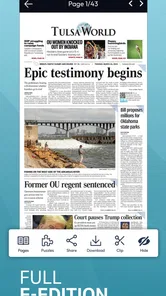
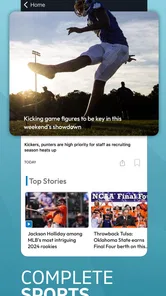
Tulsa World: Local News is designed to keep readers informed about Tulsa and surrounding communities. After exploring the app, you can expect coverage of breaking news, local government, crime, education, business, sports, entertainment, weather, and community events. It also provides access to articles and updates from the Tulsa World newsroom, making it useful for readers who want local reporting in one place.
Is Tulsa World: Local News free to download and use?
The app is free to download, but access to all content can depend on the publication’s subscription policy. Some articles or features may be available without payment, while unlimited reading, premium stories, or digital newspaper access may require a subscription or account. Before downloading, check the current in-app terms, pricing, and available trial options because access plans can change.
Does the app require an account or subscription?
You may be able to browse selected content without creating an account, but an account is generally useful for managing subscriptions, saving preferences, and accessing subscriber-only articles. If you want unlimited reading or the full digital edition, a paid subscription may be necessary. The exact requirements can vary by feature, device, and the latest terms offered by Tulsa World.
Pros
- Covers Tulsa-area politics
- schools
- crime
- and community developments.
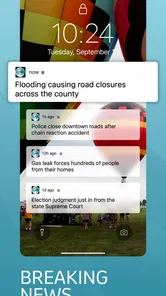
- Breaking-news notifications help readers stay updated throughout the day.
- Articles include local context often missing from national news apps.
- Clean navigation makes it easy to switch between sections and stories.
- Useful for following regional sports
- events
- and Oklahoma-related topics.
Cons
- Some content may require a subscription or account to access fully.
- Notification frequency can feel excessive during busy news cycles.
- Coverage is primarily regional and offers limited national reporting.
- Certain stories may load slowly on weaker mobile connections.
- The app’s value depends heavily on interest in the Tulsa area.











