

Towtaled - Incident Tracking
- 33.00
- 3.7
- Installs
- 10.00K
- Price
- Free
Screenshots
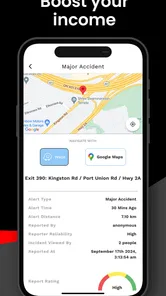
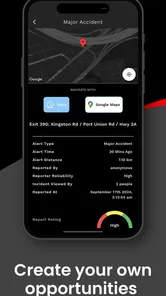
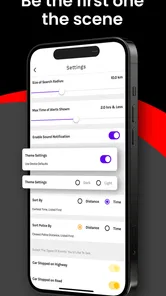
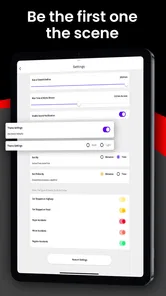
Analysis by Reviewed
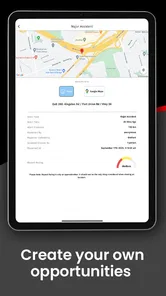
When a driver needs help after a breakdown, the difficult part is often not finding a tow truck but keeping the incident organized while everything is happening at once. Towtaled - Incident Tracking is an Auto & Vehicles app from Towtaled Inc. built around that working environment. I see it less as a general driving companion and more as a tool for towing professionals who want to manage incoming opportunities and keep their daily workflow in one place.
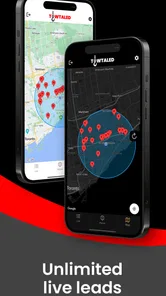
The central appeal is simple: the app is aimed at people trying to earn more through live towing leads. That makes its usefulness depend heavily on where and how you work. If you regularly accept roadside jobs, monitor requests, and need a focused mobile workflow, it has a clear purpose. If you are an ordinary driver looking for roadside assistance, this is probably not the app I would choose first.
How the everyday workflow feels
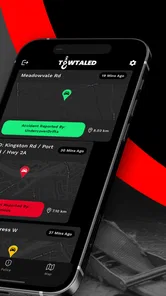
My recommended starting point is to treat the app as a work queue rather than a map or a vehicle-maintenance tool. Open it when you are ready to work, review the available lead activity, decide which opportunities fit your route and equipment, and use the app as the place where you track the incident. That mindset matters because live leads can be distracting if you react to every notification without a repeatable process.
A practical routine would begin before leaving your yard or current job. Check that your phone has a reliable connection, make sure your vehicle information and working preferences are current where the app asks for them, and decide what kind of calls you are prepared to accept that day. The value of an incident-tracking app is reduced quickly when the operator has to stop and correct basic account or availability details during a busy period.
Imagine finishing a roadside recovery on the edge of town while another request appears. Instead of relying on memory, text messages, and a notebook, you can use the app to keep the new opportunity visible while deciding whether the distance, timing, and job type make sense. That does not remove the need for judgment. It gives your judgment a more consistent place to start.
I would also avoid treating every lead as equally valuable. A nearby call may be more practical than a distant one even if the distant request appears first. Fuel, traffic, equipment, and the possibility of getting another job near the destination all affect the real return. The app can support the lead workflow, but it cannot replace a tow operator’s knowledge of local roads and operating costs.
For a small towing business, this kind of focused tool may be more useful than juggling several unrelated apps. A phone call can provide the initial details, messaging can confirm changes, and a paper log can record the day, but those methods scatter information. Towtaled makes more sense when the team wants live lead activity and incident handling to sit closer together.
More From Our News Desk

 Gmail
GmailGmail in a Busy Inbox: Who Benefits Most?
From first account to crowded workday, Gmail earns its place through dependable search and flexible sorting—but its best fit depends on how much inbox maintenance you can tolerate.

 Prime Video
Switching to Prime Video: What Changes in Your Viewing Routine
Prime Video can make a compelling second home for streaming, but switching means learning a different catalog, rental layer, and route from browsing to playback.

 Universal TV Remote Control
Universal TV Remote Control Works Best as a Reliable Backup
A phone remote earns its place through quick setup and reliable habits. Here is how to get more from Universal TV Remote Control—and where its limits show.

 Weather - By Xiaomi
Weather by Xiaomi Review: Clear at a Glance, Less Clear Up Close
Xiaomi’s weather app makes everyday forecasts quick to scan, but its calm surface can leave useful details and recovery paths harder to find than they should be.

 X
XX Under Pressure: Can It Recover When Posting Goes Wrong?
A resilience-focused review of X, examining setup, mistaken posts, interruptions, weak connections, and the gaps that matter when recovery needs to be dependable.

 Clash of Clans
Clash of Clans Is Won Between the Battles
Its raids are quick; its community is a long-term project of coordination, teaching, rivalry, and shared responsibility—with all the friction that entails.
Latest News



There is also a human factor. When a driver is working beside traffic or dealing with a stressed customer, a complicated sequence is a liability. I would use the app while parked whenever possible, complete one action at a time, and avoid making it the only record of important business details. A short personal note about the vehicle, location, or customer request can still be useful if the situation changes unexpectedly.
What I would check before relying on it
The app is free to install, which makes trying the basic workflow relatively easy. Its content rating is Everyone, and it supports devices running Android 7.0 or later. Those details make it accessible to users with older Android phones, although an older handset may still feel slower when several work tasks are happening together.
I would pay particular attention to the account and availability settings before accepting real work. The most important question is whether the app reflects when you are actually ready to take a call. Leaving a work mode active while you are fueling, repairing equipment, or already committed elsewhere can create avoidable pressure and may lead to missed expectations.
Notification behavior deserves a deliberate check as well. Live lead tools are only useful when alerts are noticeable but not disruptive. I would test how the phone presents new activity while driving, while the app is in the background, and while the device is muted. The safe habit is to pull over before reviewing anything that requires attention; no lead is worth interacting with a phone in moving traffic.
It is worth checking how much information is visible before you commit to a job. A lead may be attractive at first glance, but the practical decision depends on location, timing, vehicle type, and the equipment you have available. If the app presents those details, review them together rather than accepting based on a single headline. If you still need a phone call to clarify the situation, make that part of your standard process rather than an exception.
Because the app includes optional purchases priced from around thirty dollars to around sixty dollars per item, I would not pay for anything until the free workflow has earned a place in your routine. The right question is not whether an upgrade sounds useful; it is whether it saves enough time or helps you handle enough suitable work to justify the expense. A part-time operator and a busy fleet may reach very different conclusions.
I would also make sure the current release behaves well on your particular phone. The version shown for the app is 4.3.10, but version labels alone do not tell me how smoothly it will run on every device. Install it before a busy shift, sign in calmly, and walk through the actions you expect to use. Discovering a login or notification problem at the roadside is much worse than discovering it at home.
Habits that make the lead flow faster
The fastest users are rarely the ones tapping most aggressively. They are the ones who decide in advance what qualifies as a useful call. I would create a mental filter based on service area, equipment, current location, and the time available before the next commitment. That reduces hesitation when several leads arrive close together.
Another useful habit is to separate “review” from “accept.” First scan the request and compare it with your current position and capacity. Then commit only after checking the details that affect profitability and safety. This two-step pattern is more reliable than opening a lead and immediately agreeing before you have considered the return trip.
Keep the app’s workflow consistent from one incident to the next. Start the record at the same point, update it after the same milestones, and close it only when you have finished the work you consider complete. A repeatable sequence makes it easier to notice an unfinished incident at the end of a shift and reduces the chance that important details remain in your head.
For operators who work with a dispatcher or a small team, define who owns the next action. A live lead can become confusing when one person assumes another has called the customer or updated the incident. Towtaled may help centralize the work, but a simple team rule still matters: one person acknowledges the lead, one person communicates the status, and the driver confirms the job outcome.
I would also use quiet periods to clean up the workflow rather than waiting for a crisis. Review old incidents, notice where you repeatedly pause, and adjust your routine around those points. If you often need to leave the app to find an address, record a note, or contact someone, prepare those supporting tools before the next shift. The goal is not to force every task into one app; it is to make the handoffs predictable.
A less obvious trade-off is that speed can reduce accuracy. Towing incidents often involve changing locations, unclear vehicle descriptions, and customers who are under stress. Moving quickly through a lead is helpful only if the essential details remain correct. I would rather spend a few extra seconds confirming the pickup point than lose time driving to the wrong entrance or calling back for information that was already available.
Shortcuts are useful when they are behavioral rather than imaginary. Keep the app easy to reach, use the same phone position in the vehicle, and review leads only when safely stopped. Those small habits are more dependable than assuming the app has a special shortcut for every action. The strongest workflow comes from combining the app’s live lead focus with disciplined driving and communication.
Where the app fits among other choices
The usual alternative for a towing operator is a mixture of phone calls, text messages, a navigation app, and a spreadsheet or paper log. That combination is flexible and familiar, but it can spread the incident across several places. Towtaled is more appealing when the priority is seeing live opportunities and tracking the work without building the entire process manually.
A general navigation app remains better for route planning, traffic awareness, and exploring the most efficient way between stops. I would not expect an incident-tracking tool to replace it. Likewise, a dedicated dispatch or fleet-management system may be a better fit for a larger company that needs broader scheduling, vehicle oversight, billing, or team administration. Towtaled’s focused lead workflow is a strength for an individual operator, but that focus can become a limitation as operational complexity grows.
Compared with simply waiting for calls, the app’s live-lead orientation may help an available driver find more opportunities during quiet periods. That does not mean every lead improves the day. A job can be unsuitable because of distance, equipment, timing, or low practical value after expenses. The app gives you a stream to evaluate; it does not guarantee that the stream will match your business.
For a driver who already has a dependable dispatcher and a well-organized system, adding another tool may create duplicate work. In that situation I would only keep Towtaled if it provides a clear advantage, such as a useful source of leads or a simpler incident record. If it forces the same status to be entered in multiple places, the convenience disappears quickly.
Limits experienced users should understand
The average rating is around 3.7 from roughly two hundred ratings, with about 33 written reviews, while the app has passed ten thousand installs. I read that as a sign of a real but still fairly modest user base rather than proof that it will suit every towing operation. The numbers are useful context, but my own decision would still depend on whether the workflow works reliably in my service area and on my phone.
The biggest limitation is the dependency on live activity. If there are few suitable leads near you, the app cannot create demand where none exists. It may be valuable in one region and less compelling in another, especially for operators who already receive steady work through established relationships. I would test the local usefulness before building my income expectations around it.
Another limitation is the difference between tracking an incident and managing an entire business. A lead record can help organize an assignment, but it does not automatically solve pricing decisions, customer communication, maintenance planning, insurance administration, or end-of-day accounting. I would keep those responsibilities in tools designed for them or in a clear manual process.
Paid items also deserve restraint. Since the app is free but offers in-app purchases in a fairly substantial range, new users should compare the cost with actual results over a normal working period. Do not upgrade because you feel rushed by a busy screen. First identify the specific problem the purchase solves, then decide whether the improvement is measurable in your own routine.
There is a practical privacy and reliability consideration with any work app that handles location or incident information: use it thoughtfully and keep your phone protected. I would avoid leaving sensitive customer details visible when the device is unattended, and I would maintain a backup habit for information that the business cannot afford to lose. That is not a criticism unique to this app; it is part of using a phone as a professional work tool.
I would skip this app if I were a private motorist looking for emergency roadside help, if I rarely handle towing work, or if my company already has a complete dispatch platform that everyone uses consistently. I would also hesitate if my phone is too old to run the workflow comfortably, or if the local lead supply does not justify another daily screen to monitor.
My verdict for operators building a repeatable routine
After looking at it as a working tool rather than a general driving app, I think Towtaled has a clear audience: towing professionals who want a mobile way to engage with live leads and keep incidents organized. Its strongest quality is focus. It does not try to be a universal automotive toolbox, and that makes the idea easier to understand and easier to test.
My advice is to begin with a short, repeatable routine: prepare your availability, review leads only when safely parked, filter each opportunity against your actual equipment and route, and keep incident updates consistent. Then compare the results with the system you already use. If the app reduces missed opportunities or scattered records, it may earn a permanent place in your day.
For me, the free entry point makes that trial reasonable, while the optional purchases mean I would evaluate the value carefully rather than assuming extra spending is necessary. The best reason to use it is not the promise of more activity; it is a clearer process for deciding which activity is genuinely worth taking.
Overall, I would recommend it to an independent tow operator or small team that wants to experiment with a focused lead-and-incident workflow. I would not present it as a replacement for navigation, dispatch management, or sound business judgment. Used with those limits in mind, Towtaled - Incident Tracking can be a practical addition for the right kind of driver, especially one willing to build disciplined habits around it.
Towtaled - Incident Tracking Frequently Asked Questions
What devices can run Towtaled - Incident Tracking?
Towtaled - Incident Tracking is an app in the Auto & Vehicles category, and its listed minimum operating-system requirement is version 7.0. Before downloading, check that your phone or tablet meets that requirement and has enough available storage for the installation. Keeping your operating system updated can also help with compatibility and security when using apps for work.
Is Towtaled - Incident Tracking intended for towing-related work?
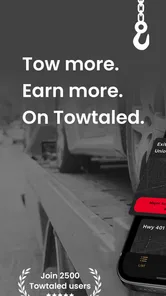
The app’s description focuses on helping users earn more money with unlimited live leads every day, so it may be relevant to people looking for towing opportunities. Its name also refers to incident tracking, which may suit users who need to organize incident-related work. Consider whether those aims match your needs before downloading, and review the app’s current features in its store page.
What is Towtaled - Incident Tracking used for?
Towtaled - Incident Tracking is designed to help users report, record, and manage incidents in an organized way. It can be useful for teams that need to document events, assign follow-up tasks, monitor progress, and keep important details in one place. Before downloading, consider whether its workflow matches your organization’s incident-reporting process and the type of information you need to track.
Who can benefit from using Towtaled - Incident Tracking?
The app may be suitable for businesses, field teams, property managers, maintenance departments, safety personnel, and other organizations that regularly deal with incidents or operational issues. Its usefulness depends on how your team works and whether everyone involved can access and update reports consistently. It is worth checking the app’s available roles, permissions, and collaboration features before adopting it for larger teams.
Does Towtaled - Incident Tracking require an account or internet connection?
Many incident-tracking applications require users to sign in so reports can be connected to a team, workspace, or organization. Some features may also depend on an active internet connection, particularly synchronization, cloud storage, notifications, and access to shared records. Because requirements can vary by version and configuration, review the app’s current store listing and privacy information before downloading or relying on it in areas with limited connectivity.
Pros
- Quickly log incidents with essential details from a mobile device.
- Keeps incident records organized for easier follow-up and review.
- Useful for teams that need a shared
- structured reporting process.
- Can improve accountability by documenting actions and status changes.
- Designed around incident tracking rather than general-purpose note taking.
Cons
- May feel too specialized for users who only need occasional reports.
- Requires consistent team usage to deliver meaningful tracking benefits.
- Advanced reporting or analytics options may be limited in the mobile app.
- Entering detailed incident information on a phone can be time-consuming.
- Users may need onboarding to understand the app’s workflow and terminology.











