Torque Pro (OBD 2 & Car)
- 10.50K
- 4.0
- Installs
- 1.00M
- Price
- $4.95
Screenshots

Analysis by Reviewed
When a warning light appears, I want more than a vague reason to worry: I want a useful clue about what the car is doing. That is where Torque Pro (OBD 2 & Car) makes sense to me. It turns a compatible phone and OBD2 adapter into a way to inspect engine information, read fault codes, and follow a drive without treating every dashboard light as a mystery.
Turning engine readings into useful clues
The appeal I keep coming back to is seeing what the car is doing while it is running, rather than relying only on a warning light after something has gone wrong. Torque Pro is a paid communication app from Ian Hawkins, listed at $4.95, and its central idea is to pair a phone with an OBD2 adapter so you can inspect vehicle information yourself. The app is rated for Everyone, has a 4.0 average from around 80,000 ratings, and has passed over a million installs.
That live view is useful because it can turn a vague concern into a more specific question. If the car feels different on a drive, checking engine readings can give you context to discuss with a mechanic. It is not the same as a professional inspection, and a number on a screen is not a diagnosis on its own, but it can help you arrive at a repair conversation with better observations.
Reading the car without mistaking data for a diagnosis
What I like about this approach is that it makes the car’s own information easier to explore. The app is not a replacement for a mechanic or a magic fix for a warning light; its value is in giving a curious owner more context. Once a compatible OBD2 adapter is connected, the phone can present engine readings that otherwise remain out of sight during an ordinary drive.
That distinction matters. A live value is most useful when it helps answer a concrete question, such as whether a reading changes when the engine warms up or whether a symptom coincides with a change in engine behavior. It is much less useful to stare at a screen full of numbers without knowing what they mean. I would treat the app as a way to notice and record patterns, not as a verdict on the health of the vehicle.
Features that Stand Out
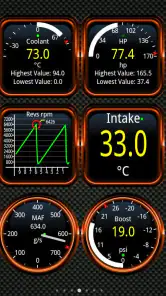
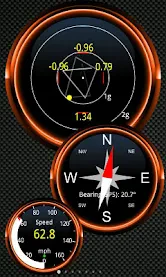
First off, let's talk about the real-time data. Once you've paired your phone with an OBD2 adapter, the app starts feeding you all kinds of stats about your car. We're talking everything from engine RPM to throttle position and even fuel consumption. It's like having a little pit crew in your pocket!
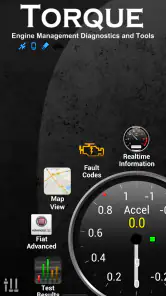
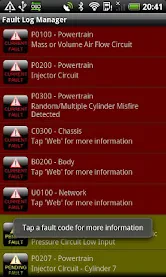
Another cool feature is the fault code reader. No more guessing why that check engine light is on. Torque Pro deciphers those cryptic codes and gives you a straightforward diagnosis. It can save you a trip to the mechanic or at the very least, help you understand what you're dealing with before you go.
You May Like

Clash of Clans Is Won Between the Battles

Android Auto Makes the Case for Quieter Car Software

MobiOffice: Transforming Mobile Productivity with Seamless Integration

EA SPORTS FC™ Mobile Soccer: Redefining Mobile Sports Gaming

How Microsoft OneDrive Became a Mobile Productivity Giant

How Google Translate Breaks Language Barriers Effortlessly
I would treat that code reading as a first clue, not a final verdict. A fault code points toward an issue the car has detected; it does not automatically tell you which part to replace or whether the car is safe to keep driving. My practical approach would be to note the code and what the car was doing, then use that information to ask a mechanic a more focused question instead of clearing the warning and assuming the problem is solved.
One useful habit is to write down the circumstances around a code: whether the engine was cold or warm, whether the car was idling or moving, and whether you noticed a change in how it ran. That context can make a later conversation more productive than simply saying that an app displayed a code. If the warning returns after being cleared, that is a reason to investigate the underlying issue, not evidence that the code reader failed.
Customizable Dashboards
Now, if you're a fan of personalizing stuff, you'll appreciate the customizable dashboard. You can tweak it to display the data that's most relevant to you. Want to keep an eye on your coolant temperature? No problem. Just drag and drop the widgets you need.
A little restraint makes this feature more useful. I would begin with only a few readings I actually understand, such as a temperature or engine speed, rather than filling the screen with numbers. That keeps the display readable at a glance and makes it easier to notice an unusual change. Set it up while parked, and avoid fiddling with dashboards while driving; the point is to observe the car without making the phone another distraction.
There is a practical reason to keep a dashboard simple beyond safety: fewer gauges make it easier to compare one drive with another. If I am checking one particular behavior, I would give the relevant reading the most space and ignore the rest for that session. A busy layout can feel impressive at first, but it makes a small change harder to spot and encourages attention to drift away from the road.
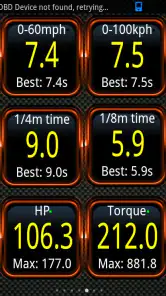
And for those who love a bit of competition, the app also lets you track your performance stats. See how your driving stacks up over time and maybe even challenge your friends to see who can get the best fuel economy. It's a fun way to engage with your car's performance.
There is also a useful distinction between a quick performance curiosity and dependable testing. A phone-based reading can make drives interesting to compare, but traffic, road conditions, and how consistently you accelerate all affect the result. I would use those figures for personal context rather than treating a single run as a precise measure of the car's ability. The app’s store summary also highlights BHP, torque, and 0–60 measurements, which will appeal to drivers who enjoy looking beyond basic fault checks.
For a fairer personal comparison, I would keep the route and conditions as similar as practical and avoid trying to produce a number in unsafe traffic. Even then, the result is best understood as an informal snapshot, not a laboratory test. That is an important trade-off: performance figures can make the app more engaging, but they are not the main reason I would rely on it when trying to understand a warning or a change in engine behavior.
Easy to Use Interface
One of the things I really like about Torque Pro is its user-friendly interface. Even if you're not particularly tech-savvy, navigating through the app is a breeze. The menus are intuitive, and the layout is clean, making it simple to find what you need without any hassle.
In practice, the adapter is part of the setup, so this is not a stand-alone phone diagnostic tool. Before paying, I would check that I have a compatible OBD2 adapter and that it works with my vehicle and phone. Compatibility can shape the experience: the app can only show information the car and adapter make available, so not every vehicle will expose every reading in the same way. That matters most if you are buying it for one particular sensor or detailed engine value.
This is also why I would decide what I hope to learn before choosing an adapter or expecting a particular screen to solve a problem. If your main goal is reading a basic fault code, you may not need to build a complex dashboard. If you are interested in a particular live value, check that your car and adapter can provide it before making that capability the reason for buying. The app’s usefulness depends on the whole setup, not just the software.
Besides, the app is regularly updated, which means you get new features and improvements to enhance your experience. It's also worth noting that the community around the app is pretty active, so if you run into any issues, there's always someone ready to help out.
For an everyday example, imagine a check-engine light appearing on the way home. Once safely parked, I could connect the adapter, read the fault, and write down the result before deciding whether to arrange a workshop visit. That is a more useful role than expecting the app to repair the vehicle or replace expert judgement. If the warning is accompanied by serious symptoms, I would prioritize safe driving and professional help rather than relying on an app readout.
In that situation, I would resist the urge to keep checking the phone while the car is moving. Park somewhere safe, read the information, and then decide what to do. If the car is running roughly, overheating, or otherwise behaving in a way that raises a safety concern, a code readout should not persuade you to continue a journey. A mechanic can combine the code with a physical inspection and other tests that a phone app cannot perform.
Where it fits among car tools
Compared with a basic code-reader app, Torque Pro’s broader appeal is that it combines fault information with live engine data and a configurable display. A simple reader may be the better choice if all you want is an occasional code check and you do not want to spend time arranging gauges. On the other hand, a fixed dashboard or a mechanic’s scan tool can be a better fit when you need a simpler glance or a more complete professional assessment. I see this app as the middle ground for curious owners who want to explore readings themselves.
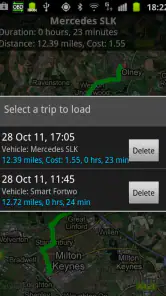
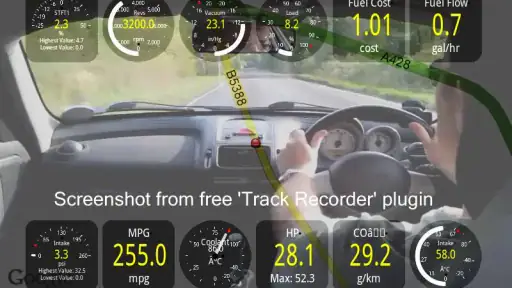
Its Google Earth view of engine data is another distinctive option for people who like relating vehicle information to a route. I would treat that as an exploratory way to review a drive, not as a reason to interact with a map or phone while moving. The most worthwhile habit is to decide in advance what question a reading should answer, then check it when parked or with a passenger handling the screen.
That route-oriented view is most compelling for someone who wants to look back at a drive and connect vehicle information with where it happened. It is not a substitute for a navigation app, and I would not choose this product just because I want maps. The distinction from ordinary car apps is its emphasis on information coming from the vehicle; a navigation tool is better for directions, while a basic reader is easier if all you need is a quick fault check.
There is a learning curve even when the menus feel approachable. Knowing how to open a screen is not the same as knowing whether a reading is meaningful for a particular vehicle. I would avoid making repairs from an isolated number or assuming that every value is available on every car. The strongest workflow is modest: observe a symptom, check relevant information while parked, keep a record, and take that context to a professional when the issue needs diagnosis.
Who will get the most from it
I think it suits owners who enjoy learning how their car behaves, drivers who want useful context before a garage visit, and people who will actually look at live data rather than install the app and forget it. It is less compelling if you expect a phone alone to identify every fault, need guaranteed access to every vehicle-specific value, or prefer a repair professional to handle all diagnostics. The current version is 1.12.108, and it supports Android 4.1 and later, which makes the stated Android requirement relatively modest.
For a new owner trying to understand an unfamiliar car, the most helpful first step is not to fill every available screen. I would start with the fault reader and one or two live readings connected to a real question, then add more only when I know why I want them. That keeps the app approachable and makes it easier to explain what I noticed if I eventually bring the car to a workshop.
Drivers who only want reassurance without learning about adapters, readings, and fault codes may be happier with a quick visit to a garage or a very simple reader. The same goes for anyone who expects the phone to identify every mechanical or electrical fault. Torque Pro can provide useful vehicle information, but it cannot examine a physical component, confirm a repair, or guarantee that a car is safe to drive. Its best audience is willing to use it as one source of evidence rather than the final authority.
So, if you're someone who loves to dig deeper into the workings of your car, or if you're just looking for a reliable way to keep tabs on your vehicle's health, Torque Pro (OBD 2 & Car) is definitely worth checking out. It's like having a mini mechanic in your pocket, ready to offer insights and keep your car running smoothly.
My recommendation comes with one condition: go in wanting an informative companion, not an automatic mechanic. You will get more from it if you already have a suitable adapter, choose a small set of readings that matter to you, and use fault codes as a starting point for sensible next steps. For that kind of hands-on owner, the combination of live information and code reading makes the $4.95 purchase easier to justify; for someone who only wants occasional reassurance, a basic reader or a workshop visit may be simpler.
Torque Pro (OBD 2 & Car) Frequently Asked Questions
Can I use Torque Pro to check whether a warning light needs attention?
Torque Pro can read diagnostic trouble codes and clear fault codes, which can help you investigate a warning indicator using information from your car. A code can be a useful starting point, but clearing it does not necessarily fix the underlying problem. If a warning returns or the car behaves unusually, have the issue properly diagnosed rather than relying on the app alone.
What should I check before buying an OBD2 adapter for Torque Pro?
Torque Pro needs an OBD2 adapter to communicate with your car, so check that the adapter supports your phone’s connection method and is compatible with the vehicle before purchasing. Adapter quality and compatibility can affect how reliably readings appear. The app’s usefulness also depends on what information your car makes available through its diagnostic systems.
Can I use Torque Pro to review trips as well as engine information?
Yes. Torque Pro includes GPS-based speed and track-recording features, and it can display engine data in Google Earth. These options let you look at driving details alongside vehicle information, rather than focusing only on a live dashboard. Keep in mind that the readings and recorded details depend on the phone, adapter, vehicle, and data available while you use the app.
Is Torque Pro a free download, and what operating system does it support?
Torque Pro costs $4.95 and is an app for Android devices running Android 4.1 or later. Before buying, check that your phone or tablet meets that minimum operating-system requirement and that you can connect it to a compatible OBD2 adapter. The app is rated for Everyone, so its content rating is suitable for a broad audience.
Can Torque Pro help me understand engine performance while driving?
Yes. Torque Pro can display vehicle data in real time, and its store summary highlights measuring BHP, torque, and 0–60 performance. You can use the information to keep an eye on engine readings and review how the car performs. The usefulness of individual readings depends on the vehicle and the information its systems make available to the app.
Pros
- Comprehensive real-time car diagnostics
- Supports multiple car models and protocols
- Customizable dashboard displays
- Includes GPS tracking for vehicle
- Affordable one-time purchase price
Cons
- Requires OBD2 adapter purchase
- Interface can be overwhelming for new users
- Limited features on free version
- Compatibility issues with some devices
- Occasional connection dropouts
- Category
- Communication
- Version
- 1.12.108











