Tinker DIY
- 69.00
- 4.3
- Installs
- 100.00K
- Price
- Free

Screenshots




Analysis by Reviewed
When a car makes a new noise or a warning light appears, I usually want a useful second opinion before deciding whether to keep driving or book a garage visit. That is where Tinker DIY has a clear purpose: it connects drivers with automotive experts over live video chat. It is a free Auto & Vehicles app from Tinker DIY, and its focus is practical help with a vehicle problem rather than browsing general car advice.
Starting with the problem in front of you
The most useful way to approach a video consultation is to get specific before you connect. Note when the issue happens, whether it is repeatable, and what changed shortly before it began. If a dashboard warning is involved, take a clear photo; if the concern is a sound, be ready to describe when you hear it. These small preparations can make the conversation more focused and help an expert ask better questions.
For example, if a car starts normally in the morning but struggles after a short stop, that timing is more useful than saying only that it “won’t start.” I would also park somewhere safe and quiet before using the camera. A live call is less helpful if wind, traffic, or an unsafe roadside situation makes it hard to explain what is happening.
Getting from a question to a useful next step
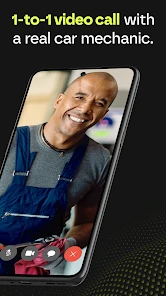
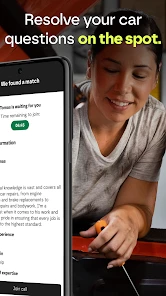
In use, the central idea is straightforward: discuss the vehicle issue with a certified automotive expert in real time, using video to show relevant details. That makes the app a different kind of tool from a search engine or a forum. Instead of comparing several posts and guessing which situation matches yours, you can explain the symptoms and respond to follow-up questions as they come up.
Making the handoff count
Video can help bridge the gap between a driver’s description and what an expert needs to understand, but it is not a magic diagnostic scan. A phone camera cannot show every hidden component or replace physical inspection. I would treat the call as a way to clarify what to check next, not as a promise that every fault can be identified remotely. Keep the vehicle’s make and model handy, and describe any warning messages accurately rather than relying on memory.
A useful outcome might be learning whether a symptom sounds urgent, what information to give a repair shop, or which visible detail deserves attention. That can make a later garage conversation more efficient. If the issue involves an immediate safety concern, though, I would prioritize stopping somewhere safe and getting appropriate roadside or emergency assistance instead of trying to troubleshoot through an app.
How it fits beside familiar alternatives
Compared with searching the web, a live conversation can be more tailored: the expert can ask what happened just before a symptom and adjust the discussion to your answer. A repair forum can be valuable when you want a record of other owners’ experiences, while a mechanic’s in-person inspection is the better route when a fault needs hands-on testing or repair. I see Tinker DIY as a useful middle step between “search and speculate” and arranging physical service, not a substitute for either one.
Who is likely to get the most from it
I would consider it when I am unsure how to describe a new but non-emergency issue, want help thinking through visible symptoms, or need a clearer idea of what to ask a repair shop. It may also suit drivers who feel overwhelmed by conflicting online explanations and would rather talk through their own situation. On the other hand, someone looking for a repair booking service, a guaranteed remote diagnosis, or step-by-step instructions to carry out a repair should look for a tool built specifically for that need.
What to expect before opening the app
The app has a 4.3 average from around 286 ratings, with over 100,000 installs, and it is rated for Everyone. Those figures suggest it has found an audience, but they do not tell me whether a particular expert will be the right fit for every issue. I would go into a session with one main question, a short symptom timeline, and a few clear views of the relevant area rather than trying to cover every maintenance concern at once.
Tinker DIY is currently at version 3.12.1 and requires iOS 12 or later. Since the core experience depends on live video, a stable connection and a phone camera you can use safely matter in practice. If you are calling from a driveway, have the vehicle parked and the key details ready; if you are on the road, wait until you are safely stopped. That simple choice can make the exchange clearer and avoid turning a small concern into a distraction.
A practical verdict
What I like about this approach is the direct handoff from a driver’s question to a conversation with an automotive specialist. It can help turn vague worry into a more organized next step, especially when you are preparing to speak with a repair professional. The main limitation is inherent to remote advice: a video view is only as useful as the symptoms and angles you can share, and some problems need an in-person inspection.
If you want a quick, human discussion about a vehicle concern, I think Tinker DIY is worth considering. I would not rely on it to replace a mechanic or handle an urgent safety problem, but for making sense of a non-emergency issue and deciding what to do next, its live-video format offers a practical alternative to searching alone.
A realistic call, from symptom to plan
Imagine noticing a new vibration on the drive home. You have reached your driveway, the car is parked, and the vibration is no longer happening. This is exactly the sort of situation where a remote conversation may still help, provided you can explain when it occurs and show anything relevant without taking risks. I would note the speed or driving condition associated with it, whether it changes while turning or braking, and whether any dashboard message appeared. Those observations give the expert a useful starting point even when the symptom cannot be reproduced on camera.
During a call, I would keep the phone steady and show one detail at a time instead of sweeping across the engine bay or cabin. A close-up is useful only when the expert knows where the camera is pointed, so I would first name the area and then follow any request to change the view. If the issue is audible, describing the circumstances may be more useful than trying to record a sound in a noisy place. The goal is not to prove a diagnosis on video; it is to help the expert understand the pattern and suggest a sensible next move.
Afterward, I would write down the guidance in plain language while it is fresh: what to monitor, what to tell a mechanic, and what would make the issue more urgent. That handoff matters because a remote discussion and a workshop visit serve different purposes. A mechanic can inspect and test the vehicle; a well-prepared driver can make that visit more efficient by bringing a clear timeline rather than a vague account of “something feels wrong.”
Small choices that improve the exchange
One practical tip is to decide what you want from the session before connecting. “Can you tell me whether this needs prompt attention?” is a more useful aim than trying to get a complete explanation of every possible cause. If several unrelated issues have built up, choose the one that affects safety or drivability first. A focused conversation gives less room for details to get lost and makes it easier to leave with an actionable next step.
I would also gather the basics before the call: the vehicle’s make and model, the exact wording of any warning, and a concise sequence of events. If another person saw or heard the symptom, ask them what they noticed rather than adding guesses. This is especially helpful with intermittent faults, where the timing and conditions can matter more than a single still image. Avoid touching hot or moving parts to get a better camera angle; showing less is better than creating a hazard.
There is a trade-off between convenience and context. A video chat can make it easier to point out a visible concern, but it cannot reproduce the feel of a steering wheel, the smell of a leak, or the results of a physical test in the same way an in-person inspection can. If your concern depends on those clues, use the conversation to organize what you have noticed and then arrange hands-on help rather than stretching remote advice beyond its strengths.
When another route is the better one
For a vehicle that will not start in an unsafe location, a flat tire on a busy road, or a problem that makes the car unsafe to drive, the priority is immediate roadside help, not a video consultation. Likewise, if you already know the vehicle needs a repair, an appointment with a qualified shop is more direct than using an expert call to confirm what you have decided to do. The app makes most sense in the uncertain middle: something has changed, but you need help deciding how to describe it and what kind of follow-up is reasonable.
It is also not the best fit if you mainly want a searchable library of repair instructions or a public thread where several owners can compare experiences over time. Search results and forums can be easier to revisit and may provide a broader range of perspectives, though they require more work to judge whether a post matches your vehicle. A live expert discussion is more personal, but it is a conversation rather than a permanent replacement for service records or a repair manual.
Before relying on the app for a particular situation, I would check whether the call is practical where I am: I need a safe place to stop, enough connection for live video, and a clear view of what I want to discuss. Free to download does not mean every possible service or outcome should be assumed; I would review the in-app details before committing to any next step. That small check helps set expectations and keeps the decision grounded in what the app can actually do for me.
Who should keep it handy
I can see this being useful for a new driver who is unsure how to explain a warning light, a car owner preparing for a garage visit, or someone who wants a human second opinion before deciding whether a non-urgent symptom can wait. It may also help a household where one person handles the car but another needs to describe the issue accurately to a repair professional. The main value is not a shortcut around maintenance; it is a more organized conversation when the next step is unclear.
Drivers who already have a trusted mechanic and a clear plan may not need another step. People seeking a firm diagnosis, repairs performed through the app, or emergency assistance should choose a service designed for those jobs. That distinction is important: a useful consultation can narrow the question without settling every mechanical uncertainty. I would judge success by whether I leave knowing what to observe, what to communicate, or who to contact next—not by expecting the camera to reveal a hidden fault.
Have you ever found yourself scrolling through your phone, wishing you could create something with your own hands? Well, let me introduce you to Tinker DIY, an app that has completely transformed my idle screen time into a productive, hands-on experience. This app is a treasure trove for anyone looking to dive into the world of DIY projects, whether you’re a seasoned crafter or just starting on your creative journey.
Discovering the World of Tinker DIY
When I first stumbled upon Tinker DIY, I was immediately drawn in by its vibrant and inviting interface. The app offers a wide range of projects, from simple paper crafts to more complex woodworking tasks. Each project is accompanied by step-by-step instructions and video tutorials, which I found incredibly helpful. The app makes it easy to follow along, ensuring that even the most complicated tasks feel manageable.
A Handy Companion for Every Project
One of the standout features of Tinker DIY is its extensive material list for each project. This list means no more guessing what you need or making multiple trips to the store. Everything is laid out clearly, allowing you to gather all your supplies before you start. Trust me, this feature alone has saved me a lot of time and frustration.
Another aspect I love is the community section. Here, users share their completed projects and tips, creating a supportive and inspiring environment. Seeing other people’s creativity is motivating, and I’ve even picked up a few tricks myself!
Perfect for All Skill Levels
Don’t worry if you’re a beginner. Tinker DIY is designed to cater to all skill levels. The projects are categorized by difficulty, so you can start small and work your way up as you gain confidence. I started with a simple origami project and am now tackling a small furniture piece. The sense of accomplishment when finishing a project is truly rewarding.
My Personal Take
Using Tinker DIY has not only helped me develop new skills but has also become a great way to unwind. There’s something incredibly satisfying about creating something tangible with your own hands. Plus, it’s a fun way to spend time with family and friends, as many of the projects are perfect for group activities.
If you're itching to create and learn, I wholeheartedly recommend giving Tinker DIY a try. It's more than just an app; it's a gateway to a world of creativity and self-expression. So go ahead, download it, and start tinkering!
Tinker DIY Frequently Asked Questions
What should I know about Tinker DIY’s automotive focus before downloading?
Tinker DIY is an Auto & Vehicles app from Tinker DIY. Its focus is connecting users with certified automotive experts through live video chat, so it is intended for people seeking help with vehicle-related questions rather than a general library of home-improvement or crafting projects. The app is free, and its age rating is Everyone.
What is Tinker DIY and who is it designed for?
Tinker DIY is a versatile app designed for DIY enthusiasts and hobbyists who love to create, modify, or repair things on their own. The app offers a multitude of tutorials, instructional videos, and guides on various DIY projects ranging from home improvements to crafting. It's perfect for beginners seeking step-by-step instructions and for experts looking for innovative ideas to enhance their projects.
Can I use Tinker DIY offline?
Tinker DIY offers both online and offline modes. While an internet connection is required to download new content, many of the tutorials and guides can be accessed offline once they are downloaded. This feature is particularly useful for users who want to work on projects in areas with limited internet access or prefer to save on data usage.
Does Tinker DIY offer community support or forums?
Yes, Tinker DIY includes a vibrant community support feature where users can join forums to discuss projects, share tips, and seek advice from fellow DIY enthusiasts. This community aspect enhances the user experience by providing a platform for collaboration and idea exchange, making it a valuable resource for both novice and experienced DIYers.
Is Tinker DIY free to use, or does it have any in-app purchases?
Tinker DIY is free to download, providing access to a wide range of basic DIY tutorials and guides. However, it also offers premium content and features through in-app purchases. These might include advanced project tutorials, exclusive video content, or specialized tools. Users can choose whether to enhance their experience by making these optional purchases.
Pros
- Easy to use interface for beginners
- Wide variety of DIY projects available
- Step-by-step video tutorials included
- Materials list provided for each project
- Community forum for user support
Cons
- Limited offline functionality
- Some projects require in-app purchases
- Occasional ads can be disruptive
- Not all projects are beginner-friendly
- Requires consistent updates for new content

- Category
- Auto & Vehicles
- Version
- 3.12.1











