The Sun Mobile - Daily News
- 75.00
- 4.5
- Installs
- 1.00M
- Price
- Free

Screenshots



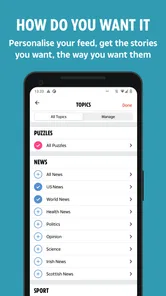



Analysis by Reviewed
I approached The Sun Mobile - Daily News as a quick news companion rather than a replacement for every source of information on my phone. It sits in the News & Magazines category and brings together reporting, sport, television coverage, and celebrity stories in one place. After spending time with it, my impression is that its main strength is convenience: it gives readers a familiar mix of fast-moving subjects without asking them to build their own collection of separate apps.
The app is free to download, which makes it easy to try before deciding whether it deserves a regular place on your home screen. It is published by News Group Newspapers Limited, has an average rating of 4.5 from around fifteen thousand ratings, and has passed one million installs. Those figures suggest that it has found a substantial audience, but they do not tell me whether it will suit your reading habits. The more important question is whether you want a lively, broad news feed or a quieter, more focused reading experience.
What using the app feels like day to day
My first useful way of thinking about this app is as a headline-checking tool. It is the sort of thing I would open while having breakfast, waiting for public transport, or taking a short break. Instead of committing to one long article or searching several websites, I can scan the main subjects and decide which stories deserve more attention. That makes the app practical for readers who want a quick overview of what is attracting attention across news, sport, TV, and gossip.
The broad subject mix is also its defining personality. Someone interested in football updates but equally curious about television personalities can move between those interests in the same app. A reader who follows only politics, business, science, or international affairs may find the experience less satisfying, because the appeal here comes from variety and immediacy rather than a narrowly specialised editorial focus.
I would not treat every headline as a complete account of a complicated event. My own habit with an app like this is to use the initial story as a starting point, then look for fuller context when a subject affects an important decision or involves disputed claims. That is not a criticism unique to this publication; it is simply a sensible way to use a fast news feed. The best results come from reading beyond the headline when the subject genuinely matters.
A realistic everyday routine
Imagine checking the app before work. You might begin with the main news items, move to sport for the latest results or developing stories, and then glance at television and celebrity coverage before closing it. In a few minutes, you have a sense of the topics likely to appear in conversations that day. Later, if one item catches your attention, you can return to it instead of opening several browser tabs.
That routine works particularly well for people who prefer editorial selection to an endless social-media timeline. Social platforms often mix reporting with comments, reposts, advertising, and personal reactions. A dedicated news app gives the reading session a clearer purpose. The trade-off is that you are accepting the publication’s choices about what deserves prominence, so anyone who wants a wider range of viewpoints should compare important stories elsewhere.
More From Our News Desk

Weather by Xiaomi Review: Clear at a Glance, Less Clear Up Close

X Under Pressure: Can It Recover When Posting Goes Wrong?

Clash of Clans Is Won Between the Battles

Android Auto Makes the Case for Quieter Car Software

MobiOffice: Transforming Mobile Productivity with Seamless Integration

EA SPORTS FC™ Mobile Soccer: Redefining Mobile Sports Gaming
Who is likely to enjoy it
I can recommend it most easily to readers who want a single, recognisable destination for popular news, sport, television, and entertainment coverage. It is also a reasonable option for someone who does not want to pay simply to experiment with a new news source. The Everyone content rating makes it suitable for a broad audience in the store’s age classification, although individual stories can naturally deal with serious or upsetting subjects.
It may be less suitable for a reader who wants a calm, low-distraction publication, a specialist business briefing, or a carefully structured international news digest. If you mainly need local reporting, technical analysis, or a neutral comparison of several viewpoints, a public broadcaster, specialist publication, or news aggregator may be a better companion. I would use this app for breadth and speed, not as my only source for every subject.
Trust starts with knowing what you are choosing
Trust, for me, begins with being clear about the editorial identity behind an app. This is not an anonymous collection of articles; it is a product from News Group Newspapers Limited with a strong tabloid-style identity. That matters because presentation, story selection, and tone influence how information feels before I have even opened an article.
I find it healthier to recognise that identity instead of expecting the app to behave like a completely different kind of publication. If I want energetic coverage of sport and entertainment, the style may feel natural. If I am looking for a restrained, document-heavy treatment of a sensitive subject, I would slow down and compare the reporting with another established source.
The app’s wide coverage can create a useful discovery effect. A story outside my normal interests may appear beside something I opened deliberately, and that can broaden what I notice during a short reading session. At the same time, a broad feed can encourage shallow browsing. I try to avoid judging a story solely by its placement or wording and open the article when the details matter.
What the visible choices mean for your budget
The download is free, but the app includes optional purchases priced from $1.99 to $12.99 per item. That is important for anyone trying to keep mobile spending predictable. I would install it with the expectation that the basic entry point costs nothing, then pay attention to any purchase prompt before confirming anything.
My practical advice is simple: do not assume that “free” means every part of the experience is included without charge. Read the wording on any offer, check whether it is a one-off item or part of a continuing arrangement, and use your device’s purchase confirmation settings. This is especially useful if a family member or child can access the same phone.
I also appreciate that the app can be evaluated before spending money. A free starting point lets me decide whether the coverage, writing style, and reading rhythm fit my routine. If I rarely open it, there is no reason to buy an optional item just because it is presented during a moment of curiosity.
Operating-system fit and maintenance
The current version is 7.21.17, and the app requires Android 8.0 or later. That makes the operating-system requirement worth checking before installation, particularly if you use an older handset that still performs well for basic tasks. On a compatible phone, keeping the app updated is a sensible way to receive the publisher’s latest maintenance and presentation changes.
I would also leave enough storage and system flexibility for ordinary app updates rather than treating installation as the end of the process. News apps change frequently because their content is constantly moving, and a stale version can make any app feel less reliable even when the underlying service is fine. If your phone is limited by an older operating system, a mobile browser may be the more practical route.
Handling personal choices carefully
When I use a news app, I separate two kinds of trust. The first is editorial trust: whether I understand the publication’s viewpoint and know when to seek another source. The second is digital trust: whether I can see what the app is asking me to do and make deliberate choices about purchases, accounts, notifications, and device access.
I do not grant permissions automatically. If the app presents a request, I read its explanation and decide whether that function is genuinely useful for me. A news reader should earn access through a clear benefit, not receive every available permission simply because I tapped through setup quickly. The exact choices available can depend on the phone and operating system, so I treat each prompt on my own device as the one that matters.
The same cautious approach applies to notifications. Breaking updates can be useful when I am following a major event, but they can also turn a short reading habit into constant interruption. I prefer to begin with a restrained notification setup and adjust it only after I know whether the alerts improve my day. If they become noise, switching them off is a reasonable choice rather than a sign that the app has failed.
Moments when data awareness matters most
News reading often happens in public places, on mobile connections, or while multitasking. I try not to enter sensitive information into an article or a prompt simply because it appears beside a story. If an optional feature asks me to sign in, subscribe, or make a purchase, I pause and check exactly what I am agreeing to before continuing.
For the same reason, I avoid making important account or payment decisions while distracted. A quick headline scan is harmless enough, but a purchase screen deserves a slower look. I check the account shown by my device, confirm the amount, and make sure I understand whether the item is connected to a broader service. These small habits protect my control without making ordinary reading difficult.
I also consider the sensitivity of the stories themselves. Coverage involving health, crime, tragedy, or public accusations can spread quickly, and a short article may not answer every question I have. I would not forward a dramatic headline as if it were a complete conclusion. Instead, I look for the article’s details, note the distinction between confirmed information and commentary, and consult another reputable source when the consequences are serious.
Keeping control of the reading experience
One of the most useful habits I developed is separating discovery from verification. I use the feed to discover subjects, then decide which ones deserve a deeper read. This prevents the app from becoming a stream that dictates my attention from one alert to the next. It also helps me avoid confusing popularity or emotional impact with importance.
I would set aside a short, intentional reading window rather than leaving the app open all day. That approach works well for the app’s mixture of quick stories and entertainment coverage. If I am following a developing event, I can return later for updates; if I am simply browsing, I can close the app once I have seen enough. The choice keeps the service useful without allowing it to dominate my schedule.
Another practical tip is to compare the app with the sources I already trust before making it central to my routine. I look at whether it helps me understand events, not merely whether it gives me more headlines. If the answer is yes for sport and entertainment but no for a specialist subject, I keep it in that role rather than demanding that one app do everything.
Readers who use shared devices should be especially deliberate. I would check which account is active before any optional purchase and avoid leaving a payment screen ready for someone else to confirm. On a personal device, I would still review notification and account settings from time to time, particularly after an update. These are ordinary safeguards, but they are more useful than assuming that a familiar app requires no attention.
How it compares with other ways to follow news
Compared with opening the publication’s website in a browser, a dedicated app can feel more direct for repeat visits. The app places the news habit in a separate space and may be more convenient for quick checks. A browser is still attractive if you want to minimise installed apps, preserve storage, or switch easily among several publications without managing separate downloads.
Compared with a general news aggregator, this app offers a more defined editorial voice. An aggregator can be better when I want multiple outlets, topic filters, or a broader comparison of perspectives. The Sun Mobile - Daily News is more appealing when I want to see this publisher’s selection in one focused stream rather than assemble it from many sources.
Compared with a public-service or specialist news app, the difference is mainly emphasis. Those alternatives may suit readers who prioritise detailed context, public affairs, business, science, or international reporting. This app makes more sense when sport, television, gossip, and widely discussed news belong together in the same daily visit. Choosing between them is less about which app is universally best and more about what I want from a ten-minute reading session.
Where the experience can feel limited
The broad mix that makes the app approachable can also make it feel uneven for a focused reader. Someone opening it for one precise subject may need to scan through unrelated material before finding what matters. I would not call that a flaw for a general audience, but it is a real trade-off for anyone who prefers a tightly organised specialist feed.
The publication’s tone will not suit everyone either. Readers who dislike sensational presentation or celebrity-led coverage may feel that the app asks for too much filtering. I would not install it hoping that its identity will disappear behind a neutral interface. It is better to choose it knowingly, with an understanding that the editorial style is part of the product.
Optional purchases are another point to watch. The free entry point is convenient, but the presence of paid items means I would not hand the phone to a child or less experienced user without first checking the device’s purchase protections. If your main goal is a completely cost-free news routine, you may prefer a service whose access model is easier for you to understand at a glance.
My cautious recommendation
After using it as a general news and entertainment reader, I see The Sun Mobile - Daily News as a useful choice for people who want quick access to a lively mixture of news, sport, TV, and gossip. Its free starting point lowers the barrier to trying it, and its established audience suggests that it has become a regular destination for many readers. I would recommend it to a friend who enjoys that combination and is comfortable judging stories within the publication’s clear editorial identity.
I would not recommend making it your sole source for high-stakes information. For serious decisions, disputed events, specialist subjects, or stories that could affect someone’s reputation or wellbeing, I would read beyond the first article and compare another reliable source. That is the most responsible way to benefit from speed without mistaking convenience for completeness.
My final advice is to install it only if its subject mix matches your real habits, start with careful notification and purchase choices, and review any prompt before accepting it. Readers on Android 8.0 or later can try the current version, 7.21.17, without paying for the download. Used with that modest level of attention, it works well as a fast, familiar window onto the stories many people are discussing; used as a complete picture of the world, it is not the right tool.
The Sun Mobile - Daily News Frequently Asked Questions
Can I read The Sun Mobile – Daily News without creating an account?
The Sun Mobile – Daily News is designed to bring The Sun’s news, sport, TV and gossip coverage to mobile devices. Whether you need an account can depend on the article or feature you want to use, particularly if paid content is involved. Before downloading, consider whether you are comfortable signing in if prompted and check any access or subscription terms shown in the app.
How often is the content in The Sun Mobile – Daily News updated?
The app brings you the latest news, sport, TV and gossip, making it useful for readers who want to check current coverage on a mobile device. News content can change as stories develop, so reopening the app is a practical way to catch up. An internet connection is normally needed to load the latest headlines and articles.
Can I customize notifications in The Sun Mobile – Daily News?
The app may request permission to send breaking-news notifications. If you allow them, they can help bring attention to new coverage, but you can manage notification permissions through your device settings or inside the application. Consider your preferences before enabling alerts, especially if you would rather open the app when it suits you than receive news updates during the day.
Is The Sun Mobile – Daily News available on iOS?
The Sun Mobile – Daily News is a mobile news app intended for smartphones or tablets. Check the app store on your device for its current availability and compatibility before downloading. If you use Android, the app runs on devices with version 8.0 or later. Whichever platform you use, reviewing the requirements first helps you avoid installing an app your device cannot run.
What should I check before paying for content in The Sun Mobile – Daily News?
The app can be downloaded without an upfront charge, but some content or features may involve a subscription or in-app purchase. Read the price and terms displayed in the app before confirming a payment, and check whether an offer involves recurring charges. In-app purchases range from $1.99 to $12.99 per item, so make sure the option suits your budget and reading needs.
Pros
- Clear summaries make major stories quick to scan.
- Covers UK news
- entertainment
- sport
- and celebrity topics.
- Breaking-news alerts can keep you updated throughout the day.
- The familiar newspaper layout feels easy for regular Sun readers.
- Digital access is convenient when you are away from print editions.
Cons
- Some articles may require a subscription or registered account.
- Advertising can make parts of the reading experience feel busy.
- The app may focus heavily on sensational or celebrity-led stories.
- Frequent notifications could become distracting without careful settings.
- Content tone may not suit readers seeking strictly neutral reporting.











