The Oregonian
- 113.00
- 3.6
- Installs
- 10.00K
- Price
- Free

Screenshots




Analysis by Reviewed
I opened The Oregonian expecting a straightforward way to keep up with local news, and that is still the clearest way to understand it. This free News & Magazines app brings the Oregonian online newspaper to a phone or tablet, with OregonLive.com and Oregonian Media Group behind it. My first impression was that it is aimed less at casual headline browsing and more at readers who want a familiar local publication in a mobile format.
That distinction matters. A general news app tries to cover everything, while this one makes more sense when Oregon news is the reason you are opening your phone. I found the experience most useful when I wanted to check local developments, read beyond a social-media headline, or make the Oregonian part of a regular morning routine. It is not trying to replace every source of national or international news, and I would not choose it for that job.
What to expect from The Oregonian
The app is listed as a free download, with optional in-app purchases priced at $24.99 per item. That means installing it does not require an upfront payment, but the complete reading experience may involve a purchase depending on what you want to access. I would keep that distinction in mind before treating the app as an unlimited free newspaper replacement.
The store summary calls it the Oregonian online newspaper app, but in everyday use I would think of it as a digital doorway into a local news publication. The value is not simply having articles on a screen. It is having one place to return to when local reporting, community information, and regional context are more important than a stream of unrelated headlines.
The app has an average rating of 3.6 from around two hundred ratings, alongside more than one hundred written reviews. I read that as a sign of a useful but not universally smooth experience. Some readers will appreciate the direct connection to a known local newspaper, while others may be more sensitive to account steps, paid access, or the limits of a publication-focused app.
It is available for devices running Android 8.0 or later, and the content rating is Everyone 10+. The current release is version 8.0.0. Those details make it approachable for many older Android devices, although the actual feel will still depend on your phone’s screen, speed, and available storage.
One practical point is that this is not the best fit for somebody who only wants breaking headlines from around the world. A broad news aggregator will usually offer a wider mix of publishers and subjects. The Oregonian makes a stronger case for itself when local relevance is the deciding factor, especially if you prefer reading from a publication rather than jumping between search results and social posts.
More From Our News Desk

Weather by Xiaomi Review: Clear at a Glance, Less Clear Up Close

X Under Pressure: Can It Recover When Posting Goes Wrong?

Clash of Clans Is Won Between the Battles

Android Auto Makes the Case for Quieter Car Software

MobiOffice: Transforming Mobile Productivity with Seamless Integration

EA SPORTS FC™ Mobile Soccer: Redefining Mobile Sports Gaming
Who will get the most from it
I would recommend trying it if you live in Oregon, have family there, recently moved to the state, or want a more consistent way to follow regional news from elsewhere. It can also suit readers who dislike the noise of large aggregator feeds and would rather open one publication with a clear local identity.
It is less convincing for someone who wants a completely free, all-purpose news dashboard. The purchase structure may be a sticking point, and a single newspaper app cannot provide the breadth of several national sources. If your main habit is scanning many viewpoints in a few minutes, an aggregator or browser-based reading routine may be more flexible.
Starting with the first setup
After installation, I would approach the app with one simple goal: get to a useful local story quickly rather than trying to understand every option at once. Open it when you have enough time to read a few headlines, look for a subject that matters to you, and notice which parts of the experience are freely available before deciding whether the paid side is worthwhile.
The first setup is also a good moment to decide how you want to read. A phone is convenient for short checks during a commute or coffee break, while a larger tablet screen is more comfortable for longer articles. I would not judge the whole app from a rushed glance at a small display; the publication format is more valuable when you give yourself room to read rather than merely skim.
Because the app comes from OregonLive.com and Oregonian Media Group, readers who already use those publications may find the transition familiar. New users should still treat the app as its own reading environment. A website habit does not automatically tell you where the most useful mobile entry point will be, so I recommend spending a minute exploring the opening screen and article navigation before settling into a routine.
The most important setup question is access. Since the app is free to install but includes in-app purchases, do not assume that every article or reading path will work exactly like an unrestricted public news feed. If you reach a purchase prompt, read it carefully and decide whether the app’s local coverage justifies that cost for your habits. That is a better approach than subscribing impulsively because you wanted to finish one particular story.
I also suggest choosing a repeatable time for your first week with it. A short morning check is useful for people who want awareness without spending all day in the news. An evening session works better if you prefer reading several pieces together. The app becomes more valuable when it has a defined role, rather than becoming another icon you open randomly and abandon.
Finding the first meaningful success
For me, the first successful action would not be installing the app or opening a headline. It would be finding one local story that answers a real question I already have. For example, if I were planning my day around a regional issue, I would open the app, scan the available coverage, choose the clearest relevant article, and read it all the way through. That gives the app a fair test based on usefulness rather than appearance.
A realistic scenario is a weekend morning when I want to know what is happening locally before making plans. I would open The Oregonian, look for the most relevant regional coverage, and use the article itself as a starting point for understanding the issue. If the story gives me enough context to discuss it with family or adjust my plans, I have already found the app’s main strength: focused access to news tied to a particular place.
Another useful workflow is to use the app as a second look after seeing a claim elsewhere. Social networks are fast, but a fast headline is not always enough context. I would search for related coverage in the newspaper app and compare the fuller article with the short version I first saw. This does not make the app a fact-checking authority for every subject, but it can help replace vague online chatter with a more substantial local report.
My advice is to read one complete article before judging navigation, advertising, or access prompts. Then try a second subject that is not part of your usual interests. That small test reveals whether the app can support both a focused need and casual discovery. If every useful path immediately feels obstructed, it may not fit your reading style. If the coverage feels relevant and easy to return to, the app has earned a place in your routine.
The best first win is a clear answer to a local question, not simply a long list of headlines. That mindset prevents the app from being compared unfairly with a global news feed and helps you decide whether its regional focus matches your actual needs.
Small habits that make the app more useful
One non-obvious advantage of a publication-specific app is consistency. Instead of rebuilding a list of local sources every time you want to catch up, you can begin with the same publication and develop a sense of what kind of coverage it provides. I found that useful for separating a quick daily check from a deeper reading session. The first is about awareness; the second is about context.
A second practical tip is to use article choice as a filter for your attention. Rather than opening every headline, pick one story that affects your community and one that simply interests you. This two-article routine gives you a manageable balance and reduces the chance that the app turns into endless scrolling. It also makes the paid-access decision clearer because you can see how often you genuinely use the publication.
A third trade-off concerns convenience versus breadth. The Oregonian can be a better starting point than a search engine when you already know you want Oregon-focused reporting. A search engine is better when you need a very specific answer from many sources, including official pages or publications outside the region. I would use this app for a publication-centered reading habit, not as my only research tool.
For readers who live outside Oregon, the app can still be worthwhile when the state remains personally important. Someone with relatives there, a former resident following local changes, or a person monitoring a regional topic may value the focus. However, distance can make the daily feed feel less relevant, so I would test it during a week when you have a genuine reason to follow Oregon news rather than relying on curiosity alone.
Common points of confusion
The first likely confusion is the difference between free installation and free reading. The app costs nothing to download, but the presence of $24.99 in-app purchases means some access may be connected to paid options. I would check the wording on any purchase screen and avoid assuming that installing the app automatically includes every part of the newspaper.
The second is the app’s scope. The Oregonian is not a replacement for a broad national news service, a specialized financial publication, or a live search tool. If you open it expecting every major world story, you may think it is incomplete when it is actually staying within its local-publication purpose. The better question is whether it gives you the Oregon coverage you came for.
The third concerns ratings. An average of 3.6 is neither a guarantee of a poor experience nor proof that the app will suit everyone. News apps are judged on several things at once: article quality, navigation, account handling, access rules, update behavior, and personal interest in the coverage. I would treat the rating as a reason to test the app yourself, not as a final verdict.
Another possible misunderstanding is expecting the app to behave exactly like a paper newspaper. A phone interface changes how you move between stories and how long you are likely to read. I found it more natural to use it in short sessions, then return later for a longer article, rather than trying to reproduce a full print-reading experience on one small screen.
There is also a useful distinction between a reader who wants depth and one who wants speed. If your priority is a quick glance at many sources, the app may feel too narrow. If you want to spend time with local reporting from a recognizable publication, its narrower focus can be an advantage. Neither preference is wrong; they simply lead to different choices.
When another option is better
I would choose a general news aggregator when I need a wide mix of national and international stories in one place. I would choose a mobile browser when I need to compare several publishers, consult official information, or search for a very specific document. I would choose The Oregonian when I want a more direct relationship with Oregon-focused newspaper coverage and do not want local stories buried under unrelated global headlines.
That comparison also explains the app’s main limitation. Its usefulness depends heavily on how much you value the publication’s regional focus. Someone who rarely reads local news may install it, browse once, and never return. Someone who wants a dependable local starting point may find the same focus reassuring and efficient.
I would also skip it if the purchase model does not fit your budget or if you need guaranteed access to a wide range of free sources. The free download lowers the barrier to trying it, but it does not remove the need to think about ongoing reading value. Before paying, I would use the app enough to know whether it is becoming part of my routine rather than treating one interesting story as proof.
My next-step recommendation
After the first successful article, I would give the app a short trial period with a specific purpose: open it at the same time each day, read one local story carefully, and note whether the coverage keeps answering questions I actually have. This is more revealing than judging it after a single installation session.
If the app becomes your preferred place for Oregon news, the next step is to decide whether the available purchase option makes sense for your reading frequency. Frequent readers may see more value in paying for continued access, while occasional readers may prefer using the free portions and checking other sources when necessary. The right decision depends on use, not on the fact that the app is free to install.
Keep your expectations specific. This is a local newspaper app from OregonLive.com and Oregonian Media Group, not a universal news utility. Its strongest role is helping you return to Oregon coverage with less friction than starting from a blank search page. Its weaker role is supplying every topic, viewpoint, and source you might want in a single place.
Overall, I see The Oregonian as a sensible choice for readers who want focused regional news on Android and are comfortable evaluating the free-to-paid boundary for themselves. The app is approachable, its age rating is Everyone 10+, and its modest install base of over ten thousand suggests a more specialized audience than the largest news platforms. I would recommend trying it with a real local question in mind, because that is where its purpose becomes clearest.
My honest recommendation: install it if Oregon news is part of your everyday life, give it a deliberate first reading session, and decide about paid access only after you know how often the coverage helps you. If you mainly want a free, broad, multi-source news stream, choose a general aggregator instead. For the right reader, though, this app offers a focused and practical way to keep a local newspaper close at hand.
The Oregonian Frequently Asked Questions
What devices and operating systems can run The Oregonian app?
The Oregonian is a mobile news app for Android and iOS, and it requires a device running operating system version 8.0 or later. Before downloading, check that your device meets this minimum requirement and has enough available storage for the app. Keeping your operating system and app updated can also help you get the intended experience.
Who publishes The Oregonian app, and what is it for?
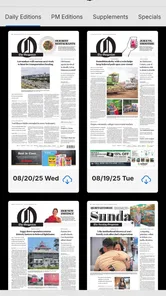
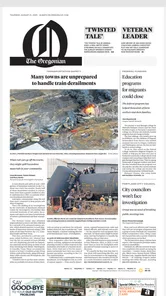
The Oregonian app is published by OregonLive.com | Oregonian Media Group. It is a News & Magazines app described as The Oregonian online newspaper app, giving readers a mobile way to follow the publication. It is intended for people who want to read news and other editorial content on a phone or tablet rather than relying only on a printed newspaper.
What is The Oregonian app?
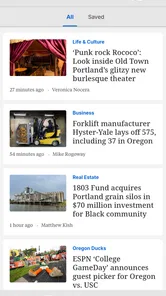
The Oregonian app is a digital news platform for readers who want coverage of Oregon and the Pacific Northwest on a mobile device. It typically includes local and regional reporting, breaking news, politics, sports, business, entertainment, opinion, and community stories. The app is designed for quick reading, article sharing, and staying informed throughout the day.
Is The Oregonian app free to download and use?
The Oregonian app is free to download from the Android or iOS app store, but access to all of its journalism may require a subscription. Some articles or features may be available without payment, while premium content, unlimited reading, digital editions, or subscriber-only benefits can be restricted. In-app purchases are listed at $24.99 per item, so review the current terms and pricing before signing up.
Does The Oregonian require a subscription?
A subscription may be required for unlimited access to The Oregonian’s complete article library and other premium features. Existing subscribers can usually sign in with their account credentials, while new readers may be offered monthly or annual plans. Before subscribing, review renewal conditions, billing details, cancellation rules, and whether access includes both the app and the publication’s website.
Pros
- Reliable local coverage of Oregon news
- politics
- and community events.
- Clean interface makes browsing articles and sections straightforward.
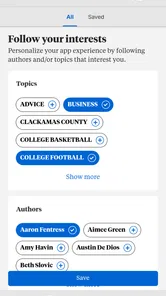
- Personalized alerts help you stay informed about important local stories.
- Includes useful reporting on sports
- culture
- and regional issues.
- Digital access is convenient for readers who prefer news on mobile.]
- contras:[
- Many full articles may require a subscription or account.
- Advertising can interrupt reading and reduce the uncluttered feel.
- Some content is focused heavily on the Portland metropolitan area.
- Breaking-news notifications may feel frequent for some readers.
- The app’s value depends on how often you read Oregon-specific news.
Cons
- Many full articles may require a subscription or account.
- Advertising can interrupt reading and reduce the uncluttered feel.
- Some content is focused heavily on the Portland metropolitan area.
- Breaking-news notifications may feel frequent for some readers.
- The app’s value depends on how often you read Oregon-specific news.











