The Epoch Times: Breaking News
- 15.42K
- 4.8
- Installs
- 1.00M
- Price
- Free

Screenshots


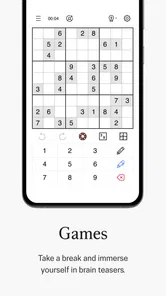
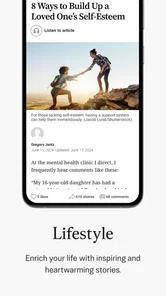
Analysis by Reviewed
I would approach The Epoch Times: Breaking News as a focused reading option, not an all-purpose answer to every news question. It brings national coverage, China-related reporting, live coverage, general news, and opinion into one publication’s app. That can suit readers who want to follow those subjects in one place, but it also means the experience reflects a particular newsroom rather than a broad mix of publishers. I find that distinction more useful than deciding whether any news app is simply “good” or “bad”: the right choice depends on what you want to keep up with and how you check what you read.
Who benefits from this particular news mix?
The Epoch Times is a free news and magazines app from Epoch Times Association Inc, with coverage spanning national news, China, live coverage, general news and opinion. That mix makes it most useful if you regularly follow U.S. affairs alongside China-related stories and want commentary in the same reading space. It is less suited to someone looking for a broad international wire service, a local-news replacement, or a single-topic feed; in those cases, a general aggregator or a publication focused on your region may make a better daily starting point.
In ordinary use, I would treat it as one newsroom’s perspective rather than my only window on a developing story. If a headline matters to a decision at work or at home, I’d compare its account with reporting from another outlet before settling on the details. That habit is especially valuable with opinion pieces: they can help explain an argument, but they are not the same thing as straight reporting. The distinction is worth keeping in mind even when an article is confidently written.
Trust starts with what you can actually inspect
The app has an average rating of 4.8 from around 92,000 ratings, and it has passed one million installs. Those figures suggest that many readers have chosen to try it, but popularity is not proof of accuracy or a substitute for checking a claim. I would use them as context about adoption, not as a reason to accept every story without question. The developer is Epoch Times Association Inc, so the publication’s own editorial perspective is part of what a reader should evaluate.
For practical trust, I look for choices I can observe rather than making assumptions about unseen data practices. The app is rated for Everyone, and the current version is 3.1.9; it supports Android 5.0 and later. These details help with basic suitability and compatibility, but they do not tell me how every permission or account setting works. Before enabling any prompt, I would read what the phone asks to access and decide whether that access makes sense for the way I plan to use a news reader.
Unraveling the Features
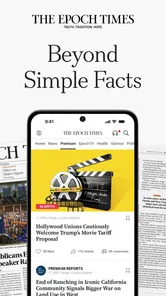
First off, the user interface is clean and intuitive. The design doesn’t bombard you with ads or unnecessary pop-ups, which is a relief in today’s app landscape. Navigating through the categories is seamless, whether you’re interested in politics, business, or arts and culture. Each section is meticulously curated to ensure that you get the most relevant updates.
One of the standout features of the The Epoch Times: Breaking News app is its commitment to providing unbiased news. In a world where media bias is a growing concern, this app strives to present facts as they are, allowing users to form their own opinions. The depth of coverage is impressive, with articles that go beyond the headlines to provide comprehensive analysis.
More From Our News Desk

Weather by Xiaomi Review: Clear at a Glance, Less Clear Up Close

X Under Pressure: Can It Recover When Posting Goes Wrong?

Clash of Clans Is Won Between the Battles

Android Auto Makes the Case for Quieter Car Software

MobiOffice: Transforming Mobile Productivity with Seamless Integration

EA SPORTS FC™ Mobile Soccer: Redefining Mobile Sports Gaming
Personal Experience
Using the app feels like having a reliable friend who keeps you updated with what's truly important, rather than just what's trending. I found myself spending more time on the app than expected, simply because the content is so engaging. The articles are well-researched, and the investigative pieces are particularly compelling.
Reading habits, alerts, and cost
A useful way to keep the feed manageable is to decide in advance what you want the app to do for you: check it at a set time, or use alerts only when you genuinely want a prompt. For example, I might open it over breakfast, scan the national and China sections, then save deeper reading for later rather than letting headlines interrupt focused work. If notification controls are available on your device, I’d use those to quiet alerts that do not help; I would not assume every topic can be individually tuned without checking the settings first.
That workflow also makes comparison with a general news aggregator clearer. Aggregators are convenient when I want many publishers in one place, while a publication’s own app gives me a more direct route into its reporting and opinion. The trade-off is that I need to seek out other perspectives myself. For readers who enjoy following one outlet closely, that focus can feel efficient; for readers who want a ready-made cross-section of viewpoints, it may feel narrow.
The app is free to download, with in-app purchases listed from $7.99 to $155.99 per item. I would check the purchase screen carefully before confirming anything, especially if I only want to browse casually or am setting it up for someone else. The free entry point is useful for trying the reading experience, but the presence of paid items means it is sensible to understand what a purchase unlocks before spending. I would not treat a subscription or purchase as necessary unless the app clearly explains the terms and the content I want is worth the cost to me.
Personal Experience
Using the app feels like having a reliable friend who keeps you updated with what's truly important, rather than just what's trending. I found myself spending more time on the app than expected, simply because the content is so engaging. The articles are well-researched, and the investigative pieces are particularly compelling.
Notifications are another aspect where this app shines. You can customize them according to your preferences, ensuring you only get alerts for topics that matter to you. This feature is especially handy for those who don’t want their phones buzzing every few minutes with irrelevant updates.
Agency and data-sensitive moments
When I install any news app, I pay attention to moments that involve a choice: granting a device permission, signing into an account, or making a purchase. I would pause at each prompt, read its wording, and decline anything that does not seem needed for my intended use. If I later change my mind, I would look in the app and the phone’s settings for the relevant controls rather than assuming that deleting the app automatically changes every account or purchase setting.
That is a cautious routine, not a claim about a particular permission or data policy here. It gives me a practical way to keep control while I read, especially if I use the app on a shared device or let notifications appear on a lock screen. A headline preview can reveal what I am following to someone nearby, so I prefer to review notification visibility at the device level when privacy matters.
Using it without letting it take over the day
A realistic routine is to open the app during a deliberate break, scan the main headlines, and choose one or two articles that deserve more attention. That works better for me than reacting to every developing story as it arrives. On a commute, for instance, I might read a short update first and leave a long analysis for a quieter moment; trying to absorb complex reporting while distracted can make details blur together. The app is most useful when it supports a reading habit rather than replacing every other source of information.
One practical tip is to separate “I want to know what happened” from “I want to understand why.” A quick headline scan can answer the first question, while a longer report or opinion piece may address the second from a particular viewpoint. I would make that distinction before sharing an article, too: a link that explains an argument is not automatically a neutral summary of an event. Keeping that small mental label attached to what I read helps me use the app without mistaking one format for another.
Where a single-publication app helps—and where it does not
Compared with a typical aggregator, this app is a more direct way to follow one publication’s coverage and editorial voice. That can reduce the clutter of seeing several outlets repeat the same breaking headline, and it can make it easier to follow a topic over time within one newsroom. The downside is just as clear: a single publication cannot provide the range of reporting and framing that comes from comparing multiple sources. If I need breadth, I would pair it with another news app or a trusted local outlet rather than expecting this one to cover every region and subject equally.
It is also not the best fit for a reader whose first need is neighborhood-level information, such as road closures, school notices, or local event updates. A local publication or municipal source is usually a more direct tool for those questions. Similarly, someone who wants a neutral-looking list of headlines from many publishers may prefer an aggregator, while a reader interested in the Epoch Times’ particular mix may find a dedicated app easier to follow. The useful choice is not about which format is universally superior; it is about matching the format to the question at hand.
Small decisions that make the experience more comfortable
If I were setting it up for a family member, I would first check how the person wants to receive news: opening the app by choice, or seeing headlines arrive as alerts. Those are different habits, and the latter can be distracting or expose a headline on a lock screen. I would also review purchase prompts together before anyone taps through them. The app is free to start using, but the listed in-app items make it sensible to distinguish ordinary browsing from any paid option and confirm the terms on the screen before committing.
For a reader who is sensitive to interruptions, the phone’s notification settings offer a straightforward place to decide whether alerts should appear, make a sound, or show previews. I would start with fewer interruptions and add them only if I find I am missing information I actually need. This is a useful trade-off with breaking-news apps generally: speed can be valuable during a major event, but constant updates can fragment attention without improving understanding. A scheduled check-in often gives me a better balance.
What the popularity and age guidance can—and cannot—tell me
There are around 15,000 written reviews alongside the app’s large pool of ratings, which gives a prospective reader plenty of public reactions to browse. I would look for comments that describe a concrete use or recurring problem rather than treating a star average as a verdict. People use news apps differently: one reader may care most about timely alerts, another about how much depth an article offers, and another about whether the topics match their interests. Reading for those specifics is more useful than expecting reviewers to agree on a single measure of quality.
The Everyone age rating makes the app broadly suitable from a content-rating standpoint, but it does not decide whether its coverage is appropriate for every reader’s needs or preferences. Parents choosing a news source for a younger reader may still want to discuss how to distinguish reporting from opinion and how to check a claim across sources. That is not unique to this app; it is part of building good news habits wherever headlines are read.
Personal Experience
Using the app feels like having a reliable friend who keeps you updated with what's truly important, rather than just what's trending. I found myself spending more time on the app than expected, simply because the content is so engaging. The articles are well-researched, and the investigative pieces are particularly compelling.
Agency and data-sensitive moments
When I install any news app, I pay attention to moments that involve a choice: granting a device permission, signing into an account, or making a purchase. I would pause at each prompt, read its wording, and decline anything that does not seem needed for my intended use. If I later change my mind, I would look in the app and the phone’s settings for the relevant controls rather than assuming that deleting the app automatically changes every account or purchase setting.
That is a cautious routine, not a claim about a particular permission or data policy here. It gives me a practical way to keep control while I read, especially if I use the app on a shared device or let notifications appear on a lock screen. A headline preview can reveal what I am following to someone nearby, so I prefer to review notification visibility at the device level when privacy matters.
Final Thoughts
In conclusion, if you're on the hunt for an app that delivers quality journalism without the sensationalism, give The Epoch Times: Breaking News a try. It's refreshing to find a news app that respects its readers' intelligence and time. Whether you're catching up on current events during your commute or winding down at the end of the day, this app provides the kind of news coverage that keeps you informed and engaged.
So, next time you’re in need of some serious news without the noise, you know where to tap—right on that sleek icon of The Epoch Times: Breaking News on your screen.
The Epoch Times: Breaking News Frequently Asked Questions
Is The Epoch Times app available in my language?
The Epoch Times is a news and magazines app centered on national and China news, live updates, general news, and opinion. Before downloading, consider whether that editorial focus and the language used in the app are a good fit for how you prefer to read news. The app’s published name and description identify it as The Epoch Times, so you can also preview its coverage after opening the app.
How much storage space does The Epoch Times app need?
If storage space is a concern, check the app’s size on the download page for your device before installing it, since app files can change over time. You can also consider whether you have room for any additional content you may choose to access in the app. Once installed, its main purpose is to provide news and magazine content for mobile reading.
Can I use The Epoch Times app without paying?
The Epoch Times app is free to download and offers a range of content available without charge. However, it also provides premium content that requires a subscription. Users can choose to pay for a subscription to access exclusive articles and features, giving them a more comprehensive news experience. Optional in-app purchases are offered at different price points, so review the purchase details before confirming any transaction.
What devices can run The Epoch Times app?
The Epoch Times is a news and magazines app from Epoch Times Association Inc. It runs on Android devices using version 5.0 or later, so checking your device’s operating system before downloading can help avoid compatibility issues. The app is rated for Everyone, making it suitable for a broad audience, though readers should still use their own judgment when choosing news content.
What is The Epoch Times app?
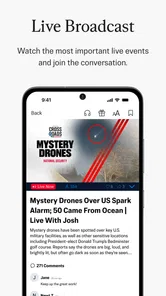
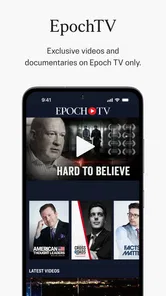
The Epoch Times app is a mobile application that delivers breaking news and in-depth coverage on a wide range of topics, including world events, politics, business, and culture. With its user-friendly interface, the app allows users to easily access articles, videos, and live updates, making it an essential tool for staying informed on current affairs.
Pros
- User-friendly interface for easy navigation.
- Provides real-time news updates.
- Covers a wide range of topics.
- Available in multiple languages.
- Offline reading mode available.
Cons
- Contains ads that may disrupt reading.
- Limited customization options.
- Requires subscription for premium content.
- Notifications can be overwhelming.
- Occasional loading issues.











