The Digital Guardian
- 11.00
- 3.6
- Installs
- 10.00K
- Price
- Free

Screenshots
Analysis by Reviewed
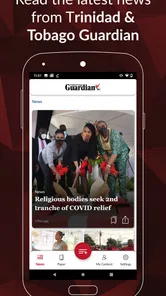
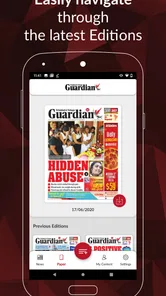
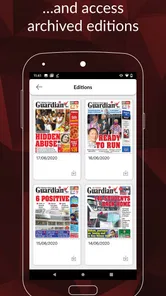
I approached The Digital Guardian as a practical way to keep the Trinidad Guardian close without carrying a printed newspaper. Developed by Guardian Media, this free news and magazines app is aimed at readers who want a mobile version of their familiar newspaper rather than a broad international news feed. That distinction matters: its value comes from focused local reading, not from trying to replace every source of news on a phone.
After spending time with it, I found the experience easiest to appreciate when treated as part of a daily routine. Open it when you have a few quiet minutes, scan the main stories, read the pieces that matter to you, and return later when you want a more deliberate newspaper-style session. It is not the kind of app I would install for constant breaking-news alerts or a huge range of unrelated topics. I would recommend it to someone who already follows the Trinidad Guardian and wants that reading habit to travel.
How the everyday newspaper routine works
The simplest workflow is also the most useful one. I open the app during breakfast, on a commute, or while waiting for an appointment, then decide whether I want a quick scan or a longer reading session. A quick scan helps me identify the stories worth returning to. A longer session works better when I am not trying to multitask, because newspaper reading rewards attention more than rapid tapping between unrelated notifications.
This makes the app different from a general news aggregator. Aggregators are convenient when I want several publishers, international headlines, or algorithmic recommendations in one stream. The Digital Guardian is more purposeful. It keeps the Trinidad Guardian at the center, which can feel calmer and more relevant for readers whose main interest is Trinidad and Tobago news and the newspaper’s own coverage.
One useful habit is to separate discovery from reading. I first look through the available headlines and then choose only a few articles to read properly. That prevents the common problem of opening every story, losing track of what I intended to read, and leaving with only a vague impression of the day’s news. The app works best when I use it as a publication, not as an endless feed.
For example, I might check it before work to understand the major local stories, then return at lunch to read one article in full. In the evening, I can use the same app for a slower look at topics I skipped earlier. This repeatable pattern is more valuable than simply installing it and hoping it will become part of my routine. The app provides access; the reading habit provides the real benefit.
Readers should also set expectations around the format. A digital newspaper can be more convenient than paper, but it does not automatically create the same relaxed feeling as holding a physical edition. On a phone, interruptions are always nearby, and a smaller screen can make extended reading less comfortable. I found that increasing the text size when needed, turning down distractions, and reading in short blocks made the experience easier.
More From Our News Desk

Weather by Xiaomi Review: Clear at a Glance, Less Clear Up Close

X Under Pressure: Can It Recover When Posting Goes Wrong?

Clash of Clans Is Won Between the Battles

Android Auto Makes the Case for Quieter Car Software

MobiOffice: Transforming Mobile Productivity with Seamless Integration

EA SPORTS FC™ Mobile Soccer: Redefining Mobile Sports Gaming
The app is free to install, which lowers the barrier for anyone curious about the digital edition. It carries an Everyone age rating, so it is suitable for a broad audience. There are in-app purchase items ranging from roughly seven dollars to around seventy dollars each, so I would pay attention to any purchase screen and understand what an offered item provides before confirming it. The free entry point is attractive, but readers should still make deliberate choices if paid options appear.
Who gets the most from this focused approach
I think the strongest audience is a Trinidad Guardian reader who wants convenient access away from home. It is also a sensible choice for someone trying to reduce paper clutter while keeping a familiar source in their daily routine. Students, commuters, professionals, and relatives living abroad may each find value in having a local newspaper available on a phone, provided their priority is the Guardian’s coverage rather than a multi-source news dashboard.
The app is less suitable for readers who want a fully personalized stream assembled from many publishers. If I am looking for international technology news, sports coverage from several countries, or instant updates from dozens of sources, a general news app will probably be more efficient. Likewise, people who rarely read newspapers may find a dedicated publication app too narrow compared with a browser or an aggregator.
Its average rating is 3.6 from 255 ratings, with 11 written reviews, so the public response looks mixed rather than universally enthusiastic. I would interpret that as a reason to test the app against your own reading habits instead of assuming it will suit everyone. A focused newspaper app can be excellent for the right reader and still feel limited to someone expecting a broad, highly interactive news service.
Settings and small habits worth checking
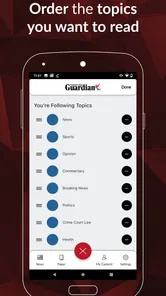
When I evaluate a newspaper app, I do not stop at the first screen. I look for any available reading preferences, account controls, notification choices, and purchase-related screens before settling into regular use. Even when the app’s main purpose is straightforward, these areas affect whether the experience feels controlled or intrusive. If notification options are available, I prefer to keep only the alerts that genuinely help me return to the publication.
A good rule is to avoid allowing every possible reminder simply because it is offered during setup. News is already plentiful, and too many prompts can turn a calm reading routine into background noise. I would begin with the quietest configuration, use the app for several days, and enable more notifications only if I notice that I am missing something useful.
It is also worth checking how the app behaves when you move between short and long reading sessions. If a story is interrupted by a call or another task, I would reopen the app and see whether returning to the same article feels straightforward. That simple test tells me more about practical usability than a polished first impression. A newspaper reader should make it easy to resume, not make me reconstruct what I was doing.
Because this is a mobile reading tool, I would also review the device’s own display and battery settings. A comfortable brightness level, a larger system font when necessary, and a sensible screen timeout can make a noticeable difference during longer sessions. These are not special functions of the app, but they are part of using it well. The best workflow combines the publication’s interface with the phone settings that support your eyes and attention.
The current version is 5.3.0 and the app supports Android 5.0 and later. That broad operating-system requirement makes it accessible on many older Android devices, although the experience can still vary depending on the phone’s screen, speed, and available storage. I would keep the app updated through the normal app-store process, especially if reading stability or compatibility matters to you.
Faster patterns for busy readers
Experienced users usually do not read every available item in order. I find it faster to create a simple three-pass routine. First, scan headlines without opening everything. Second, read the most relevant article completely. Third, return only to pieces that deserve more time. This prevents the app from becoming another place where I collect tabs, unfinished stories, and half-read information.
Another useful pattern is to assign the app a specific moment rather than checking it randomly. A morning check can answer, “What should I know today?” An evening check can answer, “What did I miss?” Those are different goals, and separating them keeps the session short. If I open the app whenever I feel bored, I am more likely to skim without remembering anything.
I would also use a stable place on the phone’s home screen if the app is part of my daily news routine. That sounds minor, but reducing the number of steps between intention and reading helps a habit survive busy days. The point is not to open it constantly; it is to make the planned reading session easy to begin.
For readers who share stories with family or colleagues, I would think about the difference between reading an article and merely passing along a headline. A headline can lack context, while the full article may explain the issue more responsibly. My approach is to read enough to understand the central point before sharing anything. That is especially important with local news, where the details may matter more than the first line.
When comparing it with a browser, I see a trade-off. A browser gives me flexibility: I can search widely, move between publications, and keep the newspaper alongside other sites. The dedicated app offers a more direct route to the Guardian and may feel less cluttered than a browser full of open tabs. I would choose the app for a repeatable publication-centered routine and the browser when research across multiple sources is the priority.
Compared with printed editions, the app wins on portability and the ability to keep the newspaper on a device I already carry. Paper can still be easier on the eyes and more satisfying for uninterrupted reading. Compared with social media, the app offers a more intentional path to news, but it may feel less lively because it is not built around a constantly changing conversation. Each alternative serves a different type of reader.
Where the focused design reaches its limits
The same focus that makes the app useful can also make it feel narrow. If I want several viewpoints on a developing story, I need another source. If I want personalized recommendations based on a wide range of interests, a general aggregator may do more. The Digital Guardian makes sense when the Guardian itself is the destination; it is not the best tool for building a complete news ecosystem from scratch.
I would also avoid treating any single publication app as my entire understanding of current events. A newspaper can provide valuable reporting and local context, but responsible news habits still involve checking important claims and reading beyond one editorial source when the subject is significant. The app can be the center of a local-news routine without being the only place I look.
Paid purchase options are another point where I would slow down. Since individual items can range from about seven dollars to nearly seventy dollars, I would read the wording carefully, confirm whether the purchase is one-time or recurring if that information is shown, and use the platform’s normal purchase protections. I would not assume that installing the free app means every part of the digital newspaper experience is free.
The install base is over ten thousand, which suggests a modest but established audience rather than a mass-market platform. That does not determine quality, but it does reinforce my view that this is a specialized publication app. It is designed for a particular readership and purpose, not for someone searching for the largest possible news community.
There is also a practical attention limit. Reading on a phone can encourage skimming, especially when notifications and other apps compete for attention. I get better results when I silence interruptions and give myself a defined reading window. If I want to study a long article carefully, I may prefer a larger screen or printed copy. The app is convenient, but convenience does not remove the need for a comfortable reading setup.
My verdict after building a repeatable routine
My overall impression is positive for the reader it is actually designed to serve. The Digital Guardian gives Trinidad Guardian readers a convenient mobile route to their newspaper, and its free installation makes trying that routine simple. Guardian Media has kept the purpose clear: this is a dedicated news and magazines app, not a noisy attempt to cover every possible information need.
I would recommend it to a friend who regularly reads the Trinidad Guardian, wants local coverage close at hand, and is comfortable making a newspaper app part of a planned daily habit. I would suggest starting with a short morning scan, checking notification and purchase settings carefully, and returning later for the stories that deserve full attention. That approach makes the app feel useful without turning it into another source of constant interruption.
I would steer a friend toward a browser or broader news app if their main goal is comparing many publications, following international developments, or receiving highly personalized feeds. I would also mention the possible cost of individual in-app purchase items before they commit to a digital reading plan. Those are not reasons to dismiss the app; they are reasons to match it with the right expectations.
For me, the deciding question is simple: do you want the Trinidad Guardian specifically, or do you want news in general? If the answer is the Guardian, this app is a practical companion that can replace the need to search for the publication each time. Its real strength is consistency: one focused source, one repeatable reading habit, and less friction between wanting local news and actually reading it.
The Digital Guardian Frequently Asked Questions
Is The Digital Guardian a newspaper app?
The Digital Guardian is a News & Magazines app from Guardian Media, described as “Your Trinidad Guardian Newspaper on the move with you.” It is intended to bring the Trinidad Guardian newspaper to your mobile device. The app is free to download, and its content rating is Everyone. Its current version is 5.3.0, and it requires Android 5.0 or later.
What is The Digital Guardian and what does it do?
The Digital Guardian is generally presented as a digital safety and monitoring application designed to help users manage online activity, protect personal information, and maintain greater control over connected devices. Depending on the version and platform, its tools may include security alerts, activity monitoring, privacy guidance, and parental or family-oriented controls. Before downloading, review the official listing carefully because available features can vary by country, device, subscription, and account type.
Is The Digital Guardian free to download and use?
The Digital Guardian may be available to download without an upfront charge, but some functions can require a paid plan, subscription, or in-app purchase. Users should check the current pricing information on Google Play or the App Store before creating an account. It is also important to review the trial period, renewal terms, cancellation procedure, and whether advanced monitoring or protection tools are restricted to premium users.
What permissions does The Digital Guardian require?
A security or monitoring app such as The Digital Guardian may request access to notifications, device usage information, location, contacts, storage, or accessibility features, depending on the tools you enable. These permissions can be necessary for alerts and supervision, but they also involve sensitive data. Installers should read each permission prompt, enable only what is needed, and check the privacy policy to understand how collected information is stored and shared.
Can The Digital Guardian monitor another person’s phone?
The Digital Guardian may include supervision features intended for parents, families, or organization-managed devices, but monitoring should always follow applicable laws and the platform’s terms of service. It should not be used to secretly track an adult or access private communications without proper authorization. Before installing it on another device, confirm that consent, account ownership, notification requirements, and local privacy regulations are respected.
Pros
- Monitors device activity to help identify unusual behavior.
- Provides alerts that can support safer browsing habits.
- Useful for parents managing children’s digital activity.
- Can help detect potentially risky apps or online interactions.
- Offers an extra layer of awareness alongside built-in security tools.
Cons
- May require extensive permissions to monitor activity effectively.
- Constant monitoring can raise privacy concerns for some users.
- Alerts may occasionally be inaccurate or overly cautious.
- Some features may depend on a subscription or premium plan.
- Background monitoring can affect battery life on older devices.











