

Tekmetric Mobile
- 44.00
- 3.1
- Installs
- 10.00K
- Price
- Free
Screenshots
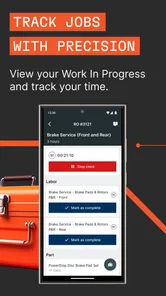
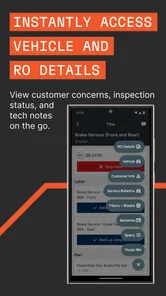
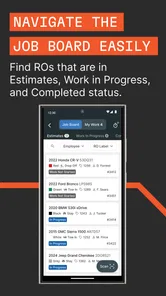
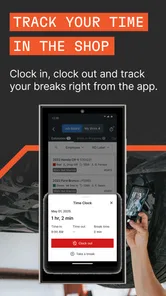
Analysis by Reviewed
I found Tekmetric Mobile most useful when I treated it as a shop-floor companion rather than a complete replacement for a desktop repair-management system. It is an Auto & Vehicles app from Tekmetric, built around the moments when a technician or service adviser is away from the front counter: greeting someone, opening a repair order, checking a vehicle, and keeping work moving from a phone.
That focus makes the app easy to understand, but it also sets a clear boundary. This is not the kind of mobile tool I would choose simply because I want a general car-maintenance notebook or a personal expense tracker. Its value depends on whether your daily work already fits the workflow Tekmetric Mobile is designed to support. If it does, the phone becomes a practical extension of the shop. If it does not, the app may feel too specialized to justify changing your routine.
Where the app fits in a real repair-shop day
The first thing I noticed is that the app is organized around actions, not around browsing information. The useful question is not “What can I read here?” but “What customer or vehicle task can I complete without returning to a computer?” That distinction matters in a busy garage, where a service adviser may be standing beside a customer’s vehicle or a technician may need to record inspection work away from the reception desk.
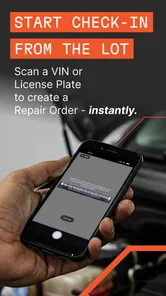
A realistic example is a customer arriving while the front counter is already occupied. Instead of asking the customer to wait while someone walks back to a workstation, a staff member can use the phone to greet the customer and begin the repair-order process. The benefit is not flashy; it is the removal of a small delay at exactly the point where delays create queues and make a shop feel disorganized.
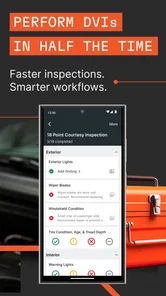
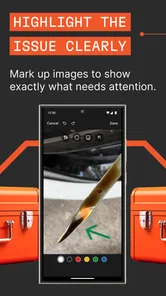
The inspection workflow is another important part of the app’s identity. A phone is naturally suited to moving around a vehicle, checking items, and entering findings close to the work being performed. I would rather use a mobile screen beside the car than write notes on paper and re-enter them later, provided the shop’s process is already set up around Tekmetric.
That last condition is important. Mobile entry can reduce duplicate work, but only when everyone follows the same process. If one person records findings in the app, another keeps separate handwritten notes, and a third updates the main system later, the phone does not solve the workflow problem. It simply adds another place where information can sit.
What the phone-first approach does well
Tekmetric Mobile’s strongest idea is bringing a few high-value shop actions closer to the vehicle and the customer. Starting a repair order from a phone can help a service adviser capture the visit at the moment it begins. Performing inspections from the same general workflow can also make the transition from intake to diagnosis feel more direct.
More From Our News Desk

 Gmail
GmailGmail in a Busy Inbox: Who Benefits Most?
From first account to crowded workday, Gmail earns its place through dependable search and flexible sorting—but its best fit depends on how much inbox maintenance you can tolerate.

 Prime Video
Switching to Prime Video: What Changes in Your Viewing Routine
Prime Video can make a compelling second home for streaming, but switching means learning a different catalog, rental layer, and route from browsing to playback.

 Universal TV Remote Control
Universal TV Remote Control Works Best as a Reliable Backup
A phone remote earns its place through quick setup and reliable habits. Here is how to get more from Universal TV Remote Control—and where its limits show.

 Weather - By Xiaomi
Weather by Xiaomi Review: Clear at a Glance, Less Clear Up Close
Xiaomi’s weather app makes everyday forecasts quick to scan, but its calm surface can leave useful details and recovery paths harder to find than they should be.

 X
XX Under Pressure: Can It Recover When Posting Goes Wrong?
A resilience-focused review of X, examining setup, mistaken posts, interruptions, weak connections, and the gaps that matter when recovery needs to be dependable.

 Clash of Clans
Clash of Clans Is Won Between the Battles
Its raids are quick; its community is a long-term project of coordination, teaching, rivalry, and shared responsibility—with all the friction that entails.
Latest News



I especially like the practical separation between front-counter work and vehicle-side work. A desktop is usually better for long forms, broad overviews, and administrative review. A phone is better when the user is standing, moving, or speaking with someone. The app makes sense when it handles the second situation without forcing the user to abandon the first.
There is also a communication benefit, even without treating the app as a messaging product. When information is entered during the inspection rather than reconstructed later, the service adviser has a fresher record of what happened. That can make internal handoffs easier and reduce the familiar problem of trying to remember which observation belonged to which vehicle.
My practical tip is to decide in advance which parts of the intake and inspection process belong on the phone. Do not ask every employee to improvise. A short shop procedure—who starts the order, who performs the inspection, and when the information is reviewed—will usually deliver more value than simply installing the app on every device.
Why the app is not just a generic vehicle utility
Someone looking for a personal app to track oil changes, compare fuel costs, or store service reminders should not assume this is the right category. Tekmetric Mobile is aimed at professional automotive operations. Its usefulness comes from connecting shop activities, not from giving an individual driver a private maintenance diary.
That distinction also separates it from simple inspection checklists. A checklist app may be faster to adapt for a one-off process, especially if a business wants total control over fields and labels. Tekmetric Mobile is more compelling when the shop wants mobile actions to belong to a broader repair-order workflow rather than remain isolated notes on a phone.
Compared with paper, the main trade-off is obvious: the app can reduce later transcription, but it requires a charged, usable phone and staff who are comfortable entering information digitally. Compared with a desktop-only setup, it offers more mobility, but the smaller screen may be less comfortable for detailed review or correcting a long sequence of entries.
Cost, practical value, and the limits of the free download
The app is free to download, which makes trying it less risky than committing to a paid mobile utility. That is the clearest cost fact I can attach to it: there is no purchase price presented for access to the app itself. I would still separate “free to download” from “free to operate in every business context,” because a shop’s broader software arrangement, training time, devices, and staff procedures can all affect the real cost of adoption.
In other words, the free price helps with evaluation, not with every possible business expense. A small shop can install it and test whether phone-based intake or inspections fit naturally into its day. The bigger question is whether the workflow saves enough time and re-entry effort to become worthwhile for the people using it.
The current release is version 1.40.0, and the app is available for devices running Android 7.0 or later. Those details make it accessible to many older Android phones, which may matter to a shop that does not want to replace working hardware simply to test a mobile workflow. I would still test the actual phones used by staff before making the app part of a critical process.
The public response is mixed rather than universally enthusiastic. It carries a 3.1 average from roughly seventy ratings, with about forty written reviews, and has passed ten thousand installs. I do not treat those figures as a final verdict, but they are a useful reminder to test the app in your own environment instead of assuming that the store page tells the whole story.
One sensible evaluation method is to run a limited trial during ordinary work, not during an unusually quiet day. Have one person use the phone for customer arrival and repair-order initiation, while another uses it for inspections. Then compare the handoff: Was information easier to find? Did anyone have to enter the same detail twice? Did the phone slow down a task that would have been simpler at the counter?
This kind of trial reveals value more accurately than the download price. If the app prevents repeated trips to a workstation and keeps vehicle-side findings connected to the right repair order, free access can be genuinely useful. If staff still prefer paper and someone must retype everything later, the apparent saving may disappear.
Small workflow choices that make a difference
One non-obvious advantage of a mobile repair workflow is timing. Entering a finding while looking at the vehicle can preserve context that is easy to lose after several inspections. My advice is to complete the record as close as possible to the observation, rather than treating the phone as a place to dump vague reminders for later.
A second useful practice is to use the app at the handoff points, not necessarily for every administrative task. For example, the phone can be most valuable when the customer arrives, when an order needs to be started, and when an inspection is being performed. Longer review or cleanup may still be more comfortable on a larger screen. Trying to force every step onto the phone can create unnecessary friction.
A third trade-off concerns standardization. Mobile inspections work best when the shop has agreed on what counts as a complete entry. Without that agreement, two employees may use the same tool but produce records with very different levels of detail. The app can make collection faster; it cannot decide the shop’s quality standard for the team.
These points are easy to overlook because the basic appeal is simply “work from your phone.” In practice, the phone is only the visible part of the change. The real improvement comes from deciding when mobile entry is authoritative, who checks it, and how the next person uses the information.
Where I felt the friction
The smaller display is the most predictable limitation. A phone is convenient beside a vehicle, but convenience does not mean it is the best screen for every task. Reviewing a complicated repair order, comparing many details, or correcting several entries may feel cramped compared with a desktop environment. I would use the mobile app for movement and capture, then reserve larger-screen review for work that demands more visual space.
There is also a learning curve that comes from changing habits rather than from the app alone. A technician who is used to paper may need time to become comfortable entering findings while moving around a vehicle. A service adviser may need to learn when to start the order and when to leave a more detailed review for later. The first few uses should be treated as process training, not as a fair measure of the final benefit.
Another limitation is suitability. If your business does not use Tekmetric as part of its repair-order process, the app’s specialized purpose becomes much less attractive. A general form builder or checklist may be a better choice for a mobile inspection process that needs to stand alone. Likewise, a personal driver will likely get more value from an app designed around private maintenance records.
I would also avoid making the app the only way to keep work moving until the team has tested its routine. Phones can be misplaced, unavailable, or awkward for certain entries. A sensible shop should know how staff will handle a customer arrival or inspection when the preferred mobile device cannot be used. That is not an argument against the app; it is a reminder that convenience tools should support operations rather than become a single point of failure.
Who should use it and who should look elsewhere
Tekmetric Mobile is a strong candidate for automotive repair shops that want service advisers and technicians to work closer to the vehicle. It is particularly relevant when the business loses time walking between the front counter and the work area, or when handwritten inspection notes must later be entered into a repair-order system.
It may also suit a shop that wants a more consistent intake routine. Starting the repair order from the phone can give the first interaction a defined place in the workflow, while mobile inspections can help keep the vehicle’s findings connected to the ongoing job. The best fit is a team willing to agree on procedures rather than simply handing everyone an installation and hoping habits change.
Independent shops should consider the human side of adoption. If one person handles intake, inspections, and customer communication, a mobile tool can reduce back-and-forth movement. But if that person is already overloaded, adding a new digital step without simplifying anything else may feel like extra work. In that situation, a short, focused use of the app is more realistic than trying to digitize the entire operation immediately.
I would skip it for a private car owner who only wants reminders and maintenance history. I would also be cautious if your shop needs a completely standalone inspection form with custom workflows unrelated to Tekmetric. In those cases, the app’s narrow professional focus may be a disadvantage rather than a benefit.
For a shop comparing it with a desktop-only approach, the decision is less about choosing one or the other. The phone is strongest for arrival, movement, and inspection capture; the desktop remains more comfortable for broad review and administration. For a shop comparing it with paper, the question is whether reducing re-entry and improving timing is worth training the team to use a device consistently.
What I would check before making it routine
Before rolling it out widely, I would choose one ordinary vehicle visit and follow it from customer arrival through inspection handoff. Watch for three specific things: whether the order begins at the right moment, whether findings are recorded with enough context to help the next person, and whether anyone has to duplicate the same information elsewhere.
I would also ask staff which tasks feel faster and which feel slower. A mobile process can be a clear win for walking and capture but a poor fit for detailed correction. That is fine if the shop assigns each task to the screen that handles it best. The mistake would be judging the app as a total replacement for every other working method.
Finally, I would check the device situation before relying on it. Because the app supports Android 7.0 and newer, older phones may be eligible, but eligibility alone does not guarantee that a particular device feels comfortable during a full shift. Screen size, battery condition, and how easily the phone can be handled around a vehicle are practical considerations that deserve a real trial.
My verdict on the free mobile workflow
I see Tekmetric Mobile as a focused tool with a sensible purpose: bringing key repair-shop actions out from behind the counter. Its best value appears when the team needs to greet customers, begin repair orders, and perform inspections while staying near the vehicle. In that setting, the free download makes experimentation straightforward, and the app can help reduce the gap between what happens in the shop and what eventually gets recorded.
My recommendation is conditional but positive for the right audience. If you already work within the Tekmetric environment and want a phone-based extension for customer intake and inspections, it is worth testing during a normal workday. Build a simple procedure around it, use the phone for the tasks it handles naturally, and keep larger-screen review available for more demanding work.
I would not recommend installing it blindly for a personal vehicle, a standalone checklist project, or a shop that has no plan for changing its paper and desktop habits. The app is not valuable merely because it is free. It is valuable when mobile access removes a real bottleneck. For a professional repair team with that bottleneck, the strongest reason to try Tekmetric Mobile is practical workflow value, not novelty.
Tekmetric lists the app for Everyone, and its release date was October 1, 2024. Those details make it approachable as a general mobile business tool, but the actual audience remains automotive professionals. My final view is simple: test it with one clearly defined intake-and-inspection process, measure whether the handoff improves, and keep it only if the phone genuinely saves steps for the people doing the work.
Tekmetric Mobile Frequently Asked Questions
Is Tekmetric Mobile free to download?
Tekmetric Mobile is free to download. However, it is designed to work with a repair shop’s Tekmetric management system, so downloading the app by itself does not give you access to shop features. If you work at a shop, check with its administrator about account access and permissions before relying on the app for daily tasks.
What devices and operating systems can run Tekmetric Mobile?
The app is available for Android devices running version 7.0 or later. Before downloading, check the operating system version on your phone and make sure it meets that requirement. Tekmetric Mobile is intended for use on a mobile device, with access to shop tasks such as greeting customers, starting repair orders, and performing inspections.
Who develops Tekmetric Mobile, and who is it intended for?
Tekmetric Mobile is developed by Tekmetric and is intended for automotive repair businesses using the Tekmetric shop management platform. It is aimed at shop owners, managers, and technicians who need mobile access to work-related information, rather than individual drivers looking for a car-maintenance or repair-tracking app. The app’s usefulness depends on having an account and the appropriate shop permissions.
What is Tekmetric Mobile used for?
Tekmetric Mobile is designed to help automotive repair shop owners, managers, and technicians stay connected with shop operations from a mobile device. Depending on the user’s permissions, it can provide access to repair orders, vehicle and customer information, inspections, appointments, estimates, and workflow updates. It is mainly a companion to the Tekmetric shop management platform rather than a standalone app for individual car owners.
Do I need a Tekmetric account to use Tekmetric Mobile?
Yes, Tekmetric Mobile is intended for businesses already using Tekmetric’s automotive shop management system. You generally need valid login credentials connected to an active shop account, and your administrator may need to enable mobile access or assign the correct permissions. Downloading the app alone does not provide access to its features, so prospective users should confirm that their repair shop has a compatible Tekmetric subscription.
Pros
- Quick access to shop performance and key metrics on mobile.
- Helps owners monitor operations without staying at a desktop.
- Useful for checking appointments
- repair orders
- and customer activity.
- Cloud-based data keeps information available across supported devices.
- Clean dashboard makes important business updates easy to scan.
Cons
- Requires a Tekmetric account and active shop-management subscription.
- Some features may be limited compared with the full web platform.
- Mobile insights depend on accurate data entered by shop staff.
- Internet access is needed for reliable synchronization and updates.
- Not designed for consumers looking for vehicle repair tracking tools.











