Techgenyz: Tech News & Updates
- 3.00
- 3.2
- Installs
- 10.00K
- Price
- Free

Screenshots
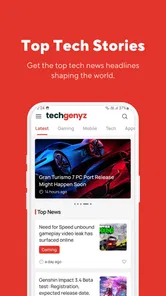

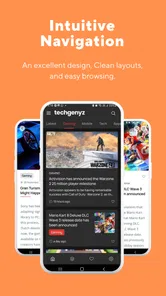
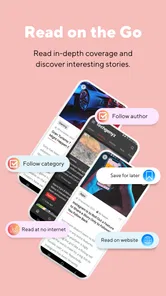
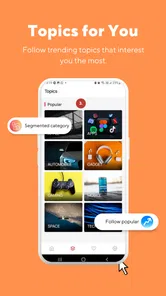


Analysis by Reviewed
I usually open a technology news app for one simple reason: I want to understand what matters without spending the whole morning moving between websites, social feeds, and notifications. Techgenyz takes that role as a compact Android news and magazines app focused on technology headlines, gadgets, gaming, applications, and related updates. I found it most useful as a quick starting point rather than a complete replacement for every source I already follow.
The app comes from Abhinava Innovations and is free to use. It is aimed at an Everyone audience, so its general presentation is approachable for casual readers as well as people who regularly track the technology world. Its current version is 3.0.4, and it works on Android 7.0 or later. Those details matter if you are using an older phone and want to avoid installing an app that requires a newer system.
From a spare moment to a useful technology briefing
I use a technology news app most when a small gap in the day opens up: waiting for a ride, taking a break, or checking the morning headlines before work. This section looks at how Techgenyz can turn that spare moment into a focused scan, while keeping the next step—whether to read more or move on—firmly in your hands.
Starting with a clear reading need
The best way to use Techgenyz is to begin with a specific question. I might want to know what is happening in mobile technology, see whether a new gadget deserves attention, catch up on gaming news, or browse application-related stories during a short break. That starting point keeps the experience focused. If I open it without any purpose, the broad mix of subjects can feel less organized than a dedicated source built around one topic.
Its coverage makes sense for readers who want several technology areas in one place. A person interested in phones may also enjoy gaming updates, app discoveries, or general industry headlines. I like that this combination can reduce the need to maintain several separate news apps. At the same time, readers who only want one narrow subject may find the wider selection distracting.
The app has a modest public footprint, with over ten thousand installs and an average rating of 3.2 from around two hundred ratings. I would not treat that rating as a final verdict, but it does suggest setting realistic expectations. This is better approached as a lightweight news companion than as a highly polished, all-purpose newsroom product.
Moving from the feed to a story
My normal workflow is straightforward: open the app, scan the available headlines, choose one that matches my immediate interest, and decide whether it is worth reading in full. The headline is the first handoff between the app and me. It needs to explain enough for me to judge relevance without forcing me to open every item.
More From Our News Desk

Weather by Xiaomi Review: Clear at a Glance, Less Clear Up Close

X Under Pressure: Can It Recover When Posting Goes Wrong?

Clash of Clans Is Won Between the Battles

Android Auto Makes the Case for Quieter Car Software

MobiOffice: Transforming Mobile Productivity with Seamless Integration

EA SPORTS FC™ Mobile Soccer: Redefining Mobile Sports Gaming
That workflow is especially practical when I have only a few minutes. For example, before leaving for work, I can check the technology section for a quick sense of the day’s topics. I do not need to prepare a reading list in advance. The app’s value in that moment is not deep investigation; it is helping me identify which subjects deserve more attention later.
I also find it useful after seeing a technology claim elsewhere. If a post in a social feed mentions a new application or device, I can use a broader news app such as this one as a second stop before accepting the claim. It is not a substitute for checking original announcements or specialist reporting, but it can help me move from a vague headline to a more informed search.
How the categories affect the handoff
The transition from a general feed to a specific subject is where the app’s broad identity becomes both helpful and limiting. Gadget readers can move naturally toward hardware stories, while gamers can look for gaming-related coverage. People who follow applications may prefer the app-focused material. The handoff is easy to understand conceptually, but a mixed technology feed still requires some personal filtering.
My practical tip is to treat the first screen as a triage area. I quickly separate items into three mental groups: something I want to read now, something I may return to, and something irrelevant to me. That habit prevents the variety of topics from turning a short visit into unfocused scrolling. It also makes the app more useful for readers who do not want to follow every technology trend.
A second useful approach is to read the headline and opening context before sharing anything. Technology stories can change meaning when a short title leaves out an important qualification. Techgenyz works best as the first handoff in a research chain: it brings a topic to my attention, then I decide whether to continue with a specialist publication, an official product page, or a longer analysis.
Passing information from the app to the next step
The real outcome of a news app is not simply that I opened it. The outcome is that I leave with a clearer decision: read more, ignore the subject, save the idea mentally, or discuss it with someone else. In that sense, Techgenyz can function as a discovery layer. It helps me notice subjects that might otherwise pass by.
For a student, that could mean finding a technology topic to investigate for a project. For someone choosing a phone or application, it could provide an initial overview before comparing products more carefully. For a casual reader, the result may simply be a short daily briefing. The app does not need to answer every question to be useful, provided I understand that its role is discovery and orientation.
I would still verify important decisions elsewhere. A headline about a device is not enough to judge battery life, support, accessibility, or long-term reliability. Likewise, an application article should not replace checking the app’s current permissions, compatibility, or privacy information. Techgenyz can point me toward those questions, but I would not use it as the only source for a purchase or security-sensitive choice.
Speed, busy sessions, and recovery
For this kind of app, I judge speed less by a benchmark and more by how quickly I can get from opening it to a useful headline. A brief scan is the natural use case, so unnecessary waiting would undermine its main appeal. I would keep expectations practical: this is a reading destination, not a tool whose value depends on elaborate real-time analysis.
Busy moments reveal whether a broad feed is genuinely convenient. If I have a few minutes between errands, I can look for one relevant story and leave; if I have more time, I can follow a topic into other sources. I would avoid opening it while expecting to monitor every development across technology, gaming, and gadgets. That kind of heavy use calls for a more deliberate source mix, not simply a longer scroll.
For reliability, I care about being able to resume a sensible routine if a reading session is interrupted: return later, scan again, and decide what still matters. I would not make the app my sole record of stories I need to follow. For work or study, keeping the key headline or question in a separate note is a safer workflow than assuming a feed will serve as a permanent research archive.
Where the reading flow breaks
The main friction comes from the difference between a quick news reader and a complete research tool. A broad technology app can introduce many subjects, but it may not provide the depth, context, or specialist comparison that a dedicated publication offers. If I need detailed hardware testing, rigorous game coverage, or a complete explanation of a complex industry change, I would move to a more focused source.
Another limitation is that a lower average rating means the experience may not satisfy everyone equally. I would pay attention to how the app behaves on my own phone rather than assuming that every reader will have the same impression. Older Android users should also check compatibility before planning to install it, since the minimum requirement is Android 7.0.
The app’s free price makes experimentation easy, but free access does not automatically make it the right fit. Someone who wants carefully curated newsletters, advanced reading controls, or a very specialized editorial voice may prefer another news service. A reader who dislikes mixed-topic feeds may also be happier with a dedicated gadget, gaming, or application publication.
Who will get the most from it
I would recommend Techgenyz to readers who want a simple way to browse several technology subjects without committing to a large subscription-based news routine. It is particularly suitable for people who check news in short sessions and enjoy moving between gadgets, gaming, applications, and general technology headlines.
It also makes sense for someone building a technology-reading habit. Instead of following dozens of sources immediately, a reader can begin with a single place for discovery and then add more specialized sources only when a subject becomes important. That staged workflow is less overwhelming and helps separate casual interest from topics that deserve deeper research.
I would be more cautious about recommending it to professionals who need dependable, highly specialized coverage throughout the day. Developers, security researchers, investors, and purchasing teams usually need stronger source comparison and more detailed reporting than a general news app is designed to provide. For those users, Techgenyz may still be a useful lead generator, but not the final destination.
Everyday tips for getting better results
My first tip is to open it with a time limit. A short visit works well because the app is strongest at helping me scan and choose. If I expect a full research session from it, I am more likely to notice the limits of a general news format.
Second, use it to create questions rather than conclusions. When a story catches my attention, I ask what information is still missing: the affected devices, the actual release status, the developer involved, or the practical impact on users. This turns passive scrolling into a useful handoff toward better research.
Third, separate news discovery from advice. An article about a gadget can tell me that the product is worth investigating, but my final choice should also consider compatibility, cost, support, and personal needs. That distinction is important because technology headlines are designed to attract attention, while a purchase requires a slower evaluation.
Finally, I would avoid treating every headline as equally urgent. The mix of categories can make several items look important at once. Choosing one or two stories and leaving the rest for another visit keeps the app from becoming another source of information overload.
How it fits beside other news sources
Compared with following separate technology, gaming, and gadget publications, a mixed app is convenient when I want breadth without planning which source to open. The trade-off is that a specialist outlet usually gives a subject more room and a clearer editorial focus. I see Techgenyz as the quick first stop, then use a dedicated publication when an item affects a decision or deserves close attention.
It also differs from social feeds, where a headline can arrive surrounded by reactions and unrelated posts. A news app offers a more direct reading intention, but I still need to evaluate the story rather than treating its appearance in a technology feed as proof. My useful habit is to note the claim, then check whether a primary source or independent specialist can answer the question that matters to me.
Device fit and practical expectations
Android 7.0 or later gives older-device owners a clear compatibility threshold to check before installing. Beyond that, I would judge the fit on the phone I actually use: whether a short reading session feels comfortable and whether the app is convenient enough to keep in my routine. I would not assume that a broad news feed needs heavy resources, but I also would not promise a particular battery, data, or memory impact without testing it on a specific device.
If you read mostly on an older or storage-constrained phone, a sensible first test is a short session rather than making the app a constant background habit. Notice whether opening a few stories feels comfortable for your device and connection, then decide whether it earns a place beside your existing sources. This is more useful than judging it by a single headline or expecting it to replace every site you visit.
My final view after following the workflow
Techgenyz is a free Android app for people who want technology news in a broad, accessible package. Its strongest point is the handoff from spare time to topic discovery: I can open it with a general interest, scan across gadgets, gaming, applications, and headlines, then decide what deserves deeper attention.
Its weaknesses are just as clear. The broad scope is not ideal for readers who want a tightly curated specialist publication, and the public rating of 3.2 suggests that expectations should remain measured. I would not rely on it alone for detailed buying advice, technical verification, or professional monitoring.
Still, I think it has a reasonable place in a personal news routine. If you want a lightweight way to notice technology stories and then choose your next step, it is worth trying, especially because it is free and supports Android 7.0 and newer. My recommendation is to use it as a starting point, not as the entire journey. That framing matches what it does best and makes its limitations much easier to live with.
Techgenyz: Tech News & Updates Frequently Asked Questions
Is Techgenyz compatible with my Android device?
Techgenyz is an Android app, and its minimum operating-system requirement is Android 7.0. Before downloading, check your device’s Android version and make sure you have enough room for another app. Compatibility can also depend on your device and the version currently available to you, so reviewing the download page on your device is a sensible final check.
Who publishes Techgenyz, and is it an established app?
Techgenyz is published by Abhinava Innovations and is listed in the News & Magazines category. It has been available since July 10, 2017, and has passed 10,000 installs. Those details offer a little context about its history and reach, though they are not a substitute for deciding whether its coverage and reading experience suit your own interests.
What is Techgenyz: Tech News & Updates?
Techgenyz is a technology news and information app designed to keep readers updated on subjects such as smartphones, artificial intelligence, software, gadgets, cybersecurity, apps, and emerging digital trends. Its articles are generally presented in a magazine-style format, making it useful for users who want to browse technology stories in one place rather than checking several websites throughout the day.
What type of content can I read in Techgenyz?
The app covers a broad selection of technology-related topics, including product news, app recommendations, how-to guides, reviews, business developments, internet trends, and updates from the wider tech industry. The exact stories available may change frequently, so the experience depends on the publication schedule and the topics currently receiving attention from the Techgenyz editorial team.
Is Techgenyz free to download and use?
Techgenyz is free to download, so there is no upfront purchase required to install it. The app’s price does not necessarily settle every question about the reading experience, so check the download page for current details about advertising or optional features before proceeding. Reading individual articles may also require an internet connection.
Pros
- Covers emerging technology
- startups
- gadgets
- and digital trends in one place.
- Short updates make it easy to catch up during brief reading sessions.
- Useful for readers who want technology news beyond mainstream headlines.
- Clean category structure helps users find topics of personal interest.
- Regular content can keep tech enthusiasts informed about fast-moving developments.
Cons
- Some articles may feel brief when a topic requires deeper technical explanation.
- Coverage quality can vary depending on the news category or source.
- Frequent updates may make older stories harder to locate quickly.
- Readers may encounter promotional content alongside editorial articles.
- Not every story will include expert commentary
- testing
- or independent verification.











