TeamSnap: manage youth sports
- 7.47K
- 3.2
- Installs
- 5.00M
- Price
- Free

Screenshots





Analysis by Reviewed
When I first join a youth team, the hardest part is rarely finding a place to put a game on the calendar. It is keeping the time, location, attendance, messages, and family logistics straight when plans change. TeamSnap gives a team one shared place to handle much of that coordination. I find it most useful when coaches and families agree to use it consistently, rather than treating it as one more place to check after decisions have already been made elsewhere.
A team hub, not a cure for every mix-up
I think of this Sports app as a shared place for the details that otherwise scatter across group chats, email threads, calendars, and payment reminders. TeamSnap is made by TeamSnap, Inc., and its focus is practical: help a team keep its plans and communication together. It is free to install, rated for Everyone, and has an average rating of 3.2 from around 30,000 ratings, so I would approach it as a useful organizer rather than assume every family will love every part of it. More than five million installs show that it is familiar to many sports households, but fit still depends on how your team prefers to communicate.
The app has been available since February 13, 2012, and version 7.52.0 is the current version. It supports devices running Android 8.0 or later, while purchases inside the app range from $1.99 to $49.99 per item. That does not mean every team needs to buy anything: I would first find out how your coach plans to use it and whether the features your family needs are available without an extra purchase. That quick check can prevent confusion later, especially if different families assume the app covers the same things for everyone.
Who gets the most from a shared team space
I would recommend it most to a coach or team parent who is tired of answering the same questions about where to meet, who can attend, or whether a practice changed. It can also suit a family coordinating more than one team, provided everyone is willing to use a shared team space. I would be less enthusiastic for someone who only wants a personal sports calendar or whose team already has a reliable routine and does not want another app to check.
The key trade-off is that an organizer only helps if the people involved keep it current. For a team that regularly changes plans or needs to collect attendance, a shared space can reduce scattered follow-ups. For a small group that already has one dependable chat and a simple calendar, moving every conversation may create more friction than it removes. I would ask the coach what the team expects families to use before inviting everyone to change their habits.
Getting Started with TeamSnap
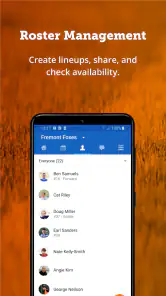
First off, setting up TeamSnap is a breeze. Download it from the app store, and within minutes, you can start setting up your team. The user interface is intuitive, making it easy even for those of us who aren't exactly tech-savvy. You can add all the team members, coaches, and parents with just a few clicks. The app allows you to manage multiple teams, which is a bonus if you're involved in more than one sport.
Make setup useful, not just complete
When you join, I would start by checking the team name, your player’s profile, and which family members need access. Then look at the next event and confirm that its time and location make sense. This is more useful than spending your first session exploring every screen: one accurate event gives you an immediate test of whether you can find the information you came for. If you are a coach creating a team, invite people only after the basic details are clear, so the first notification they receive is something they can act on.
You May Like

Clash of Clans Is Won Between the Battles

Android Auto Makes the Case for Quieter Car Software

MobiOffice: Transforming Mobile Productivity with Seamless Integration

EA SPORTS FC™ Mobile Soccer: Redefining Mobile Sports Gaming

How Microsoft OneDrive Became a Mobile Productivity Giant

How Google Translate Breaks Language Barriers Effortlessly
A small but helpful habit is to decide which channel is the source of truth. If the coach posts a change in TeamSnap, parents should avoid repeating it in several separate chats unless someone genuinely needs a direct reminder. Otherwise, the same team can end up with conflicting versions of a schedule. For families with more than one player or sport, take a moment to check which team you are viewing before responding; that simple pause is especially useful on a busy evening when two teams have events close together.
Get a useful result before exploring everything
For a first meaningful success, I would use the schedule to plan one ordinary week: check the next practice, note the location, and make sure it appears where you normally check your calendar. That is a practical test of the app’s value, because it shows whether team details can fit into your existing routine. Calendar syncing is handy, but it also means you may see the same event in two places; if that feels cluttered, decide which calendar view you prefer to rely on instead of treating every notification as a new task.
My everyday test would be a rainy afternoon before practice: open the team schedule, check whether the event has changed, confirm the player’s availability, and read the latest team message before setting off. If the key details are easy to find, the app has earned a place in the routine. If you repeatedly have to ask the coach to repost information because people are not checking the same channel, the team may need a communication agreement more than another feature.
Features That Stand Out
One of the standout features of TeamSnap is its schedule organization. You can easily sync your game schedules, practices, and even team events. The best part? It integrates with your calendar, so you never miss a game or practice. The app sends out automatic reminders to all team members, ensuring everyone is on the same page.
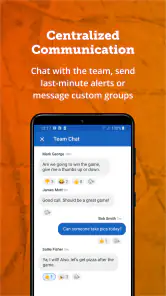
Another great feature is the communication tool. Whether you need to send a quick message to a single parent or broadcast an update to the entire team, TeamSnap has got you covered. You can send emails, push notifications, and even text messages directly through the app. No more juggling between different platforms to keep everyone informed.
When plans change, and when messages get missed
For those last-minute changes, like a sudden rainout or a change in venue, the real-time updates feature is a godsend. You can update everyone in seconds, saving you the headache of making countless phone calls. And let's not forget the tracking capabilities. Keeping track of player availability is simple, as players can update their status for each event. This feature alone can save coaches hours of follow-up.
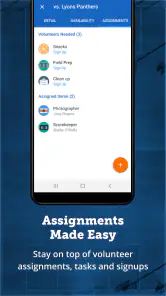
Availability is most useful when families treat it as a small team habit, not a one-time setup task. If a player cannot attend, updating the event early gives the coach a clearer picture before practice or a game; marking attendance only at the last moment reduces that benefit. Parents should also check that they have selected the right event before responding, particularly when the calendar is busy. For a coach, the trade-off is straightforward: the app can make replies easier to collect, but it still depends on people actually opening it and keeping their status current.
One common point of confusion is expecting every message to reach every person in exactly the same way. A notification can be overlooked, and families may have different preferences for email, app alerts, or text. I would agree with the team on where urgent changes will be posted and ask members to check that channel before leaving home. For ordinary updates, the built-in communication is more organized than a long group chat; for a tiny informal team that already coordinates happily in one chat, switching everyone over may feel like extra work rather than an improvement.
Money, boundaries, and the right fit
Financial management is another area where TeamSnap excels. Collecting fees, managing budgets, and tracking expenses can be done directly through the app. It's a relief not to have to chase after checks or deal with cash transactions. Everything is digital, and the app provides clear records at a glance.
I would still agree on the team’s money process before relying on an app record as the only record. Coaches and families should know who is responsible for entering payments and how they will handle a question about a fee. In-app purchases are available, so I would check what is included for your particular team before assuming a paid option is necessary. If your group only needs to share dates and a few messages, a regular calendar and chat may be simpler; if it needs attendance, team-wide updates, and fee organization in one place, the extra structure can be worth learning.
Choosing between TeamSnap and familiar alternatives
Compared with a basic calendar, TeamSnap is more team-oriented: event details sit alongside communication and attendance rather than being just an appointment. A calendar may be the better choice if one parent only needs to keep dates visible, or if the team does not need to gather replies. Compared with a group chat, the app offers more structure around schedules and team matters, while a chat can feel quicker for a handful of informal messages. The best choice depends less on the number of tools than on whether your coach and families will actually use the same one.
I would not move a team’s entire routine overnight. First, agree that new schedules and changes belong in one place; then use messages for the conversation around those details. This keeps the app from becoming a duplicate archive while leaving room for a direct call or text when an urgent matter needs personal attention. Families who share pickup duties can also check the same event details before coordinating a ride, instead of relying on one person to relay every change.
The Final Whistle
In conclusion, TeamSnap is a comprehensive solution for anyone involved in youth sports. It's packed with features that simplify team management, enhance communication, and keep everyone organized. Whether you're a coach, a parent, or a player, this app can significantly reduce the stress associated with managing a sports team. So, if you're looking for a way to streamline your team's operations, give TeamSnap a shot. You might just find it to be the MVP of team management tools.
Overall, TeamSnap delivers on its promise to make youth sports management a breeze. From the ease of use to the robust set of features, it's an app that truly understands the needs of its users. So, why not take it for a spin and see how it can transform your team's dynamics?
A sensible next step
For a first-time user, I would join the team, verify the next event, test the calendar connection, and make sure messages are reaching the right family members before relying on it for a time-sensitive change. Then try one small task, such as responding to an availability request. That gives you a clear sense of whether the team’s workflow feels natural without requiring you to learn everything at once.
My overall view is that TeamSnap is strongest when a whole team commits to using it consistently. It is not a magic fix for unclear coaching or missed notifications, and a simple group chat can remain the better choice for a small, informal group. But when schedules, attendance, messages, and team finances are creating separate bits of admin, having them gathered in one sports-focused app can make the season easier to manage.
TeamSnap: manage youth sports Frequently Asked Questions
Can TeamSnap be used for more than one child or team?
TeamSnap is built around sports team communication and logistics, so it can be useful for families who need to follow team activity in a shared app. Coaches and team managers can also use it to coordinate the groups they oversee. Before downloading, consider how your family or team plans to keep its schedules and updates organized, and whether the people involved are ready to use the same platform.
Does everyone on the team need to use TeamSnap?
TeamSnap is most useful when coaches, team managers, parents, and other team members can use it as a common place for communication and logistics. A shared app can help keep messages and schedule changes together rather than scattered across separate channels. If some families prefer not to use an app, discuss how they will receive important updates so that team coordination works for everyone.
Is TeamSnap available on iPhone and Android?
TeamSnap is a sports app for managing team communication and logistics. Its Android requirements include version 8.0 or later, so check your device’s operating system before downloading it there. Families and teams often use a mix of devices, so it is also sensible to confirm that the app is available for the platform you plan to use before asking everyone to join.
Is TeamSnap free to download, and are there in-app purchases?
TeamSnap is free to download, so families and team organizers can get started without an upfront app price. In-app purchases are available, ranging from $1.99 to $49.99 per item. If you are considering a purchase, check the details shown in the app before proceeding, especially if other family members will also be using the team’s tools.
What devices and age groups is TeamSnap suitable for?
TeamSnap is a sports app for organizing youth teams and is rated Everyone, making it suitable for a broad audience. It requires Android 8.0 or later, so it is worth checking your device’s operating system before downloading. Coaches, parents, and team managers can use it to keep track of team activities and stay connected around schedules and updates.
Pros
- Easy scheduling and calendar integration.
- Real-time updates and notifications.
- User-friendly interface for all ages.
- Comprehensive team management tools.
- Supports multiple sports and activities.
Cons
- Limited free version features.
- Occasional syncing issues.
- Ads in the free version.
- Some features require premium upgrade.
- Dependent on internet connection.

- Category
- Sports
- Version
- 7.52.0