

Taximeter
- 133.00
- 4.4
- Installs
- 10.00K
- Price
- $17.99

Screenshots
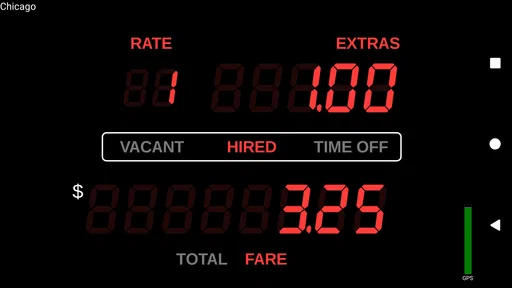
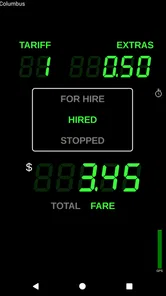
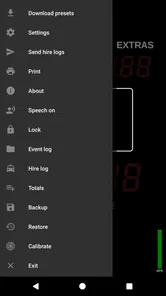
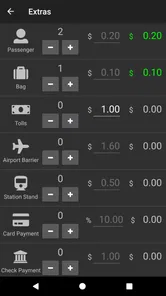
Analysis by Reviewed
Ever wondered what it’s like to have a taxi meter right in your pocket? Well, let me introduce you to the Taximeter app, an essential tool for every driver who wants to keep their rides fair and square. Whether you’re a professional driver or just someone who likes to give friends a lift, this app might just be your new best friend. Let me walk you through my experience with it.
Before the first fare: a sensible setup check
I would not treat a fare meter as something to install seconds before collecting a passenger. The useful preparation happens while the car is parked: enter the vehicle and rate details, then take a moment to check that the figures match the way you are expected to charge. If your work involves more than one rate, make sure you understand how you will select the right one before a shift begins. A little care here is more valuable than rushing through setup and discovering a mismatch mid-ride.
That routine also helps answer a practical question: can a phone app replace a conventional taxi meter? It can provide a convenient way to calculate a fare, but it is not automatically a substitute for equipment or procedures required by local rules. If your job requires an approved meter, confirm those requirements before relying on a phone. For informal driving, the flexibility may be useful; for regulated commercial work, local compliance comes first.
Choosing the right moment to rely on a phone
A phone-based meter is most appealing when you already use your phone as part of your working routine and can keep it mounted and powered. It is less attractive if you need a completely independent device, if your phone is old or unreliable, or if handling a screen would distract you. I would set everything up before a passenger gets in and avoid changing rates or settings while the car is moving. That is a simple safety habit, but it also reduces the chance of starting a trip with the wrong configuration.
For a driver who works occasional shifts, the key question is not just whether the app can calculate a fare; it is whether the setup and record-keeping are worth the cost and attention. Someone who takes only a few informal rides may be better off with a basic estimate or another method they already trust. A regular driver who wants consistent calculations and a place to review trip records has a stronger reason to consider a dedicated meter app.
Getting Started: Simple and Straightforward
Downloading the app was a breeze, and within minutes, I was ready to roll. The user interface is pretty intuitive, which is a big plus. No one wants to fumble around with complicated settings when you’re trying to hit the road, right?
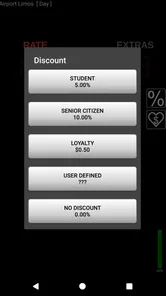
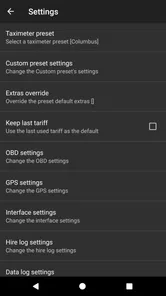
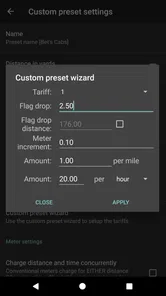
Once I opened the app, I was greeted with a clean and organized dashboard. Setting up my vehicle details was as easy as pie. I just had to input basic info like my car model and license plate. The app even lets you customize your rates, so you can adjust them according to your city’s standards. How cool is that?
More From Our News Desk

 Gmail
GmailGmail in a Busy Inbox: Who Benefits Most?
From first account to crowded workday, Gmail earns its place through dependable search and flexible sorting—but its best fit depends on how much inbox maintenance you can tolerate.

 Prime Video
Switching to Prime Video: What Changes in Your Viewing Routine
Prime Video can make a compelling second home for streaming, but switching means learning a different catalog, rental layer, and route from browsing to playback.

 Universal TV Remote Control
Universal TV Remote Control Works Best as a Reliable Backup
A phone remote earns its place through quick setup and reliable habits. Here is how to get more from Universal TV Remote Control—and where its limits show.

 Weather - By Xiaomi
Weather by Xiaomi Review: Clear at a Glance, Less Clear Up Close
Xiaomi’s weather app makes everyday forecasts quick to scan, but its calm surface can leave useful details and recovery paths harder to find than they should be.

 X
XX Under Pressure: Can It Recover When Posting Goes Wrong?
A resilience-focused review of X, examining setup, mistaken posts, interruptions, weak connections, and the gaps that matter when recovery needs to be dependable.

 Clash of Clans
Clash of Clans Is Won Between the Battles
Its raids are quick; its community is a long-term project of coordination, teaching, rivalry, and shared responsibility—with all the friction that entails.
Latest News



What the fare calculation means in practice
The most useful part of a meter app is not simply seeing a number increase; it is being able to explain how a fare was reached. Distance-and-time calculation can help make a ride easier to discuss with a passenger, especially when traffic turns a short route into a slow one. I would still check that the rates I enter match the rules and expectations where I drive. A calculator can apply a rate, but it cannot decide whether that rate is appropriate for a particular city or trip.
For a working driver, I’d treat the first few rides as a setup check rather than immediately relying on the screen without thought. Confirm the vehicle and rate settings before starting, then compare the result with the fare method you normally use. This small habit can catch a mistaken rate before it affects several trips. It is also sensible to keep the phone positioned where it can be checked safely, not to adjust settings while driving.
Features That Make a Difference
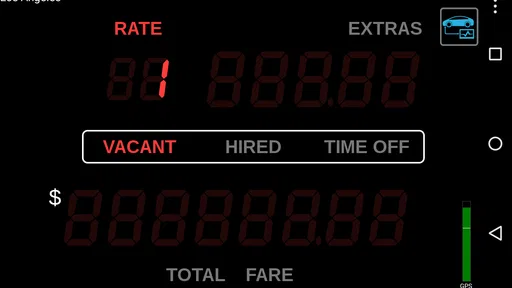
One of the standout features of the app is its real-time GPS tracking. This isn’t just any GPS tracker; it’s incredibly accurate and updates in real-time. I could see my route mapped out perfectly, which gave me a sense of control over the ride. Plus, the app calculates the fare based on distance and time automatically. Say goodbye to mental math!
Another feature that really caught my attention was the ability to save travel logs. As someone who likes to keep things organized, having a record of all my trips at my fingertips was a game-changer. This is especially handy for keeping track of expenses or just reminiscing about past journeys.
Making trip records useful after the ride
A saved log is most helpful when I give it a small, regular role rather than expecting it to organize everything by itself. After a ride, I would check that the trip appears as expected, then use the record as a reference when reviewing the day. If I drive several separate shifts, looking at records soon after each one can make it easier to spot an unexpected fare while the details are still fresh. That is a practical workflow, not a replacement for whatever formal accounts or records a driver is required to keep.
There is also a trade-off: keeping records in an app is convenient, but it ties that habit to the phone. I would not assume a trip log alone is a complete backup or a full business ledger. Drivers who need detailed reporting should decide how the app’s records fit with their existing process, and keep any required documentation separately. The log is valuable as a quick reference; it should not be asked to do a job beyond that.
A practical routine for a busy shift
Imagine beginning a shift with a passenger who asks for a clear account of the fare. I would set the meter before moving, keep attention on the road, and use the saved trip record afterward to review the journey. That log can be more useful than relying on memory at the end of a long day: it gives a driver a place to check individual rides when reviewing work or expenses. It is not a substitute for formal bookkeeping, but it can make personal record-keeping less scattered.
For someone who drives only occasionally, the same workflow may be more than they need. A quick estimate or a built-in vehicle feature may be enough for informal lifts, while a dedicated meter is more appealing when fare transparency and repeatable calculations matter. The trade-off is that a driver must take time to configure rates and make sure the phone is ready before a journey. If you want an automatic, hands-off arrangement without setup, this style of tool may feel like extra responsibility rather than a convenience.
Handling a busy moment without losing the thread
Consider a shift with several short trips, a slow stretch of traffic, and little time between passengers. That is when a consistent start-and-finish routine matters most. I would confirm the meter is ready before each ride, avoid multitasking with the phone while driving, and review the saved record when parked. The aim is not to watch the screen constantly; it is to let the calculation run while keeping attention on the road, then check the result at a safe moment.
This is also where a phone can be less convenient than a dedicated meter. A call, navigation task, low battery, or other interruption can compete for attention on the same device. A driver who expects that kind of heavy use should test the whole routine before depending on it: mount the phone, check the route and meter workflow while stationary, and see whether the setup remains manageable across a normal shift. I would rather discover friction during a quiet test than with a passenger waiting.
Oh, and did I mention the customer support? They have a nifty feature where you can chat with their support team directly from the app. I had a question about setting different rates for peak hours, and they got back to me in a jiffy. Talk about service!
Speed, stability, and phone limits
A meter app needs to be ready when a ride begins, so I value a straightforward launch and a screen that does not demand a lot of tapping. The simple setup described here makes the basic workflow approachable, but GPS use has a practical cost: navigation and location tracking can put extra demands on a phone during a long shift. I would start the day with a charged device and keep a charging option available if I expected to use tracking continuously. That is sensible preparation for any phone-based meter, not a promise about battery performance on every device.
When the phone is busy, warm, low on battery, or struggling to maintain location, I would not assume a digital record is infallible. Check that the trip has begun correctly and review the saved log after the ride. If the app or GPS stops behaving as expected, pause and resolve the issue safely before using it for another fare. Drivers who need a certified or regulated meter should also confirm local requirements; an app’s calculations do not automatically replace equipment or procedures required by local rules.
Where it sits beside other options
Compared with estimating a fare mentally, a meter app can make the calculation more repeatable and give the driver a trip record to consult later. Compared with a simple calculator, its appeal is the combination of time-and-distance metering, GPS tracking, and saved journeys rather than a single manual sum. But a conventional taxi meter may be the better choice where regulations demand one or where a driver wants a device that is not sharing space with calls and other phone tasks.
Navigation apps are useful for finding a route, but route guidance is not the same thing as fare calculation. I would not expect a map estimate to replace a meter when a passenger needs a fare based on the actual trip. Likewise, a spreadsheet or written log may suit someone who wants more control over records, but it requires more manual work. The right choice depends on whether the priority is hands-on flexibility, regulatory compliance, or keeping the phone out of the fare process.
Who will get the most from it
Planet Coops’ app is aimed at drivers who want to calculate fares from time and distance, tailor rates, and keep trip records in one place. It is listed in the auto and vehicles category, has an Everyone age rating, and costs $17.99. That price makes the decision more consequential than trying a free basic calculator, so I would consider how often I expect to use its metering and logs before buying. Its 4.3 average from around 700 ratings and 10,000-plus installs suggest that it has found an audience, though popularity alone cannot tell you whether its workflow suits your route or local rules.
The app was released in 2010, and its current version is 1.1.145, with Android 5.0 as the minimum operating system. Those details matter if you are installing it on an older phone or setting up a dedicated device: check compatibility before planning to use it for work. I would also test the setup on the actual phone and in the places I drive, since location reliability and battery life can vary between devices and conditions. A driver who needs only occasional estimates, or who prefers a standard taxi meter with no phone dependency, may be better served by another option.
Questions worth settling before you depend on it
Would I use it for a full shift without preparation? No: I would first configure the rates, test the workflow while parked, and make sure the phone can remain powered. Does the app make a fare legally valid everywhere? No app calculation can settle that; local rules and any required equipment still matter. Is the trip log enough for accounting? It can support personal review, but I would keep whatever formal records my work requires.
Would I recommend it to a driver who already has a reliable, compliant meter? Only if the phone-based tracking and logs solve a separate problem; otherwise, adding another system may create unnecessary work. Would I recommend it to a casual driver? Only if transparent fare calculation is important enough to justify setting it up and paying for it. Those distinctions matter more than a broad claim that one meter suits every driver.
My Honest Verdict
Overall, I’d say the app is a solid choice for anyone in the driving business. It’s packed with useful features that make managing rides a whole lot easier. The app’s reliability and ease of use really stood out to me, and I can see why it’s becoming a favorite among drivers.
If you’re looking to streamline your driving experience and keep everything transparent, give this app a shot. It’s not just about calculating fares; it’s about enhancing the entire ride experience for both drivers and passengers. So next time you’re on the road, let Taximeter be your trusty sidekick.
In a world where precision matters, having an app like this in your arsenal is invaluable. Happy driving!
Taximeter Frequently Asked Questions
What does Taximeter cost, and is it a one-time purchase?
Taximeter is listed at $17.99, so it is a paid app rather than a free download. Before purchasing, consider whether its fare-calculation and ride-management tools fit the way you work. The app is categorized under Auto & Vehicles, and its professional focus may appeal to drivers who want a dedicated tool for handling taxi rides.
What is Taximeter and how does it work?
Taximeter is a mobile application designed to help taxi drivers calculate fares accurately and efficiently. It uses GPS technology to track the distance and time of a ride, automatically calculating the fare based on pre-set rates. The app also includes features such as tracking earnings, managing routes, and logging rides for better organization and efficiency in daily operations.
Is the Taximeter app compatible with both Android and iOS devices?
Yes, the Taximeter app is designed to be compatible with both Android and iOS devices. Users can download the app from the Google Play Store for Android devices or the Apple App Store for iOS devices. It is optimized to work seamlessly on both platforms, ensuring a smooth user experience for all taxi drivers. On Android, the listed minimum operating-system requirement is version 5.0, so check your device’s software before downloading.
Does Taximeter require an internet connection to function?
While Taximeter primarily relies on GPS for tracking distance and time, which does not require an internet connection, certain features like real-time map updates and fare sharing might need internet access. However, the basic functions of calculating fares can be performed offline, ensuring that drivers can use the app even in areas with limited connectivity.
Can I customize the fare rates in the Taximeter app according to my local regulations?
Yes, the Taximeter app allows users to customize fare rates to comply with local taxi regulations. Drivers can set their base fare, cost per mile or kilometer, and waiting time charges. This flexibility ensures that you can adhere to local pricing rules and provide accurate fare calculations to your passengers.
Pros
- Accurate fare calculation
- User-friendly interface
- Real-time GPS tracking
- Multi-language support
- Customizable settings
Cons
- Requires internet connection
- Limited to specific regions
- No offline maps
- Occasional GPS glitches
- Battery intensive usage











