SPORT xR: Watch face
- 22.00
- 4.2
- Installs
- 5.00K
- Price
- $1.99
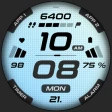
Screenshots
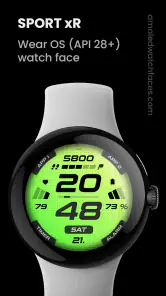
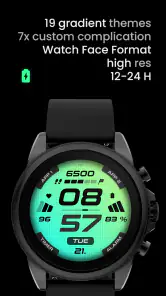
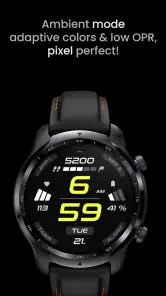
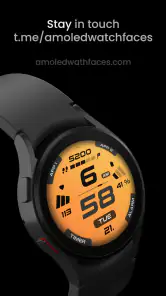
Analysis by Reviewed
I’d judge SPORT xR: Watch face less by how many visual choices it offers and more by whether it makes a Wear OS watch easier to read during an ordinary day. It is a paid sports-oriented watch-face app from amoledwatchfaces™, priced at $1.99, with an Everyone age rating. Its true-black look gives it a clear identity, but it is best suited to someone who wants information on the wrist without turning the display into a tiny phone screen.
Getting past the first setup hurdles
Watch faces can feel confusing at first because choosing one in an app and seeing it on the watch are not always the same step. If you install the app and do not see it immediately, I would first check the watch’s own face-selection screen and look through the available faces there. Confirm that the watch is running Wear OS and that the watch and phone are connected as expected before trying the installation again. Those simple checks are more useful than repeatedly tapping the app icon.
A practical tip is to make one change at a time when adjusting a new face. Set it as the active face, look at it in normal lighting, and then decide whether its layout works for you. Changing several settings in one sitting can make it harder to tell which choice improved readability. On a compact display, a design that looks crisp in a preview may feel crowded once you are glancing at it while walking.
Where a sports face fits into daily use
For a realistic routine, imagine checking your watch between errands or on the way to a workout. A sports-focused face can be useful when you want a quick glance rather than a detailed session report: you can see the time and whatever information the chosen layout presents without opening a separate app. The key trade-off is that a watch face is a starting point for quick checks, not a replacement for a dedicated fitness app when you want to review or manage a workout in depth.
The true-black background is a meaningful choice if you prefer a darker, restrained screen. It can keep the display visually calm in a dim room and make bright elements stand out, though whether that suits your watch and personal taste depends on the screen and your preferred brightness. If you mainly want colorful artwork or a highly decorative design, a more expressive face may be a better match. If you want a straightforward sports look, this face is more relevant.
Recovering when the face does not appear
If the face seems to disappear after installation or a change, I would avoid assuming the purchase or app has failed. Reopen the face selector on the watch, check whether it is still available, and select it again if needed. A temporary connection or synchronization delay can also make changes appear later than expected, so give the watch a moment before repeating the same action. Restarting the watch is a reasonable general troubleshooting step if the selector itself is not responding.
There is also a useful distinction between a watch-face issue and a watch issue. If other faces or ordinary watch functions are behaving oddly too, the cause may be broader than this app. Checking the watch’s connection and basic operation first can save time; if only this face is affected, then revisit its selection and settings. I would not make repeated changes while the watch is still catching up, since that makes it harder to identify what actually helped.
Who should choose it—and who should pass
I’d recommend considering it if you use a Wear OS watch, prefer a dark digital presentation, and want your watch face to feel aligned with sport and fitness. It also makes sense for someone who values quick, glanceable information more than elaborate artwork. The app has a 4.2 average from around 160 ratings, and it has passed 5,000 installs, so it has attracted a modest but established audience. Those figures are context, not a guarantee that its look will suit your particular watch.
I would skip it if you use a different smartwatch platform, want a free option, or expect a watch face to provide the depth of a standalone workout tracker. Compared with generic digital faces, its sports identity and true-black styling are the main reasons to choose it; compared with highly customizable faces, the appeal is less about endless experimentation and more about a focused look. The app was released on November 25, 2021, so it is also sensible to check that your current watch and Wear OS setup can install it before paying.
Choosing a face that fits your routine
The best reason to choose a sports-oriented face is not simply that you exercise. It is that your watch is often checked in brief moments when opening a phone would be inconvenient: crossing a lobby, waiting for a class to begin, or pausing before heading outside. I find this style most useful when I want a consistent digital layout that feels at home beside workout gear but does not have to be reserved for training. If your daily routine is mostly formal and you prefer a traditional dial, however, the sporty character may feel out of place even if the display is easy to read.
For a morning workout, I would treat the face as a glanceable home screen rather than a training control panel. Before leaving, check that it is selected and that the details you care about are visible at the size your watch allows. During activity, keep glances brief and rely on a dedicated workout app for recording or reviewing the session. That division of labor is practical: the face helps with quick orientation, while a fitness app handles the more involved task.
That distinction also helps set expectations about widgets and information. A face can bring selected details within reach, but it does not automatically make every piece of phone or fitness information easier to interpret on a small screen. If you have to stare at your wrist to decipher a crowded display, the advantage of a quick glance disappears. I would prioritize legibility over filling every available area, especially if you are likely to check the watch outdoors or while moving.
How it compares with the usual alternatives
Against a basic digital face, the appeal here is a more deliberate sports-and-fitness identity paired with a dark visual style. A plain alternative may be preferable if all you need is a simple time display and you do not care about a sport-focused appearance. At the other end, some watch faces invite extensive tinkering with colors and layouts. That can be enjoyable, but it is not automatically better: more choices can mean more time spent tuning a screen you only glance at. I would choose this one when its overall look already suits me, rather than expecting it to be a design playground.
The paid price is part of that decision. At $1.99, I would want to be confident that I like the visual direction and that my Wear OS watch can use it. If you frequently rotate faces or are still figuring out what kind of layout you prefer, trying a free alternative first may make more sense. If you already know that you want a dark sports presentation, paying for a focused option can be a more sensible choice than browsing endlessly for something that matches the same preference.
Compatibility is worth checking before purchase, especially if the watch is older or has a less familiar setup. The important practical question is whether your device uses Wear OS and whether its face selector can install and display the app. I would confirm that through the watch’s normal settings and installation flow instead of assuming that every smartwatch with a digital screen supports Wear OS faces. The app’s Everyone age rating is straightforward, but the platform requirement is the more relevant consideration for most buyers.
Small setup habits that save time
When a new face does not show up right away, I would avoid uninstalling and reinstalling as my first move. Start with the watch’s face selector, then give the watch and phone a little time to synchronize. If the face is listed, select it there and check the result on the actual watch. This sequence separates an installation delay from a display or selection problem without introducing extra changes that may muddy the troubleshooting.
It is also useful to inspect the face in more than one setting. A preview can look appealing on a phone, while the watch’s smaller screen and ambient lighting change how readable it feels. Try a quick glance indoors and in daylight, and notice whether the information you want is easy to pick out without stopping. This is not a technical test; it is a simple way to find out whether the design suits your real habits rather than only looking good in a screenshot.
If the watch is already having trouble with other faces, menus, or its phone connection, I would deal with that broader issue first. A watch face cannot fix a connection that is not working, and changing face settings repeatedly is unlikely to help when the watch itself is unresponsive. Once the watch behaves normally, return to the selector and try choosing the face again. If only this particular face remains unavailable, checking the installation and device compatibility is more useful than changing unrelated watch settings.
First impressions and the claims worth weighing
The developer is amoledwatchfaces™, and the app’s presentation points toward a dark, sporty style rather than a general-purpose collection of decorative designs. I would approach any promise of effortless customization with a little care: the useful question is whether the available layout gives you the balance of time and glanceable details you want, not whether it can be made to suit every possible mood or outfit. A watch face is most successful when you can set it once and stop thinking about it.
It is easy to mistake a watch-face app for a full smartwatch companion, so I would keep the scope clear. The app’s role is to change the look and at-a-glance experience of the watch. If you need workout planning, detailed activity history, or controls for a training session, look to the relevant fitness tools on your watch or phone instead. This is not a criticism of a face; it is a boundary that makes the purchase easier to judge.
Customization Galore
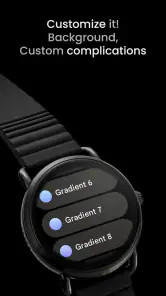
This app is all about personalization. Whether you're into minimalist designs or something more vibrant and eye-catching, it has got you covered. I spent a good amount of time playing around with different styles, colors, and widgets. What's cool is that you can adjust the settings to match not just your outfit, but also your mood or the occasion. Feeling sporty? There's a face for that. Want something more elegant for a night out? They've got you covered!
One of my favorite features is the ability to add helpful widgets right onto the watch face. From step counters to weather updates, you can tailor your smartwatch to show exactly what you need at a glance. It's like having your own personal dashboard on your wrist.
Performance and Compatibility
Now, let's talk about performance. I found that the app runs smoothly without any glitches or lag. It's compatible with a wide range of smartwatch models, so no worries if you're not using the latest device. The app works seamlessly, ensuring that your watch face updates in real-time, which is crucial for those who rely on timely information.
Battery life was another concern I had initially, but I'm happy to report that the app is designed to be power-efficient. I didn't notice any significant drain on my smartwatch's battery, which is a huge plus for anyone who hates frequent charging.
The Final Verdict
To wrap things up, the app is a fantastic choice for anyone looking to add a touch of personal style to their smartwatch. It's user-friendly, offers a plethora of customization options, and performs like a charm without compromising on battery life. Whether you're a tech novice or a smartwatch aficionado, this app is sure to impress.
So, if you're ready to give your wrist some new life, head over to your app store and check it out. Trust me, your smartwatch will thank you!
My practical verdict
I’d put this watch face on the shortlist for someone who already owns a Wear OS watch, likes a dark digital screen, and wants a sport-leaning look that can sit on the wrist throughout the day. Its strongest case is everyday convenience: a face should make routine checks feel immediate, not require you to open and navigate another screen. If that matches how you use your watch, the focused style is more persuasive than a long menu of designs.
I would pass if your priority is a richly illustrated face, deep workout management, or broad platform compatibility. I would also hesitate if you are uncertain whether your watch supports Wear OS faces; confirm the device and installation path before spending money. For the right wearer, this is a straightforward paid option with a distinctive dark identity. For everyone else, a basic digital face or a dedicated fitness tool may be the more useful choice.
SPORT xR: Watch face Frequently Asked Questions
Can I use SPORT xR: Watch face with a Wear OS smartwatch?
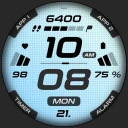
SPORT xR: Watch face is a digital watch face app for Wear OS, so it is intended for a Wear OS smartwatch. Before downloading, check that your watch runs Wear OS and supports installing custom watch faces. The app’s focus is a sports and fitness look, with a true black background that keeps the display clean and easy to read.
What is SPORT xR: Watch face and what does it offer?
SPORT xR: Watch face is a customizable watch face app designed for smartwatches. It offers a variety of sports-themed designs and features that enhance your smartwatch's appearance and functionality. Users can choose from different layouts, colors, and widgets to display information such as time, date, weather, and fitness data right on their smartwatch screen.
How do I customize the SPORT xR: Watch face on my smartwatch?
Customizing the SPORT xR: Watch face is simple and user-friendly. Once installed, you can access the customization options through the app settings on your smartwatch. You can change the watch face design, adjust colors, and select which widgets or information to display, making your smartwatch more personalized to your preferences.
Is SPORT xR: Watch face compatible with all smartwatches?
SPORT xR: Watch face is designed to be compatible with most smartwatches that support custom watch face installations. However, compatibility can vary depending on the smartwatch's operating system and version. It is recommended to check the app's compatibility with your specific smartwatch model before downloading to ensure optimal functionality.
Does SPORT xR: Watch face affect the battery life of my smartwatch?
While SPORT xR: Watch face is optimized for efficiency, using certain features, such as animated watch faces or continuously updating widgets, may slightly impact your smartwatch's battery life. To minimize battery consumption, you can adjust settings to use fewer active widgets or select static watch face designs, ensuring you maintain a good balance between functionality and battery usage.
Pros
- Highly customizable watch faces
- Seamless integration with fitness apps
- Intuitive user interface
- Regular updates with new features
- Supports multiple languages
Cons
- Limited free watch face options
- Battery consumption can be high
- Occasional sync issues
- Requires Wear OS 2.0 or above
- Some features need premium upgrade
- Category
- Sports
- Version
- Varies with device