SpoofCard - Privacy Protection
- 1.14K
- 4.3
- Installs
- 500.00K
- Price
- Free

Screenshots
Analysis by Reviewed
I’d approach SpoofCard as a tool for choosing what number to present when I communicate, not as a complete privacy shield. That distinction matters: it can help keep your personal number out of a particular exchange, but it doesn’t make every call or text anonymous. If you’re trying it for the first time, the most reassuring way to begin is to decide on one ordinary, legitimate use before exploring the more playful options.
Before your first call, choose a clear purpose
A practical first use might be contacting someone about a secondhand item, arranging a service visit, or making a work-related call you don’t want tied to your everyday number. I’d start with one short conversation rather than testing several settings at once. That makes it easier to understand what the other person sees and to notice whether the app fits your routine.
This is also where I’d set a personal boundary: use number presentation to protect your contact details, not to impersonate someone or mislead a person who needs to know who is calling. If you need dependable two-way contact with customers or colleagues, a dedicated business line may be a better fit. SpoofCard is more useful when occasional separation matters than when you need a full phone system.
What a first-time user should keep in mind
The app is free to install, but the service may involve spending beyond the download. SpoofCard has in-app purchases ranging from $4.99 to $99.99 per item, so I’d check the available options and decide what you’re comfortable paying before making it part of a regular calling habit. If you only need a separate number occasionally, think about that frequency before committing to repeated use.
I’d also keep expectations realistic about the word “privacy.” Hiding your everyday number from a recipient is different from hiding your identity from the service, your carrier, or the law. For routine contact with a stranger, that distinction can be useful; for sensitive conversations where confidentiality is essential, I’d choose a communication method designed around that need instead of assuming caller-number control is enough.
Ever felt like your personal privacy is slipping through your fingers in this digital age? Well, I stumbled upon something that might just be a game-changer for you. Let me introduce you to SpoofCard – a nifty app that promises to give you the kind of privacy protection you’ve been dreaming of.
Your First Encounter with SpoofCard
So, what's the deal with this app? Well, SpoofCard is designed to let you make calls and send texts without revealing your real number. It's like having a secret identity for your phone. Imagine being able to prank your friends or keep your business calls separate from your personal ones without juggling multiple SIM cards. Sounds cool, right?
You May Like

Clash of Clans Is Won Between the Battles

Android Auto Makes the Case for Quieter Car Software

MobiOffice: Transforming Mobile Productivity with Seamless Integration

EA SPORTS FC™ Mobile Soccer: Redefining Mobile Sports Gaming

How Microsoft OneDrive Became a Mobile Productivity Giant

How Google Translate Breaks Language Barriers Effortlessly
Installation was a breeze. I hopped onto the app store, grabbed the app, and within minutes, I was all set up. The user interface is clean and pretty intuitive, which is always a plus in my book. No one wants to wrestle with an app just to use a simple feature.
Digging Deeper into Features
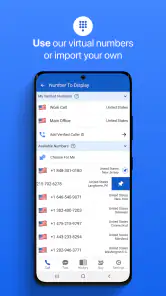
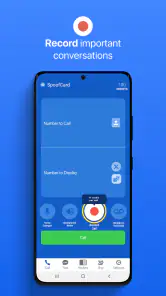
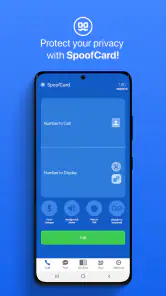
Once you're in, the app gives you a bunch of options to tweak how your calls and texts appear to others. You can choose a different number to display, record calls for later reference, and even add voice changers. Yes, you heard me right—voice changers! Ever wanted to sound like a robot or a completely different person? Now you can.
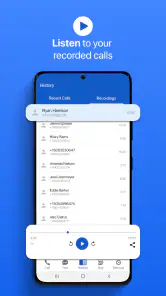
One feature I found particularly handy was the call recording. It's a lifesaver for anyone who needs to keep track of important conversations. Just make sure to check local laws regarding recording calls, as they can vary widely.
The Experience: Using SpoofCard in Real Life
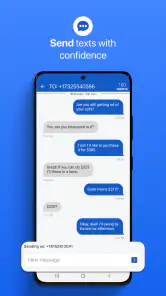
After setting everything up, I decided to test the waters by making a few calls and sending texts using different numbers. The process was seamless, and my friends were none the wiser. It’s surprisingly empowering to have control over who sees what number, especially if you're dealing with online transactions or sketchy Craigslist deals.
Now, let's talk about customization. You can even choose different caller IDs for different contexts. Got a business meeting? Use a professional-looking number. Planning a prank? Choose something that screams mystery. The possibilities are endless, and it’s up to your imagination how you use them.
Is SpoofCard Worth It?
If privacy and security are important to you, then SpoofCard is definitely worth considering. It provides a unique solution to keeping your personal number under wraps while still being able to communicate freely. Plus, the added features make it more than just a simple spoofing tool—it’s like a Swiss Army knife for your phone calls.
The app is free to download, but keep in mind that it runs on a credit-based system for calls and texts. You’ll need to purchase credits to keep using it, so it’s worth considering how often you’ll need the service. For me, the peace of mind it offers is well worth the price.
Final Thoughts
In a world where privacy is increasingly hard to come by, SpoofCard offers a refreshing way to take back control. Whether you’re a privacy enthusiast, a prankster, or just someone who wants to keep business and pleasure separate, this app is definitely worth checking out. Just remember to use it responsibly and stay within the bounds of the law.
So, are you ready to give SpoofCard a whirl? It's waiting for you on the app store, promising a whole new level of privacy and fun. Go ahead, take it for a spin, and let me know what you think!
How it fits among communication options
Compared with simply calling from your regular phone app, SpoofCard gives you more control over the number displayed, which can be handy when you’d rather not share your personal contact details with a one-off contact. A second SIM or a dedicated business line can offer a more stable separation for ongoing relationships, but they also mean managing another line. I see this app as the middle ground for occasional calls and texts, not a replacement for a permanent work number.
For a first successful test, I’d pick a trusted person, explain that I’m trying a separate caller ID, and send a brief text or make a short call. That confirms the basic workflow without creating confusion or leaving a stranger wondering who contacted them. Once I understand what appears on the recipient’s end, I can decide whether the same approach makes sense for a marketplace inquiry or a temporary business conversation.
Who should try it—and who may prefer something else
SpoofCard is most appealing if you make occasional calls where keeping your everyday number private is useful and you’re comfortable checking the cost before using the service. It is less compelling if you rarely call unfamiliar people, need a long-term number that clients can save, or want privacy features that protect the content of a conversation. In those cases, a separate phone line or an encrypted messaging service may be a more suitable choice, depending on what you’re trying to protect.
The app comes from SpoofCard and is listed in the communication category. It has a 4.3 average from around 3.8 thousand ratings, with over 500 thousand installs. Those figures suggest that it has found an audience, but I’d still judge it by whether its particular caller-ID workflow solves your problem. It is free to download, rated for Everyone, and its current version is 5.8.4; it requires Android 8.0 or later.
A sensible next step
If you decide to try it, keep the first session simple: install it, review the purchase choices, select a legitimate use, and test one call or text with someone who knows what to expect. Don’t treat a changed caller ID as a guarantee of anonymity, and be careful with recordings by checking the rules where everyone on the call is located. That small bit of preparation makes the experience clearer and helps avoid the most common misunderstanding: privacy from the recipient is not the same thing as total secrecy.
Overall, I’d recommend SpoofCard to someone who needs occasional separation between a personal number and a specific communication, and who is willing to manage the costs and use it transparently. If you need a dependable second identity for daily work, or protection for highly sensitive conversations, I’d look at alternatives built for those jobs. Used thoughtfully, its main value is straightforward: you can make a call or send a text without automatically giving every contact your usual number.
Make the first test useful, not just convenient
For a first real-world try, I’d choose a situation where the other person has a reason to reply but where ongoing contact is unlikely. A one-time service question is a better test than a complicated conversation with several people involved. Before calling, write down the exact detail you need to ask, and keep the exchange brief. That gives you a chance to judge whether the number display and the reply path make sense without mixing the test with a sensitive or high-stakes matter.
There is a small but useful distinction between protecting a number and managing a relationship. If someone may need to reach you again, make sure you are comfortable with the route they will use to respond. For a short-lived inquiry, a separate caller ID can be enough; for a landlord, regular client, or healthcare provider, stable contact and clear identification matter more. I would not choose a temporary privacy measure if it could make an important follow-up harder to recognize or return.
Keep the workflow easy to understand
When trying the app, I’d avoid changing several options between calls. If you explore caller-ID choices, recording, or voice effects, test one element at a time with someone who knows what is happening. That’s not only a safer way to learn the controls; it also makes it easier to tell whether a confusing result came from the setting you changed or from the situation itself. A simple test can prevent an awkward surprise when you later contact someone you do not know.
Call recording deserves particular care because a useful record can also create a responsibility. I’d decide beforehand why I need a recording, keep it limited to that purpose, and check the rules that apply to everyone involved before switching the feature on. If the conversation is informal and no record is genuinely needed, leaving recording aside is the simpler choice. A feature being available does not mean it belongs in every call.
When another option is the better privacy choice
People often use “private” to mean different things. If your concern is simply that a marketplace seller or a one-time contact should not have your everyday number, changing what is presented may address that narrow concern. If you need to protect message contents, build a lasting professional identity, or make sure a contact can reach you reliably over time, those are separate needs. An encrypted messaging app, a dedicated work line, or an ordinary call with clear boundaries may be a better match.
I’d also skip the app if the main goal is to trick a recipient into believing a call comes from a different person or organization. That can damage trust and create serious trouble, even if the interaction begins as a joke. The most responsible use is one where the number choice gives you a little distance while you remain honest about who you are when it matters. That approach makes the privacy benefit practical rather than deceptive.
Costs, expectations, and the right rhythm
Because the download is free but purchases are available, I would not assume that regular use will cost nothing. Before relying on it, look through the purchase choices in the app and decide whether an occasional call justifies the expense for you. Someone who only needs a separate contact method now and then may judge the trade-off differently from someone who expects to use it every day. The key is to make that decision before the app becomes part of an important routine.
My overall recommendation is deliberately narrow: try SpoofCard when you have a clear, lawful reason to keep your personal number out of a particular exchange, and begin with a short, transparent test. It is not a substitute for a second phone line, secure messaging, or careful judgment about what information a conversation reveals. Used for the limited job it suits, it can add a useful layer of separation; expecting it to solve every privacy concern would be asking too much.
SpoofCard - Privacy Protection Frequently Asked Questions
What should I check before installing SpoofCard on my device?
SpoofCard is a communication app from SpoofCard, and it is available for devices running Android 8.0 or later. The app is free to download and is rated for Everyone. Before installing, check that your device meets the operating-system requirement and consider whether its privacy and calling features fit the way you plan to communicate.
Does SpoofCard require payment, or can I use it for free?
SpoofCard is free to download, but it also offers in-app purchases ranging from $4.99 to $99.99 per item. That means downloading the app does not necessarily make every call or feature free. Review the purchase options shown in the app before using paid features, and make sure any spending fits your needs.
What is SpoofCard and how does it work?
SpoofCard is a privacy protection app that allows users to make anonymous calls and send texts while keeping their personal number private. By using a proxy number, users can maintain their privacy and security, making it ideal for personal or business use. It offers features like call recording, voice changing, and customizable caller ID.
Is SpoofCard legal to use?
Yes, SpoofCard is legal to use in most jurisdictions, provided it is used for legitimate purposes. It is crucial to adhere to local laws and regulations regarding privacy and telecommunications. Using the app for harassment, fraud, or any illegal activities is strictly prohibited and could result in legal consequences.
Can SpoofCard be used for international calls?
Yes, SpoofCard supports international calling, allowing users to make anonymous calls across borders. The app provides flexibility for both domestic and international communications, but users should be aware of potential additional costs and ensure that their usage complies with the laws of the countries involved.
Pros
- Easy to use interface for all users.
- Reliable call masking feature.
- Supports multiple devices seamlessly.
- Offers customizable caller ID.
- Provides secure and private communication.
Cons
- Limited free trial minutes.
- Must purchase credits for extended use.
- Caller ID may not work in all areas.
- Requires stable internet connection.
- No support for international numbers.

- Category
- Communication
- Version
- 5.8.4











