Space Launch Now - Tracker
- 2.52K
- 4.8
- Installs
- 100.00K
- Price
- Free

Screenshots
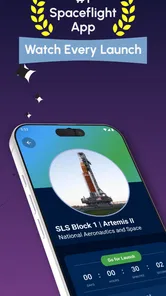
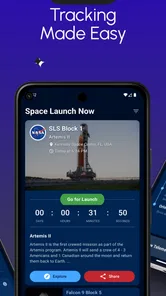
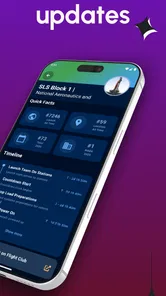
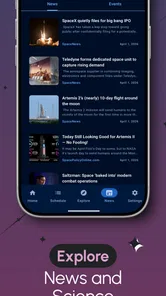
Analysis by Reviewed
I like apps that turn a complicated subject into something I can follow without opening several websites at once. Space Launch Now - Tracker does that for rocket launches, and its focus is refreshingly clear: it helps me keep an eye on upcoming missions, watch countdowns, and receive alerts when something worth following is approaching. After spending time with it, my view is that it is most useful as a personal launch calendar and notification tool rather than as a complete space-news publication.
That distinction matters. If you want a steady stream of long articles, mission analysis, or broad astronomy coverage, a traditional news app will probably suit you better. If you want to know when a launch is scheduled, which agency is involved, and whether you are likely to miss the moment, this app has a much more practical purpose. It is free to install, aimed at Everyone, and developed by Caleb Jones. The app has been available since April 20, 2016, which gives it the feel of an established specialist tool rather than a temporary experiment.
Why this launch tracker works so well in daily use
I find the tracker most useful when I treat it as a planning aid, not a promise that a countdown cannot change. A quick schedule check can help me decide which missions deserve a closer look, while a final check with official coverage is sensible before I rearrange my day. That balance makes its focused approach clearer—and helps explain where other kinds of space apps may be a better fit.
A focused view of the launch schedule
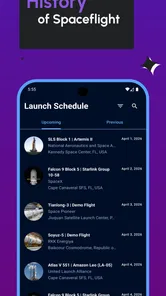
The strongest part of the experience is the way the app keeps the subject narrow. Instead of making me search through general headlines for a launch date, it puts rocket missions at the center. SpaceX, NASA, ISRO, and ESA are all part of the coverage described for the app, so it can appeal to people who follow more than one national program or commercial provider.
I find that useful because launch information is easy to lose in a normal news feed. A general app may mention a mission once, but a dedicated tracker encourages me to return to the schedule and see what is coming next. That changes the experience from passive reading to planning. I can check whether a launch is worth setting aside time for, then use the countdown and alert tools to avoid relying on memory.
The app’s 4.8 average from around 14 thousand ratings suggests that this focused approach has connected with many users. I would not treat a rating as proof that every screen will suit everyone, but it does match my impression that the app understands its main job. It does not need to become a giant media platform to be useful; it needs to make launch timing easier to follow.
Alerts are more valuable than they first appear
For me, notifications are the feature that turns a schedule into a genuinely helpful tool. A launch date on a calendar is easy to forget, especially when several days pass between checking. An alert provides a second chance to pay attention, which is particularly useful for missions that happen during working hours, overnight, or while I am away from my usual news apps.
More From Our News Desk

Weather by Xiaomi Review: Clear at a Glance, Less Clear Up Close

X Under Pressure: Can It Recover When Posting Goes Wrong?

Clash of Clans Is Won Between the Battles

Android Auto Makes the Case for Quieter Car Software

MobiOffice: Transforming Mobile Productivity with Seamless Integration

EA SPORTS FC™ Mobile Soccer: Redefining Mobile Sports Gaming
There is also a practical trade-off here. Notifications are helpful only when I treat them as reminders rather than guarantees that a rocket will lift off at the displayed time. Launch schedules can move, and anyone following spaceflight quickly learns that a countdown is a plan, not a promise. I would still check the latest information before making a special trip, staying up late, or planning a group viewing session.
My preferred workflow is to use the app as an early warning system. I look through the upcoming schedule, decide which missions matter to me, and then keep alerts active for those events. That is less distracting than allowing every possible notification to compete for attention. It also makes the app more useful over time because the alerts become connected to decisions I have actually made.
A good companion for live viewing
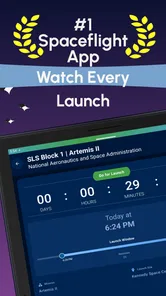
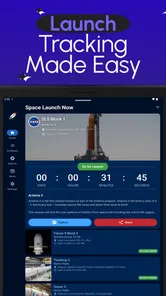
When I want to watch a launch, I usually need two things: enough warning to prepare and a quick way to confirm the timing. This tracker fits that routine better than a standard news reader. I can check the countdown first, then move to the relevant viewing source or official coverage when the event gets close.
That division of labor is important. I would not use this app as my only destination for live video or detailed mission commentary. Its value is in helping me arrive at the right moment. For a family, classroom, or small group of friends, that can be enough to make a launch easier to share. One person can monitor the schedule while everyone else receives a reminder that it is time to gather around the screen.
A less obvious benefit is that the tracker can help separate genuine launch plans from the general noise surrounding space news. A headline about a rocket may appear days before an event, while the useful question is whether there is a scheduled opportunity to watch. Keeping the schedule visible gives me a more grounded starting point than scrolling through speculation or recycled headlines.
Useful for beginners without feeling childish
I think the app is approachable for someone who has only recently become interested in launches. The subject can feel intimidating because missions involve agencies, vehicles, locations, payloads, and changing timelines. A dedicated tracker gives a newcomer a simple reason to return: see what is next and decide whether to follow it.
At the same time, it is not limited to casual curiosity. More experienced followers can use it as a compact reference point between deeper sources. I would still turn to official mission pages and specialist reporting when I wanted technical background, but I would rather begin with a focused launch list than assemble dates manually from scattered articles.
That makes the app particularly suitable for people who follow several programs at once. Someone interested in SpaceX may also want to keep up with NASA, ISRO, or ESA, and a single tracker is less cumbersome than maintaining separate routines for every organization. The benefit is not that it replaces specialist knowledge; it reduces the effort required to notice what deserves that deeper attention.
What the long-standing app identity adds
Because it was released in 2016, the app has had time to establish itself in the news and magazines category. It now has over 100 thousand installs, and that scale is meaningful for a niche subject. I see it as a sign that the app is serving a continuing interest rather than a one-off event surrounding a particular mission.
The developer, Caleb Jones, has kept the product centered on launch tracking instead of stretching it into an unrelated all-purpose app. That focus is one reason I can recommend it without adding many qualifications. The interface concept is easy to explain to a friend: install it, check upcoming launches, and use alerts to remember the ones you care about.
Where the experience becomes less complete
The same focus that makes the app convenient also creates its main limitation. A launch tracker is not automatically a full space-news service. If I want detailed explanations of why a mission matters, background on a payload, a long interview, or broader coverage of astronomy and science, I need another source.
This is not a flaw in the basic idea, but it affects expectations. A person downloading it after seeing the News & Magazines label may expect a broad reading experience. I would describe it more precisely as a specialist news companion. It points my attention toward launches; it does not replace the wider space-information ecosystem.
There is also a natural tension between countdown precision and the unpredictable nature of launches. Even a well-maintained schedule can become outdated when weather, technical checks, range restrictions, or operational decisions change the plan. I would never use a countdown as the sole basis for travel arrangements or an important appointment. The app helps me follow the event, but it cannot remove uncertainty from the event itself.
Another point to consider is notification discipline. Someone who enables every alert may find the app more interruptive than expected, especially during periods with several missions close together. I recommend starting selectively and adjusting the habit after seeing how often reminders are useful. The best setup is personal: a dedicated space enthusiast may want frequent updates, while a casual viewer may need only a reminder for major launches.
How it compares with the usual alternatives
Compared with a general news app, this tracker is faster for one specific question: what launches are coming up? A general reader is better for context, breaking stories, and unrelated subjects, but it often makes me work harder to find a reliable schedule. The tracker wins when timing is the priority.
Compared with following individual agencies or companies through social feeds, it offers a more organized starting point. Social platforms can be useful for immediate announcements, but they also mix mission updates with everything else. I prefer this app when I want a calmer overview and a reminder that is connected to a launch rather than to a constantly moving feed.
Compared with official sources, the choice is more balanced. Official pages are the place I would go for authoritative mission details and final confirmation. This app is more convenient for keeping several programs in one place and remembering what is ahead. In my routine, the two approaches work together: the tracker helps me notice and plan, while official coverage provides the final check.
Compared with manually maintaining a calendar, the app saves time and reduces the chance that I will forget to update an event. Manual calendars can be excellent for people who want complete control, but they require regular maintenance. I would choose this app when I want the convenience of a purpose-built schedule without turning launch watching into an administrative task.
Who should install it, and who should skip it
I would recommend it to anyone who checks launch dates more than occasionally, especially people who follow multiple space agencies or commercial launch providers. It is also a strong fit for parents, teachers, and group organizers who want to turn a launch into a shared viewing event. The Everyone age rating makes it suitable for a broad audience, although younger users may still benefit from an adult explaining the science and the difference between a planned time and an actual liftoff.
It is a good choice for casual followers who do not want to research every mission from scratch. Opening a dedicated tracker is easier than searching the web each time curiosity strikes. It also suits experienced enthusiasts who want a quick schedule before moving to deeper sources.
I would skip it if my main goal were long-form journalism, extensive technical analysis, or a complete astronomy reference. I would also look elsewhere if I needed a single official source for mission-critical confirmation. In those cases, specialist reporting and agency channels are better companions, even if they are less convenient as a combined calendar.
Pricing and what to consider before spending
The app is free, which makes trying it straightforward. It also offers optional in-app purchases ranging from $0.99 to $49.99 per item. Since the core appeal is the launch-tracking workflow, I would begin with the free experience and decide whether any optional purchase solves a problem I actually have.
That advice is especially relevant for a focused utility. I would not pay simply because I enjoy spaceflight; I would pay only if an added option noticeably improves the way I follow launches. Starting free also lets me discover whether the schedule, alerts, and overall rhythm fit my habits before committing money.
The free entry point is one reason the app works well as a recommendation between friends. Someone can test it before deciding whether launch tracking deserves a permanent place on the phone. There is no need to build an elaborate setup immediately; the useful first step is simply to follow a few upcoming missions and see whether the reminders improve the experience.
Small habits that make the tracker more useful
My first tip is to check the schedule at the beginning of the week rather than waiting for a notification to surprise me. That gives me a sense of which launches are worth following and prevents alerts from feeling random. I can then reserve attention for the missions that match my interests instead of treating every event as equally important.
My second tip is to use the app before opening a video platform. Searching for a launch video first can lead to old recordings, commentary, or unrelated clips. Checking the tracker first gives me the timing context I need, after which I can look for the appropriate live coverage with less confusion.
My third tip is to make a backup habit for important events. If I am planning a viewing party or arranging my schedule around a launch, I check an official source close to the event as well. This is not because the tracker is pointless; it is because rocket launches can change quickly, and the cost of a final confirmation is small.
A fourth useful approach is to treat the app as a learning doorway. When a mission catches my attention, I use the launch listing as the prompt for deeper reading elsewhere. That gives the tracker a role beyond reminders: it helps me decide which mission deserves my limited time and curiosity.
My final recommendation
Space Launch Now - Tracker succeeds because it does one job clearly and makes that job easy to repeat. It brings launch schedules, countdown awareness, and alerts into a single space-focused tool, with coverage that reaches beyond one company or country. In my experience, that is more useful than a general news feed when the real question is whether I can watch a launch live.
Its limitations are equally clear. It is not the best replacement for official confirmation, deep reporting, or broad science news, and notifications need sensible management. Those are reasonable boundaries for a specialized app, not reasons to dismiss it.
For a free app with a strong user response, an Everyone rating, and a long presence in the category, I think it earns a place on the phone of anyone who regularly follows rocket launches. I would recommend starting with a few alerts, using it to plan viewing, and turning to official or specialist sources for final details. If that is the role you want, this tracker is a practical and pleasantly focused choice.
Space Launch Now - Tracker Frequently Asked Questions
Can I use Space Launch Now to follow launches from different countries and agencies?
Yes. Space Launch Now is intended to bring launch activity from several space organizations together, including the SpaceX, NASA, ISRO, and ESA countdowns highlighted in its description. That makes it useful if you follow missions beyond one agency or country. Coverage and the details shown can vary by mission, so open an individual launch entry to see the information available for the event you care about.
Is Space Launch Now suitable for someone new to spaceflight?
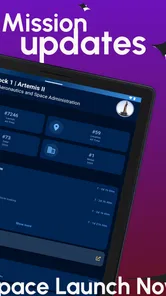
The app can be approachable for newcomers because it gathers launch schedules, countdowns, and mission information in one place. You do not need to be an expert to browse upcoming launches or learn what a mission is about. More experienced followers may also appreciate having vehicle and launch-location details alongside the schedule, making the app useful for different levels of interest.
Does the app cover only upcoming launches, or can I look at past missions too?
Space Launch Now is designed to help users follow upcoming and recent rocket launches. Its mission information can provide context beyond a countdown, making it worthwhile to explore launch entries even when an event is no longer imminent. The app’s main purpose is tracking launch activity, so it is best approached as a spaceflight information companion rather than a complete historical archive.
Who is Space Launch Now - Tracker designed for?
Space Launch Now - Tracker is suited to anyone curious about rocket launches, from occasional followers who want to see what is coming up to space enthusiasts who like keeping mission details close at hand. Its focus on countdowns, schedules, and mission information makes it a convenient companion for following spaceflight activity without needing to search across multiple sources.
What is Space Launch Now - Tracker?
Space Launch Now - Tracker is a spaceflight information app designed to help users follow upcoming and recent rocket launches. It brings together launch schedules, mission descriptions, countdowns, vehicle details, launch locations, and notifications in one place. The app is useful for casual space enthusiasts as well as users who want a convenient way to keep track of commercial, government, and international missions.
Pros
- Covers launches from multiple agencies and private space companies.
- Provides detailed mission pages with payload
- vehicle
- and launch-site information.
- Countdown notifications help users follow upcoming missions on time.
- Clean interface makes browsing launch schedules quick and straightforward.
- Includes past launch history for exploring previous missions and outcomes.
Cons
- Some mission details may change quickly after delays or schedule updates.
- Notification timing can be inconsistent depending on device settings.
- The amount of technical information may overwhelm casual space fans.
- Live coverage quality may vary between launches and available providers.
- Some features or content may depend on an internet connection.











