

Soul EV Spy
- 8.00
- 4.1
- Installs
- 1.00K
- Price
- $16.99

Screenshots
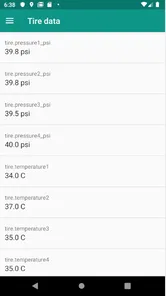
Analysis by Reviewed
I judge a car-data app less by how many readings it can show than by whether I can make sense of them and use them responsibly. Soul EV Spy is an Android auto app from EVRanger.com for checking information from compatible Kia and Hyundai electric cars with a Vgate iCar Pro OBD adapter. That extra hardware matters: this is not simply a dashboard app you install and use without connecting anything to the vehicle. I’d consider it when I want a closer look at EV data, rather than when I only need ordinary trip directions or a basic charge indicator.
Check the fit before spending
The first question I’d settle is whether the car and adapter are a match for the way I plan to use the app. It is aimed at Kia and Hyundai electric-car data, and it relies on a Vgate iCar Pro OBD adapter. An OBD port by itself does not make every car or every adapter suitable. If I were shopping from scratch, I’d verify the exact adapter and vehicle fit before paying the app’s $16.99 price, particularly if I expected to use it only once in a while.
I’d also think about where the adapter will live. If it stays with the car, a quick check is easier; if I need to find it, carry it, or reconnect it each time, that friction can make an otherwise interesting tool less useful. The value depends not just on the information available but on whether I’ll build a repeatable habit around connecting and checking it.
Start with a parked test
A useful first session is a parked one. I’d connect the adapter, open the app, and take time to understand which readings appear before trying to interpret them during a drive. That avoids turning a commute into a troubleshooting exercise and makes it easier to notice whether a connection or reading behaves as expected. The app is rated for Everyone, but the information is still technical enough that an unfamiliar battery readout may need patience rather than a quick glance.
Keeping the first session simple also helps separate setup questions from driving questions. I’d look at the app while stationary, make a note of which screens I understand, and leave interpretation of anything unfamiliar until later. That small change makes the app easier to evaluate: I can decide whether its information is actually useful to me before making it part of a regular routine.
Get to Know Your Car Like Never Before
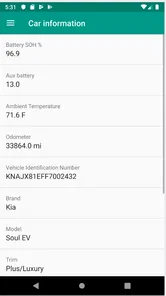
So, what's the deal with Soul EV Spy? Essentially, it's an app designed to connect to your Kia Soul EV's onboard computer and relay a treasure trove of information right to your smartphone. Think of it as having a personal mechanic tucked into your pocket, always ready to spill the beans on your car's performance and health.
Battery readings are most useful in context
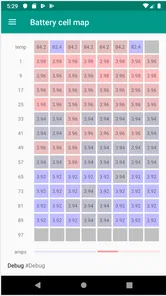
One of the coolest features of the app is its ability to monitor the battery's status in real-time. You can see everything from the current charge level to the health of individual battery cells. It’s like having x-ray vision for your car's most crucial component. Plus, it provides detailed insights into your energy consumption, helping you drive more efficiently and extend your range.
More From Our News Desk

 Gmail
GmailGmail in a Busy Inbox: Who Benefits Most?
From first account to crowded workday, Gmail earns its place through dependable search and flexible sorting—but its best fit depends on how much inbox maintenance you can tolerate.

 Prime Video
Switching to Prime Video: What Changes in Your Viewing Routine
Prime Video can make a compelling second home for streaming, but switching means learning a different catalog, rental layer, and route from browsing to playback.

 Universal TV Remote Control
Universal TV Remote Control Works Best as a Reliable Backup
A phone remote earns its place through quick setup and reliable habits. Here is how to get more from Universal TV Remote Control—and where its limits show.

 Weather - By Xiaomi
Weather by Xiaomi Review: Clear at a Glance, Less Clear Up Close
Xiaomi’s weather app makes everyday forecasts quick to scan, but its calm surface can leave useful details and recovery paths harder to find than they should be.

 X
XX Under Pressure: Can It Recover When Posting Goes Wrong?
A resilience-focused review of X, examining setup, mistaken posts, interruptions, weak connections, and the gaps that matter when recovery needs to be dependable.

 Clash of Clans
Clash of Clans Is Won Between the Battles
Its raids are quick; its community is a long-term project of coordination, teaching, rivalry, and shared responsibility—with all the friction that entails.
Latest News



For me, the practical question is not whether a reading looks impressive, but whether it helps answer a question I actually have. Am I seeing a pattern across several similar drives, or reacting to one trip with unusual conditions? I’d avoid treating a single display as a verdict on battery condition. A closer look can help me understand what the car is reporting, but it does not replace a qualified assessment when a concern needs diagnosis.
Trip tracking for repeat journeys
Another standout feature is the journey tracking. Ever been curious about how efficiently you're driving or how your routes impact your battery life? The app records each trip, offering data on speed, energy usage, and more. It's a bit like having a fitness tracker, but for your car.
The strongest workflow here is a comparison between trips that are reasonably alike. A repeated commute can offer a more useful reference than comparing a short stop-and-go errand with a longer, faster drive. I’d use the trip record to spot questions worth investigating—perhaps a change in energy use or a difference between familiar routes—rather than expecting one figure to explain every factor behind it.
Read patterns, not isolated numbers
The less obvious value for me is in comparing like with like. Rather than drawing conclusions from one unusual trip, I’d check similar journeys under broadly similar conditions and look for patterns in energy use. A regular drive to work, for example, gives a more useful baseline than comparing a short urban errand with a longer, faster trip. This is where journey information can help me ask better questions about my habits, without treating a single reading as a diagnosis or a promise of extra range.
A practical way to do that is to keep the comparison narrow: look at the same familiar journey, then consider whether the result is consistent over more than one outing. If I change several things at once, I won’t know what explains a difference. This is a modest but useful discipline for anyone tempted to turn detailed vehicle data into a scorecard for every drive.
Battery-cell information also calls for restraint. It can help an owner understand what the car is reporting, but I wouldn’t use an unfamiliar number on its own to decide that a battery needs repair. If a reading looks concerning, I’d record when it appeared and seek qualified advice rather than relying on an app as a substitute for inspection. That distinction is important: detailed access is useful, but it does not automatically make every display self-explanatory.
Connection and attention have a cost
The user interface is described as approachable, and once the adapter is connected, the idea of checking vehicle data from a phone is straightforward. Still, I’d treat the first connection as a small setup task, not something to rush through in a busy parking lot. The adapter has to be available and connected, so the experience is less immediate than opening a standard vehicle companion app. If the adapter is misplaced, incompatible, or simply not something you want to carry, the app’s deeper readings won’t be as convenient to reach.
I also wouldn’t try to read technical displays while driving. This app’s value is in checking information before setting off or reviewing it afterward, not in demanding attention on the road. For someone who wants a glanceable answer without setup, the car’s own display is the more sensible everyday choice. The added hardware is a trade-off: it creates a more hands-on way to inspect data, but also adds a step that can discourage casual use.
Trust starts with visible choices
For a data-focused tool, I want to know what I’m granting and what happens when a device connects to the car. I’d review the permissions Android requests during setup and make choices deliberately, allowing only what is needed for the functions I plan to use. I wouldn’t assume anything about account options, data retention, or privacy practices without checking the app’s current disclosures and my device’s permission settings. That is a sensible habit with any app that handles vehicle information.
That cautious approach is especially useful when an app and an adapter are involved. I’d distinguish between information I can see on the phone and choices I can actively control in the app or Android settings, rather than assuming that access to vehicle readings tells me how all information is handled. If I share a car, I’d also talk with other regular drivers before recording trips. Journey details can reveal routines, so shared access deserves the same common-sense conversation as any other record of vehicle use.
A realistic routine for an owner
A realistic use case is checking the car while parked at home before a longer drive, then reviewing the journey afterward to understand energy use. For instance, if I have a familiar trip coming up, I could use the app before leaving to get oriented to the readings, drive normally, and review the record once parked. That is more useful than trying to monitor every number in real time or changing my driving based on one isolated result.
If the vehicle is shared, I’d agree on who will connect the adapter and review journey information. That avoids treating trip records as purely individual data and helps prevent confusion if two people use the car differently. Someone who only wants a quick range estimate may prefer the vehicle’s own display; an owner who enjoys exploring battery and journey details is more likely to find the setup worthwhile.
How it differs from familiar alternatives
Compared with a general EV route planner, this app is focused on information coming from the vehicle through an OBD adapter, rather than helping choose a charging stop or plan a route. Compared with the car’s ordinary display, its appeal is the closer look at battery and journey details; the cost is carrying and connecting separate hardware. I’d choose it for curiosity, repeat-trip comparisons, or keeping an eye on what the car reports—not as a replacement for navigation, service advice, or the manufacturer’s own vehicle functions.
That distinction also helps decide who should skip it. If I mainly need directions, charger discovery, or a quick check before driving, a navigation tool or the car’s own display is a better fit. If I’m interested in investigating how my own vehicle reports battery and trip information, the adapter-based approach has a clearer purpose. I would not buy it expecting it to solve every EV ownership task; its usefulness is concentrated in looking more closely at the car’s data.
Version, platform, and value
This is an Android app, and it requires Android 5.0 or later. Its current version is 1.0.12-2250, and it has been available since September 8, 2019. It has over a thousand installs, an average rating of 4.1 from 61 ratings, and eight written reviews. Those figures suggest some real-world use, but I’d still make the adapter and vehicle fit my first checks. The developer is EVRanger.com, and the one-time price is a more meaningful decision point for a casual user than the app’s technical appeal alone.
The price makes most sense to me if I expect to return to the readings, not if I only want a one-off experiment. Before buying, I’d ask myself whether I can name a question I want to investigate—such as comparing familiar journeys or learning what battery information the car reports. If I can, the cost is easier to judge against a specific use. If I can’t, the novelty of extra data may wear off once the initial exploration is over.
When I’d choose it—and when I wouldn’t
In a world where technology is rapidly advancing, keeping up with the latest tools and apps can be daunting. But with Soul EV Spy, you’re not just keeping up – you’re setting the pace. Whether you're looking to optimize your driving, understand your car better, or simply geek out over the sheer amount of data available, this app has got you covered.
So, if you're a proud owner of a Kia Soul EV, do yourself a favor and check out Soul EV Spy. It's more than just an app; it's your ticket to unlocking the full potential of your electric vehicle. Trust me, once you've tried it, you'll wonder how you ever managed without it.
I’d temper that enthusiasm with a practical test: do I have the right car and adapter, and will I make time to use the readings thoughtfully? The app is best suited to an owner who enjoys exploring vehicle information and is comfortable treating the results as clues rather than authoritative diagnoses. It is less suitable for someone who wants a no-setup utility, broad route planning, or a quick answer that requires no interpretation.
My cautious recommendation
I’d recommend it to an owner of a supported Kia or Hyundai EV who already has, or is happy to use, the specified adapter and genuinely wants to explore vehicle data. I’d skip it if I only wanted route planning, a quick charge check, or a tool that works without extra hardware. The strongest reason to try it is the opportunity to examine battery and trip information more closely; the strongest reason to pause is that extra detail takes setup and careful interpretation. If that balance sounds right for you, it is a focused tool worth considering, with sensible expectations about what an app can tell you.
Soul EV Spy Frequently Asked Questions
What kind of car information can Soul EV Spy show me?
Soul EV Spy is an Auto & Vehicles app for viewing data from a Kia or Hyundai electric car through a Vgate iCar Pro OBD adapter. It is intended for drivers who want vehicle information on a phone rather than relying only on the car’s displays. The app is developed by EVRanger.com, and its content rating is Everyone.
What is Soul EV Spy and what does it do?
Soul EV Spy is a mobile application designed for Kia Soul EV owners to monitor and manage their vehicle's battery and overall performance. The app connects to the car's onboard system to provide real-time data on battery health, charge level, and energy consumption, helping users optimize their driving experience and extend battery life.
Is Soul EV Spy compatible with all models of Kia Soul EV?
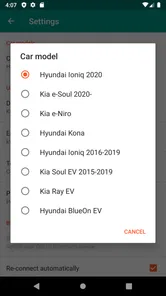
Soul EV Spy is specifically designed for Kia Soul EV models. However, compatibility may vary depending on the model year and software version of your vehicle. It is recommended to check the app's compatibility list on its official website or app store listing before downloading to ensure it will function with your specific vehicle model.
What do I need before using Soul EV Spy with my car?
You need a Vgate iCar Pro OBD adapter to use Soul EV Spy with a Kia or Hyundai electric car. The adapter connects through the vehicle’s OBD system so the app can read car data. Before purchasing, consider whether you already own this adapter or are willing to obtain one separately, as the app itself is not the only item needed to get started.
How does Soul EV Spy connect to my Kia Soul EV?
Soul EV Spy connects to your Kia Soul EV via a Bluetooth OBD-II adapter. You will need to purchase a compatible adapter and plug it into the vehicle's OBD-II port. Once connected, the app will sync with the car's system, allowing you to access detailed information about your vehicle's performance and battery status directly from your smartphone.
Pros
- User-friendly interface design
- Comprehensive vehicle data insights
- Real-time battery status updates
- Supports multiple EV models
- Easy integration with smart devices
Cons
- Limited features in free version
- Occasional data sync issues
- Requires stable internet connection
- Not compatible with all car models
- Subscription plans can be pricey











