Sling: Employee Scheduling App
- 2.03K
- 4.5
- Installs
- 1.00M
- Price
- Free

Screenshots




Analysis by Reviewed
I’d approach Sling as a practical way to bring shift planning and team communication together, rather than as a general-purpose workplace chat app. If you’ve ever found yourself tangled in the web of work schedules, you’re going to want to stick around for this one. The key question is whether your workplace regularly coordinates shifts; that’s where this kind of tool has a clear purpose.
Who is likely to get the most from it?
I can see Sling being a good fit for a restaurant, shop, or other team where people work different hours and managers need everyone looking at the same schedule. Its focus is communication and employee scheduling, and Sling Inc. develops it. A manager can use it to organize the rota, while staff can check when they’re expected and keep work-related conversations together. It is less compelling for a small team with fixed hours that already handles everything comfortably through a shared calendar.
What a first useful day can look like
Imagine a manager preparing the coming week while an employee realizes they cannot cover one of their shifts. Rather than starting a long chain of personal messages, the employee can request a swap with a coworker in Sling, and the manager can review the change. That gives everyone a clearer route from problem to decision. I would still make sure the final schedule reflects any approved change; a request is not the same as a confirmed adjustment.
The app is free and rated for Everyone, so trying it does not require a purchase. Its average rating is 4.5 from around 9,400 ratings, with roughly 2,000 written reviews, and it has over one million installs. Those figures suggest an established audience, but they can’t tell you whether its workflow suits your particular team. I’d judge it by whether staff actually check the schedule and use the communication tools consistently.
What is Sling All About?
So, what exactly is Sling? It's an intuitive employee scheduling tool designed to simplify workforce management for businesses of all sizes. Whether you're running a bustling restaurant, a retail store, or even a corporate office, Sling swoops in to save the day, making the tedious process of scheduling as easy as pie.
Setting Up and Getting Started
First things first, getting started with Sling is a breeze. The app is available on both Android and iOS, ensuring that no one is left out. After a quick download and installation, you're greeted with a clean, user-friendly interface. The onboarding process is straightforward, guiding you through setting up your business profile, adding employees, and crafting your first schedule. Trust me, even if you're not the most tech-savvy, you'll find this process smooth sailing.
Features that Make Sling Stand Out
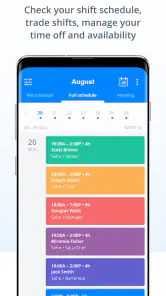
Let’s talk features because Sling is packed with them! One of my favorites has to be the shift swapping feature. Employees can easily swap shifts with their coworkers, and managers can approve these changes with just a few taps. This takes a massive load off managers’ shoulders and empowers employees to manage their own schedules.
You May Like

Clash of Clans Is Won Between the Battles

Android Auto Makes the Case for Quieter Car Software

MobiOffice: Transforming Mobile Productivity with Seamless Integration

EA SPORTS FC™ Mobile Soccer: Redefining Mobile Sports Gaming

How Microsoft OneDrive Became a Mobile Productivity Giant

How Google Translate Breaks Language Barriers Effortlessly
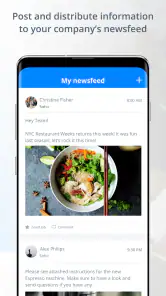
Another standout feature is the built-in messaging system. Gone are the days of juggling multiple communication tools; Sling keeps all your work-related conversations in one place. Need to remind your team about a meeting or update them on a schedule change? It’s all just a message away!
User Experience and Interface
When it comes to user experience, Sling scores major points. The app's interface is sleek and intuitive, with a design that's easy on the eyes. Navigating through the app feels natural, and the responsiveness is top-notch. Plus, the color-coded schedules make it easy to see who’s working when at a glance.
Where it fits—and where it may not
Compared with relying on a shared calendar and a separate group chat, Sling puts shift changes and team messages in a work-focused place. That can reduce the chance that a schedule update gets buried among unrelated conversations. The trade-off is that your team must adopt another app and remember to check it. If staff rarely use smartphones at work, or the schedule barely changes, a simple printed rota or existing calendar may be easier to maintain.
Small habits that make the workflow clearer
For a smoother first week, I’d agree on one team habit before inviting everyone in: treat the posted schedule as the reference point, and use the swap process rather than assuming a private conversation changed a shift. Managers should also tell employees who has final approval, so nobody mistakes a proposed change for a confirmed one. This is a small distinction, but it prevents the most avoidable confusion in shift coordination.
Messaging is useful for schedule-related reminders, but I wouldn’t treat it as a replacement for every workplace communication channel. Keep urgent, face-to-face matters in the channel your team already relies on, and use Sling for information employees need alongside their shifts. That separation helps keep the schedule conversation useful instead of letting the app become another noisy inbox.
Version and compatibility
The current version is 1.90.74, and the minimum operating system requirement is version 9. Before asking a whole team to move over, I’d check that the devices people depend on can run it. That avoids making the schedule easier for some employees while accidentally leaving others out.
Ending Thoughts
In the end, Sling: Employee Scheduling App is more than just a scheduling tool; it’s a comprehensive solution to workforce management. It cuts down on scheduling conflicts, improves communication, and gives both managers and employees more control over their work lives. If you’re in the market for a scheduling app that’s reliable and packed with features, Sling is definitely worth checking out. So why not give it a try and see how it can transform your workplace?
Whether you're looking to streamline operations or simply make scheduling a less daunting task, Sling has got your back. So, what are you waiting for? Dive in and let Sling do the heavy lifting for you!
My recommendation for a first-time user
I’d start with a single, real scheduling cycle instead of trying to move every workplace process into the app at once. Set up the business profile, add the employees who need to participate, create the upcoming schedule, and ask the team to use the swap and messaging tools for that week. This gives you a concrete test: can people find their shifts, understand changes, and reach the right coworkers without extra explanation?
Sling was released on January 7, 2015, and its long-running presence may reassure people looking for an established scheduling option, though it does not guarantee a perfect fit for every workplace. I’d recommend it most to shift-based teams that want scheduling and everyday coordination close together. If your organization needs a broader workforce-management system or has a process that depends on tools beyond shift planning and team messages, compare those requirements carefully before switching. For a team whose main headache is keeping shifts and updates straight, it’s a sensible place to begin.
Make the first setup useful, not exhaustive
As a first-time user, I’d resist the urge to model every exception before anyone has used the app. Begin with the people who will create or approve schedules and a small group of employees who can test whether the basic routine makes sense. Add the rest once the first schedule is understandable. That approach is less about limiting the tool and more about catching confusing team habits early, while changes are easy to explain.
Before publishing, decide how your workplace names roles and shifts. If one person calls a shift “opening” and another calls it “early,” people may technically be looking at the same plan but still misunderstand what they’re expected to do. A consistent naming convention makes the color-coded view more useful, especially for workers who scan quickly between tasks. I’d also agree on where employees should look when a message and the schedule appear to disagree: the schedule should be the final reference.
Turn a shift request into a dependable handoff
A realistic test is a busy team member who knows in advance that a personal commitment may conflict with a shift. They can use the swap workflow to ask a coworker, while the manager checks the request and confirms the outcome. The practical benefit is not simply fewer messages; it is a clearer handoff, with less room for one person to believe a change is settled while another still expects the original assignment. I would make sure the employee requesting the change knows to keep the existing shift until approval is clear.
Managers can make this process smoother by checking requests at predictable times rather than letting them sit indefinitely. The app can organize the request and discussion, but the team still needs a human decision-maker and a shared expectation about response time. If employees are unsure whether a request is pending, approved, or declined, they may revert to texting one another, which defeats the point of having a common workflow.
Questions worth settling with the team
Will employees need to do anything before they can see the schedule? In practice, the manager needs to establish the business profile, add the relevant staff, and create a schedule before the app can serve as a useful reference. I’d tell employees what they are expected to do after joining: check their assigned shifts, use the agreed route for swap requests, and read work-related notices there. A brief explanation at the start is more effective than assuming everyone will discover the routine on their own.
Does a swap automatically change the rota? I would not treat it that way. The useful distinction is between asking for a change and having it approved; the schedule should reflect the final decision, and both employees should verify that it does. Can the app replace a manager’s judgement? No. It can make the request and communication easier to follow, but staffing decisions, coverage needs, and any workplace rules still belong to the people responsible for the schedule.
Where the comparison really matters
A shared calendar can be perfectly adequate when the team is small, everyone works predictable hours, and only one person edits the plan. A group chat is familiar and quick for informal coordination, but schedule details can disappear into unrelated talk. Sling’s advantage is that it brings the rota, swap requests, and work-focused messages closer together. Its cost is a change in habit: every employee must know where the authoritative schedule lives and remember to check it.
For a workplace already using a dedicated workforce-management system with broader operational needs, replacing it with a focused scheduling app may leave important processes elsewhere. I’d compare the actual daily tasks rather than choosing by feature count. If the recurring problem is simply “Who is working, and how do we handle a change?”, Sling is a sensible match. If managers need a unified system for several other responsibilities, a broader platform may be a better fit even if its schedule is less immediately simple.
Who should pass, and how I’d judge the trial
I’d skip Sling if the team has no meaningful shift rotation, staff are not expected to use phones for work coordination, or a posted paper schedule already stays accurate without much effort. It can also be a poor fit if management is unwilling to maintain the schedule after changes are approved. No scheduling app can rescue a process where nobody owns updates; putting an outdated rota in a clearer interface may only make the mistake easier to see.
For a team that does need it, I’d judge the first scheduling cycle by practical signs rather than by whether everyone likes a new app on day one. Can employees locate their next shift without asking a manager? Do coworkers understand how to request a swap? Does the person approving it update the published plan? Are important notices easier to find than in a busy group chat? Those answers reveal whether the workflow is genuinely helping, and they give the team specific habits to adjust.
A measured recommendation
My view is that Sling is strongest when a team’s everyday friction comes from changing shifts and scattered coordination, not from a need to digitize every part of work. Start with one schedule, explain the approval rule, and use a real but manageable request to test the process. If the schedule becomes the place everyone trusts and the messages stay focused on work, the app is earning its place. If employees keep relying on private chats or the rota rarely changes, the simpler system you already have may remain the better choice.
Sling: Employee Scheduling App Frequently Asked Questions
Who is Sling: Employee Scheduling App designed for?
Sling is a communication app for workplaces that need to coordinate employee schedules and keep team members informed. It may be useful for managers organizing shifts as well as employees who need to check work-related updates. Its focus on scheduling and team communication makes it more suited to coordinating a workplace than to personal calendar planning.
What platforms is Sling: Employee Scheduling App available on?
Sling: Employee Scheduling App is available for both Android and iOS devices. Users can download it from the Google Play Store for Android or the Apple App Store for iOS. The app is designed to be highly compatible with a wide range of smartphones and tablets, ensuring that users can access their schedules on the go.
Is Sling: Employee Scheduling App free to use?
Sling offers a free version that includes essential features for scheduling and communication. However, for advanced functionalities like labor cost management and reporting, users might need to subscribe to Sling’s premium plans. This tiered pricing structure allows businesses to choose a plan that best fits their operational needs.
How does Sling help with employee communication?
Sling includes built-in messaging features that facilitate seamless communication among team members. This tool allows employees to send direct messages or group messages, ensuring that everyone is on the same page regarding schedules, tasks, or any last-minute changes. This feature is crucial for maintaining effective communication and operational efficiency in the workplace.
Can Sling track employee work hours and attendance?
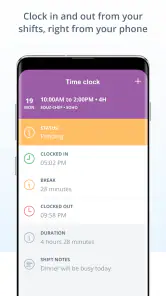
Yes, Sling comes equipped with time tracking and attendance monitoring tools. It allows managers to keep an eye on employee work hours, shift changes, and attendance in real time. This feature not only assists in payroll processing but also helps in identifying patterns such as tardiness or overtime, which can be addressed to enhance productivity.
Pros
- Intuitive user interface
- Seamless shift swapping
- Efficient time tracking
- Real-time notifications
- Integrates with payroll systems
Cons
- Limited free version
- Occasional sync issues
- Requires internet connection
- Limited customization options
- Steep learning curve for new users

- Category
- Communication
- Version
- 1.90.74











