Skincare Routine
- 103.00
- 4.7
- Installs
- 10.00K
- Price
- $3.99

Screenshots
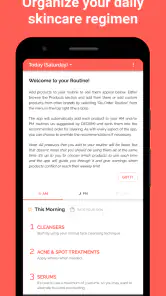



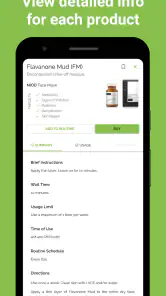


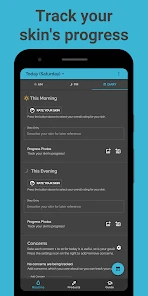
Analysis by Reviewed
I find a skincare routine easier to stick with when I can tell what I used, when I used it, and whether my skin seemed to respond. That’s the practical appeal of Skincare Routine: it is a beauty app built around organizing daily care and keeping a record of changes, rather than turning skincare into another stream of advice to scroll through. It’s aimed at people who want a little more structure, especially if a crowded bathroom shelf or an inconsistent schedule makes it hard to know what is working.
What I’d want from a routine tracker
For me, the useful question is not simply whether an app can list products. It’s whether it helps me repeat a manageable routine long enough to notice patterns. Made by Mento Apps Ltd, this paid app costs $3.99, has a 4.7 average from nearly 700 ratings, and has passed 10,000 installs. Those figures suggest a solid audience, but the important decision is whether you want a dedicated place for skincare habits rather than a general notes app or a paper checklist.
It’s rated for Everyone, and the current version is 7.4.41; it runs on Android 8.0 or later. The app has been around since August 13, 2018, which gives it some history as a focused skincare tool. I’d still treat any routine suggestions as organizational help, not a diagnosis or a substitute for professional advice when a skin concern is persistent or painful.
The First Swipe: Initial Impressions
When I first opened Skincare Routine, I was immediately struck by its clean and user-friendly interface. It’s like stepping into a virtual spa, with soothing colors and intuitive navigation. The app starts with a quick questionnaire to understand your skin type and concerns, which I found super helpful. No more guessing games about whether I have dry, oily, or combination skin!
Features That Stand Out
One of the coolest features is the personalized skincare plan. Based on your answers, the app curates a routine tailored just for you. It felt like having a personal skincare consultant in my pocket. I was also impressed by the ingredient checker. You can scan your products to see if they’re compatible with your skin type or if there’s something potentially irritating. This feature alone saves tons of time and prevents those dreaded breakout surprises.
Another highlight is the product recommendations. The app doesn’t just throw random product names at you. Instead, it suggests items based on user reviews and expert opinions. Plus, it provides a detailed breakdown of how each product benefits your skin. Talk about going the extra mile!
A routine that survives a busy week
The best way I’d use the tracker is to keep the routine steady before drawing conclusions. If I start several new products at once, a change in my skin is hard to interpret; spacing out changes and noting them alongside a photo makes the record more useful. That’s a small but important trade-off: logging takes a little discipline, yet it can prevent me from blaming the wrong product or abandoning something too quickly.
More From Our News Desk

Weather by Xiaomi Review: Clear at a Glance, Less Clear Up Close

X Under Pressure: Can It Recover When Posting Goes Wrong?

Clash of Clans Is Won Between the Battles

Android Auto Makes the Case for Quieter Car Software

MobiOffice: Transforming Mobile Productivity with Seamless Integration

EA SPORTS FC™ Mobile Soccer: Redefining Mobile Sports Gaming
In an everyday scenario, I might check the evening routine after washing my face, mark what I actually used, and add a short note if my skin felt unusually tight or irritated. A photo taken under similar lighting every so often can make comparisons fairer than relying on memory. I’d keep notes brief and consistent rather than trying to document every detail; the goal is a routine I can maintain, not a second job.
Keeping Track and Making Progress
The app also includes a tracker to monitor your skin’s progress. You can log changes and even upload photos to visually track improvements over time. It's like having a skin diary, and seeing the progress is quite motivating. I’ve noticed that sticking to a routine is easier when I can see tangible results.
Let’s not forget the reminders. If you’re like me and sometimes too busy to remember your skincare routine, this feature is a lifesaver. It gently nudges you to stick to your schedule without being too intrusive.
Who benefits most—and who may prefer another approach
I’d recommend this kind of structure to someone building a routine from scratch, someone who rotates products and loses track, or anyone who wants a simple record to discuss with a skincare professional. The questionnaire and plan can make the first steps feel less random, while the tracker gives a reason to pause before buying yet another product. It is especially useful if the problem is remembering and observing, rather than needing a complicated beauty database.
There are sensible reasons to choose an alternative. A paper diary or ordinary notes app may suit someone who wants complete control and no paid dedicated tool. A general habit tracker can be a better fit if skincare is only one of many daily routines to manage. And if your main need is medical guidance, neither product suggestions nor a personal log can replace a qualified clinician. The app’s ingredient checker can help flag possible concerns, but I wouldn’t treat a compatibility result as a guarantee that a product will suit my skin.
Making the switch worth the effort
Moving an established routine into a new tracker can feel like more work than simply continuing with a note on the bathroom mirror. I’d start by entering only the products I currently use and the steps I genuinely intend to follow. That makes reminders less likely to become noise. If I’m changing products, I’d record the change clearly and avoid making several other adjustments at the same time; otherwise, even a detailed history won’t tell me much about cause and effect.
One question worth asking before paying is whether you’ll use the tracking and reminders regularly. The $3.99 price makes most sense to me if the app becomes part of a repeatable habit; if you only want occasional product research, a free general-purpose note may be enough. The app is for Android, so iPhone users should look for an iOS option rather than assume this version will work on their device.
Making the record more useful
I would treat the app as a small experiment log, not a beauty scorecard. A note such as “felt dry after cleansing” is more useful than a vague judgment that my skin looked bad, because it captures something I can compare later. If I change one step and keep the rest stable, the record has a better chance of showing a pattern. If I change cleanser, moisturizer, and frequency together, I may still have a timeline, but it will be much harder to learn from it.
Photos also work best as comparisons rather than proof of a result. I’d try to take them in similar lighting and at a similar point in my routine, instead of comparing a bright daytime photo with one taken late at night. That reduces the temptation to mistake lighting or camera differences for a change in skin. The point is not to create a perfect archive; it is to give memory a useful reference when weeks have passed.
Where a dedicated beauty app earns its place
Compared with a basic checklist, this app’s value is the combination of a skincare-focused plan, reminders, product-related guidance, and a progress record. A checklist can tell me whether I did a step, but it usually needs extra effort to connect that step to how my skin felt over time. Conversely, a broad beauty database may be a better choice for someone whose main goal is browsing products or learning about ingredients in depth. I’d choose this tracker when consistency and observation matter more than having a large reference library.
That distinction matters if you already keep a reliable routine in a calendar or notes app. There is little benefit in copying the same information into another place unless the dedicated reminders and skin diary solve a real problem. I’d give myself a short trial of the habit before building a long product history: if I naturally open the app after my routine, it may be worth keeping; if I keep forgetting to log, a simpler method is likely to work better.
Small habits that make tracking easier
To avoid turning reminders into background noise, I’d schedule them around moments that already happen, such as getting ready for bed, rather than choosing an arbitrary time that clashes with my day. I’d also keep the tracked routine realistic. If I add steps that I rarely complete, the app may show a string of missed tasks and make skincare feel like a test instead of a helpful habit. A shorter routine recorded honestly gives me better information than an ambitious one I keep skipping.
For anyone sharing a bathroom or traveling often, there is another practical trade-off: routines change when products are left at home or the day runs late. I’d mark what I actually used instead of trying to preserve a perfect streak. That makes the log more truthful and helps distinguish an occasional interruption from a genuine pattern. The app can organize my observations, but it cannot make an inconsistent routine consistent on its own.
Questions I’d settle before committing
If you are wondering whether you need to know your exact skin type before starting, I would not let uncertainty stop you from using a tracker. The questionnaire can give you a starting point, but I’d treat that result as a practical prompt, not a medical determination. Skin can also feel different across circumstances, so I would focus on recording what I notice rather than forcing every observation to fit a label.
If you are asking whether the app can tell you why a reaction happened, I would be cautious. An ingredient checker and a timeline can help you spot possible connections, but they do not prove a cause. A gradual, one-change-at-a-time approach makes the record more informative; persistent or painful concerns call for professional advice rather than more app-based guessing. That boundary is important because a convenient tool can make health-related suggestions feel more certain than they are.
Another sensible question is whether the app is worth paying for when free options exist. I’d pay only if its skincare-specific prompts and tracking are features I will use repeatedly. Someone who mainly wants a reminder can get by with a general habit tool, while someone who wants to compare products may prefer a dedicated research resource. The right choice depends less on how many tools an app offers and more on whether its particular workflow fits the reason you are looking for help.
Final Thoughts
Overall, the Skincare Routine app is a fantastic tool for anyone serious about their skin. It takes the guesswork out of finding the right products and routines, making skincare feel less like a chore and more like a pampering session. Whether you’re a skincare newbie or a seasoned pro, there’s something in this app for everyone.
So, if you’re looking to up your skincare game, I’d definitely recommend giving Skincare Routine a try. Your skin will thank you, and who doesn’t want that healthy, glowing complexion?
Skincare Routine Frequently Asked Questions
What does the Skincare Routine app cost to download?
Skincare Routine is a paid beauty app, priced at $3.99. Before downloading, consider whether its focus on managing a daily skincare regimen and tracking your skin’s progress fits what you want from an app. The price is for the app itself; it should not be confused with the cost of skincare products you may choose to use.
Who develops Skincare Routine, and what devices can run it?
Skincare Routine is developed by Mento Apps Ltd. It requires an operating system version 8.0 or later, so check your device’s software before downloading. The app is intended for managing a skincare routine, and its age rating is Everyone, making it suitable for a broad audience interested in organizing their daily skin-care habits.
What is the main purpose of the Skincare Routine app?
The Skincare Routine app is designed to help users create and maintain a personalized skincare regimen tailored to their specific skin type and concerns. It offers customized product recommendations, tracks skincare progress over time, and provides educational content about different skincare ingredients and techniques. This makes it easier for users to achieve healthier and more radiant-looking skin.
How does the Skincare Routine app customize skincare recommendations?
The app uses a detailed skin analysis questionnaire that users fill out upon registration. This questionnaire gathers information about your skin type, concerns, and goals, such as dealing with acne, dryness, or aging. Based on this data, the app generates personalized skincare routines and product recommendations that align with your individual skincare needs, ensuring you get the most effective care.
Is the Skincare Routine app suitable for all skin types?
Yes, the Skincare Routine app is designed to accommodate a wide range of skin types, including oily, dry, combination, sensitive, and normal skin. By using a comprehensive skin analysis, the app tailors its recommendations to suit your unique skin characteristics, ensuring that everyone can benefit from a customized skincare routine that addresses their specific concerns.
Pros
- Easy-to-use interface.
- Comprehensive skincare tips.
- Customizable routine plans.
- Tracks product usage.
- Provides expert advice.
Cons
- Limited free features.
- Occasional app crashes.
- Requires internet access.
- Ads in free version.
- Limited product database.
- Category
- Beauty
- Version
- 7.4.41











