Skin Bliss: Skincare Routines
- 144.00
- 4.5
- Installs
- 1.00M
- Price
- Free

Screenshots






Analysis by Reviewed
When I share a bathroom shelf with people whose skin concerns and product habits differ from mine, the hard part is not remembering what to use; it is keeping each person’s choices separate. Skin Bliss: Skincare Routines works best for me as a personal organizer and learning aid, rather than a household treatment plan. It is a free beauty app from skinbliss, with a 4.2 average from around 8,600 ratings and more than a million installs. That audience makes it an established option, but popularity alone cannot tell you whether its suggestions will suit your skin.
One bathroom shelf, different routines
A realistic use is tracking my own morning and evening steps while other people at home follow their own preferences. If a housemate asks why I stopped using a product, a routine log can help me explain what changed and when instead of relying on memory. I would not treat a shared phone as a shared skin profile: recommendations and tracking make the most sense when they reflect one person’s skin and habits. For coordinating purchases across a household, a simple shopping list may still be easier than trying to make one skincare profile serve everyone.
The app is free to download, with optional in-app purchases ranging from $1.99 to $49.99 per item. I’d begin with the free experience and decide whether the routine tools fit my habits before paying for anything. Skincare is personal, and a paid feature is useful only if it solves a specific problem for you; it should not be mistaken for a guarantee of better results.
Keep profiles and expectations personal
Skin Bliss is built around assessing a person’s skin and offering tailored guidance, so I’d keep profile answers specific and honest rather than entering a blended household description. One person’s sensitivity, routine, or reaction to a product should not steer another person’s choices. If several people share a device, check whose profile is active before adding notes or interpreting recommendations. The app is rated for Everyone, but that age label is not a substitute for an adult helping a younger user make sensible skincare decisions.
I also wouldn’t use an app’s analysis as a diagnosis. If a skin concern is painful, persistent, or worrying, a qualified healthcare professional is a better next step than changing products based only on an app. This matters when people compare experiences: a product that suits one person is not automatically right for another.
Understanding Your Skin
The first thing Skin Bliss does is take you on a journey of self-discovery. By analyzing your skin type, this app helps you understand what your skin truly needs. Say goodbye to random purchases and hello to personalized skincare. The app guides you through creating a profile that assesses factors like skin type, sensitivity, and even lifestyle habits that might affect your skin. Trust me, this feature alone is worth its weight in gold!
Personalized Skincare Recommendations
Once you've got your profile set up, the app provides tailored product recommendations. And I’m not just talking about generic suggestions. These are meticulously chosen based on your unique skin profile. Whether you're battling acne, dryness, or just looking to maintain that healthy glow, Skin Bliss has got you covered. The recommendations also include reviews and ratings from other users, so you know exactly what you're getting into.
More From Our News Desk

 Instagram
’s Power Comes From Its Place in Your Phone
A close look at how Instagram turns Meta’s reach, recommendation systems and everyday camera habits into durable platform power—and what that costs users.

 Gmail
Gmail in a Busy Inbox: Who Benefits Most?
From first account to crowded workday, Gmail earns its place through dependable search and flexible sorting—but its best fit depends on how much inbox maintenance you can tolerate.

 Prime Video
Switching to Prime Video: What Changes in Your Viewing Routine
Prime Video can make a compelling second home for streaming, but switching means learning a different catalog, rental layer, and route from browsing to playback.

 Universal TV Remote Control
 Works Best as a Reliable Backup
A phone remote earns its place through quick setup and reliable habits. Here is how to get more from Universal TV Remote Control—and where its limits show.

 Weather - By Xiaomi
Weather by Xiaomi Review: Clear at a Glance, Less Clear Up Close
Xiaomi’s weather app makes everyday forecasts quick to scan, but its calm surface can leave useful details and recovery paths harder to find than they should be.

 X
X Under Pressure: Can It Recover When Posting Goes Wrong?
A resilience-focused review of X, examining setup, mistaken posts, interruptions, weak connections, and the gaps that matter when recovery needs to be dependable.
Latest News



The app also keeps things fresh by updating recommendations regularly. Just like your wardrobe, skincare needs change with the seasons, and this app makes sure you're always equipped with the best options. It’s like having a skincare consultant in your pocket!
Routine Planning and Tracking
What’s a good skincare regimen without consistency? Thankfully, Skin Bliss makes planning and tracking your skincare routine a breeze. The app allows you to set reminders and track your progress, ensuring you stay on top of your skincare game. It’s perfect for those of us who need a little nudge to stick to a routine—no more excuses!
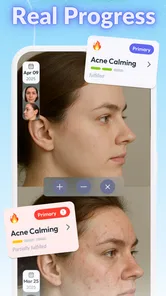
Moreover, I love how the app offers insights into how different products work with your skin over time. It’s like having a skincare diary that shows you what’s working and what isn’t, helping you tweak your routine for the best results.
What I’d use it for day to day
The most useful habit is to change one thing at a time. If I start several new products in the same week, even a diary cannot clearly tell me which one caused irritation or helped. I’d record a simple baseline, make one cautious adjustment, and give myself enough time to notice a pattern. That makes tracking more informative than treating every daily fluctuation as proof that a product works or fails.
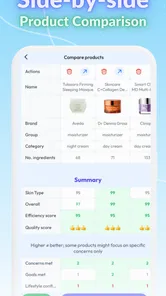
The ingredient scanner can help when I’m standing in a shop comparing two labels. I’d use it to prompt better questions—what ingredients do I want to understand, and does this fit the routine I already have?—rather than letting a scan make the decision for me. Ingredient names and app guidance are useful context, but they cannot account for every individual reaction or replace careful use.
Where it differs from simpler alternatives
Compared with a notes app or paper checklist, Skin Bliss brings skin profiling, product guidance, scanning, and routine tracking into one skincare-focused place. That can reduce the friction of keeping a diary and connect a product choice to the concerns behind it. The trade-off is that a general notes app is more flexible for household coordination, while a basic checklist may be faster if all you need is a reminder to wash your face and apply moisturizer. I’d choose Skin Bliss when I want to explore ingredients and organize a changing routine; I’d skip the extra setup if my routine is settled and I only need a tick box.
For someone who enjoys learning about cosmetics but feels overwhelmed by labels, the app’s structure can make exploration less random. For someone who wants a clinician’s assessment, a guaranteed result, or a completely effortless experience, it is the wrong tool. Recommendations are starting points, not commands, and user reviews are personal experiences rather than proof that a product will behave the same way on your skin.
Community and Expert Advice
Another stellar feature is the community aspect. You can connect with other skincare enthusiasts, share tips, and even get advice from skincare experts. The app hosts forums and Q&A sessions that allow you to dive deeper into the skincare world. It’s a fantastic way to learn from others' experiences and expand your skincare knowledge.
And let’s not forget the expert advice section. The app frequently updates with articles and videos from skincare professionals, offering tips and tricks to refine your routine. It’s like having a library of skincare wisdom at your fingertips!
Who should try it, and who might not
I’d recommend it to a curious beginner who wants help making sense of product ingredients, or to someone who has accumulated products and needs a clearer way to track routine changes. A busy morning is a good test: a reminder can help you follow the steps you chose without rethinking the whole shelf before work. I would not use its suggestions as the only basis for buying a product, and I’d avoid treating a community discussion as personalized medical advice.
The app is free to download, is rated for Everyone, and runs on Android 7.0 or later; its current version is 5.0.6. It was released on August 3, 2018, and its steady presence in the beauty category makes it a familiar option rather than a brand-new experiment. Still, I’d check that its approach suits my needs before building a long-term routine around it. On a shared device, keeping each person’s profile and notes distinct matters more than having everyone use the same tool.
A practical routine for a shared household
One useful way to keep the app from becoming another source of clutter is to treat it as a record of decisions, not a command center for the bathroom. I’d use my own profile to note which products I actually use, then keep the physical shelf organized separately so nobody accidentally follows my steps. If someone borrows a product, that is a household conversation—not something a recommendation can resolve. The distinction is small but practical: digital tracking can clarify personal habits, while clear labels and a shared shopping note are better for coordinating what is bought or used in common.
For a person who wants to build a routine from a crowded collection, I’d first list the products already in use and avoid adding several suggested items at once. The app can help me investigate ingredients and track changes, but restraint is what makes that information useful. If a recommendation introduces an unfamiliar product, I would check whether it duplicates a step I already have before buying it. This reduces the risk of turning a tool meant to simplify decisions into a reason to keep adding products.
Small habits that make tracking more useful
Tracking works best when notes are consistent enough to compare. I’d record a change close to the day it happens and keep the wording plain—what I used, when I used it, and what I noticed—rather than trying to write a detailed skin report every night. A short, steady record is easier to maintain and more helpful later than a burst of enthusiastic logging that stops after a week. If a routine changes because of weather, travel, or a new product, I’d make that context clear so I don’t mistake a temporary shift for a lasting effect.
I’d also avoid interpreting the app’s analysis as a precise measurement of skin health. A scan or profile can organize observations and suggest what to explore, but skin changes for many reasons, and a single check-in cannot settle what caused them. The best trade-off is to use the tools to notice questions worth asking, then make cautious choices. That mindset keeps the scanner informative without letting it overrule how my skin feels or advice from a professional.
Questions worth settling before you rely on it
If you are wondering whether it can replace a dermatologist, my answer is no: I see it as a cosmetic research and routine tool, not a way to diagnose a condition. If you are asking whether you need to pay to get started, the app is free to download and has optional purchases, so I’d explore the basic experience before deciding whether an upgrade is worthwhile. And if several people want to use it on one phone, I’d keep their entries and profiles separate rather than treating the device as a communal account.
Another reasonable question is whether its recommendations should determine what you buy. I wouldn’t let them do that alone. I’d use them to narrow what I want to learn about, compare the ingredients with products already in my routine, and consider my own history of sensitivity. Community opinions can add perspective, but a positive experience from another person does not predict my result. If your priority is simply a quick reminder or a shared household list, a basic checklist or notes app is likely the more direct choice.
Age, trust, and shared-device boundaries
The Everyone rating makes the app accessible across age groups, but it does not mean every recommendation is automatically suitable for every young user. I’d expect an adult to help a child distinguish cosmetic guidance from medical advice and to make purchasing decisions, especially when a concern is persistent or painful. For teenagers sharing a phone with a parent or sibling, the practical question is less about the age label and more about whose profile is being edited and who can see the notes on that device. I would not assume that a rating or a shared screen creates a family supervision system.
Trust also means being selective about what you enter. A skin profile is most helpful when answers reflect the person using it; guessing or filling it in on someone else’s behalf weakens the value of personalized guidance. In a household, I’d agree on a simple boundary: each person owns their own routine decisions, while shared purchases are discussed separately. That keeps the app from becoming an accidental authority over everyone’s bathroom habits.
Household verdict
I see Skin Bliss as a better fit for one person in a household who enjoys learning about cosmetics and wants to build a more deliberate routine. It can support that person with product exploration, scanning, and tracking, while a paper note or shared shopping list handles the family logistics. It is less appealing if everyone expects one profile to coordinate multiple people, if you only need a simple reminder, or if you want medical answers. Used with personal profiles and modest expectations, it can make skincare choices feel more considered without pretending that one app can settle every skin question.
Final Thoughts
In a nutshell, Skin Bliss is a game-changer in the skincare app space. It combines personalized recommendations, routine tracking, and a vibrant community, making it a one-stop shop for your skincare needs. If you’re serious about taking your skincare routine to the next level, it is worth checking out. I’d approach it as a guide for organizing and learning, not as a substitute for professional care or your own judgment. Start with the routine you already have, change one thing at a time, and let the app help you keep track of what you choose.
Skin Bliss: Skincare Routines Frequently Asked Questions
Is Skin Bliss free to download, and are there optional purchases?
Skin Bliss is free to download, so you can try the app without paying upfront. It also offers in-app purchases, giving users the option to access paid features or content. The app is rated for Everyone, making it suitable for a broad audience. If you prefer to avoid unexpected charges, review purchase details in your app store before confirming anything.
What is Skin Bliss and how does it work?
Skin Bliss is a skincare app designed to help users manage and optimize their skincare routines. By analyzing your skin type and concerns, it provides personalized product recommendations and routine suggestions. The app uses a database of skincare ingredients and reviews to ensure that the products suit your specific needs, helping you achieve healthier skin.
Is Skin Bliss suitable for all skin types?
Yes, Skin Bliss is designed to cater to all skin types, including sensitive, oily, dry, and combination skin. The app's algorithm personalizes recommendations based on your unique skin profile, which you can set up during the initial assessment. This ensures that the suggested products and routines are tailored to your specific skincare needs and preferences.
Can I trust the product recommendations on Skin Bliss?
Skin Bliss uses a comprehensive database of skincare products, including user reviews and expert analyses, to provide trustworthy recommendations. The app focuses on ingredients and efficacy, ensuring that suggested products have a good track record of performance. However, it's always advisable to patch-test new products to ensure compatibility with your skin.
Does Skin Bliss offer any free features?
Yes, Skin Bliss offers several free features, including basic skin assessments and routine suggestions. Users can access a limited selection of product recommendations and educational content without a subscription. For advanced features like in-depth skin analysis and personalized skincare tracking, users may need to upgrade to a premium plan.
Pros
- Comprehensive ingredient analysis
- Personalized skincare recommendations
- User-friendly interface
- Regular updates on new products
- Community-driven reviews
Cons
- Limited free features
- In-app purchases required
- Occasional technical glitches
- Requires internet connection
- Limited to skincare products