ShowChat:Friend | Girls Dance
- 240.00
- 4.2
- Installs
- 10.00K
- Price
- Free

Screenshots




Analysis by Reviewed
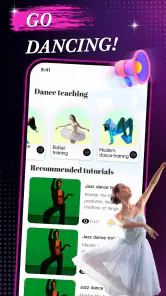
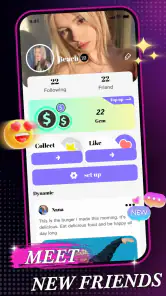
I approached ShowChat: Friend | Girls Dance as a social app for people who want to watch and share online video while also connecting around dance. Its store summary points to video sharing and dance learning, but the short label, ShowChat, suggests that the social side matters just as much as the clips themselves. After spending time with it, my impression is that it works best when you treat it as a place to discover, react to, and pass along dance content rather than as a complete dance course.
The app is free to install, which makes it easy to try without committing money first. It is published by JADE RACK CONTRACTORS LLC and sits in the social category. The audience should pay attention to its Mature 17+ age rating before installing, especially if the phone is shared with younger users. The current release is version 1.9.1, and it supports devices running Android 7.0 or later.
From a dance idea to a shareable social moment
The most useful way to understand this app is through a normal workflow. Imagine that I have seen a dance move online, want to learn the basic motion, and then want to show the result to friends. With a conventional video platform, I might search for a tutorial, switch to a messaging app, save a clip, and use a separate social network for reactions. ShowChat brings the discovery and social handoff closer together, at least in principle, by combining online video sharing with a dance-focused social setting.
That starting condition matters. I would not open it expecting the structured progression of a dedicated training service. I would open it when I want inspiration, a quick demonstration, or a social reason to keep practicing. The distinction saves time: people looking for formal lessons, detailed technique analysis, or a carefully sequenced curriculum may be happier with a specialist dance platform. People who learn by watching, repeating, and discussing may find this format more natural.
The app has reached more than ten thousand installs and holds an average rating of 4.2 from roughly sixteen hundred ratings. Those figures give it a modest but meaningful footprint rather than the scale of a mainstream social giant. I read that as both a benefit and a limitation. A smaller community can feel less overwhelming, but it may also offer fewer creators, fewer styles, and less activity than the biggest video networks.
Starting with the right expectation
My first practical tip is to decide what outcome I want before browsing. If the goal is “find one move I can practice tonight,” short viewing sessions make sense. If the goal is “build a long-term dance routine,” I would use ShowChat as a discovery layer and keep a more organized method beside it. This simple distinction prevents the common frustration of collecting entertaining clips without ever turning them into practice.
I also recommend treating the social setting as part of the experience, not as decoration. A clip can be useful because of the discussion around it: someone may point out a timing detail, suggest a variation, or help identify the part of the movement that is difficult. At the same time, social feedback is not the same as instruction. I would still rely on my own judgment about safety, ability, and whether a movement is suitable for my space.
More From Our News Desk

Weather by Xiaomi Review: Clear at a Glance, Less Clear Up Close

X Under Pressure: Can It Recover When Posting Goes Wrong?

Clash of Clans Is Won Between the Battles

Android Auto Makes the Case for Quieter Car Software

MobiOffice: Transforming Mobile Productivity with Seamless Integration

EA SPORTS FC™ Mobile Soccer: Redefining Mobile Sports Gaming
Moving from discovery to practice
The second stage is the handoff from watching to doing. I would begin with a short viewing session, choose one movement instead of trying to copy an entire routine, and replay it until I understand the rhythm. Then I would practice slowly without worrying about recording anything. This is a better workflow than immediately trying to perform at full speed for an audience, because it separates learning from presentation.
ShowChat’s social focus can create a useful push to finish that process. Knowing that a clip can be shared or discussed gives the practice a destination. For example, I might watch a dance after work, spend a few minutes breaking down the footwork, and later send the clip to a friend who enjoys the same style. If I decide to record my own attempt, the social handoff happens after I have checked the movement rather than before.
The strongest use case is the small loop between inspiration, practice, and conversation. That loop is more realistic for casual users than expecting every session to become a polished performance. It also makes the app easier to use with friends: one person finds an interesting dance, another tries it, and the group compares impressions or encourages a second attempt.
Sharing without losing the context
Sharing is where this app can feel more convenient than using separate tools, because the content and the conversation belong to the same general experience. In a normal alternative, I may copy a video link into a chat and then explain why I sent it. Here, the social setting is already connected to the video-oriented purpose, so the handoff should feel more direct for dance-related exchanges.
Still, I would avoid sending everything I find. A better approach is to share clips with a clear reason: “This is a good warm-up,” “The transition begins near the end,” or “Can you tell whether this is the same variation we practiced?” A specific message turns passive scrolling into collaboration. It also helps friends decide whether they want to watch, practice, or simply react.
One non-obvious trade-off is that social convenience can encourage impulsive sharing. A clip that looks easy may involve speed, balance, or floor space that is not obvious on a phone screen. I would watch it fully before attempting it, check the surrounding area, and avoid treating popularity or enthusiastic reactions as proof that a move is safe for everyone.
What the outcome looks like in daily use
For me, a successful session does not require becoming a creator or spending a long time online. The outcome might be discovering one dance idea, understanding its basic rhythm, and having a friend to discuss it with. That is a narrower result than completing a lesson, but it is also achievable during a short break or after dinner.
Consider a realistic evening workflow. I open the app looking for something new, watch several dance videos, and stop when one catches my attention. Instead of endlessly scrolling, I focus on the movement, practice it slowly, and then share the original clip with a friend. If the friend responds with a variation or asks to try it together, the app has done its job: it has turned a random video into a small social activity.
This also explains why the app may appeal to people who feel uncomfortable with formal classes. There is less pressure in beginning with observation and conversation. A user can take time to watch before deciding whether to participate. The downside is that self-directed learning demands discipline. Without a clear stopping point, browsing can replace practice, and the social feed can become entertainment rather than progress.
The app’s rating of 4.2 indicates generally positive reception, but I would not interpret that as a guarantee that every user will enjoy the same workflow. Social apps depend heavily on the content a person encounters and on whether their friends or preferred creators are active there. The experience can be lively for one user and comparatively quiet for another.
Where the handoffs become awkward
The first friction point is the jump from a watched clip to an actual learning plan. The store positioning connects video sharing with dance learning, but those are different jobs. A video can demonstrate a move without explaining posture, timing, common mistakes, or how to build up safely. If I need those details, I would look for a dedicated tutorial alongside the app rather than assume the social clip is enough.
The second issue is attention. A social video environment naturally invites one more clip, one more reaction, and one more shared item. That can be enjoyable, but it makes the input-to-outcome path less efficient. My workaround is to choose a single goal before opening the app and stop after I have either found a useful clip or completed one practice attempt.
Another limitation is audience fit. The Mature 17+ rating means I would not position it as a general family dance app or hand it to a child without adult judgment. Parents looking for a controlled, youth-oriented learning environment should choose a service designed for that age group. The rating is especially relevant when the app is installed on a shared tablet or a device used by teenagers and younger children.
There is also a financial point to keep in mind. The app is free, but in-app purchases range from ninety-nine cents to ninety-nine dollars and ninety-nine cents per item. I would begin with the free experience, understand what I can do comfortably, and only then decide whether any optional purchase is worthwhile. The broad range means users should pay attention at the point of purchase rather than assume every paid item has a similar cost.
How it compares with familiar alternatives
Compared with a large general video platform, ShowChat has a more focused identity around social video and dance. A general platform is usually better when I need an enormous archive, highly specialized instruction, or a creator with a very specific teaching style. ShowChat is more appealing when the value comes from discovering a dance idea and connecting it to a conversation.
Compared with a messaging app, it offers a more natural starting point for video discovery. Messaging is excellent once I already know whom I want to contact, but it does not necessarily help me find a dance clip in the first place. ShowChat makes more sense when discovery comes before the handoff to friends.
Compared with a dedicated dance-learning service, the trade-off is structure versus spontaneity. A specialist tool should be the better choice for progressive lessons, repeatable training plans, and technique-focused instruction. ShowChat is better suited to casual exploration, social motivation, and sharing ideas that might lead to practice.
That comparison leads to a practical recommendation. I would keep ShowChat if I wanted a social doorway into dance content and enjoyed learning through short demonstrations and conversation. I would skip it as my main tool if I wanted measurable training, detailed correction, or a quiet environment with no social distraction. Neither choice is a criticism; the apps solve different problems.
Small habits that improve the experience
My first habit would be to save the useful idea outside the moment mentally, even if that simply means writing down the name of the move or the part of the clip I want to revisit. Social feeds are good at surfacing novelty but not always at helping me remember a sequence. A short note turns browsing into a practice cue.
Second, I would use a “watch, pause, repeat” rhythm. Watch once for the overall movement, pause to identify the difficult transition, and repeat only that section at a slower personal pace. This is more effective than replaying the whole clip while hoping the body absorbs it automatically. It is also a way to reduce the temptation to compare my first attempt with someone else’s finished performance.
Third, I would make the handoff specific when sharing. Sending a clip with a question creates a better conversation than sending it without context. Asking a friend to identify the beat, compare two variations, or practice together gives the social feature a purpose and makes it easier to judge whether the session produced a real result.
Finally, I would keep purchases separate from enthusiasm. A particularly impressive video can make optional spending feel urgent, especially in a social environment. I would wait until I know what I actually need and review the item price carefully, since the available purchase range extends from less than a dollar to nearly one hundred dollars.
Who should install it, and who should pass
I can recommend it to adults who enjoy dance videos, want a lighter way to discover movements, and like the idea of sharing that discovery with other people. It may also suit beginners who are motivated by friendly interaction rather than by a formal lesson plan. The free entry point makes experimenting straightforward, while the social angle gives practice a reason to continue.
I would be more cautious about recommending it to someone who dislikes public or semi-public interaction, wants a strictly organized course, or expects every video to include detailed coaching. I would also steer younger users and families toward an age-appropriate alternative because of the Mature 17+ classification. People with limited storage, older devices, or a preference for minimal social apps may likewise prefer a simpler video player or messaging tool.
The developer, JADE RACK CONTRACTORS LLC, has positioned the product around a clear combination: online video sharing, dance learning, and social connection. That combination is appealing, but it asks the user to supply some of the structure. The app can start the activity; it cannot replace personal practice, careful judgment, or a proper course when those are the real goals.
My final take after following the full workflow
ShowChat: Friend | Girls Dance is most convincing when I use it as a bridge: a bridge from seeing a dance to trying it, and from trying it to talking about it with someone else. Its value is not simply that it contains video. The useful part is the handoff between discovery and social participation, provided I keep the session focused.
I like the free starting point, the dance-centered identity, and the possibility of turning a casual clip into a shared activity. I also appreciate that it can serve people who learn informally and do not want to begin with a serious training program. The limitations are just as important: social browsing can distract from practice, clips may not provide enough technical guidance, and the Mature 17+ rating makes it unsuitable as a family-friendly default.
My recommendation is therefore selective rather than universal. Install it if your desired outcome is discovering dance content and sharing that interest with other adults. Use a dedicated learning service when your outcome is structured improvement, and use a general video platform when breadth matters more than social focus. For the right user, ShowChat is a convenient starting point for turning online dance videos into a small, repeatable social routine.
ShowChat:Friend | Girls Dance Frequently Asked Questions
What devices and operating systems can run ShowChat: Friend | Girls Dance?
ShowChat: Friend | Girls Dance is available for Android devices running version 7.0 or later. Before downloading, check your device’s operating system and make sure you have enough storage for the app and its content. Compatibility and the available download option can depend on your device and the app store you use.
Who develops ShowChat, and how widely is it used?
ShowChat is developed by JADE RACK CONTRACTORS LLC and is a social app for sharing and discovering online video, including dance-related content. It has more than 10,000 installs and an average rating of 4.2 from around 1,600 ratings, giving prospective users a general sense of its reach and reception. Individual experiences can still vary.
What is ShowChat: Friend | Girls Dance, and what can I do with it?
ShowChat: Friend | Girls Dance is a social entertainment app focused on discovering dance-related content and interacting with other users. After installing it, users can browse available videos or live-style content, follow creators, send messages, and participate in conversations. The exact features may depend on your region, account status, and the version available on your Android or iOS device.
Is ShowChat: Friend | Girls Dance free to download and use?
The application is free to download, but some functions can require in-app purchases, subscriptions, virtual credits, or other paid features. In-app purchase prices range from $0.99 to $99.99 per item. Before using any premium interaction or purchasing credits, check the pricing shown inside the app and review the payment terms in Google Play or the App Store. Charges can vary by country and platform.
Do I need to create an account to use ShowChat?
You may be able to open the app and view limited content without registering, but an account is generally required for interactive features such as chatting, following profiles, saving content, or sending virtual items. Registration may involve an email address, phone number, or a third-party login. Use accurate information and review the privacy options before completing your profile.
Pros
- Quick way to discover dance-focused profiles and start conversations.
- The visual format makes browsing entertaining and easy to understand.
- Useful for meeting people with similar interests in dance and social content.
- Simple interface is accessible for casual users and first-time chat app users.
- Profile-based interactions can help users decide whom to contact.
Cons
- Some features may require in-app purchases or premium access.
- Public profiles and chats can raise privacy concerns for younger users.
- The quality and authenticity of profiles may vary considerably.
- Frequent dance videos or media sharing can consume mobile data quickly.
- Users may encounter unwanted messages
- promotional content
- or fake accounts.
- Category
- Social
- Version
- 1.9.1











