

SEPTA Park
- 170.00
- 3.9
- Installs
- 10.00K
- Price
- Free

Screenshots
Analysis by Reviewed
Parking at a SEPTA lot is one of those small travel tasks that can become surprisingly irritating. You are trying to catch a train, watching the clock, and then you have to deal with payment before you can settle into the trip. I tested SEPTA Park with that exact kind of practical question in mind: does it become a useful part of a regular commute, or does it feel like another app that is convenient only during its first week?
My short answer is that it has a clear purpose and can earn a permanent place on the phone of someone who regularly parks in SEPTA lots. It is a free parking-payment app from the Southeastern Pennsylvania Transportation Authority, designed specifically for paying through a mobile device at SEPTA parking locations. That focus is its biggest strength, but also its main limitation. If you rarely use those lots, its value drops quickly.
Why the first week feels worthwhile
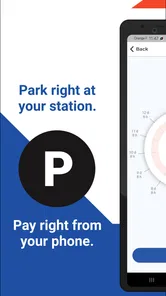
The initial appeal is easy to understand. Instead of treating parking as a separate errand at a machine, you can handle it from your phone while preparing to board. That is especially helpful when the weather is unpleasant, when you are carrying a bag, or when you realize you need to extend your parking time after already walking toward the station.
I like the fact that the app is not trying to be a general-purpose driving platform. Its identity is narrow: parking connected with SEPTA travel. That makes the experience easier to understand than a broad parking marketplace filled with unrelated garages, street spaces, and city services. When I open it, I know what problem I am there to solve.
A realistic morning scenario shows where it fits best. I arrive at a SEPTA lot with only a few minutes before my train, park, and use my phone rather than searching for a payment terminal. Later, if my return trip is delayed, mobile access is more convenient than having to hurry back to the vehicle simply to adjust the parking session. The benefit is not dramatic, but it removes a repeated point of friction from a routine that many commuters perform several times a week.
The app is listed as free, with an Everyone content rating, so there is little barrier to trying it. It belongs to the Auto & Vehicles category, and the developer is the Southeastern Pennsylvania Transportation Authority itself. That direct connection matters to me because the app feels built around a specific transit system rather than adapted from a generic parking product.
Still, the first-week experience depends heavily on your parking pattern. If you use SEPTA lots only for occasional appointments or weekend trips, you may not build enough repetition to notice a lasting improvement. A person who usually gets dropped at the station, walks, bikes, or uses street parking elsewhere may find the app unnecessary. The right question is not whether mobile payment is convenient in theory; it is whether SEPTA parking is a recurring part of your own travel.
More From Our News Desk

 Gmail
GmailGmail in a Busy Inbox: Who Benefits Most?
From first account to crowded workday, Gmail earns its place through dependable search and flexible sorting—but its best fit depends on how much inbox maintenance you can tolerate.

 Prime Video
Switching to Prime Video: What Changes in Your Viewing Routine
Prime Video can make a compelling second home for streaming, but switching means learning a different catalog, rental layer, and route from browsing to playback.

 Universal TV Remote Control
Universal TV Remote Control Works Best as a Reliable Backup
A phone remote earns its place through quick setup and reliable habits. Here is how to get more from Universal TV Remote Control—and where its limits show.

 Weather - By Xiaomi
Weather by Xiaomi Review: Clear at a Glance, Less Clear Up Close
Xiaomi’s weather app makes everyday forecasts quick to scan, but its calm surface can leave useful details and recovery paths harder to find than they should be.

 X
XX Under Pressure: Can It Recover When Posting Goes Wrong?
A resilience-focused review of X, examining setup, mistaken posts, interruptions, weak connections, and the gaps that matter when recovery needs to be dependable.

 Clash of Clans
Clash of Clans Is Won Between the Battles
Its raids are quick; its community is a long-term project of coordination, teaching, rivalry, and shared responsibility—with all the friction that entails.
Latest News



The small habits that make it more useful
One practical habit is to open the app before leaving the car, not after boarding. That gives you a moment to check that you are working with the intended parking location and that the session has been handled before the train pulls away. Rushing through payment from a moving train is a poor routine, particularly when reception or attention is limited.
I would also treat the app as one part of a parking checklist rather than as a replacement for awareness. I still note where I parked, especially at a large lot, and I keep an eye on the session details instead of assuming that opening the app automatically means payment is complete. Mobile convenience is useful only when the final state is clear.
Another non-obvious advantage is how it changes the timing of the task. A physical payment machine forces the payment moment to happen at the station entrance or exit. A phone-based process can be completed while you are still beside the vehicle, which is valuable for families, people with mobility concerns, and anyone managing luggage. The time saved may be modest, but the reduction in uncertainty is more important than speed.
What remains valuable after the novelty fades
After the first few uses, the app stops feeling like a new tool and becomes a routine utility. That is the standard I prefer for transportation apps. I am less interested in a polished first impression than in whether the product still helps on an ordinary Tuesday when I am tired, late, or returning from a long day.
For a frequent SEPTA driver, the recurring value comes from consistency. The app keeps parking payment attached to the same travel habit: drive to a SEPTA lot, park, pay, ride, and return. It does not need to entertain me or provide a wide collection of extras. Its usefulness comes from being present at the exact point where the parking task happens.
The current version is 1.4.1, and the app was released on September 9, 2024. Those details suggest a relatively young product rather than a decades-old utility with a long history behind it. I would therefore judge it by whether it remains dependable as part of a repeated commute, not by whether it already feels as mature as a large navigation platform.
Its public response is reasonably encouraging but not flawless. It has a 3.9 average from around 600 ratings, alongside roughly 170 written reviews. I read that as a sign that the idea works for many people while leaving enough room for occasional friction. A score in that range does not make me dismiss the app, but it does make me keep a backup plan for days when payment technology is not cooperating.
The most important long-term trade-off is specialization. A general parking app may be more useful if you regularly move between different cities, private garages, airport lots, and street-payment systems. SEPTA Park is better when the SEPTA network is the center of your routine. I would rather have a focused tool that matches my regular station than a crowded app that covers many places I never use, but travelers with varied parking needs may reasonably prefer broader coverage.
Who gets the strongest recurring benefit
The best match is a commuter who drives to SEPTA parking lots often enough to repeat the same payment workflow. It also makes sense for someone who dislikes walking to a machine after parking, has limited time before a train, or sometimes needs to manage parking while away from the vehicle. In those cases, the app’s narrow purpose becomes an advantage because it supports a real recurring behavior.
It is less compelling for a person who uses SEPTA only a few times a year. Occasional users may spend more effort remembering an app they rarely open than they would simply using the available alternative at the station. Likewise, if your employer, family member, or another driver normally handles the parking, installing this may not change your routine at all.
I would also hesitate to make it the only option for someone who depends on a phone with unreliable battery life or connectivity. That is not a criticism unique to this app; it is the basic weakness of moving a physical payment task onto a mobile device. Before a long trip, I prefer to leave with enough battery and to know how I would handle the payment if the phone became unavailable.
Maintenance, repetition, and the cost of attention
A parking app has a lower maintenance burden than a social or content-heavy app, but it is not maintenance-free. The main responsibility is remembering to keep it available and to use it deliberately. I do not want to discover that I need it only after parking, when I am already rushing toward the platform.
The app’s small install base, listed as over ten thousand installs, reinforces the sense that this is a focused SEPTA utility rather than a mass-market parking service. That is not automatically negative. A specialized app can be perfectly worthwhile with a modest audience if it solves a frequent local problem. It does mean that users should approach it as a transit-specific tool, not as a universal parking wallet.
Because the app is free, the real cost is attention. I need to remember which app handles parking, confirm the correct lot, and check that my action has gone through. Those steps are minor, but they matter during a rushed commute. The more often I park, the more naturally they become part of my routine; the less often I park, the more noticeable the mental overhead becomes.
My preferred workflow is simple. Before leaving home, I make sure the phone is charged. At the lot, I identify the location before walking away. I complete the payment while still near the car, then take a moment to verify the session rather than relying on memory. If I expect a late return, I check the app before the original parking period becomes an urgent problem. This routine reduces mistakes without turning parking into a project.
There is also a useful distinction between app maintenance and parking maintenance. SEPTA Park can make payment more convenient, but it does not remove the need to understand the lot where you leave the car. I still pay attention to signs, station rules, and the time I expect to return. A mobile interface can streamline the transaction; it cannot replace the driver’s responsibility to park in the right place and follow the posted conditions.
Where the experience can become tiring
The first source of fatigue is repetition without visible added value. Once I understand the payment process, I do not need a lot of novelty. If each visit requires extra decisions or repeated checking, the app can start to feel like a gatekeeper between me and the train. Its long-term success depends on staying quiet and predictable.
The second is context switching. A commuter may already be using a transit app for schedules, a navigation app for driving, and a payment app for other daily purchases. Adding another specialized tool can be worthwhile, but only if it clearly reduces effort. For someone who wants one place to manage every part of a journey, SEPTA Park may feel fragmented compared with a broader transportation platform.
The third is the risk of false confidence. Paying by phone feels more modern than using a machine, but modern does not mean automatic. I still want a clear indication that I selected the intended parking location and completed the transaction. If I am distracted by a train announcement, a child, or heavy luggage, even a straightforward workflow can be rushed.
That is why I would not recommend installing it and then ignoring it until the next parking emergency. The better approach is to test the routine on a normal trip, when there is enough time to understand the screens and build confidence. Once the process becomes familiar, the app earns its place through repetition rather than through features I rarely use.
Compared with paying at a traditional station machine, the phone approach is more flexible and keeps the task close to the vehicle. The machine, however, does not depend on the same personal device being charged and available. Compared with a general parking service, SEPTA Park is more relevant inside the SEPTA context but less useful outside it. Compared with doing nothing until arrival, it encourages a more organized payment habit, though it still requires the user to pay attention.
My long-term verdict on SEPTA Park
After the novelty fades, I still see a reason to keep SEPTA Park installed if I regularly drive to SEPTA parking lots. Its lasting value is not entertainment, broad coverage, or a collection of extras. It is the repeated removal of one awkward step from a transit commute. That is a modest benefit, but modest benefits become meaningful when they appear every week.
I would recommend it most strongly to regular SEPTA drivers who want to pay from the phone, avoid unnecessary walks to a payment machine, or handle parking more easily when plans change. I would recommend a trial rather than an automatic installation for occasional riders. If SEPTA parking is not part of your normal travel, the app may simply occupy space and add another credential to remember.
The balanced conclusion is that this is a practical local tool, not a universal answer to parking. Its 3.9 average shows useful acceptance without suggesting a perfect experience, and the relatively focused audience explains why its value is highly personal. I can live with that trade-off. An app does not need to serve everyone to deserve a permanent place on my phone; it needs to solve one repeated problem reliably enough that I stop thinking about the problem.
For me, SEPTA Park clears that bar when used in the right setting. I would keep my battery charged, verify each session, and retain awareness of the lot rather than trusting the app blindly. With those habits, the free app becomes a sensible part of a SEPTA driving routine. Without that recurring use, the better choice is to avoid adding another specialized tool and stick with the parking method that already fits your travel.
SEPTA Park Frequently Asked Questions
Is SEPTA Park free to download, and what devices can run it?
SEPTA Park is free to download and is intended for mobile use. Before installing, check that your device runs at least Android 7.1, the stated minimum operating system requirement. The app is for paying to park in SEPTA parking lots, so its usefulness depends on whether you park at a participating facility. Its Everyone age rating also makes it suitable for a general audience.
Who makes SEPTA Park, and is it an official SEPTA app?
SEPTA Park is developed by the Southeastern Pennsylvania Transportation Authority, the organization behind SEPTA’s parking service. Its purpose is focused: paying for parking with a mobile device in SEPTA parking lots. That makes it relevant to drivers using those facilities, rather than a general-purpose parking app. If you regularly park at SEPTA lots, the developer and the app’s specific parking function are useful details to consider before downloading.
What is SEPTA Park, and what can I use it for?
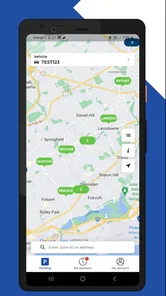
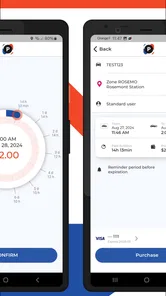
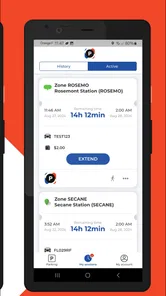
SEPTA Park is a mobile parking app designed to help users pay for parking at participating SEPTA Park locations. After installing it, you can typically select a parking zone or location, enter your vehicle details, choose a parking duration, and complete payment from your phone. It is intended to make station parking more convenient and reduce the need to use a pay station or carry cash. The app is free to download, though parking payment itself is a separate transaction.
How do I pay for parking through the SEPTA Park app?
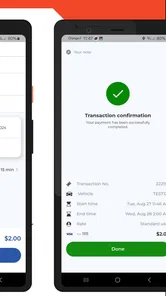
To pay, you generally need to create or access an account, select the correct SEPTA parking facility or zone, add your vehicle information, and choose the amount of time you want to park. The app then processes payment using an available payment method, such as a debit or credit card. Always check the selected location and license plate carefully before confirming. Since the app is designed for mobile parking payments at SEPTA lots, confirm that the facility accepts SEPTA Park before relying on it.
Does SEPTA Park work at every SEPTA station and parking lot?
No, the app may only work at participating SEPTA parking facilities and designated parking zones. Availability can depend on the station, lot, local parking rules, and the payment system installed there. Before relying on the app, check the location shown in the application and confirm that the signs at the lot identify SEPTA Park as an accepted payment option. This helps avoid selecting a location that does not match the lot where your vehicle is parked.
Pros
- Quickly locates SEPTA parking facilities near transit stations.
- Useful details help compare parking options before leaving home.
- Supports easier planning for park-and-ride commutes.
- Can reduce time spent searching for available SEPTA parking.
- Convenient reference for regular regional transit users.
Cons
- Parking availability may change before you arrive.
- Coverage is limited to SEPTA-related parking locations.
- Information may not always reflect temporary closures or restrictions.
- Some facilities can fill up during peak commuting hours.
- A data connection may be needed for reliable location information.











