Securus Mobile
- 10.66K
- 3.6
- Installs
- 1.00M
- Price
- Free

Screenshots

Analysis by Reviewed
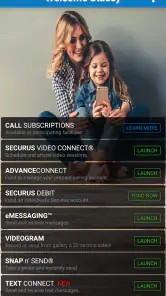
If you’re arranging contact with someone in a correctional setting, the hardest part may not be finding a video-chat app; it may be fitting communication around account arrangements and a visit schedule. That is the specific problem Securus Mobile is built to address. I see its value less as an everyday messenger and more as a practical place to manage calling-account needs and plan a video session from a phone.
What makes this communication app different
Many familiar communication apps are designed for spontaneous calls between people who can both open the same service whenever they want. This one serves a narrower purpose: it brings account management and video-session scheduling together for people using Securus services. That distinction matters. If you need that route to keep in touch, having the administrative steps in one mobile app can be more useful than another general-purpose chat tool.
The trade-off is that it should not be judged as though it were a direct substitute for a typical messaging app. Its usefulness depends on whether the person you want to reach and the arrangements around that contact fit the service. I would first consider the communication setup you actually need, then decide whether a dedicated account-and-visit workflow is worth having on my phone.
Effortless Communication
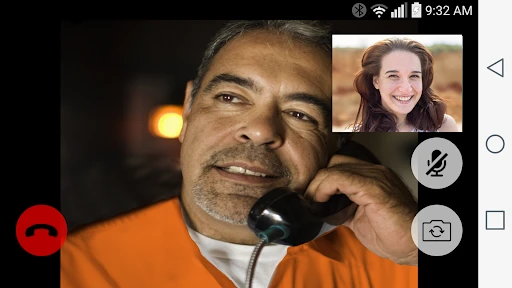
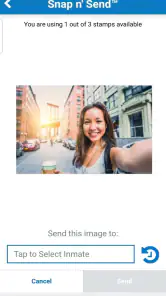
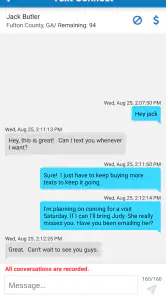
First off, the main thing that caught my eye about Securus Mobile was its ability to facilitate communication in environments where it’s not typically easy. Whether it's video calls, messaging, or even just sharing photos, the app makes it easy to keep in touch. I remember the first time I used it—connecting with someone on the inside felt seamless, almost as if there were no barriers. That’s a big deal, especially when face-to-face visits aren’t possible.
Making a video visit easier to plan
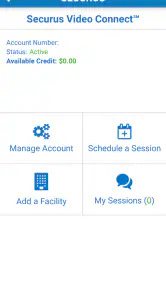
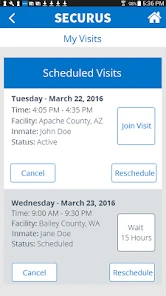
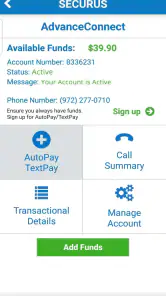
The most useful angle for me is the mix of account management and video-session scheduling. Rather than treating a visit as a call you simply start whenever you like, the app makes planning part of the process: I can handle the calling account and arrange a session from the same mobile service. That matters when coordinating with someone whose access to communication depends on an organized visit, not just a quick spontaneous call.
For a realistic routine, I’d check the account and session details before setting aside time, then make sure my phone is ready and I can give the visit my attention. If plans change, checking the scheduled session before assuming it is still happening can prevent a wasted wait. The app can help with the administrative side, but it cannot remove the need to coordinate around the other person’s availability and the facility’s arrangements.
A practical routine for the day of a visit
Imagine setting aside time after work to speak with a family member. I would confirm the session details ahead of time, make sure I know which account I intend to use, and avoid leaving the planning until the last few minutes. On the day, I’d find a quiet spot and keep the phone available rather than starting another task that might interrupt the conversation. Those are ordinary preparations, but they matter more when a session is scheduled than when a friend can simply call back later.
You May Like

Clash of Clans Is Won Between the Battles

Android Auto Makes the Case for Quieter Car Software

MobiOffice: Transforming Mobile Productivity with Seamless Integration

EA SPORTS FC™ Mobile Soccer: Redefining Mobile Sports Gaming

How Microsoft OneDrive Became a Mobile Productivity Giant

How Google Translate Breaks Language Barriers Effortlessly
One useful habit is to treat account checks and the conversation itself as separate steps. I’d deal with funding or scheduling before settling in, so I’m not trying to make decisions while the visit is about to begin. If another family member helps manage the account, agreeing in advance who will check the details can also reduce confusion. This is a small coordination issue that a general video app usually does not create, but it is part of using a service built around arranged contact.
User-Friendly Interface
Let’s talk about the interface for a second. I’ve used a fair share of apps that made me want to pull my hair out trying to navigate through them. Luckily, this isn’t the case here. The design is intuitive, making it easy for anyone to pick up and start using right away. All the features are well-organized, which saves a ton of time and frustration.
That straightforward layout is especially valuable if you only open the app occasionally. I wouldn’t want to relearn a complicated set of menus every time a visit comes around. My practical tip is to get familiar with the account and scheduling areas before the day you plan to connect; that leaves less to figure out when time is limited. It’s a small preparation step, but with a scheduled conversation, reducing last-minute navigation is worth it.
Planning when more than one person is involved
Families may share the practical work of staying in contact, even when one person usually handles the calls. In that situation, I’d keep expectations clear: who is checking the account, who is arranging the visit, and who needs to know the scheduled details. The app can put account and scheduling tasks in reach, but it cannot coordinate relatives for you. A simple shared plan outside the app can prevent two people from making assumptions about who has handled the next step.
This also helps when a visit is important to someone who is less comfortable with mobile apps. I would have the person who handles the account become familiar with the process first, then explain the essentials in plain language rather than asking everyone to explore menus under time pressure. That approach makes the app easier to use as a family tool without pretending it replaces communication between family members.
Security Features
When it comes to apps that deal with sensitive information, security is a major concern. I was pleased to find that Securus Mobile takes this seriously. The app employs robust security measures to ensure that all communications remain private and secure. Knowing that my conversations are protected gives me peace of mind, which is priceless.
I’d still approach any communication app with sensible care: keep account access private, check that I’m using the intended account, and avoid leaving a signed-in device unattended. Those habits are useful in particular when a phone is shared with family members. Security can support peace of mind, but it does not replace careful handling of a personal account or make every conversation suitable for a public place.
Costs, planning, and practical limits
Now, let's get real about costs. While the app is free to download, using its features comes with a price. It’s important to be aware that maintaining such a secure and reliable service involves a subscription. I’d suggest weighing the cost against the value of staying connected with loved ones when deciding if it’s worth it for you.
Because this is an account-based service, I would check the available account and session details before relying on a particular visit or making a funding decision. The app is most useful when you already need the Securus communication route; it is not a general-purpose replacement for everyday calls, texts, or video chats. If your loved one can be reached through ordinary messaging services, those familiar options may be simpler and less dependent on scheduled access.
There is also a difference between being able to arrange a session and having a relaxed, uninterrupted conversation. A scheduled visit calls for a bit more preparation than an informal video call: I’d choose a quiet place, check my connection, and leave myself a few minutes to deal with account or scheduling tasks first. That routine will not suit someone who wants to call spontaneously, but it can make a planned conversation feel less rushed.
Choosing between a dedicated service and ordinary video chat
If your main need is a spontaneous video call with a friend or relative who can use standard consumer services, I would choose one of those familiar options. They are a more natural fit for casual, unscheduled contact. Securus Mobile earns its place when the account and scheduled-session process is part of how contact needs to happen; the benefit is not that it does everything a typical messenger does, but that it addresses a more specific arrangement.
That difference can help set expectations. I would not install it hoping to replace all my messages, photos, and everyday calls. I would consider it because I need the Securus communication workflow, then keep ordinary communication tools for relationships and conversations that do not depend on that setup. Using the right tool for each situation is more practical than expecting one app to cover every kind of contact.
Who benefits most from this setup
This communication app is aimed at people who need to stay in touch with someone in a correctional setting and want calling-account management and video-session scheduling in one place. The developer, Securus Technologies, LLC, focuses this service on that particular need. I’d recommend it to family members and friends who expect to arrange visits more than once and value having the account and schedule accessible on a phone.
It is less compelling for someone who only wants a standard video-chat app, or for a person who does not need to manage a Securus account. In those cases, familiar services built for ordinary personal calls are a better fit. The key question is not whether this replaces every communication tool, but whether its specific arrangements match the way you need to connect.
What to consider before relying on it
If you are deciding whether to install it, I would start with two practical questions: do you need to manage a Securus calling account, and do you expect to arrange video sessions through that service? If both answers are yes, combining those tasks on a phone may simplify your routine. If you only need occasional contact that can happen through ordinary channels, the extra account-focused workflow may feel unnecessary.
I would also make sure the phone meets the app’s platform requirement before counting on it for a planned visit. The current version, 4.5.0 build 13, requires Android 11 or later. That is worth checking in advance, especially if you rely on an older device or are helping a relative prepare their phone. Discovering a compatibility issue on the day of a scheduled conversation is exactly the kind of avoidable stress a little preparation can prevent.
The app is free to install and has an Everyone age rating. That does not mean every feature or communication arrangement will be free to use, so I would distinguish the download from any account-related costs and review the details that apply to my intended use. For anyone budgeting carefully, checking before funding an account is more useful than assuming the app’s install price tells the whole story.
The app is free to install, carries an Everyone age rating, and has an average rating of 3.6 from around 28,000 ratings, with more than 1 million installs. It first appeared on August 13, 2015, and version 4.5.0, build 13, requires Android 11 or later. Those figures give a sense of its reach, while the practical fit will still depend on whether you need its particular account and video-visit workflow.
Overall, Securus Mobile is a game-changer for anyone looking to maintain connections when physical visits aren’t an option. The ease of use, combined with strong security features, makes it a worthwhile choice. If staying connected is your priority, this app could be just what you need. Give it a shot, and you might find it becomes an essential part of your communication toolkit.
My take on its place in a communication toolkit
I would recommend it to someone who already depends on Securus arrangements and wants a mobile way to handle the account and prepare for video visits. For that person, the focused purpose is a strength: less time switching between unrelated tools can make it easier to keep the practical steps together. It is particularly useful when contact needs planning, when relatives are sharing the responsibility, or when a visit is important enough that arriving prepared matters.
I would skip it as a general chat app, and I would not choose it for someone whose communication needs are already met by ordinary calls and video services. The scheduled nature of the workflow and the need to pay attention to account details are real trade-offs, not flaws that a different interface can solve. My overall view is that it is most worthwhile when its specific purpose matches your circumstances; if it does, the app can make a complicated routine easier to manage without making the connection itself feel like just another task.
Securus Mobile Frequently Asked Questions
Does Securus Mobile support video sessions as well as calling accounts?
Yes. Securus Mobile is designed to help users manage and fund calling accounts, and it also supports scheduling and joining video sessions. These tools bring key communication tasks together in one app. What you can use may depend on the services available to you, so it is sensible to check that the relevant communication options are available before relying on the app.
Who develops Securus Mobile, and how established is it?
Securus Mobile is developed by Securus Technologies, LLC. It is a free communication app that has been available since August 13, 2015, and it has more than one million installs. That track record may be reassuring if you are looking for an established app, though the features most useful to you will depend on whether you need calling-account management or video-session access.
Which devices can run Securus Mobile?
Securus Mobile is a communication app from Securus Technologies, LLC, available for Android and iOS. Check that your device meets the platform’s minimum operating-system requirement before downloading, then install the app through the appropriate app store. Once installed, you can use it to manage calling accounts and handle video-session tasks, subject to the services available to you.
What is Securus Mobile and how does it work?
Securus Mobile is a comprehensive application designed to facilitate communication and security for families, friends, and individuals connected through correctional facilities. The app allows users to send messages, photos, and videos, as well as manage phone calls and video visits with incarcerated individuals. It also provides access to account management features, making it easier to handle various aspects of communication and financial transactions.
Is Securus Mobile free to use or are there any costs involved?
While downloading Securus Mobile is free, users should be aware that there are costs associated with its services. Charges may apply for sending messages, photos, or videos, and for scheduling video visits or phone calls. It's important to check the app's pricing details and your facility's specific costs to understand the financial commitments involved.
Pros
- User-friendly interface
- Real-time notifications
- Comprehensive monitoring features
- Easy setup process
- Secure data encryption
Cons
- Limited free version
- Requires constant internet
- Occasional app crashes
- Battery consumption issues
- Subscription-based pricing

- Category
- Communication
- Version
- 4.5.0 (build 13)











