Scripps News
- 1.15K
- 3.7
- Installs
- 100.00K
- Price
- Free

Screenshots




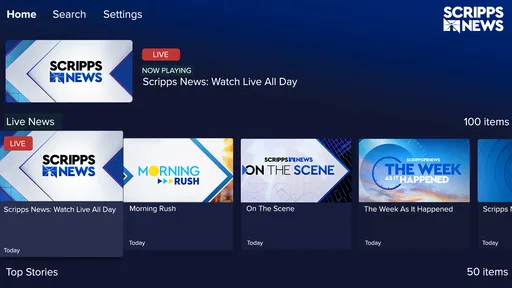
Analysis by Reviewed
I came away from Scripps News with a clear impression: it is a useful free news app when I want a focused way to catch up on major stories, but it works best as a starting point rather than my only source of information. Its appeal is the combination of headlines, breaking coverage, investigations, and reporting from the field, all inside an app that is simple enough to check between other tasks. The experience feels aimed at people who want news without turning every visit into a long reading session.
That focus matters. Many news apps try to become an entire media universe, filling the screen with opinion, lifestyle material, newsletters, videos, alerts, subscriptions, and personalized recommendations. Scripps News feels more direct. I open it to see what is happening, scan the main stories, and decide which subjects deserve more attention. That straightforward role is its strongest quality, although it also means readers looking for deep customization or a complete replacement for several specialized news sources may eventually want something else alongside it.
How Scripps News fits into a daily news routine
Newsy is the developer behind this News & Magazines app, which has been available since February 26, 2010. It is free to use and carries an Everyone age rating, making it approachable for a broad household audience. The app has passed 100 thousand installs, with an average rating of 3.7 from around 2.7 thousand ratings. Those numbers suggest a product with a real audience and a generally mixed-to-positive reception rather than an app that satisfies every reader equally.
In my routine, the most practical way to use it is in short visits. I might check it while waiting for coffee, look through the leading stories before work, or return later when a developing event needs another look. The app’s value is not that it can replace every newspaper, broadcaster, or specialist publication. Its value is that it gives me a manageable news checkpoint. I can use it to identify the stories that matter to me, then move to a more detailed source when I need background, documents, local context, or a particular editorial perspective.
The distinction between a news checkpoint and a complete news library is important. A person who wants a calm overview may appreciate the reduced effort of opening one app and scanning the current conversation. Someone who follows financial markets, local government, technology research, sports, or a particular region may find the general-news approach less satisfying. The app is strongest at helping me notice important subjects; it is less suited to being the only place where I investigate them.
What the reporting mix does well
The combination of breaking news and investigations gives the app more range than a feed built only around fast headlines. Breaking coverage is useful when speed matters, especially during a major public event or an unfolding story. Investigative work serves a different purpose: it encourages me to slow down and consider causes, responsibility, and consequences rather than simply moving from one update to the next.
On-the-ground reporting is another meaningful part of the mix. I value this because a headline can feel abstract when it is separated from the people and places involved. Reporting from the scene can make a story easier to understand, particularly when the subject is changing quickly. It also gives the app a more human feel than a stream assembled entirely from brief summaries.
More From Our News Desk

Weather by Xiaomi Review: Clear at a Glance, Less Clear Up Close

X Under Pressure: Can It Recover When Posting Goes Wrong?

Clash of Clans Is Won Between the Battles

Android Auto Makes the Case for Quieter Car Software

MobiOffice: Transforming Mobile Productivity with Seamless Integration

EA SPORTS FC™ Mobile Soccer: Redefining Mobile Sports Gaming
My advice is to treat the different kinds of coverage differently. I use a breaking item to learn what has happened or what is developing, but I do not assume that the first update explains the whole situation. When an investigation or a longer report appears, I give it more time and look for the details that a quick headline cannot provide. This simple habit prevents the app’s fast-moving side from becoming my complete understanding of a complicated story.
The most useful strength is the balance between immediate awareness and reporting that rewards a slower read. That balance is more valuable than a large number of loosely connected sections. I would rather have a clear route from “this is happening” to “this is why it matters” than a crowded home screen that makes every item seem equally urgent.
A realistic everyday scenario
Imagine starting the day with fifteen minutes before leaving home. I would open Scripps News and scan the leading items instead of reading several separate sites. If a major story is developing, I would note the basic facts and return later rather than repeatedly refreshing the same report. If an investigation catches my attention, I would save the subject mentally as something to read when I have enough time. On a lunch break, I could check for meaningful developments and decide whether the story deserves a deeper look elsewhere.
This workflow keeps news from taking over the entire morning. It also avoids a common problem with fast feeds: confusing repeated updates with additional understanding. I use the app for orientation first, then choose deliberately where to spend my attention. For readers who feel overwhelmed by constant notifications and endless tabs, that two-step approach is one of the best reasons to try it.
Where it feels less complete
The same simplicity that makes the app approachable can feel limiting after regular use. A general news service cannot give every reader the depth of a specialist publication, the neighborhood detail of a local outlet, or the highly tailored selection of a personalized aggregator. If my main concern is one city, one industry, or one narrow subject, I would prefer a source built around that interest.
There is also a trade-off between speed and context. A breaking-news format naturally encourages quick checking, but important stories often need timelines, definitions, primary material, and competing interpretations. I would not make a major decision based on a single brief update from any news app, including this one. The sensible approach is to use Scripps News to identify the issue, read the fuller material available, and compare it with reliable sources when the stakes are high.
Readers who expect extensive personalization should keep their expectations realistic. I would choose a more customizable aggregator if I wanted to construct a very precise mix of local, international, business, science, and cultural sources. I would also choose a dedicated publication when I already know which newsroom’s style and specialist expertise I want. Scripps News makes more sense for people who prefer a broad, editorially selected overview and do not want to spend much time configuring a feed.
The rating of 3.7 reflects that middle-ground character. It is not a warning that the app is unusable, but it does remind me that news preferences are personal. Some readers want speed, others want long-form reporting, and others want control over every topic shown to them. A single app will rarely satisfy all three groups equally.
Practical ways to get more from it
First, I would avoid treating every headline as an invitation to read immediately. I scan, choose, and return to the subjects that genuinely affect my work, family, community, or understanding of current events. This reduces the feeling of being pulled around by the news cycle and makes the app more useful as a daily tool.
Second, I separate urgent awareness from evidence gathering. A breaking report can alert me to a situation, while an investigation or fuller report can help me understand it. If the topic involves public safety, money, health, or a major civic decision, I would verify important details through additional reputable sources before acting. This is not a criticism unique to Scripps News; it is a sensible way to use any fast-moving news service.
Third, I would use the app at set moments instead of checking it constantly. A morning overview and an evening update are often enough for ordinary news days. During a major event, I might check more often, but I would still pause between updates. The advantage is psychological as much as practical: the app becomes a tool I control rather than another stream competing for attention.
Fourth, I would give investigative pieces more time than headline scans. The app’s reporting mix is most valuable when I do not consume every item at the same speed. A quick glance is appropriate for orientation; a serious report deserves slower reading and a willingness to follow the details. That difference in pace is easy to miss, but it changes how much I actually learn.
Finally, I would pair the app with a source that fills my personal blind spot. For me, that might mean a local outlet for community news or a specialist publication for a subject I follow closely. This combination is better than demanding that one general app provide every detail, every viewpoint, and every level of expertise.
Who should install it, and who should skip it
I would recommend Scripps News to someone who wants a free, accessible way to keep up with broad current events. It suits readers who like a concise first pass, appreciate a mixture of immediate reports and investigations, and are comfortable deciding which stories deserve further research. It can also work well for a household with different levels of news interest because the Everyone rating keeps the app broadly approachable.
It is particularly suitable for people who have fallen out of the habit of following news because other apps feel noisy or demanding. The clear purpose makes it easier to build a modest routine. I can check the main developments without committing to a subscription-heavy ecosystem or spending the first part of the day assembling a reading list from several places.
I would skip it as a primary choice if I needed highly specialized coverage, extensive local reporting, or a deeply personalized feed. I would also look elsewhere if my ideal news experience is built around one publication’s long-form analysis rather than a broad selection of current stories. In those cases, a specialist app, a local newsroom, or a carefully configured aggregator would probably serve me better.
My verdict after using it as a news companion
Scripps News succeeds because it gives general news a clear, practical role. I can open it for a quick overview, notice the stories that deserve attention, and find a path from breaking information toward more substantial reporting. The presence of investigations and on-the-ground coverage keeps the experience from feeling like a bare headline board, while the free price removes a major barrier for casual readers.
Its limitations are equally clear. It is not the best answer for every niche, every locality, or every preference for customization. I still want other sources when I need specialist expertise, deeper context, or a second perspective. The app works best when I understand that boundary instead of asking it to be an entire media diet.
For a free news app from Newsy, the result is worthwhile: useful for staying oriented, capable of leading me toward more meaningful reporting, and simple enough to fit into an ordinary day. I would recommend installing it if you want a broad news companion and are willing to read beyond the first update when a story matters. If you want one perfectly tailored source for everything, I would point you toward a more specialized alternative.
Overall, I see it as a sensible first stop rather than a final destination. That may sound modest, but it is exactly where the app has the greatest value. It helps me decide what deserves my attention without pretending that a quick news check can replace careful reading. For readers who want that balance, Scripps News is worth trying.
Scripps News Frequently Asked Questions
Is Scripps News suitable for all ages?
Scripps News is a news app in the News & Magazines category, with a content rating of Everyone. It is intended for following current events through headlines, reporting, and video coverage. As with any news service, individual stories may discuss serious or upsetting events, so parents may want to consider a child’s maturity and interests when deciding whether the app is appropriate for them.
Who develops Scripps News, and is it available on Android and iOS?
Scripps News is developed by Newsy and is offered as a mobile news app. It is intended for people who want to follow headlines, breaking news, investigations, and on-the-ground reporting on their devices. Before installing, check the relevant app store on your phone or tablet for the version available to your device, then review its current compatibility and permissions information.
What is Scripps News, and what type of content does it offer?
Scripps News is a news app focused on delivering live and on-demand coverage of national and international events. It combines video reports, breaking-news updates, explainers, interviews, and topic-based stories. The app generally emphasizes straightforward reporting and visual storytelling, making it useful for readers and viewers who want a broad overview of current events without relying only on traditional text-based articles.
Is Scripps News free to download and use?
The Scripps News app is free to download and is presented as a free service, providing access to news stories, video reports, and live or scheduled coverage. Advertising may be part of the experience, and the availability of particular features or programming can vary. If you have specific expectations about viewing or app features, review the current app-store listing and in-app information before installing.
Does Scripps News offer live streaming or only recorded news reports?
Scripps News is designed to provide more than a collection of recorded articles. Depending on your location and the current app version, it may include live news programming alongside on-demand reports, clips, and previously published stories. Live availability can vary because of regional restrictions, programming schedules, internet connection quality, and changes made by the provider, so not every user will see exactly the same viewing options.
Pros
- Free access to live and on-demand news coverage
- Clean interface makes browsing stories quick and simple
- Offers video reports alongside written news articles
- Provides coverage of national and international events
- News updates are available without a cable subscription
Cons
- Some stories may load slowly on weaker connections
- The app can send frequent breaking-news notifications
- Coverage may feel limited for highly local news
- Video content can use significant mobile data
- Occasional advertisements may interrupt the viewing experience











