

SaferCar
- 181.00
- 3.8
- Installs
- 100.00K
- Price
- Free
Screenshots
Analysis by Reviewed
When I first opened SaferCar, I understood its purpose quickly: it is a free vehicle-safety app from the National Highway Traffic Safety Administration, built to help drivers keep recall information closer at hand. It belongs in the Auto & Vehicles category, but I would think of it less as a driving utility and more as a safety-check companion for moments when I need to identify a vehicle or investigate a possible recall.
That distinction matters. This is not a navigation app, a roadside-assistance service, a maintenance tracker, or a replacement for a mechanic. Its value comes from making safety information easier to consult when I am buying a used car, checking a family vehicle, or trying to decide whether an unfamiliar warning deserves immediate attention. If you want a tool that helps you stay informed about vehicle recalls, the app has a clear reason to exist. If you expect live traffic, repair estimates, insurance help, or direct emergency support, you will be looking in the wrong place.
What to expect before you begin
The app’s store summary focuses on vehicle safety and recall information, and that is the right expectation to carry into the first launch. I would not install it expecting a polished dashboard filled with driving statistics. The experience is centered on finding and reviewing safety-related information, so the most useful results depend on entering the right vehicle details and reading the result carefully.
SaferCar is aimed at ordinary drivers rather than specialists. You do not need to understand recall terminology before using it. In practice, the important preparation is having accurate information about the vehicle you want to check. For a car already in your driveway, that may mean looking at the vehicle identification number, commonly called the VIN. For a used-car search, it may mean asking the seller for the exact vehicle information instead of relying only on the model name shown in an advertisement.
That is my first practical recommendation: treat the app as a verification step, not as a quick guess based on a badge or body style. A broad model description can cover several configurations, while a vehicle-specific check can be more useful when you are making a purchase decision. I would open the app before meeting a seller, save enough time to enter the details calmly, and avoid trying to do the whole process while standing beside a car in a busy parking lot.
The app is free and rated for Everyone, which makes it easy to recommend for households with several drivers. It has passed the one-hundred-thousand-install mark and holds an average rating of 3.8 from roughly 468 ratings, so there is evidence that people find it useful, although the score also suggests that the experience is not perfect for every user.
One important expectation is that recall information is not the same as a complete health report for a vehicle. A clean recall result should not be interpreted as proof that a car has never been damaged, poorly maintained, or affected by an issue outside the information available through this kind of safety lookup. I use it as one layer in a larger decision: inspection, service records, a test drive, and professional advice still matter.
More From Our News Desk

 Gmail
GmailGmail in a Busy Inbox: Who Benefits Most?
From first account to crowded workday, Gmail earns its place through dependable search and flexible sorting—but its best fit depends on how much inbox maintenance you can tolerate.

 Prime Video
Switching to Prime Video: What Changes in Your Viewing Routine
Prime Video can make a compelling second home for streaming, but switching means learning a different catalog, rental layer, and route from browsing to playback.

 Universal TV Remote Control
Universal TV Remote Control Works Best as a Reliable Backup
A phone remote earns its place through quick setup and reliable habits. Here is how to get more from Universal TV Remote Control—and where its limits show.

 Weather - By Xiaomi
Weather by Xiaomi Review: Clear at a Glance, Less Clear Up Close
Xiaomi’s weather app makes everyday forecasts quick to scan, but its calm surface can leave useful details and recovery paths harder to find than they should be.

 X
XX Under Pressure: Can It Recover When Posting Goes Wrong?
A resilience-focused review of X, examining setup, mistaken posts, interruptions, weak connections, and the gaps that matter when recovery needs to be dependable.

 Clash of Clans
Clash of Clans Is Won Between the Battles
Its raids are quick; its community is a long-term project of coordination, teaching, rivalry, and shared responsibility—with all the friction that entails.
Latest News



Install it with a specific question in mind
The best first session is not an aimless browse. Before opening SaferCar, decide what you want to know. Are you checking your own car because you received a notice? Are you considering a used vehicle? Are you helping a parent or another family member understand a safety concern? A clear question makes the app feel much more straightforward because you can judge each result against a real decision.
For a vehicle I already own, I would use the app as part of a routine safety check after buying the car or when taking responsibility for a family member’s vehicle. For a used-car purchase, I would check before paying a deposit, not after. That timing is a small but meaningful advantage: information is most useful while I can still ask the seller questions, request documentation, or walk away.
Because the developer is the National Highway Traffic Safety Administration, I see the app as an official-source tool rather than a community discussion board. That gives it a practical role when I want recall information presented through a government safety channel instead of pieced together from forum posts, social-media comments, or search results of uncertain quality.
Setting up the first check
The setup is easier if I prepare the vehicle information first. I keep the VIN available when possible, because copying it from the vehicle or its paperwork is safer than typing from memory. A single incorrect character can lead to an unhelpful search or make me question a result that was caused by an input mistake. This is one of those small details that is easy to overlook when the app itself appears simple.
I also recommend checking the vehicle identity twice before acting on the result. If I am inspecting a used car, I compare the information I entered with the vehicle in front of me and with the seller’s paperwork. That extra comparison is especially useful when a seller has several similar cars or when an online listing uses a generic description. The app can help me investigate, but it cannot correct information that I entered incorrectly.
During setup, I would not rush through screens simply because the app is focused. A first-time user should read the labels and make sure the selected vehicle is the one they intend to check. If the result looks surprising, I would repeat the search with the vehicle information copied directly from the car or its documents before drawing a conclusion.
Another useful habit is to keep the app separate from the repair decision. Discovering a recall does not automatically tell me whether I should attempt a repair myself, continue driving, or choose a particular workshop. It tells me that I need to understand the notice and contact the appropriate manufacturer or service channel. The app is strongest at helping me reach that next question; it is not a substitute for the instructions attached to a specific safety campaign.
How I reach the first meaningful result
The first successful action is not merely installing the app. It is completing a vehicle lookup and understanding what the result means for the next step. I would enter the vehicle details carefully, submit the check, and then read beyond the first line of the response. The useful information is not just whether something appears; it is the identity of the vehicle, the nature of the safety issue, and what action the notice recommends.
If I were checking a car before purchase, I would write down the result or show it to the seller and ask for a clear explanation. A recall result is a reason to ask whether the repair has already been completed and whether documentation exists. If the seller says the issue was fixed, I would still want the relevant service record rather than treating a verbal answer as final.
If I were checking my own vehicle, I would use the result to organize a call with the manufacturer’s service network or another appropriate professional. I would keep the vehicle details and the wording of the notice available during that conversation. That makes the exchange more efficient and reduces the chance that I confuse one vehicle with another in a household.
My most useful workflow is to check, interpret, document, and then act. I do not close the app immediately after seeing a result, and I do not assume that a result alone resolves the issue. Taking a screenshot or noting the relevant information can help when I later speak with a dealer, seller, or mechanic, although I would always rely on the current notice and professional guidance for the actual repair decision.
This workflow also explains why the app can be valuable even for people who do not use it often. A recall lookup may take only a short session, but the consequences of skipping that check can be much more serious when buying an unfamiliar used vehicle. The app does not need to be opened every day to earn its place on my phone.
Where first-time users may get confused
The biggest possible confusion is treating the app as a complete vehicle-history report. It is not how I would evaluate accident history, mileage, ownership, title status, routine maintenance, tire condition, or every mechanical fault. A vehicle can have no relevant recall result and still need a careful inspection. Conversely, a recall entry does not necessarily mean the car is unsafe to drive in exactly the same way under every circumstance; the notice’s details and professional advice determine the appropriate response.
I would also avoid assuming that a model-level search answers every vehicle-specific question. Trim, production details, and identification information can matter, which is why accurate vehicle data is more dependable than a casual search based only on the name printed in an advertisement. If I am helping someone else use the app, I would ask them to bring the actual vehicle information rather than trying to reconstruct it from memory.
Another point of friction is emotional rather than technical. Seeing a recall can make a driver panic, particularly when the wording sounds serious. My approach is to pause, read the notice completely, and contact the proper service channel. The app is useful because it brings the issue to my attention, but it does not replace calm interpretation. I would not ignore a result, and I would not make a dramatic decision based on a headline alone.
The rating of 3.8 reflects this mixed reality. The app has a focused job, but focused tools can feel limited when users expect a broader automotive service. Some people may also prefer a website because a larger screen is more comfortable for reading detailed information or comparing paperwork. I find the mobile format more convenient when I am standing beside a vehicle, yet I would switch to a browser or desktop for extended research.
SaferCar is also not the right choice for urgent roadside trouble. If a vehicle is smoking, losing control, involved in a collision, or presenting an immediate danger, I would prioritize emergency services and qualified assistance rather than opening a recall app. The tool is for information and follow-up, not real-time intervention.
How it compares with the usual alternatives
The common alternative is to search the web, visit a manufacturer’s website, or ask a dealer. Those options can be useful, especially when I need repair scheduling or campaign-specific instructions, but they can also scatter the process across several sources. SaferCar gives me a more direct starting point for safety and recall information, which is particularly helpful when I am not yet sure where to begin.
A manufacturer’s channel may be better once I have identified a recall and need to arrange service. A mechanic may be better when I need a physical diagnosis. A vehicle-history service may be better when I am researching previous ownership or damage. I would not choose one of these alternatives against SaferCar as if only one could be used. The sensible comparison is about sequence: I use the app to screen for safety information, then move to the source best suited to the action required.
Compared with general search, the app’s advantage is focus. I do not need to judge every result by its domain or wonder whether a forum comment applies to my exact vehicle. Compared with a dealer-only conversation, its advantage is independence: I can perform an initial check before entering a sales discussion. Its weakness is that it does not turn the lookup into a full buying or repair service, so I still need other tools and people afterward.
Useful habits after the first check
Once I have completed the first lookup, I would make the app part of a sensible ownership routine rather than opening it repeatedly without a reason. A new-to-me vehicle is the clearest trigger. Another is helping a relative who may not know where to find safety information. I would also revisit the check when a vehicle changes hands, because the new owner should not depend entirely on what a previous owner remembers.
For a household with more than one car, I would keep the vehicles mentally separate and check them one at a time. Mixing identification details is an avoidable source of confusion. If I am helping someone remotely, I would ask them to read the vehicle information directly from the car or documents and confirm the result before discussing what it means.
A particularly useful trade-off is convenience versus verification. The app makes the first investigation easier, but convenience can tempt me to accept a result too quickly. I get more value when I use it as a prompt for better questions: Has the repair been completed? Is there documentation? Does the notice affect how the vehicle should be used? Who should handle the next step?
I would also keep expectations realistic about updates. The installed app is version 1.4.4, and it supports devices running Android 7.0 or later. That makes it accessible to many older Android phones, but I would still keep the operating system and app reasonably current when possible. A safety-information tool is more reassuring when I am using a maintained installation rather than an abandoned copy.
The app’s age rating of Everyone is appropriate for its subject matter. Still, younger users who discover a serious vehicle issue should involve an adult rather than deciding alone whether a car can be driven. The rating describes who can access the app; it does not remove the need for responsible judgment around a potentially unsafe vehicle.
Who will benefit most
I would recommend SaferCar most strongly to first-time used-car buyers, families sharing vehicles, and drivers who want an official starting point for recall checks. It is also practical for someone who has recently inherited a car or is helping an older relative organize vehicle information. In each case, the app turns a vague safety concern into a concrete lookup and a list of questions to pursue.
I would be less enthusiastic for drivers who want a single app to manage every part of vehicle ownership. If your priority is fuel tracking, route planning, maintenance reminders, insurance claims, or live roadside support, this narrow tool will not replace those services. Its limited scope is a strength when I need recall information and a weakness when I want an all-in-one automotive dashboard.
For professionals who inspect many vehicles, a larger-screen workflow or specialized vehicle-history tools may be more efficient. For an individual driver checking one car at a time, the mobile format is easier to carry into the real-world situation where the question arises. That is where I think it earns its place: not as an app I stare at daily, but as a practical checkpoint before a purchase or after a safety concern.
My recommendation after using it
SaferCar is a focused, free app that I would keep available for vehicle recall checks, especially before buying a used car or taking responsibility for a vehicle whose history I do not know well. The National Highway Traffic Safety Administration is a credible developer for this purpose, and the app’s simple role makes sense once I stop expecting it to perform unrelated automotive tasks.
Its limitations are easy to understand: accurate input matters, a recall result needs interpretation, and the app does not replace a mechanic, manufacturer service channel, emergency assistance, or a complete vehicle-history report. Those are not reasons to dismiss it; they are boundaries that make the tool easier to use responsibly.
My advice to a first-time user is straightforward. Install it before you need it, gather the vehicle information, complete one careful lookup, and treat the result as the beginning of an informed conversation rather than the end of one. The most valuable habit is checking before a decision becomes expensive or difficult to reverse.
For that reason, I think SaferCar is worth having on an Android device for drivers who want a convenient official route to vehicle safety information. It is free, available to Everyone, and has attracted over one hundred thousand installs. I would not call it a complete automotive companion, but for its specific job, it gives me a sensible first move when safety and recall questions come up.
SaferCar Frequently Asked Questions
Is SaferCar available for both Android and iOS?
SaferCar is a mobile app for vehicle-safety information, and the National Highway Traffic Safety Administration is its developer. Before installing, check the app store on your device for SaferCar and confirm that your operating system meets the minimum requirement of version 7.0. The app is free, so you can review its store page and compatibility details before downloading.
Who develops SaferCar, and is it intended for everyday drivers?
SaferCar is developed by the National Highway Traffic Safety Administration and focuses on vehicle safety and recall information. Its straightforward purpose can make it relevant to everyday drivers, vehicle owners, and people researching a car. The app has an Everyone content rating, and its vehicle-safety focus is useful for people who want a convenient place to consult safety-related information.
What is SaferCar and what does it do?
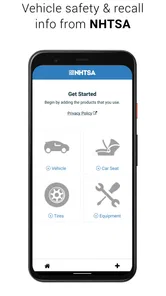
SaferCar is a vehicle-safety information app designed to help drivers and car owners find important details about vehicles, recalls, and safety-related equipment. After exploring the app, its main value is the convenient access to official safety information in one place. It can be useful when checking a current vehicle, researching a used car, or staying informed about potential safety issues.
Can SaferCar identify recalls for my vehicle?
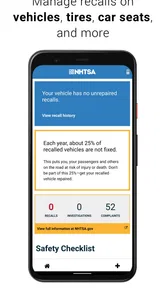
Yes, SaferCar is intended to help users check whether a vehicle may be affected by a safety recall. You generally need to provide identifying information, such as the vehicle identification number, when the feature is available. The results depend on the accuracy of the information entered and the availability of updated recall records, so users should also confirm serious concerns with an authorized dealer or the relevant safety authority.
Is SaferCar free to download and use?
SaferCar is generally presented as a free safety-information application, allowing users to access its core vehicle and recall resources without purchasing a subscription. However, availability, supported features, and policies can change between versions or platforms. Before downloading, it is still worth checking the current store listing for in-app purchases, regional restrictions, privacy details, and any requirements for using particular tools.
Pros
- Helps organize vehicle safety information in one convenient place.
- Useful for comparing safety ratings before buying a car.
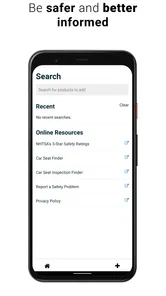
- Search tools can make researching specific models quicker.
- May support more informed discussions with dealers or family members.
- A practical reference for safety-conscious drivers and parents.
Cons
- Coverage may vary by vehicle model
- year
- and available test data.
- Some information may be more useful in the United States than elsewhere.
- The app cannot replace a professional vehicle inspection or test drive.
- Safety ratings may not reflect every real-world driving condition.
- Older vehicles may have limited or incomplete information available.











