Rock VPN: Fast & Secure
- 14.00
- 4.6
- Installs
- 10.00K
- Price
- Free

Screenshots
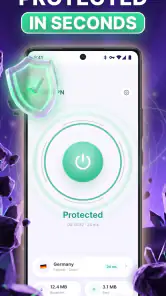
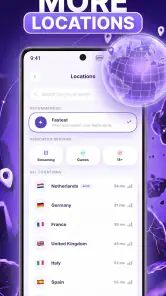
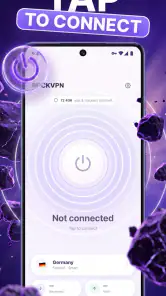
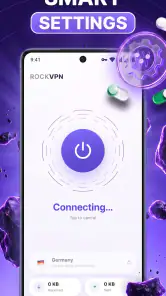
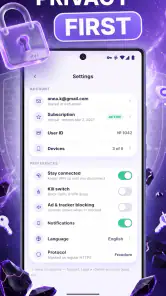
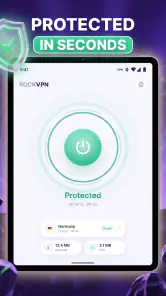
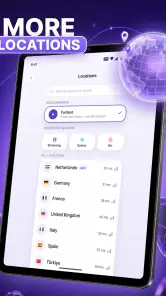
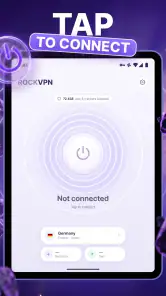
Analysis by Reviewed
When I use a VPN, I am usually trying to solve one immediate problem: I want a safer connection on a network I do not fully trust without turning my phone into a complicated project. Rock VPN: Fast & Secure takes that straightforward approach. It is a free social app from Stergo, built around VPN proxy access for hiding an IP address, protecting traffic on public Wi-Fi, and making streaming or online gaming more comfortable when a network is restrictive.
That focus matters because a VPN is only useful if I can actually remember to use it. In my experience, the strongest part of Rock VPN is not an elaborate collection of controls; it is the idea of placing a private connection between my phone and the internet with as little friction as possible. The app is rated 4.6 from around 165 ratings, has passed 10K installs, and is aimed at Everyone. Those figures suggest a small but positive user base rather than a long-established giant, so I approach it as a practical tool that deserves a careful trial rather than an automatic replacement for every mature VPN service.
What the VPN capability changes on a phone
The central capability is the VPN proxy connection. Once active, it can mask the public IP address that websites and online services normally see and route the phone’s traffic through the VPN connection. That does not make me invisible, and it does not turn an unsafe website into a safe one, but it changes the path between my device and the wider internet.
The most useful effect is on networks I do not control. At a café, hotel, airport, library, or shared office, I cannot personally inspect how the Wi-Fi is configured. A VPN gives me an additional layer between my phone and that local network, which is especially reassuring when I need to check an account, send a message, or handle ordinary browsing away from home.
There is also a location-related effect because services see the VPN endpoint’s IP rather than the one assigned directly to my connection. I treat that as a privacy convenience, not as a promise that every service will behave differently. Streaming platforms, banking apps, games, and websites can apply their own rules, detect VPN traffic, or require extra verification. Rock VPN can alter the connection route, but it cannot override those service decisions.
I also appreciate the distinction between protecting a connection and protecting a device. Rock VPN is not an antivirus scanner, password manager, parental-control system, or ad blocker. It does not replace software updates, strong passwords, or sensible browsing. Its value is narrower and clearer: it is a tool for managing how the phone connects to the internet, particularly when the network itself is the part I trust least.
Why the proxy approach is useful in daily browsing
A proxy-style VPN is most helpful when I need a quick change to the connection rather than a permanent networking setup. For example, if a public hotspot feels necessary but I do not want my traffic exposed directly to that local network, I can open Rock VPN before continuing. The benefit is not something I necessarily see on the screen; it is the extra separation created while the connection is active.
More From Our News Desk

Weather by Xiaomi Review: Clear at a Glance, Less Clear Up Close

X Under Pressure: Can It Recover When Posting Goes Wrong?

Clash of Clans Is Won Between the Battles

Android Auto Makes the Case for Quieter Car Software

MobiOffice: Transforming Mobile Productivity with Seamless Integration

EA SPORTS FC™ Mobile Soccer: Redefining Mobile Sports Gaming
That makes the app more relevant to travelers, students, remote workers, and anyone who frequently moves between networks. At home, the improvement may be less noticeable because I already control the router and know which devices are connected. On an unfamiliar network, the same simple connection can feel much more valuable.
For streaming, the experience depends heavily on the service and the available route. A VPN can help when a local network interferes with access or when I want the service to see a different IP location, but it can also create buffering or trigger restrictions. I would not install Rock VPN solely to unlock a particular catalog. I would use it first for connection privacy and treat streaming access as a secondary possibility that needs testing with the service I actually use.
Gaming has a similar trade-off. A VPN may help me get around a network that blocks or poorly handles a game connection, but adding another route can also increase latency. If a game is sensitive to delay, I would compare a normal connection with Rock VPN enabled rather than assuming that “secure” automatically means “faster.” The app’s usefulness for gaming is therefore situational: it is more convincing when the network is the obstacle than when my ordinary connection is already stable.
How I would use Rock VPN in practice
My preferred workflow is simple. I install the app, open it before joining an untrusted hotspot or before starting a sensitive browsing session, and confirm that the VPN connection is active before doing anything that matters. I then use the phone normally, keeping in mind that the protection applies while the VPN is connected and may affect individual apps differently.
One practical habit is to activate the VPN before opening a browser or email app on public Wi-Fi, not after. This avoids beginning a session unprotected and then assuming that turning on the VPN later covers what already happened. I also disconnect when I no longer need it if the connection causes trouble with a website, local device, or game. A VPN should be part of my routine, not something I leave enabled blindly without checking how the phone behaves.
Another useful check is to compare the connection before and after activation. I look at whether pages load normally, whether video quality changes, and whether a game becomes more responsive or less responsive. This is more informative than judging the app from its name. VPN performance depends on the route, the network, the time of day, and the destination service, so my own routine matters more than a single successful test.
I would also avoid treating a connection icon as proof that every app is protected exactly as I expect. Mobile operating systems can handle traffic differently, and individual services can react to VPN addresses in their own ways. If I am using a banking app, I keep the bank’s security checks enabled and expect that a new IP may lead to an identity confirmation. That is normal friction, not necessarily a sign that the VPN is broken.
A realistic public Wi-Fi routine
Imagine I am working from a hotel lobby and need to upload a document, answer work messages, and look up a train route. I connect to the hotel Wi-Fi, open Rock VPN before signing in anywhere, and wait for the VPN connection to become active. I then browse and send the messages through that protected route. If the document upload becomes unusually slow, I test the upload without the VPN only if the file and account do not require the extra privacy, or I postpone it until I have a trusted connection.
This example shows the app’s real strength: it gives me a quick decision point. I can ask whether this task benefits from a private route and turn the connection on before proceeding. It also shows why I should not assume that every activity belongs behind a VPN at all times. A video call, a local printer, or a location-sensitive service may work better without it, and switching temporarily is more sensible than blaming the app for a conflict.
For travel, I would prepare the app before leaving home rather than waiting until I am already standing at a crowded hotspot. I would sign in to the app if required, understand its basic controls, and test a normal website first. That small preparation reduces the chance of trying to learn a new connection tool while dealing with a weak signal and an urgent task.
Where this app fits beside ordinary alternatives
The usual alternative is simply using the network without a VPN. That is easier, and it may be perfectly reasonable on a trusted home connection, but it offers no equivalent change to the route or visible IP address. Rock VPN earns its place when I want that extra layer without researching advanced networking settings.
Another alternative is the VPN feature built into a browser. Browser-only protection can be convenient for web pages, but it may not cover other apps on the phone. Rock VPN is more relevant when I want the connection to matter beyond one browser session, such as when moving between browsing, messaging, and a game. I still check how each activity responds instead of assuming that all traffic behaves identically.
Dedicated subscription VPN services are the stronger choice for people who need a large, established network, detailed server selection, extensive platform support, or a long history of independent scrutiny. Rock VPN is more appealing to someone who wants a free starting point and a focused mobile experience. The free entry lowers the barrier, while the in-app purchase range of $4.99 to $49.99 per item means I should examine any upgrade screen carefully and decide whether the added value matches my needs.
The app’s current version is 3.3.0, and Stergo is the developer behind it. I would keep the app updated through the official store because VPN software sits close to the phone’s network activity and benefits from maintenance. I would also read the in-app explanations before accepting a connection, especially if I am unfamiliar with how VPN profiles appear in the operating system.
The trade-offs I noticed before recommending it
The first trade-off is speed. Routing traffic through a VPN can add distance and processing to a connection. Even if Rock VPN feels quick for ordinary pages, high-resolution streaming, large downloads, and competitive games can expose the difference. My advice is to judge it by the task: use it confidently for privacy on a hotspot, but test it before depending on it for a live match or an important video call.
The second is compatibility. Some websites and apps dislike VPN addresses because they associate them with unusual traffic or shared users. I may encounter a CAPTCHA, a login alert, a changed content selection, or a service that refuses to continue. That does not make the VPN useless, but it means I need a quick way to disconnect and retry when a trusted service behaves strangely.
The third is trust. A VPN shifts part of my trust from the local network to the VPN provider. I would not choose any VPN solely because it says “private.” I would read the app’s own privacy and connection explanations, avoid entering sensitive information into suspicious pages, and remember that the VPN provider is involved in handling the connection. Rock VPN improves the route from my phone, but privacy still depends on the provider’s practices and my own behavior.
There is also the everyday friction of battery, notifications, and network switching. A VPN connection can require attention when I move from Wi-Fi to mobile data or when a hotspot forces a sign-in page. If I notice that a local service stops working, I do not keep toggling random settings. I disconnect, complete the local network login if necessary, and reconnect afterward. That workflow is less frustrating than expecting one setting to solve every network problem.
I would skip Rock VPN if I need a highly specialized service with many precisely labeled locations, advanced configuration, or business-grade administration. I would also look elsewhere if my main goal is consistently minimizing latency in online games. In those cases, a mature paid provider or a purpose-built network solution may be a better fit. Rock VPN makes more sense when simplicity and free access matter more than a deep control panel.
Small habits that make the app more useful
I would create a personal rule for when to enable it: unfamiliar Wi-Fi, account work while traveling, and browsing on networks shared with many strangers. A rule is easier to follow than trying to judge every hotspot from its name. At home, I would leave it off when I need the best compatibility with printers, smart devices, or location-based services.
I would also keep a short list of apps that I know react poorly to VPN connections. If a bank, streaming app, or game repeatedly asks me to verify my identity after I connect, I would use that service on a trusted network or disconnect temporarily rather than repeatedly triggering security checks. This is a non-obvious advantage of testing the app in advance: I learn where it helps before an urgent situation exposes a compatibility issue.
For streaming, I would start with a low-stakes video and watch for buffering, quality changes, and sign-in prompts. I would not begin with a long film or a paid event. For gaming, I would test a casual session and compare responsiveness with and without the VPN. These quick tests tell me whether the app is solving a network problem or creating a new one.
Finally, I would treat the VPN as a connection choice, not a permanent badge of safety. I would still use secure websites, update the operating system, avoid unknown downloads, and protect accounts with strong authentication. That mindset prevents the most common mistake: assuming that a VPN makes careless online behavior harmless.
Who gets the most from Rock VPN
Rock VPN is best suited to Android users who want a simple, free VPN option for public Wi-Fi and occasional privacy-focused browsing. It is especially practical for someone who travels, studies in shared spaces, works from cafés, or regularly switches between networks. The Everyone age rating also makes it approachable for a broad audience, although younger users should still understand that a VPN does not replace safe browsing guidance.
I can also recommend it to casual streamers and mobile gamers who occasionally face network restrictions, provided they are willing to test performance and accept that some services may not cooperate. The app is less convincing for people who expect guaranteed access to every region, perfect gaming latency, or a large collection of advanced controls.
The free price is a meaningful advantage for trying the basic experience without committing immediately. At the same time, I would inspect the purchase choices before confirming anything, since optional items range from $4.99 to $49.99. I would only pay if the upgrade directly addresses a problem I have experienced, rather than assuming a purchase automatically guarantees faster streaming or better game performance.
With around 165 ratings and a 4.6 average, the early response is encouraging, but I would still form my own opinion after testing the app on the networks and services I use most. A VPN can feel excellent on one connection and inconvenient on another. That is why my recommendation is conditional but positive: start with a public hotspot, a normal browsing task, and a short performance comparison.
My final view is that Rock VPN: Fast & Secure succeeds when I use it for its clearest purpose: adding a private VPN route before handling everyday internet tasks on an unfamiliar network. It is not a universal fix for slow internet, blocked services, or unsafe websites, and its connection may introduce compatibility or speed compromises. For a reader who wants an uncomplicated free starting point and understands those boundaries, it is a sensible social app to try. For demanding streaming, competitive gaming, or advanced privacy requirements, I would compare it with a more established specialist before making it my only VPN.
Rock VPN: Fast & Secure Frequently Asked Questions
Does Rock VPN: Fast & Secure work on my phone?
Rock VPN: Fast & Secure is listed for devices running Android 9 or later, so check your phone’s operating system before installing. It is a social-category app from Stergo, and its current version is 3.3.0. Keeping your operating system and the app updated can help with compatibility and security; review the app’s store page on your device for the platform-specific download option.
What does Rock VPN: Fast & Secure offer for streaming and gaming?
Rock VPN: Fast & Secure is presented as a fast, private VPN proxy for hiding your IP, securing Wi-Fi hotspots, and streaming or gaming. A VPN connection may be useful when you want traffic routed through a server, but the experience depends on the connection, server, and service you use. It cannot guarantee uninterrupted streaming, lower gaming latency, or access to every platform.
What is Rock VPN: Fast & Secure, and how does it work?
Rock VPN: Fast & Secure is a virtual private network app designed to route your internet traffic through a VPN server instead of connecting directly to websites and online services. After opening the app, you generally select a server or use the automatic connection option, then grant the required VPN permission. The app can help encrypt traffic on public Wi-Fi and mask your visible IP address, although it does not make you completely anonymous online.
Is Rock VPN: Fast & Secure free to use?
Rock VPN: Fast & Secure is free to download, and it may offer free VPN access, but the exact features available without payment can depend on the current app version, region, and subscription policy. In-app purchases range from $4.99 to $49.99 per item. Free users may encounter advertising, limits on server locations, connection speed, or daily usage. Before downloading, check the official store listing and the in-app subscription screen carefully, especially for trial periods, automatic renewal, and premium features.
Can Rock VPN: Fast & Secure improve my internet speed or access blocked content?
A VPN can sometimes provide more stable access when a network throttles or restricts certain services, but it cannot guarantee faster internet. Encryption and the distance to the selected server may actually reduce speed or increase latency. Rock VPN: Fast & Secure might also help users reach services unavailable on a local network, but access depends on the server location, the service’s VPN detection, local regulations, and the provider’s terms.
Pros
- Simple interface makes connecting to a server quick.
- Offers an extra privacy layer on public Wi‑Fi networks.
- Useful for accessing region-restricted websites and services.
- Connection status is easy to identify at a glance.
- Works well for occasional browsing and lightweight online tasks.
Cons
- Free access may include advertisements or usage limitations.
- Some servers can become noticeably slower during busy periods.
- The available server locations may be limited compared with rivals.
- VPN use can increase battery consumption during extended sessions.
- Streaming and torrenting performance may vary by server and region.
- Category
- Social
- Version
- 3.3.0











