

Rivian
- 330.00
- 3.1
- Installs
- 50.00K
- Price
- Free

Screenshots
Analysis by Reviewed
Rivian is a free Auto & Vehicles app from Rivian, LLC., built for people who own, drive, or are seriously considering a Rivian vehicle. I approached it less like a general car utility and more like a companion for staying connected with one particular vehicle ecosystem. That distinction matters: its usefulness depends heavily on whether a Rivian is part of your daily life.
The store summary, “Adventurous Forever,” gives the app a lifestyle-oriented identity, while the short description simply identifies the brand. In practice, I found the most sensible way to judge it is by asking a straightforward question: does keeping a Rivian close at hand make ownership easier? For the right person, the answer can be yes. For everyone else, the app has little reason to remain installed.
How the app fits into Rivian ownership
The application sits in the Auto & Vehicles category and is available at no charge. That makes the initial decision uncomplicated: there is no purchase price to weigh against the convenience it may provide. The more important cost is practical rather than financial. You need a Rivian-related reason to use it, and its value is tied to how often you need vehicle information or ownership tools away from the driver’s seat.
I would not treat “free” as proof that it is automatically valuable. A free brand companion can still feel unnecessary if you rarely open it, while a modestly useful tool can become important when it handles a task you would otherwise need to do in person or through another channel. Rivian’s app belongs in that second group only when it fits your routine.
It is also aimed at a broad audience in terms of age, with an Everyone content rating. That is useful context for families or households sharing responsibility for a vehicle, although the rating should not be confused with universal usefulness. The app is accessible in tone and purpose, but its relevance remains specific to Rivian drivers and prospective owners.
Rivian, LLC. has continued developing the app since its release on September 17, 2021. The current version is 3.15.0, which suggests that this is an actively maintained companion rather than a one-off showroom utility. I still recommend checking what the latest update changes before relying on any particular screen or workflow, because vehicle companion apps can evolve as the manufacturer adjusts its ownership experience.
What I found useful in everyday routines
The strongest use case is the small moment when you are away from the vehicle but still need to stay oriented. For example, imagine leaving home for work and realizing that you want to check something related to the vehicle before your next trip. Opening a dedicated Rivian app is more direct than searching through a general automotive app, a browser, or scattered messages. That kind of reduced friction is the app’s real value.
More From Our News Desk

 Gmail
GmailGmail in a Busy Inbox: Who Benefits Most?
From first account to crowded workday, Gmail earns its place through dependable search and flexible sorting—but its best fit depends on how much inbox maintenance you can tolerate.

 Prime Video
Switching to Prime Video: What Changes in Your Viewing Routine
Prime Video can make a compelling second home for streaming, but switching means learning a different catalog, rental layer, and route from browsing to playback.

 Universal TV Remote Control
Universal TV Remote Control Works Best as a Reliable Backup
A phone remote earns its place through quick setup and reliable habits. Here is how to get more from Universal TV Remote Control—and where its limits show.

 Weather - By Xiaomi
Weather by Xiaomi Review: Clear at a Glance, Less Clear Up Close
Xiaomi’s weather app makes everyday forecasts quick to scan, but its calm surface can leave useful details and recovery paths harder to find than they should be.

 X
XX Under Pressure: Can It Recover When Posting Goes Wrong?
A resilience-focused review of X, examining setup, mistaken posts, interruptions, weak connections, and the gaps that matter when recovery needs to be dependable.

 Clash of Clans
Clash of Clans Is Won Between the Battles
Its raids are quick; its community is a long-term project of coordination, teaching, rivalry, and shared responsibility—with all the friction that entails.
Latest News



I also see a practical role for it during shared ownership. One person may drive most of the time, while another handles planning, charging decisions, or general vehicle administration. A brand-specific companion gives the household a common place to begin rather than forcing everyone to remember separate web pages and support routes. I would still be careful about treating it as a replacement for the vehicle’s own controls or official support when a matter is urgent.
A less obvious benefit is continuity. When a car brand’s app is used consistently, it becomes a single reference point for the ownership relationship. That can be more convenient than relying on memory, especially after a long period without driving or when preparing for a trip. The advantage is not one dramatic feature; it is the way a focused app can reduce the number of places you need to look.
My advice is to organize your use around moments rather than opening it aimlessly. Check it when preparing for a journey, when coordinating access to the vehicle, or when you need to confirm an ownership-related detail. If you install it without a clear routine, it may quickly become another rarely opened app on your phone.
Where it differs from general car apps
Compared with a general vehicle-maintenance app, Rivian is narrower but potentially more relevant to a Rivian owner. Generic tools are often better when you want to track several makes, store service notes, compare fuel or energy costs, or maintain a long-term maintenance history across different cars. Rivian’s advantage is the opposite: it is centered on one manufacturer and therefore feels more appropriate when your needs are tied to that brand.
It also should not be confused with a navigation app. A navigation service is designed around routes, traffic, destinations, and live travel decisions. A vehicle companion serves the ownership layer around the trip. If your main goal is simply getting from one place to another, a dedicated navigation alternative will usually be the better tool. If your question is specifically about your Rivian relationship, the brand app is the more natural starting point.
That trade-off makes the app easy to classify. It is not trying to be a universal garage manager, a complete driving log, or a replacement for every automotive service. I appreciate that focus, but it also means the app has less value for people who want one application to manage multiple vehicles and all related records.
Small workflows that make it more worthwhile
One useful habit is to open the app before you need it, not during a rushed departure. Sign in, look through the available vehicle-related areas, and learn where the information you care about is located. This avoids wasting time when you are standing outside with a full schedule. The tip sounds basic, but it is especially helpful with any companion app whose usefulness depends on quick access at the right moment.
A second workflow is to use it as a household reference rather than a personal dashboard. If more than one person is involved in using the vehicle, agree on who handles which tasks and avoid duplicating actions unnecessarily. This can prevent confusion over whether someone has already checked an item or started an ownership-related process. The app cannot solve household communication by itself, but a shared routine can make it more effective.
A third insight is to separate convenience from urgency. I would use a phone companion for ordinary checks and planning, but I would not depend on it as the only response to a safety issue, a breakdown, or a time-critical problem. In those situations, the vehicle’s direct controls and appropriate official assistance should take priority. This is a sensible boundary for any connected-car app, and it is worth deciding where that boundary is before a stressful situation occurs.
Finally, keep expectations realistic after an update. The version number can change the layout or the path to a familiar action, so if an important workflow matters to you, revisit it after updating. I find that a few minutes of reorientation is better than assuming an old habit still matches the current interface.
Where the experience can become frustrating
The clearest limitation is its dependence on the Rivian ecosystem. Someone researching vehicles may find the app useful as a window into the brand, but a person with no serious Rivian connection is unlikely to get lasting value from it. The narrow audience is not a flaw in itself; it is simply the consequence of building a manufacturer-specific tool.
Another possible friction point is the gap between what users expect from a modern connected-car app and what any phone application can reliably provide. People often want immediate, perfectly synchronized information and effortless control from anywhere. Real-world connectivity, account setup, vehicle state, and phone conditions can all affect that experience. I would judge the app by whether it makes normal ownership easier, not by expecting it to eliminate every limitation of remote vehicle interaction.
The public response is mixed rather than overwhelmingly positive. The app has an average rating of 3.1 from 713 ratings, alongside 330 written reviews. I would not use that figure as a complete verdict, because ratings can reflect different vehicle configurations, expectations, phone environments, and moments of frustration. Still, it is a useful warning that the experience may not feel equally smooth for every user.
Its reach is also still relatively modest, with over 50 thousand installs. That does not automatically indicate poor quality, especially for a brand-specific application, but it reinforces the point that this is a focused ownership tool rather than a mass-market automotive platform. I would be more interested in whether it fits my vehicle and routine than in comparing its audience size with broad navigation or maintenance apps.
Who will get genuine value from it?
I would recommend trying it first to a current Rivian owner who wants a dedicated mobile connection to the vehicle experience. The free access removes the usual purchase barrier, so the decision mainly comes down to convenience. If you regularly need brand-specific information while away from the vehicle, the app has a clear reason to earn space on your phone.
It can also make sense for a prospective owner who wants to understand how much of the ownership relationship is handled through a phone. I would treat that as an exploratory use rather than assuming the preview will answer every question about owning the vehicle. The app can help you judge whether a connected companion feels comfortable and useful, but it should not be the only basis for a vehicle purchase.
Households with more than one person involved in driving may benefit as well. A shared vehicle often creates small coordination problems: who checked something, who is preparing for the next trip, and where to find the relevant information. A dedicated brand app can make that starting point clearer. The benefit is strongest when everyone follows a consistent routine instead of using the app sporadically.
I would skip it if you do not own a Rivian, do not plan to own one, and are looking for a general-purpose automotive utility. In that situation, a multi-brand maintenance tracker, a navigation service, or a broader vehicle-management app will probably give you more useful coverage. Installing this one simply because it is free would not be a good reason.
My verdict on free value
For a Rivian owner, the app is easy to justify because the price is free and the purpose is directly connected to the vehicle. That does not guarantee a perfect experience, and the middling public rating means I would keep expectations measured. The right question is not whether it replaces every other automotive tool, but whether it reduces everyday friction around your Rivian.
My recommendation is conditional but positive: install it if you are part of the Rivian ecosystem, explore its main workflows before you need them, and keep a second route available for urgent support or tasks outside its scope. I would not recommend it as a general car app, and I would not expect it to replace navigation, multi-car records, or direct safety procedures.
My bottom line: Rivian delivers the most value as a free, focused companion for owners who want their vehicle relationship available on a phone. Its narrow purpose is both its strength and its limitation. If that purpose matches your daily routine, it is worth trying; if it does not, the lack of a purchase cost still cannot create a reason to use it.
Rivian Frequently Asked Questions
Who develops the Rivian app, and which phones can I use it on?
Rivian, LLC. develops this Auto & Vehicles app, which is available for Android and iOS. You can install it on a compatible phone and sign in with your Rivian account to access the features associated with your vehicle or reservation. The app is free to download and is rated for Everyone, so its age rating is suitable for a general audience.
What is the Rivian app used for?
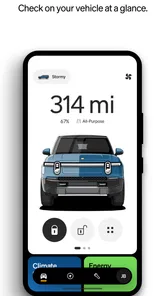
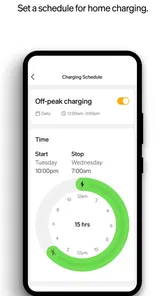
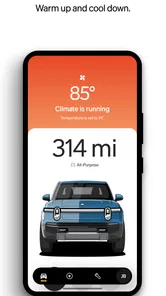
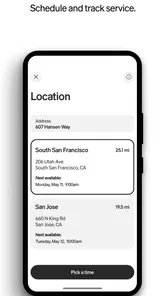
The Rivian app is the companion app for Rivian electric vehicles, including the R1T pickup and R1S SUV. After signing in with your Rivian account, you can check battery status, monitor charging, lock or unlock the vehicle, adjust climate settings, locate the vehicle, view service information, and manage selected vehicle features remotely from an Android or iOS phone.
Can I use the Rivian app without owning a Rivian vehicle?
You can download and open the Rivian app without owning a vehicle, but most useful features require an active Rivian account connected to a Rivian vehicle or reservation. Prospective customers may still use the app for account-related information, vehicle reservations, delivery updates, and selected purchasing or support tasks, although the complete remote-control experience is intended for owners.
Does the Rivian app allow remote control of the vehicle?
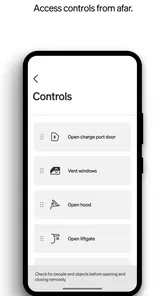
Yes, the app provides several remote functions, although availability can depend on the vehicle model, software version, connectivity, and account permissions. In supported situations, you can lock or unlock doors, start climate control, check charging progress, locate the vehicle, and review important status details. Remote commands may take a moment when cellular coverage is weak.
Can I manage charging and road trips through the Rivian app?
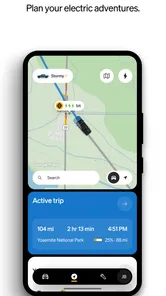
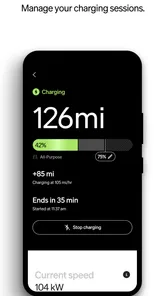
The Rivian app is useful for monitoring charging and preparing journeys. Owners can generally view the current battery level, charging status, estimated range, and charging history, while supported trip-planning tools can help identify routes and charging stops. Charging information may not update instantly, so it is wise to confirm the vehicle screen before beginning a long trip.
Pros
- Live vehicle tracking and remote controls are convenient for daily ownership.
- Over-the-air updates can add features without visiting a service center.
- Charging information helps plan trips and monitor energy usage.
- Clean interface makes key vehicle functions easy to find.
- Service requests and support access are available directly in the app.
Cons
- Many features require an active Rivian vehicle and account.
- Some remote commands may respond slowly depending on connectivity.
- Battery and range estimates can change with weather and driving conditions.
- The app may use substantial battery when notifications and tracking are enabled.
- Limited usefulness for people without access to Rivian’s charging ecosystem.











