Reuters - Breaking World News
- 2.48K
- 4.6
- Installs
- 1.00M
- Price
- Free

Screenshots

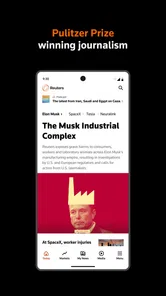


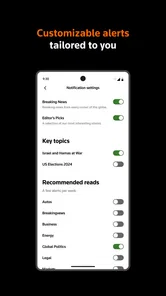
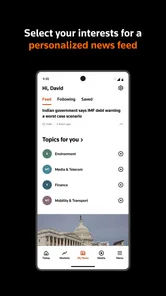
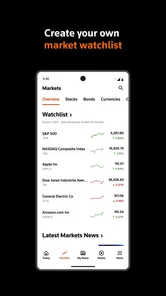

Analysis by Reviewed
I judge a news app less by how many headlines it can put in front of me than by how easily I can understand what matters when I have only a few minutes. Reuters is a focused way to follow international reporting from Thomson Reuters, and its strongest appeal is the editorial perspective: it gives readers a route into major events beyond the narrow view of a single country’s news cycle. In my experience, it works best as a regular briefing and a place to follow developing stories, rather than as an all-purpose destination for every local update or personal interest.
The app is free to download and sits in the news and magazines category. Its average rating is 4.6 from around 23,000 ratings, and it has over one million installs. It is rated for Everyone 10+, runs on operating systems version 10 or later, and its current version is 7.48.0. Those details make it easy to assess basic fit, but the real question is whether Reuters suits the way you read. For me, its value depends on wanting a concise, global view and being comfortable with a news product whose coverage priorities may differ from those of local broadcasters or a social feed.
Finding a readable route through the headlines
I start this section by looking at how Reuters helps me move from a quick scan to a more considered read, because headline clarity matters most when time or concentration is limited. I also weigh the app against social feeds and local outlets, which serve different purposes and can fill gaps a global briefing leaves open. That gives a practical basis for considering how the experience holds up across different reading needs.
A more deliberate alternative to a social feed
Opening Reuters makes sense when I want to check events without first sorting through reactions, reposts, and unrelated recommendations. The app is built around journalism rather than conversation, so it can help me move from a headline to a report with less distraction than a general-purpose social platform. That does not make it a complete replacement for other sources: a city paper may be far more useful for transport changes, school notices, or neighborhood decisions. I treat Reuters as a strong companion for the wider context, not a substitute for every kind of reporting.
The title is Reuters – Breaking World News, but I would not use the word “breaking” as a promise that every story will matter equally to every reader. A global outlet has to make choices about which developments receive attention. The upside is breadth; the trade-off is that a major international event may occupy more of the experience than a local issue that directly affects your day. If you need a quick overview of world affairs, that focus is useful. If your priority is one city, sport, or specialist subject, a dedicated publication may get you to the right information faster.
For a practical routine, I would open the app once in the morning to scan the main developments, then return to a specific report when a story affects a decision or conversation. This is a better use than refreshing headlines repeatedly while expecting every update to add meaningful context. A short first pass helps me identify which items deserve attention; a second, slower read is where Reuters is more valuable than a headline-only feed.
Reading with different levels of attention
News reading happens in uneven slices: a full article at home, a fast check between errands, or a glance while waiting for an appointment. Reuters can fit that pattern as long as I choose the right task. I would reserve detailed reading for a quiet moment and use brief visits to orient myself rather than trying to absorb complicated developments in fragments. That distinction matters particularly for international stories, where one headline may rely on background that is easy to miss when reading in a hurry.
More From Our News Desk

Weather by Xiaomi Review: Clear at a Glance, Less Clear Up Close

X Under Pressure: Can It Recover When Posting Goes Wrong?

Clash of Clans Is Won Between the Battles

Android Auto Makes the Case for Quieter Car Software

MobiOffice: Transforming Mobile Productivity with Seamless Integration

EA SPORTS FC™ Mobile Soccer: Redefining Mobile Sports Gaming
One useful habit is to pause before sharing or acting on a headline and open the underlying report. Headlines compress events; the article is where I can see the framing and details that make a claim meaningful. For a developing story, I also avoid treating one visit as a final account. Returning later can help me distinguish an early update from a fuller explanation, although I still compare important claims with other reputable coverage when the stakes are high.
Reuters is made by Thomson Reuters, a name associated with professional reporting, but the developer name alone should not be treated as a reason to stop checking. I value the app as a source to read critically, not as an authority that removes the need for judgment. That is especially true when a story is breaking, when facts can evolve, or when a report concerns a local situation that another outlet covers more closely.
Different bodies, devices, and reading conditions
For people who find dense screens tiring, the practical test is whether the app remains comfortable during a real reading session on their own device. I would check the text and contrast settings available on the phone, then read a full article rather than judging the experience from the front page alone. System-level display options can help some readers, but they do not guarantee that every screen, graphic, or layout will remain equally clear. If small text or visual complexity is a concern, trying the app before relying on it for daily reading is sensible.
Motor needs also affect how a news app feels. A person who has difficulty with precise taps may prefer to use a larger device, increase system display scaling where available, or read when they are not moving. I would not assume that every control is equally easy to reach one-handed or that the app offers a particular alternative interaction mode. The useful approach is to test the actions you expect to repeat—opening a story, returning to the feed, and navigating between sections—and see whether they feel dependable with your grip and preferred settings.
Sensory context can change the experience just as much as ability. Bright daylight, a dim bedroom, noisy public transport, and a quiet desk each place different demands on a reader. A visual news app is naturally less convenient when looking at a screen is unsafe or impractical, such as while walking across a busy street. I would save reading for a stationary moment rather than trying to keep up with headlines in a setting that competes for attention. For anyone who needs audio-first news, Reuters may not be the best sole option unless its current setup on their device meets that need.
People who read in a second language may also want to approach unfamiliar international stories slowly. Short headlines can contain names, institutions, or political context that are not self-explanatory. I find it more useful to open the article and identify the central event before deciding whether I need another source for local background. Readers who depend on simplified language or extensive explanatory context may prefer a publication that consistently provides that kind of support alongside its reporting.
Keeping up when time and connectivity vary
A realistic everyday use is checking Reuters during breakfast before a busy workday. I would scan the headlines, choose one international story with direct relevance to my work or family, and read it fully rather than opening several pieces and finishing none. At lunch, I might return to the subject if it has developed. This routine turns the app into a manageable briefing instead of another stream demanding constant attention.
For travel or patchy connections, I would avoid assuming that every story will be available in the exact way I want at the moment I need it. If I expect to read on a commute, I test the app beforehand under ordinary conditions and keep another source in mind for essential information. For immediate safety instructions, local alerts and official channels are more appropriate than relying on a general international news app. Reuters is useful for understanding broader events; it is not a replacement for time-sensitive local guidance.
It is also worth considering the cost beyond downloading. Reuters is free to install, while in-app purchases range from $0.99 to $209.99 per item. I would review any purchase prompt carefully before confirming, especially if someone else uses the device or manages its spending. The free starting point is helpful for trying the experience, but readers should make their own decision about whether any paid option fits their budget and needs.
Where the experience may still fall short
The biggest limitation for me is not a single missing feature; it is the gap between global coverage and personal relevance. A broad international report can be excellent context yet still leave unanswered questions about what is happening on my street, in my local government, or in a specialist community. Pairing Reuters with a local outlet is often the more useful choice than asking one app to cover everything.
There is another trade-off in the pace of news. A headline-driven visit can encourage quick judgments, while a serious story often deserves more time than a phone screen allows. If you are trying to reduce screen use or avoid feeling pulled into every developing event, set a deliberate check-in time rather than opening the app whenever a notification or conversation sparks curiosity. I find that the product is more helpful when I bring a question to it—what happened, why does it matter, what has changed?—instead of browsing without a stopping point.
Readers with specific accessibility requirements should test their own most important tasks rather than rely on assumptions based on the app’s category or reputation. Someone who needs a particular screen-reader workflow, very large text, simplified navigation, or hands-free operation should confirm that those needs are met on their device before making Reuters a primary source. That is not a judgment that the app cannot work for them; it is a practical reminder that an individual setup matters more than a broad label.
Making a brief visit more useful
A small adjustment to the way I browse helps me avoid mistaking a busy feed for a useful briefing: I decide what I want to learn before opening the app. That might be whether a major event has changed since yesterday, or what the central issue is in a developing international story. I read with that question in mind and stop when I have a reasonable answer. This approach is especially useful for readers who find a stream of headlines stressful or who have limited time to concentrate.
When a story has implications for a specific place, I use Reuters to establish the wider event, then look for reporting from people closer to that community. The two sources serve different purposes: international coverage can help explain why an event matters beyond one location, while local reporting can clarify what residents are experiencing and what may happen next. Neither perspective needs to displace the other. That is a more dependable workflow than expecting one global app to answer questions it was not designed to prioritize.
Who I would recommend it to
I would recommend Reuters – Breaking World News to readers who want a dependable-feeling starting point for international affairs, prefer reporting over social commentary, and are willing to read beyond the headline. Its free download lowers the barrier to trying it, and its 4.6 average gives prospective readers a useful sense of how other users respond, though neither fact can tell you whether its coverage matches your interests.
I would be more cautious recommending it as the only news app for someone whose daily decisions depend on local reporting, who wants a highly personalized entertainment feed, or who needs a specific accessibility interaction that they have not tested. A regional newspaper, specialist publication, or audio-oriented news service may be a better main choice in those cases. Reuters can still add an international perspective alongside them.
Overall, I see Reuters as most inclusive when readers use it in a way that fits their abilities and circumstances: choose a comfortable reading environment, slow down for complex reports, and pair it with a more local or accessible source when needed. It is a thoughtful option for keeping world events in view, but it is not a universal answer to every news need. If that balanced, global role is what you want, I think it is worth trying and judging through your own daily reading routine.
My recommendation is to use Reuters for perspective, not as your only window on the news. That distinction makes its strengths clearer and its limits easier to manage. The app suits readers who value international reporting and can give stories enough attention to understand them; people who need local immediacy or a specialized reading experience should combine it with a better-matched alternative.
Reuters - Breaking World News Frequently Asked Questions
What is Reuters – Breaking World News?
Reuters – Breaking World News is a news app that brings together reporting from Reuters on international and local events. Readers can explore breaking stories, politics, business, markets, technology, and other topics, with coverage presented through articles, photographs, and, where available, video. The exact selection of stories and features may vary by region and app version, so check the current store listing for details.
Is Reuters – Breaking World News free to download and use?
The app may be available to download without an upfront charge, but access to all articles or features can depend on the subscription options and rules in your country. Some content may be freely accessible, while other material may require payment or an account. Before subscribing, review the price, billing period, renewal terms, and cancellation instructions shown in the app store or within the app.
Can I personalize the news and receive breaking-news alerts?
Reuters may offer ways to follow particular topics or receive notifications about important developments, though the available controls can differ between versions and regions. If you enable alerts, you can typically manage notification permissions through your device settings and, if available, the app’s own preferences. Consider choosing only the topics and alerts you want so that updates remain useful rather than disruptive.
Does the Reuters app work offline, and how much data does it use?
You generally need an internet connection to load current news, images, and video, and the app’s offline capabilities should not be assumed unless a download or save-for-later option is provided in your version. Data use depends on how many stories you read and whether you stream media. Using Wi-Fi for video and checking your device’s mobile-data settings can help manage consumption.
What should I check before downloading Reuters – Breaking World News?
Check that your phone meets the app’s current operating-system requirements and that the app is available in your region. Review the latest store listing for subscription details, in-app purchases, privacy information, and requested permissions; these can change over time. Also consider whether you want personalized alerts or account-based features, and install the official Reuters app from a trusted app store.
Pros
- Customizable alerts help you follow specific topics and breaking stories.
- Live video coverage adds context to major events.
- Articles include clear attribution and reporting from Reuters journalists.
- Save articles to return to them later.
- A clean layout makes headlines and sections easy to browse.
Cons
- Some stories may require a subscription or registration to access fully.
- Frequent breaking-news alerts can become distracting.
- Coverage may be less detailed for some local or niche subjects.
- Video and image-heavy stories can use significant mobile data.
- The volume of updates may make it harder to keep up with every story.











