RedAlert - צבע אדום
- 713.00
- 4.6
- Installs
- 1.00M
- Price
- Free

Screenshots
Analysis by Reviewed
When I travel or spend time in Israel, I want emergency information to be direct and easy to act on, not buried in a news feed. That is the specific job I look to RedAlert - צבע אדום to do: deliver alerts about rocket threats so I can focus on taking the appropriate safety steps. It is a focused tool, not a general news reader, and that distinction matters when every second of attention counts.
Quick alerts, with realistic expectations
An emergency alert app is most useful when it can get a warning to you without requiring you to watch a screen. RedAlert is intended to work in the background, which suits the ordinary pattern of leaving a phone in a pocket or on a table while working, cooking, or moving around. I would still treat any phone alert as one part of being prepared, rather than as a promise that a notification will always arrive before danger is near. Keep the device available and follow official safety instructions when an alert occurs.
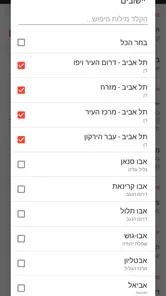
For a visitor, a practical routine is to set the relevant areas before heading out, then check those choices again if the day’s plans change. A person staying in one place may want a narrower selection; someone crossing between areas may need a broader one. That creates a real trade-off: more coverage can mean more alerts that are not immediately relevant, while a tighter selection is easier to interpret but may not fit a changing route.
Useful when the phone is busy
The app’s value is clearest in moments when I am not actively checking news: a commute, a conversation, or a quiet evening at home. Choosing an alert tone that I can recognize in a noisy setting is more useful than picking one simply because it sounds pleasant. I would also avoid silencing the app casually if I am relying on it for an area I have selected. These small decisions make the setup more dependable in practice, without assuming that any particular phone or network condition can be guaranteed.
Compared with a general news app, RedAlert is narrower by design: it is for urgent warnings, not background context, analysis, or a broad stream of headlines. News sources can help explain what is happening, but they are not a substitute for a dedicated alert channel when the immediate task is to notice a warning. I would use the two for different purposes rather than expect one to replace the other.
Stay Alert, Stay Safe
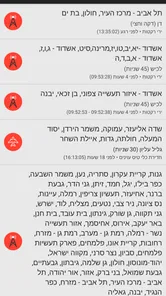
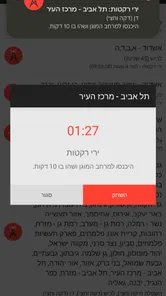
Living in areas prone to rocket attacks is nerve-wracking, to say the least. The RedAlert - צבע אדום app steps in to ease some of that anxiety by providing users with instant alerts. The moment there’s a threat, your phone buzzes with a notification, giving you those precious extra seconds to find safety. It’s almost like having a personal security guard in your pocket, always ready to inform you about potential dangers.
User-Friendly Interface
One of the first things I noticed about the app is its user-friendly interface. It’s straightforward and doesn’t bombard you with unnecessary information. When you’re dealing with something as serious as a rocket alert, the last thing you want is a complicated app. Just open it up, and you’ll see a simple dashboard with all the alerts neatly organized. Plus, it’s available in both Hebrew and English, making it accessible to a wider audience.
More From Our News Desk

Weather by Xiaomi Review: Clear at a Glance, Less Clear Up Close

X Under Pressure: Can It Recover When Posting Goes Wrong?

Clash of Clans Is Won Between the Battles

Android Auto Makes the Case for Quieter Car Software

MobiOffice: Transforming Mobile Productivity with Seamless Integration

EA SPORTS FC™ Mobile Soccer: Redefining Mobile Sports Gaming
Real-Time Updates
The real-time update feature is what truly sets this app apart. It taps into reliable sources to ensure you get the most up-to-date information. Whether you’re at home, at work, or even traveling, knowing that you’ll receive an alert instantly provides a sense of security that’s hard to beat. And the best part? It works seamlessly in the background, so you don’t have to keep it open all the time.
Performance is important here, but I would not judge an emergency tool by how many settings or screens it offers. Its strength is the straightforward alert-first approach. If you are comparing it with checking news sites manually, the main difference is workflow: you do not need to keep refreshing a page in anticipation. At the same time, background delivery depends on the phone being able to receive notifications, so I would check that the app is allowed to notify me and avoid assuming it can overcome every connectivity or device limitation.
Customization is Key
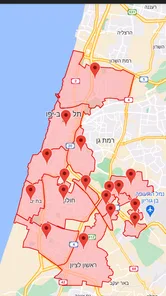
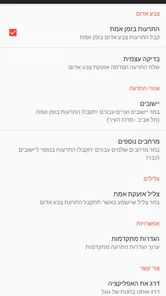
What’s cool about this app is the level of customization it offers. You can choose the specific areas you want to receive alerts for, meaning you won’t get bombarded with notifications about regions you’re not in. This tailored approach ensures that the information you receive is relevant to your current location.
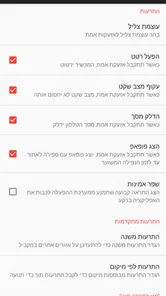
Furthermore, you can adjust the alert tones to something that suits your preference. Whether you prefer a loud siren or a gentle nudge, the choice is yours. It’s little tweaks like these that make using the app a more personalized experience.
Getting the setup right
Area choices and sound settings are worth reviewing when your routine changes, not just on the first day. For example, if I am visiting someone outside my usual area, I would update the selection before setting off rather than wait until I arrive and remember. If I am in a shared space, a distinct tone can make an alert easier for me to notice, although a quieter setting may be more considerate; the right choice depends on whether I can still hear it when it matters.
People often wonder whether this can replace checking local news or official instructions. I would not use it that way. RedAlert is best treated as an alert channel, while news and official guidance provide context and next steps. Likewise, if I am outside Israel or do not need warnings for the areas covered by my plans, a broader news app may be more useful than installing a specialized alert tool.
Who will get the most from it
I see the clearest fit for residents who want a dedicated warning app and for visitors who need to keep track of selected areas while moving around. It may also suit someone who dislikes leaving a news stream open just to watch for urgent information. On the other hand, it is not a general-purpose safety planner, and someone seeking broad regional reporting, travel advice, or ongoing analysis should pair it with other sources rather than expect this app to provide all of that.
Practical routines for residents and visitors
A useful way to make the app part of a real routine is to connect its area selection to the day’s schedule. Before leaving home, I would think through the places I expect to pass or spend time in, then decide whether a narrow or wider selection is more appropriate. If plans change at lunch or a meeting moves to another part of the country, that is a natural moment to revisit the selection. This is more reliable than choosing areas once during installation and assuming that choice will stay suitable indefinitely.
For a visitor, the challenge is often not knowing which place names correspond to the route. I would take a few minutes to check the areas against an itinerary before going out, rather than trying to make sense of the list while walking or under pressure. A companion who knows the region can help with that initial setup. This does not make the app a navigation tool; it simply reduces the chance of relying on a selection that no longer matches where the day is taking me.
There is also a useful household workflow. If several people are traveling together, each person should make sure their own phone is set up rather than assuming one person’s device will cover everyone. A phone can be left behind, run out of power, or be in another room. I would treat the app as a personal notification channel and keep the group’s practical safety plan separate from it, including knowing what to do if someone does not receive a notification.
What “fast” can and cannot mean
The appeal of a dedicated alert app is that it removes the manual step of opening a news source and looking for an update. That can make the experience feel faster in everyday use, especially when the phone is locked or I am occupied with something else. But the app cannot make every part of the alert chain instantaneous: the phone needs a working route to receive notifications, and its notification settings must allow them through. I would not use the word “fast” as a guarantee about delivery in every location or circumstance.
For the same reason, I would not judge responsiveness by leaving the app open and watching it. The background role is the point; repeatedly checking the screen adds little and can turn a helpful tool into another source of anxiety. A more sensible check is to confirm the selected areas and notification settings during setup, then make sure the phone is generally available when I am relying on it. If the device has been silenced or notifications have been restricted, I would correct that rather than assume the app can override the choice.
Reliability is partly a phone habit
In an emergency, reliability is not only about the software. It also depends on whether the phone is charged, close enough to hear or feel, and configured in a way that fits the environment. I would avoid leaving it buried under a coat or in a bag across the room if noticing a warning matters. In a loud workplace, a tone that is easy to distinguish may be more practical; at home overnight, the settings should still make an alert noticeable without creating unnecessary disturbance for everyone else.
Recovery after a missed or unclear notification deserves a calm plan too. If I notice an alert late, I would first follow official safety guidance instead of trying to reconstruct events from the app alone. Later, I could review whether the selected areas, sound choice, or phone notification settings contributed to the problem. That is a practical troubleshooting habit, not a promise that changing one setting will solve every delivery issue.
Battery, background use, and older devices
Because RedAlert is designed to work in the background, I would expect to use it without keeping the screen lit or opening it repeatedly. That is a more sensible pattern than treating it like a live dashboard. I would not make a precise claim about battery use across phones, since background behavior varies by device and system settings. If battery life is already a concern, keeping the phone charged and avoiding unnecessary screen checks are sensible habits for any alert-dependent routine.
The Android requirement is version 5.0 or later, which makes the app usable on a broad range of Android software versions, but compatibility alone does not tell me how a particular handset handles notifications. Older devices, heavily customized system settings, or aggressive battery management can affect background apps differently. After installing, I would check that notifications are enabled and that the phone has not put the app into a restricted state. If alerts appear inconsistent, I would investigate those device-level settings before relying on the app as the only way to notice warnings.
That advice matters especially for people who use work profiles, focus modes, or scheduled quiet hours. Those tools can be helpful for reducing interruptions, but an emergency alert app should not be accidentally treated like an ordinary social notification if I need it to reach me. I would review the phone’s own controls whenever I change a focus schedule or move the app between profiles. The trade-off is personal: fewer interruptions can make a phone easier to live with, yet filtering too aggressively can defeat the reason for installing a warning tool.
Choosing between an alert app and other sources
RedAlert fills a different role from television, radio, local news sites, or a general news app. Those sources can provide a wider picture and explain developments, but they usually ask me to turn toward them and search for information. A focused alert app is more convenient when the immediate goal is to notice a warning for selected areas. I would combine channels according to need rather than look for one app to do everything.
There are situations where another option is better. If I want analysis, travel reporting, or a broad view of events, a news service is the more natural choice. If I am in a place where I do not need the areas covered by this app, its specialized purpose offers little value to my routine. And if I cannot keep notifications enabled or the phone is often unavailable, I should not pretend that installing another app fixes that weakness; I need a dependable way to receive safety information that suits my actual circumstances.
Availability and value
RedAlert is a free news-and-magazines app from developer Elad Nava, with optional in-app purchases listed from about $2.49 to $54.99 per item. It is rated for Everyone, has an average rating of 4.6 from around 27,000 ratings, and has been installed over a million times. The current version is 1.0.94, and it requires Android 5.0 or later. Those figures suggest an established audience, but I would still make my decision based on whether its focused alert role fits my needs and whether notifications work as expected on my own device.
Final Thoughts
In today’s world, staying informed is crucial, especially when it comes to personal safety. The RedAlert - צבע אדום app is a must-have for anyone living in or visiting areas prone to rocket attacks. Its real-time alerts, user-friendly interface, and customization options make it an invaluable tool.
While we all hope for peace and safety, having an app like this on your phone is a smart way to stay prepared. After all, it’s always better to be safe than sorry. So, if you’re in Israel, give this app a try and experience the peace of mind that comes with being well-informed.
RedAlert - צבע אדום Frequently Asked Questions
What devices and operating systems can run RedAlert - צבע אדום?
RedAlert - צבע אדום is an Android app that requires Android 5.0 or later. Before downloading, check your device’s operating-system version and make sure you have enough room for another app. It is listed as suitable for Everyone, so its age rating is broad. Keeping your phone’s notification permissions available is also important if you want alerts to reach you.
Who makes RedAlert - צבע אדום, and what kind of app is it?
RedAlert - צבע אדום is a News & Magazines app developed by Elad Nava. Its focus is emergency alerts in Israel, rather than general news reading or entertainment. The app is free to download, while in-app purchases are offered. If you are looking for an app centered on alerts rather than a broad news feed, its purpose is clear from the start.
What should I check before downloading RedAlert - צבע אדום?
RedAlert - צבע אדום is a free News & Magazines app from developer Elad Nava, intended for people who want emergency alerts related to Israel. It is rated for Everyone and requires Android 5.0 or later. Before installing, check that your device meets that requirement and consider whether you can keep a reliable internet connection available for timely notifications.
What is RedAlert - צבע אדום and what does it do?
RedAlert - צבע אדום is a mobile application designed to provide real-time alerts for missile attacks in specific regions, primarily in Israel. The app sends notifications to users when a missile attack is imminent, allowing them to seek shelter immediately. It is especially crucial for residents in high-risk areas who need instant warnings to ensure their safety.
How can I customize the alert settings in RedAlert - צבע אדום?
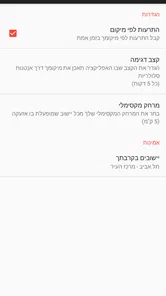
Users can customize alert settings in RedAlert - צבע אדום by accessing the app's settings menu. Here, they can choose specific regions for which they wish to receive alerts, set the volume and type of alert sound, and even decide the notification frequency. This customization ensures users receive relevant alerts tailored to their specific needs.
Pros
- Real-time alerts for rocket attacks.
- User-friendly interface and navigation.
- Customizable alert settings.
- Supports multiple languages.
- Fast and reliable notifications.
Cons
- Limited to specific geographic regions.
- Requires internet connection to function.
- Notifications can be overwhelming.
- No offline mode available.
- Can drain battery quickly.











