

RecovR: Vehicle Theft Recovery
- 68.00
- 3.6
- Installs
- 50.00K
- Price
- Free

Screenshots
Analysis by Reviewed
When a car is shared by several people, the difficult part of recovery is often not knowing that a vehicle has gone missing; it is making sure the right person can act quickly and responsibly. I found RecovR: Vehicle Theft Recovery most useful in that narrow but important space. It is an Auto & Vehicles app from RecovR, designed for cars fitted with a RecovR locator rather than as a general-purpose tracker for any vehicle.
That distinction matters from the beginning. Installing the app alone does not turn a phone into a vehicle recovery system. Its value depends on having the compatible locator in the car and on the people who use the vehicle understanding who is expected to monitor it. In my experience, that makes the app less like a casual driving utility and more like one part of a household security arrangement.
How RecovR works in a shared household
Imagine a family with one car used for commuting, school runs, shopping and occasional trips. One person may normally park it at home, another may take it to work, and a third may borrow it at the weekend. In that situation, a locator app can be reassuring, but only if everyone knows its purpose. The useful question is not simply “Where is the car?” It is “Who should check, and what should they do if the vehicle is not where it should be?”
I would set expectations before handing the keys around. The person responsible for the vehicle should know that the app is intended for theft recovery and locating a car equipped with the RecovR device. Other household members should not treat it as a way to casually watch every journey. That boundary keeps the tool focused and avoids turning a practical safety measure into a source of unnecessary arguments.
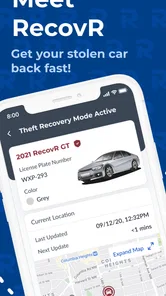
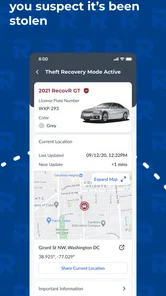
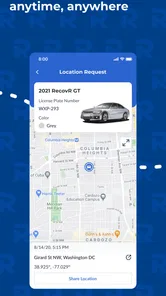
A realistic example is a shared car left in a large parking area while its owner is away for the day. If the vehicle cannot be found later, the app can be a more sensible first step than walking randomly between rows or immediately assuming it has been stolen. The driver can check the vehicle’s location, while another trusted household member helps confirm the last known parking plan. That division of responsibility is where the app feels most useful.
The app is free to install, which lowers the barrier for people who already have the compatible RecovR hardware. Its audience is fairly specific, though. If your car does not have a RecovR locator, downloading it will not provide the same practical benefit. Someone looking for a universal phone-based tracker, a driving diary or a broad vehicle maintenance tool should look elsewhere rather than expecting this app to cover those jobs.
RecovR has reached over fifty thousand installs and holds a 3.6 average from roughly one hundred ratings. I read that as a sign of a functional but not universally smooth experience. The rating is neither a reason to avoid it automatically nor proof that it will suit every household. With a locator-dependent app, the quality of the complete setup matters just as much as the phone interface.
More From Our News Desk

 Gmail
GmailGmail in a Busy Inbox: Who Benefits Most?
From first account to crowded workday, Gmail earns its place through dependable search and flexible sorting—but its best fit depends on how much inbox maintenance you can tolerate.

 Prime Video
Switching to Prime Video: What Changes in Your Viewing Routine
Prime Video can make a compelling second home for streaming, but switching means learning a different catalog, rental layer, and route from browsing to playback.

 Universal TV Remote Control
Universal TV Remote Control Works Best as a Reliable Backup
A phone remote earns its place through quick setup and reliable habits. Here is how to get more from Universal TV Remote Control—and where its limits show.

 Weather - By Xiaomi
Weather by Xiaomi Review: Clear at a Glance, Less Clear Up Close
Xiaomi’s weather app makes everyday forecasts quick to scan, but its calm surface can leave useful details and recovery paths harder to find than they should be.

 X
XX Under Pressure: Can It Recover When Posting Goes Wrong?
A resilience-focused review of X, examining setup, mistaken posts, interruptions, weak connections, and the gaps that matter when recovery needs to be dependable.

 Clash of Clans
Clash of Clans Is Won Between the Battles
Its raids are quick; its community is a long-term project of coordination, teaching, rivalry, and shared responsibility—with all the friction that entails.
Latest News



Start with clear account responsibility
The first practical decision is who should be the main account holder. I would choose the person who normally manages the vehicle, not necessarily the person who drives it most often. That person can keep track of the device, make sure the car is correctly associated with the account and coordinate access with other trusted users.
This is especially important when a car changes hands within a household. A partner, older child or visiting relative may need to use the vehicle, but that does not automatically mean every driver should manage the locator account. Keeping one primary owner reduces the chance of conflicting changes, forgotten credentials or uncertainty about who should respond during a stressful incident.
I would also avoid treating shared access as an informal arrangement that nobody discusses. Before the car is lent out, explain what the app is for, who can view its location and when checking it is appropriate. That conversation is more valuable than silently installing the app on several phones and assuming everyone understands the same boundaries.
The minimum operating system is Android or iOS version nine, so the app is aimed at devices that are not especially new. That is helpful for households with an older spare phone, although compatibility alone does not guarantee that every device will feel equally comfortable to use. I would test the app on the phone that will actually be carried during travel, rather than relying only on the newest device in the home.
RecovR’s current version is 1.73.0. Keeping the app current is a sensible part of the setup because location-related tools depend on reliable communication between the vehicle hardware, account and phone. I would make updates part of ordinary phone maintenance, while remembering that an updated app cannot compensate for a missing, disconnected or incorrectly installed locator.
What to check before relying on it
Before considering the setup complete, I would perform a calm test at home. Confirm that the car appears as expected, check that the household’s designated account holder can open the relevant information and make sure everyone knows which vehicle is being referenced if more than one car is involved. This is a simple step, but it prevents confusion when the situation is urgent.
A second useful habit is to keep the app’s role separate from other vehicle records. RecovR is about locating and recovering a compatible vehicle. It should not replace insurance documents, registration details, roadside assistance information or a written note of who is allowed to drive. If a theft occurs, those other details may still be needed, and searching for them only after the event creates avoidable stress.
I would also agree on a response sequence. For example, the driver first checks whether the car was moved by an authorized household member, then the account holder checks the app, and any formal report is handled through the appropriate local authorities. The app can provide useful location information, but it is not a substitute for making safe decisions or confronting anyone at a suspected location.
The most important boundary is simple: use the location information to support a safe recovery process, not to encourage personal confrontation. A map or locator result can help people communicate clearly, but it does not establish that approaching a vehicle or another person is safe. In a household, agreeing on that rule in advance avoids impulsive decisions.
Coordination is where the app earns its place
For a single-driver car, the app may be a straightforward recovery aid. For a shared vehicle, its real advantage is coordination. One person can be responsible for the account, another can confirm the last legitimate trip and a third can help gather the information needed for a report. That is more organized than several people independently checking different phones and giving contradictory updates.
I would keep the coordination practical rather than excessive. A household does not need a constant stream of messages about every movement. It needs a shared understanding of normal use and a clear plan for unusual situations. If someone borrows the car unexpectedly, a quick message to the account holder can prevent a false alarm and make later location information easier to interpret.
This also helps with parked-car confusion. In a busy household, a driver may remember leaving the vehicle near a particular shop while another person recalls a different destination. Instead of debating memory, the responsible user can check the app and compare the result with the day’s plans. That is a small but genuinely useful workflow that goes beyond the basic idea of “track my car.”
There is a trade-off here. More people involved can mean more reassurance, but it can also mean more opportunities for misunderstanding. I would not give access casually to every person who occasionally borrows the car. Access should follow trust and necessity. A regular household driver may need a defined role; a one-time borrower may only need to know whom to contact if the car cannot be found.
The app is also better suited to locating the vehicle than to managing a complete household transport system. If your main goal is fuel logging, service reminders, mileage records or driver behavior analysis, a different automotive app may be a better match. RecovR’s focused purpose is a strength when theft recovery is the concern, but it is a limitation when you want an all-in-one dashboard.
Age, trust and sensible household use
The content rating is Everyone, which makes the app broadly suitable from an age-classification perspective. That does not mean every young person should automatically receive account control. Age is only one part of the decision. A teenager who borrows the family car may understand how to open a location screen but still need clear guidance about privacy, emergencies and what to do with the information.
I would separate driving permission from app permission. Someone may be trusted to drive the car without being responsible for the locator account. Conversely, a parent who rarely drives may still be the best person to manage the account because they handle household records and emergency planning. This distinction keeps the app aligned with responsibility rather than simply handing control to the most frequent driver.
Trust matters between adults as well. A locator can feel reassuring when used for recovery, but uncomfortable when used to scrutinize ordinary movements. Before adding another household member, explain the intended use and agree that location checks should have a legitimate reason. That is not a technical setting; it is a human agreement, and the app cannot create it for you.
For a young driver, I would explain the app in plain language: it helps find the car if it is missing, and it is not a replacement for calling for help or following safe procedures. I would also make sure the driver knows who the primary contact is. In a stressful moment, “call the account holder and explain where the car should be” is more useful than expecting a young user to solve the entire situation alone.
Households should be equally careful when a vehicle changes ownership or when a relationship changes. The person who no longer has permission to use the car should not remain part of the informal access arrangement. Removing old access, changing shared credentials where appropriate and confirming the new responsible user are sensible steps whenever control of the vehicle changes.
Everyday strengths and points of friction
My favorite aspect of RecovR is its focus. It does not try to be a generic driving companion. When paired with the right locator, it gives the household a dedicated place to begin when the car is unexpectedly absent. That focused workflow is easier to explain than a large app filled with unrelated vehicle tools.
The main friction is equally clear: the app’s usefulness is tied to the RecovR locator. A person discovering the app without compatible hardware may find the experience disappointing because the phone itself is not the complete solution. This is why I would confirm the hardware arrangement before asking several family members to install the app.
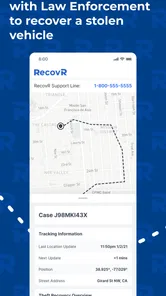
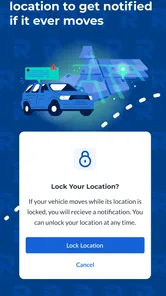
Another limitation is that location information can be misunderstood. A displayed position may help identify where to look or what to report, but users should not assume that it answers every question about the vehicle’s condition, the driver or the reason it is there. The app is a recovery aid, not an investigation service. Good judgment remains essential.
The 3.6 rating from about one hundred twenty ratings and nearly seventy written reviews suggests that prospective users should approach it with realistic expectations. I would not choose it because of the rating alone. I would choose it because the household already has the compatible locator and needs a focused way to coordinate vehicle recovery.
RecovR was released on April 18, 2021, and the developer is listed as RecovR. That history gives the app a clear place in the vehicle-security category, while the current version shows that it remains an actively identified product rather than an abandoned download. Still, the practical test is whether the app fits your actual car, phone and household responsibilities.
Who should use it, and who should skip it
I would recommend it to a household that owns or uses a car with a RecovR locator, especially when several trusted people share responsibility for the vehicle. It can also suit an individual owner who wants a dedicated recovery tool without filling the phone with unrelated automotive features.
I would be more cautious about recommending it to someone seeking a universal tracker that works with any car. The locator requirement makes the decision hardware-specific. If you are comparing products before buying anything, look at the complete arrangement rather than judging the app in isolation: the device, the account responsibilities and the way your household plans to respond all matter.
I would also skip it if your real need is routine vehicle management. Drivers wanting maintenance schedules, expense tracking, navigation or detailed trip analysis will probably get more value from an app built around those tasks. RecovR is not weak because it lacks those functions; it is simply aimed at a different problem.
For shared-device use, I would avoid installing it on every available phone without a plan. A smaller group of trusted users is easier to coordinate than a large group with unclear responsibilities. The best arrangement is usually one clear account owner, a limited number of people who genuinely need access and an agreed method for handling a missing vehicle.
My household verdict
After looking at it as both a vehicle tool and a shared-household tool, I see RecovR: Vehicle Theft Recovery as a focused companion for cars equipped with the matching locator. Its strongest quality is not a long list of extras; it is the way it can give a household a common starting point when a vehicle is unexpectedly missing or difficult to find.
I would install it when the hardware is already part of the car-security plan, then test the setup before an emergency, assign one responsible account holder and explain the privacy boundaries to everyone who may use the vehicle. Those steps make the app more useful than simply downloading it and hoping it will solve a problem later.
At no cost, with an Everyone rating and support for operating systems from version nine onward, it is accessible to many households. But accessibility should not be confused with universal suitability. The compatible locator, sensible account management and safe recovery behavior are all essential parts of the experience.
My final view is positive but specific: choose RecovR if your priority is locating and recovering a compatible car, especially in a shared household where coordination matters. Choose another automotive app if you want broad driving, maintenance or expense features, or if you do not have the required locator. Used within its proper boundaries, it can be a practical layer of reassurance; used without those boundaries, it can create confusion instead of solving it.
RecovR: Vehicle Theft Recovery Frequently Asked Questions
Is RecovR free to download, and are there separate service costs?
RecovR is free to download, but using its vehicle-recovery features generally depends on having a compatible RecovR locator and an active service arrangement. The app itself does not replace the tracker or determine the terms of your vehicle program. Before relying on it, check with the dealership or provider that supplied your locator to understand activation and any ongoing costs.
What information or setup do I need before using the app?
You’ll need a vehicle with a compatible RecovR locator, plus an account that is properly activated for the service. Have your account credentials available when setting up the app, and make sure your vehicle is enrolled through the relevant dealership or provider. Completing those steps first can help avoid installing the app only to find that the vehicle is not connected to your account.
What is RecovR: Vehicle Theft Recovery and how does it work?
RecovR: Vehicle Theft Recovery is a vehicle-tracking and recovery service designed to help owners locate a car if it is stolen or misplaced. The system typically uses a connected tracking device, a mobile application, and location services to show the vehicle’s position. After installation and activation, users can check the vehicle’s status and follow recovery instructions through the app.
Does RecovR require a separate tracking device or subscription?
Yes, RecovR is generally connected to a dedicated vehicle-tracking device rather than functioning as a phone-only application. Availability, activation requirements, and subscription options may depend on the dealership, vehicle program, or service plan that provided the device. Before downloading, confirm that your vehicle is enrolled and that your account credentials and service coverage are active.
Can I use RecovR to locate my vehicle in real time?
The app is intended to provide location information for an enrolled vehicle, but the exact update frequency may vary. GPS visibility can be affected by underground parking, buildings, weather, signal coverage, device power, and the tracker’s connection. It should be treated as a recovery and monitoring tool, not as a guarantee of uninterrupted, perfectly real-time tracking.
Pros
- Fast access to vehicle location and recovery details
- Helpful theft-reporting guidance in one place
- Clean interface makes key information easy to find
- Useful for organizing vehicle and ownership details
- Can provide reassurance when traveling or parking remotely
Cons
- Effectiveness depends on an active compatible tracking device
- Some features may require a subscription or service plan
- Location accuracy can vary in areas with weak network coverage
- Requires accurate vehicle information to work reliably
- Not a replacement for contacting police after a theft











