Real News - Republican News
- 167.00
- 4.6
- Installs
- 100.00K
- Price
- Free

Screenshots


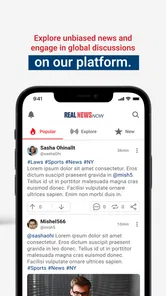




Analysis by Reviewed
I often judge a news app less by how much it can show me than by how easily I can find a story, read it comfortably, and decide what deserves more of my attention. Real News - Republican News is aimed at readers looking for a conservative-leaning news experience, and that focus is central to deciding whether it belongs in your daily routine. It is a free news and magazines app from Real News Now, with a Teen content rating, and it has reached over 100,000 installs. I would approach it as a focused way to follow current affairs, not as a complete substitute for checking a range of reporting.
Starting with a focused news habit
For someone who feels overwhelmed by a general-purpose news feed, a more clearly positioned app can make the first step into the day feel simpler. The trade-off is that a focused editorial identity is not the same thing as a neutral overview of every perspective. I would use this app to keep up with the stories it brings forward, then consult reporting from other viewpoints when a subject is important or contested. That small habit helps me separate convenient reading from a fully rounded picture.
In everyday use, the best role for a news app is often modest: a quick check while having breakfast, a few minutes between tasks, or a return to a developing story later. I would not expect any single feed to tell me everything worth knowing. Instead, I would ask whether its selection gives me a useful starting point and whether the reading experience makes it easy to spend time with an article rather than merely skim a headline.
Readability and navigation in practice
When I first download Real News - Republican News, the clean and user-friendly interface is the first thing that catches my attention. No clutter, no unnecessary frills—just news content. The app’s design focuses on delivering news in a straightforward manner, which is honestly a breath of fresh air in today's over-complicated app world. A simpler presentation can be especially useful when I have only a short break: fewer visual distractions make it easier to decide what to read next.
The app is in the News & Magazines category, so I compare it with the familiar alternatives: a broad news aggregator, a newspaper’s own app, or a browser with several publications bookmarked. An aggregator can offer a wider mix in one place, while a publisher’s app can give more direct access to that outlet’s own reporting. A browser is flexible, but it asks me to do more of the organizing. This app’s appeal is its more specific point of view and a focused feed; that same focus means it will not be my only stop when I want a deliberately broad range of coverage.
For a practical routine, I would scan the feed once, choose a small number of stories, and read those fully instead of treating every headline as urgent. If a story is still developing, I would return later and compare how the account has changed rather than relying on the first impression. This is a useful way to avoid confusing a quick news check with a complete understanding, especially when the subject is political or likely to be debated.
Motor and sensory considerations
The original experience is described as intuitive, and straightforward navigation can reduce the effort involved in moving from a feed to a story. That matters to readers who prefer a predictable interface or find dense screens tiring. The app also offers customizable text sizes and a dark mode, which are practical options for adjusting the reading presentation to personal comfort. I would try a larger text setting before settling into a long article, since comfortable reading often matters more than fitting more words on screen.
More From Our News Desk

Weather by Xiaomi Review: Clear at a Glance, Less Clear Up Close

X Under Pressure: Can It Recover When Posting Goes Wrong?

Clash of Clans Is Won Between the Battles

Android Auto Makes the Case for Quieter Car Software

MobiOffice: Transforming Mobile Productivity with Seamless Integration

EA SPORTS FC™ Mobile Soccer: Redefining Mobile Sports Gaming
Those options can help with visual comfort, but they do not automatically make every part of a news app accessible to every person. Larger text may mean more scrolling, and dark mode is a preference rather than a universal solution: some readers find it easier at night, while others prefer a light background. I would test both in the lighting where I usually read and keep whichever makes it easier to follow paragraphs without strain. The key is to treat these settings as useful adjustments, not as proof that every accessibility need is covered.
There is also a motor side to reading on a phone. A feed that is easy to scan is helpful when I am using one hand, but any app still requires careful tapping and scrolling. In a crowded commute, I would save a longer read for a steadier moment rather than trying to navigate while walking. That is not a flaw unique to this app; it is a sensible boundary for reading on a small screen in a busy environment.
Offline reading and notifications as a workflow
The curated feed is presented as a way to bring relevant updates together, and offline reading is useful when a connection is unreliable or I want to prepare something to read before travelling. I would make a deliberate habit of opening the app while connected and setting aside stories I expect to want later, then check that they are available before leaving. Offline access is most useful when treated as preparation, not as a guarantee that every newly published item will be ready without a connection.
Notifications can also shape the experience. The app is described as limiting alerts to important updates rather than sending constant interruptions. I still prefer to decide how much news gets to break into my day: if alerts start pulling my attention away from work or rest, I would review the app’s notification controls and keep only what I find genuinely useful. A notification is a prompt to look, not a reason to assume a story requires immediate action.
A realistic use case is a reader who checks headlines over breakfast, chooses a few pieces for later, and then reads them during a quiet part of a commute where the phone can be used safely. The feed supplies a starting point, while offline preparation can make the later session less dependent on a strong signal. If the day’s top story is especially important, I would also compare its details with another outlet rather than treating one app’s selection as the whole record.
Where its editorial focus helps—and where it narrows the view
The app’s conservative orientation is useful for readers who specifically want to follow news presented for that audience, or who want to understand which issues and stories are being emphasized from that perspective. It can also be a convenient companion for someone who already reads multiple outlets and wants this feed as one distinct part of a wider routine. I would not recommend relying on it alone if the main goal is to encounter a carefully balanced range of political interpretations in one place.
That distinction matters because curation is an editorial choice: what appears prominently, what is grouped together, and what gets less attention can shape a reader’s sense of the day. My practical tip is to pick one consequential story and compare the basic facts, timeline, and quoted viewpoints across sources. This takes less effort than trying to monitor every outlet, while making it easier to notice where accounts agree and where interpretation differs.
The app has an average rating of 4.6 from around 1,600 ratings, alongside 167 written reviews. Those figures suggest that many people have taken the time to rate it, but they cannot tell me whether its editorial approach matches my own needs. I would treat ratings as a reason to consider trying it, then judge the feed by the quality and relevance of the stories I actually encounter.
Situational access and remaining barriers
Released in January 2021, the app is currently at version 4.2 and requires Android 8.0 or later. That makes the operating-system requirement worth checking before making it part of a routine, especially if I use an older phone. Its Teen content rating is also useful context for families deciding whether the app is suitable for a younger reader; I would still make that decision based on the content and reading habits involved, rather than treating an age label as a substitute for family judgement.
For short sessions, a news feed can be convenient while waiting for an appointment or taking a break. For longer reading, I would want a comfortable seat, enough time to concentrate, and a screen setting that works for me. People who depend on specific assistive technology or need detailed accessibility controls should test the app directly before relying on it as their main news source. The text-size and dark-mode options are helpful, but they do not answer every question about navigation, contrast, or compatibility for every individual setup.
There are other practical limits to keep in mind. A curated stream may make discovery quicker, but it also asks the reader to accept someone else’s selection as the starting point. Offline reading can help with connectivity, yet it requires a little planning. Notifications may be restrained, but the right alert level varies from person to person. None of these trade-offs makes the app unusable; they simply mean the best experience comes from deciding how it fits into a broader reading routine.
Who I would recommend it to
I would suggest giving it a try if you want a free, focused news app with a conservative perspective, prefer a direct route from feed to article, and are comfortable using it as one source among several. It may also suit readers who appreciate having text-size and dark-mode adjustments and who sometimes want to prepare articles for offline reading. Before depending on it during travel, I would test the offline workflow at home; before depending on alerts, I would spend a few days noticing whether they add value or simply interrupt.
I would steer away from it if you want a politically broad aggregator, need every major viewpoint represented in one feed, or dislike editorial curation. In those cases, a general news aggregator or a routine built around several publications may be a better fit. I would also choose another source when I need an especially comprehensive account of a complex breaking story, then use this app as an additional perspective rather than the final word.
The Reliable News Companion
One of the key features of this app is its curated news feed. It’s like having a personal news editor who understands your preferences. The app aggregates news from trusted sources, ensuring you get the most relevant updates. And, if you’re someone who loves to stay informed on-the-go, the app’s offline reading feature will become your new best friend.
Another aspect worth mentioning is the notification system. Unlike other apps that bombard you with alerts, this one only sends notifications about the most important updates, keeping you informed without being annoying. It’s like the app respects your personal space, which is something I genuinely appreciate.
User Experience and Accessibility
Diving into the user experience, Real News - Republican News is incredibly intuitive. Even if you're not tech-savvy, navigating through the app is a breeze. The developers clearly prioritized usability, and it shows in every aspect of the app.
Accessibility-wise, the app offers customizable text sizes and a dark mode option, catering to users with different preferences and needs. This attention to detail in ensuring that all users can comfortably access the news is commendable.
Why It Stands Out
What makes this app particularly interesting is its commitment to delivering unbiased news. In a world where media can often be skewed, having an app that strives to present news as it is, without unnecessary spin, is incredibly valuable. Whether you’re a staunch Republican or just someone seeking diverse perspectives, this app offers a comprehensive look at current events.
In conclusion, if you’re on the hunt for a news app that respects your time, preferences, and need for unbiased reporting, give Real News - Republican News a try. It’s not just another app; it’s a trusted companion in your quest for truth. So, go ahead, download it now and stay informed!
Real News - Republican News Frequently Asked Questions
What devices and operating systems can run Real News - Republican News?
Real News - Republican News is a news app for Android with a minimum operating-system requirement of version 8.0. That makes it worth checking your device’s software before downloading, particularly if you use an older phone or tablet. The app is listed as free, and its Teen content rating is another useful point to consider when deciding whether it is suitable for you or your family.
Who makes Real News - Republican News, and how established is it?
Real News - Republican News is developed by Real News Now. It was released on January 11, 2021, and its current version is 4.2. The app has over 100,000 installs and an average rating of 4.6 from around 1,600 ratings, alongside 167 written reviews. These details offer a sense of its presence and reception, though individual experiences with a news app can naturally differ.
What is Real News - Republican News app about?
Real News - Republican News is an app designed to provide users with the latest news and updates from a Republican perspective. It offers articles, opinion pieces, and analysis on various political topics, ensuring that users stay informed with news relevant to their political interests. The app emphasizes delivering content that aligns with conservative values. Its positioning is also summed up by the phrase “RNN: Beyond mainstream media,” so readers looking for that perspective may find its focus especially relevant.
Is Real News - Republican News available on both Android and iOS?
Yes, Real News - Republican News is available for download on both Android and iOS platforms. Users can easily find the app in the Google Play Store for Android devices and the Apple App Store for iOS devices. This cross-platform availability ensures that users can access their preferred Republican news source on the go, regardless of their device.
Does Real News - Republican News offer real-time updates?
Yes, the Real News - Republican News app provides real-time updates to keep users informed of the latest developments in politics. The app sends notifications for breaking news and important updates, ensuring users are always up-to-date with current events. This feature is particularly useful for those who want to stay informed about Republican perspectives as events unfold.
Pros
- User-friendly interface enhances readability.
- Offers real-time news updates.
- Covers a wide range of topics.
- Customizable news feed.
- Reliable source for conservative news.
Cons
- Contains ads that can be distracting.
- Limited to conservative viewpoints.
- Requires internet connection.
- Occasional app crashes.
- No offline reading mode available.











