Read Chan (Paid), 4chan Reader
- 103.00
- 4.7
- Installs
- 1.00K
- Price
- $2.99

Screenshots






Analysis by Reviewed
I use a 4chan reader for a particular reason: I want to follow threads without wrestling with a tiny mobile webpage. That convenience matters, but so does knowing what an app actually lets me control. Read Chan is a paid social app by Deezus, and I’d consider it most relevant to people who already browse 4chan and want a dedicated iOS experience rather than a general-purpose social feed.
Who benefits from a dedicated reader
A reader built around boards and threads can suit someone who checks a few discussions in short bursts: on a commute, during a break, or while waiting for an appointment. Instead of repeatedly finding the same conversation in a browser, a person can use the app’s thread-focused tools to keep their place. That is a practical difference from a general social app, where posts are usually presented as a constantly moving feed.
It is less suitable if you rarely visit 4chan, prefer a carefully moderated community, or want one app that brings together conversations from several social networks. A dedicated reader makes sense when 4chan itself is the destination; it does not make the site’s content more curated or change the nature of its boards. I would also pause if paying for a specialist app feels like too much for a site you only visit occasionally.
A small workflow that makes browsing easier
For a realistic routine, I’d open a thread I care about, keep it available while checking another discussion, and use bookmarks to make the first one easy to revisit. If I get interrupted, history can help me return to a page I had open. These tools are most useful when I treat them as a lightweight reading routine, rather than expecting them to filter the site or decide which conversations deserve attention.
The image gallery can also change how I approach a long thread: I can look through its images separately instead of stopping at each one while reading every post. That is convenient when images are the reason I opened a discussion, but it is not a replacement for reading the thread around them. Context can matter, and the gallery is best treated as a companion view, not as a complete summary.
What to weigh before paying
Read Chan costs $2.99, so the decision is less about whether a reader is useful in theory and more about how often I would use this one. If I browse 4chan regularly on an iPhone or iPad, a dedicated layout and saved places may justify the purchase. If I only check a thread now and then, the mobile browser remains the straightforward alternative and avoids paying for a separate app.
The app has a 4.7 average from around 362 ratings, with over 1K installs. Those figures suggest that people who find it are responding well, but they do not tell me whether its approach suits my own habits. Its Mature 17+ age rating is another reason to think about who might use the device and whether 4chan is an appropriate destination for them.
More From Our News Desk

Weather by Xiaomi Review: Clear at a Glance, Less Clear Up Close

X Under Pressure: Can It Recover When Posting Goes Wrong?

Clash of Clans Is Won Between the Battles

Android Auto Makes the Case for Quieter Car Software

MobiOffice: Transforming Mobile Productivity with Seamless Integration

EA SPORTS FC™ Mobile Soccer: Redefining Mobile Sports Gaming
One useful question is whether I need a separate account to make use of the reader. I would not assume that bookmarks or browsing history require an account, or that they sync across devices; I’d check the choices shown in the app before relying on them. The same caution applies to privacy: it is sensible to review the app’s visible settings and the permissions requested on the device rather than treating a broad privacy promise as proof of how every kind of data is handled.
Another practical check is whether the version and device fit my setup. Read Chan is at version 3.0.140 and requires iOS 8.0 or later. Before buying, I’d confirm that it is available for my device and that its current interface still suits the way I browse; a version number alone cannot tell me which changes matter to my workflow.
How it fits into a real browsing day
Imagine I have ten minutes between errands and want to check a thread I opened earlier. A dedicated reader can make that small window more useful: I can return through history, skim the discussion, and save a thread I expect to revisit instead of searching for it again later. If I spot another conversation worth following, tabs let me keep both destinations separate rather than abandoning the first one. The practical benefit is continuity, not a guarantee that every thread will be interesting or easy to follow.
There is a trade-off in that workflow. Bookmarks and history help with personal organization, but they can also make it easy to collect more threads than I have time to read. I’d keep bookmarks purposeful—perhaps one for a discussion I’m actively following and another for a reference I genuinely need—rather than treating them as a permanent archive. That small habit makes the app’s organizational tools more useful and reduces the chance that saved items become another cluttered feed.
Choosing between the app and a browser
The usual alternative is simply opening 4chan in a mobile browser. That is a sensible choice if I browse infrequently, want to avoid a paid download, or prefer not to add a dedicated app to my device. A browser is also easier when I move between sites and do not need a thread-focused routine. The reader makes more sense when returning to discussions, using tabs, and separating image viewing from post-by-post reading are recurring parts of how I browse.
Compared with a broad social app, Read Chan serves a narrower purpose: it is for reading 4chan, not for bringing together different communities or smoothing out their differences. That focus can be a strength for a regular visitor, but it is not a substitute for moderation preferences or content controls that belong to the destination itself. If the main thing I want is a more curated environment, I would choose a different kind of community rather than expecting a reader interface to change what appears on the boards.
Practical checks before making it a habit
Because the app is centered on a site with varied material, I would think about where and when I browse. A commute or shared room may not be the best place to open every thread, especially when image viewing is involved. I’d use the gallery intentionally, and leave it for a private moment if I am unsure what a thread contains. That is a user choice, not a content filter, and it is worth keeping the distinction clear.
I would also test the features I expect to rely on before building a routine around them. Open a thread, move to another tab, return to the first, and check whether bookmarks and history behave in the way that feels natural on your device. If a saved place matters to you, verify that you can find it again before assuming it will serve as a long-term record. These are simple checks, but they answer more useful questions than judging the app by its feature names alone.
Who should pass
I would skip this purchase if I only browse 4chan once in a while, if I am satisfied with the mobile browser, or if I need a single service for several social networks. It is also not the right choice for someone who expects an app to screen the site’s material or provide a more closely moderated community. Its value depends on wanting a dedicated reading setup, and the more occasional the browsing, the harder it is to justify paying for that convenience.
For a frequent reader, the calculation is different. If I routinely return to the same discussions and appreciate having tabs, bookmarks, history, and a separate image view in one place, those tools can make the app feel less cumbersome than repeatedly navigating a browser. I would still judge it by my own habits rather than by its 4.7 average: a well-liked app can be the wrong fit if its narrow purpose does not match what I need.
Trust begins with what I can inspect
Ever found yourself lost in the myriad threads of 4chan, wishing for a more streamlined experience? Well, let me introduce you to Read Chan, an iOS app that promises to enhance your 4chan browsing with ease and efficiency. I decided to give this app a whirl to see if it truly lives up to the hype.
Simplifying the 4chan Experience
Let's face it, browsing 4chan on a mobile browser can be a bit of a chore. The endless scrolling, the constant zooming in and out, and the sheer volume of content can be overwhelming. Enter Read Chan, a paid app specially designed to make your 4chan browsing experience smoother and more enjoyable. It’s like having a personal assistant dedicated to organizing your favorite threads and boards.
User-Friendly Interface
One of the first things I noticed about Read Chan is its sleek and intuitive interface. The developers have clearly put in a lot of thought into making the app as user-friendly as possible. The navigation is seamless, and the app loads threads faster than you can say "moot." Plus, the customization options let you tweak the appearance to match your personal style, making it both functional and fun to use.
Features That Stand Out
What really sets Read Chan apart are its unique features. The app supports multiple tabs, allowing you to jump between different threads without losing your place. It also includes a powerful search function that helps you find exactly what you're looking for in seconds. I particularly appreciated the image gallery feature, which lets you view all images in a thread without having to scroll through endless posts. This is a real time-saver!
Moreover, Read Chan allows you to bookmark your favorite threads, so you can easily come back to them later. And for those moments when you accidentally close a tab, the app’s history feature comes to the rescue, letting you pick up right where you left off.
Security and Privacy
When trust is part of the decision, I prefer to separate what I can observe from what I would merely like to be true. A clean interface or a convenient reading workflow does not, on its own, tell me how information is handled. I look at the permissions the device presents, the settings the app makes available, and the choices I can actually make before deciding how comfortable I am using it.
In practical terms, I would pay attention to the moment a feature asks for access or offers a setting, rather than granting everything automatically. If I only want to read text, I can consider whether an image-related action is necessary at that moment; if a device permission appears, I can read its prompt and decide whether it matches what I am trying to do. This is a useful habit with any reader, especially one used for browsing a wide range of public material.
Additionally, the app is regularly updated to address any potential security vulnerabilities, which is reassuring for users who want to keep their personal information secure while enjoying the app’s features.
Control without assuming more than the app shows
Multiple tabs, bookmarks, and history give me control over how I organize reading, but they are not the same as account controls or privacy guarantees. I would not treat a saved thread as a private note, nor assume that a browsing trail is stored or removed in a particular way without checking the app’s actual options. For a thread I would rather not keep returning to, I would avoid bookmarking it and review the visible history controls instead of assuming that closing a tab clears every trace.
That distinction also matters when sharing a device. If other people can use the same phone or tablet, I would consider whether saved pages and recent history might be visible to them. I would make a habit of checking the app’s on-device choices and closing or clearing material when appropriate. This does not require making assumptions about remote data practices; it is simply a sensible way to manage what remains easy to reach on a shared screen.
One likely question is whether the app can replace a regular browser for every kind of visit. I would use it for following threads and revisiting discussions, but keep a browser available for ordinary web navigation or when I need the familiar controls of a full browser. Another reasonable question is whether it suits someone new to 4chan: I would say only if that person already understands the site’s open-ended nature and is comfortable choosing boards and threads without expecting the reader to curate them.
A cautious verdict for regular readers
So, is Read Chan worth the investment? In my opinion, absolutely. While it may come with a price tag, the convenience, speed, and enhanced browsing experience it offers are well worth it. If you're a frequent 4chan user looking for a more efficient way to engage with your favorite content, this app is definitely worth considering. It’s a small price to pay for a significantly improved browsing experience.
In conclusion, Read Chan is a game-changer for anyone who loves spending time on 4chan. Its user-friendly interface, robust features, and commitment to privacy make it a standout choice in the world of mobile browsing apps.
My more careful recommendation
I would put less weight on sweeping claims and more on whether the app’s visible controls work for the way I browse. Its appeal is specific: a dedicated iOS reader for someone who wants to keep several 4chan discussions organized, return to saved places, and inspect a thread’s images in a separate view. The developer is Deezus, the app has a Mature 17+ rating, and its social category describes its broad store placement, not a promise that every board or discussion will suit every reader.
At $2.99, it is an easy decision only if I expect to use those conveniences often. The app was released on Dec 28, 2020, and its current version is 3.0.140; I would check that the version available for my device still matches my expectations before making it part of a daily routine. My bottom line is cautious rather than universal: regular 4chan readers may appreciate the focused tools, while occasional visitors, people seeking stronger curation, and anyone uneasy with the site’s open-ended content are better served by another option.
Read Chan (Paid), 4chan Reader Frequently Asked Questions
What devices can run Read Chan?
Read Chan is an Android app with a minimum operating system requirement of version 8.0. Before downloading, check the Android version on your device to make sure it meets that requirement. The app is a social reader for people interested in browsing 4chan, so it is worth considering whether that kind of content and community suits what you want from a mobile app.
What is Read Chan and how does it differ from other 4chan readers?
Read Chan is a premium 4chan reader designed for a seamless browsing experience on mobile devices. Unlike other 4chan readers, Read Chan offers an ad-free interface, enhanced customization options, and faster loading times. It is tailored to provide users with a smooth and intuitive way to navigate and post on 4chan, while ensuring privacy and a clean user interface.
Is Read Chan worth the purchase compared to free alternatives?
Read Chan costs $2.99, so it is worth weighing that one-time purchase against how often you expect to use a 4chan reader. For users who frequently browse 4chan and seek an uninterrupted, high-quality experience, Read Chan is a worthwhile investment. Its premium features such as ad-free browsing, customizable themes, and priority support set it apart from free alternatives. Additionally, the app receives regular updates that improve performance and user experience, making it a preferred choice for serious users.
What customization options are available in Read Chan?
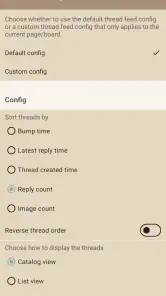
Read Chan offers extensive customization options that allow users to tailor their browsing experience. Users can choose from various themes, adjust font sizes, and modify the layout to suit their preferences. This level of customization ensures that users can have a personalized experience, enhancing readability and comfort while using the app.
Is Read Chan appropriate for younger users?
Read Chan is rated Mature 17+, which is an important consideration for families and anyone choosing an app for a younger person. The rating reflects that the app is intended for mature audiences, so it may not be suitable for every user. Consider the age rating and the nature of 4chan when deciding whether to download it or allow someone else to use it.
Pros
- Ad-free experience for uninterrupted browsing
- Intuitive and user-friendly interface
- Fast loading times for images and threads
- Customizable settings for personalization
- Supports multiple boards and threads
Cons
- Paid app without a free trial option
- Limited updates and feature additions
- Occasional crashes on older devices
- No offline mode for reading threads
- Requires internet connection for full functionality
- Category
- Social
- Version
- 3.0.140











