

Quantum Logbook
- 13.00
- 4.3
- Installs
- 10.00K
- Price
- Free

Screenshots
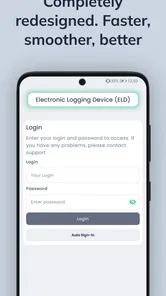
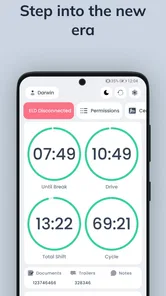
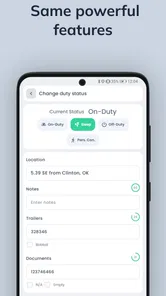
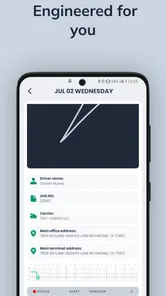
Analysis by Reviewed
When I look at a logbook app for professional driving, I am not judging it by how attractive the screens seem. I want to know whether it can make a long day easier, reduce paperwork pressure, and help me keep my records organized when a roadside inspection or office review is on my mind. Quantum Logbook is built for that specific job: it is an electronic logging device app from GL Logistics for truckers who need digital logs, vehicle inspection reporting, fuel-tax support, and hours-of-service compliance tools in one place.
My first impression is that it aims to be a practical work tool rather than a general driving companion. That distinction matters. A personal mileage tracker can be useful for trips and expenses, but it is not designed around the daily routine of a commercial driver. Here, the focus is on the records that belong to regulated trucking work. The app is free to download, carries an Everyone age rating, and has reached over ten thousand installs. Its average rating is 4.3 from around eighty-nine ratings, with thirteen written reviews, so there is enough public feedback to show interest without making the app feel universally established.
I would describe Quantum Logbook as a focused fleet and driver compliance app. It is most relevant to owner-operators, small carriers, and drivers who want a phone-based way to manage their electronic logs instead of relying on handwritten pages or several disconnected tools. The important question is not simply whether it is free, but whether its workflow fits the way you actually drive and maintain records.
What Quantum Logbook does in a working day
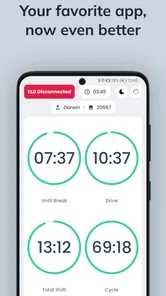
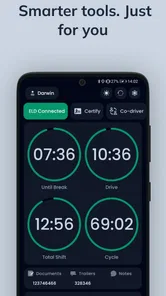
The core experience revolves around recording duty status and keeping the driver's logbook current. That sounds straightforward, but the usefulness comes from having the log, inspection reporting, fuel-tax information, and compliance-related work close together. In a typical day, I would expect to move between driving time, on-duty work, breaks, loading activity, and off-duty periods. A good ELD app should make those transitions understandable instead of turning each change into a confusing administrative task.
Quantum Logbook presents itself as an FMCSA-certified ELD, which is a meaningful part of its identity. Certification is not the same as a promise that every driver will find the app effortless, but it tells me the product is intended for regulated electronic logging rather than casual trip notes. For a driver, that makes the app relevant at the point where compliance becomes part of the job, not merely an optional recordkeeping habit.
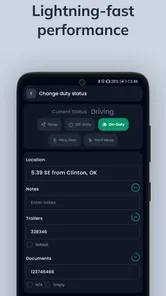
The DVIR function is another practical part of the package. Vehicle inspection reports are easy to postpone when a driver is tired or trying to get moving, so placing that responsibility inside the same work app can help keep it visible. I would use the inspection step as a deliberate start-of-shift and end-of-shift checkpoint: look over the vehicle, record the condition, and avoid treating the logbook as complete until the inspection work is handled too.
IFTA support gives the app a second audience beyond drivers who only need daily logs. Fuel-tax reporting can become messy when fuel purchases, distances, and vehicle records live in different places. Keeping IFTA-related information alongside the operational log may reduce the amount of reconstruction needed later. I would still review entries carefully before filing or sharing anything important, but the combined approach is more useful than an app that stops at duty-status tracking.
More From Our News Desk

 Gmail
GmailGmail in a Busy Inbox: Who Benefits Most?
From first account to crowded workday, Gmail earns its place through dependable search and flexible sorting—but its best fit depends on how much inbox maintenance you can tolerate.

 Prime Video
Switching to Prime Video: What Changes in Your Viewing Routine
Prime Video can make a compelling second home for streaming, but switching means learning a different catalog, rental layer, and route from browsing to playback.

 Universal TV Remote Control
Universal TV Remote Control Works Best as a Reliable Backup
A phone remote earns its place through quick setup and reliable habits. Here is how to get more from Universal TV Remote Control—and where its limits show.

 Weather - By Xiaomi
Weather by Xiaomi Review: Clear at a Glance, Less Clear Up Close
Xiaomi’s weather app makes everyday forecasts quick to scan, but its calm surface can leave useful details and recovery paths harder to find than they should be.

 X
XX Under Pressure: Can It Recover When Posting Goes Wrong?
A resilience-focused review of X, examining setup, mistaken posts, interruptions, weak connections, and the gaps that matter when recovery needs to be dependable.

 Clash of Clans
Clash of Clans Is Won Between the Battles
Its raids are quick; its community is a long-term project of coordination, teaching, rivalry, and shared responsibility—with all the friction that entails.
Latest News



How I would use it during a normal route
Imagine starting a morning with a pre-trip inspection, then moving into on-duty work while preparing the truck before leaving. Once driving begins, the log should reflect that change without making me dig through unrelated screens. At a fuel stop, I would want the stop to remain part of a coherent record rather than becoming a separate note that I might forget later. After delivery, unloading and paperwork should be treated as work activity, not silently confused with rest time.
The best habit with an app like this is to update the record at natural transition points instead of waiting until the end of the day. I would check the log after leaving the yard, after a meaningful stop, and before signing off. That routine does more than save time: it makes mistakes easier to catch while the details are still fresh. A driver who waits until several events have passed may spend more effort correcting a chain of entries than maintaining it in real time.
One useful but easily overlooked workflow is separating operational memory from compliance memory. I might remember that I stopped at a particular location, but that does not automatically tell me which duty status best represents the work performed there. By reviewing the reason for each stop—fueling, loading, inspection, rest, or delivery paperwork—I can make the log more defensible and more useful to the person reviewing it later.
The value of combining logs, inspections, and IFTA work
Quantum Logbook's strongest idea is not any single feature. It is the decision to bring several recurring trucking tasks into one app. If I use one tool for logs, another for inspections, and a spreadsheet for fuel-tax details, every handoff creates a chance for mismatched dates, missing entries, or duplicate work. A unified workflow can reduce that friction, especially for a small operation where the driver may also be responsible for administration.
That convenience has a practical limit. A single app does not remove the need to understand the records being entered. I would not assume that the presence of an IFTA section automatically makes tax reporting correct, or that an electronic log prevents every error. The app can organize the work, but the driver still has to choose accurate statuses, keep vehicle information current, and review the result.
For that reason, I see the product as most valuable when it becomes part of a repeatable routine. Opening it only when a deadline is approaching would weaken its main advantage. Using it at the start, during, and end of each shift gives the combined features a chance to work together rather than acting as isolated menus.
Cost, practical value, and the tradeoffs
The cost question is refreshingly clear: Quantum Logbook is free. That means a driver can consider it without an upfront purchase price, and a small carrier can test whether the workflow suits its operation before committing money to the app itself. Free access is a real advantage in a category where compliance tools are business expenses, but I would still separate “free to use” from “free of all operating costs.” A driver may still have normal phone, data, device, or business expenses outside the app.
I also would not treat the absence of a listed purchase price as proof that every possible service connected with electronic logging is covered forever at no cost. The confirmed value here is that the app itself is free. That is enough to make trying it low-risk, but it is not a reason to skip the normal questions about setup, support, compatibility with a carrier's process, and any equipment requirements that may apply to a particular operation.
At no charge, the package delivers a meaningful set of work functions: electronic logs, DVIR records, IFTA assistance, and HOS compliance support. That combination gives it more practical reach than a basic mileage diary. The value is especially easy to see for someone who currently keeps notes in several places and then spends time reconciling them.
The tradeoff is that compliance software rewards careful use. Drivers who want a completely automatic experience may find the responsibility of reviewing duty statuses and inspection details less convenient than expected. Automation can reduce typing, but it cannot replace judgment about what actually happened during a shift. I would rather have a tool that keeps the driver involved than one that appears effortless while hiding mistakes, but that does mean the app is not a “set it and forget it” solution.
Where the app may create friction
Any ELD workflow can feel demanding during a busy day. A driver may be dealing with traffic, a tight appointment, a difficult loading area, or a change in plans. In those moments, stopping to correct a log or complete an inspection can feel like another task competing for attention. My advice would be to build the app into existing pauses—before departure, during fueling, after delivery, and at shutdown—rather than treating every entry as an interruption.
Another tradeoff is concentration. A phone-based work tool is convenient, but the driver should not interact with it while driving. The useful workflow is preparation and review while safely parked, followed by a quick check at the next legitimate stop. The app can support compliance, but safe operation still comes first.
There is also a learning curve for anyone moving from paper logs. Paper gives a driver a broad visual overview and familiar handwriting-based corrections. An electronic system replaces that flexibility with structured entries and a more formal review process. I consider that a worthwhile change for many commercial drivers, but it can be uncomfortable at first. A few practice sessions while parked would be smarter than learning the interface during a pressured shift.
The current version is 2.3.2, and the app supports devices running Android 8.0 or later. That makes it accessible to many Android users, although anyone using an older phone would need to check the operating-system requirement before planning a switch. I would also test the app on the actual device used in the truck, not just on a newer personal phone, because screen size, battery condition, and mounting position can affect everyday usability even when the software installs correctly.
Who is likely to get the most value
I think Quantum Logbook is a strong candidate for owner-operators who want one free starting point for logs, DVIR work, and IFTA-related organization. It also makes sense for small fleets that need drivers to follow a consistent electronic recordkeeping routine without immediately adding a paid app to the budget. The FMCSA-certified ELD positioning makes it more relevant to commercial compliance than ordinary driving apps.
It may also suit a driver who is tired of switching between a paper log, a separate inspection checklist, and scattered fuel notes. The benefit is not just fewer apps on the screen. It is the possibility of reviewing the day's operational story in one place: when work began, when driving occurred, what inspections were recorded, and how fuel-related information fits into the broader record.
I would be more cautious if you manage a larger fleet with complex dispatch, accounting, maintenance, and reporting needs. A focused ELD app can be useful, but a full fleet-management platform may be a better fit when many people need shared dashboards, centralized administration, or broader business controls. In that situation, the free price is attractive for testing, yet it may not cover the depth of coordination the operation requires.
I would also skip it as a primary choice if your work does not involve commercial hours-of-service records, DVIR routines, or IFTA-related tasks. A personal driver, occasional road-tripper, or commuter is unlikely to gain much from a compliance-centered logbook. The app's specialization is its strength for truckers, but it is unnecessary complexity for ordinary private driving.
Questions I would settle before relying on it
The first question is whether it fits your exact operating situation. I would confirm that the app's ELD workflow matches the requirements that apply to your vehicle, carrier arrangement, and type of operation. Its FMCSA-certified positioning is encouraging, but responsible use still means checking the setup against your own compliance responsibilities rather than assuming every trucking scenario is identical.
The second question is how much manual review you are comfortable doing. If you want an app to record the day while you barely look at it, this may not be the right mindset for any compliance tool. I would plan to review entries regularly, correct mistakes while parked, and make sure the inspection and fuel-related records tell the same story as the driving log.
The third question is whether free access is enough for your business. For a single driver, it may be a compelling starting point. For a larger carrier, the decision should include the time spent training drivers, checking records, and fitting the app into existing office procedures. A free app can still have a real implementation cost if it does not match the team's habits.
The fourth question is device readiness. Android support from version 8.0 onward covers a broad range of phones, but I would still make sure the device has a reliable battery, a practical position in the cab, and enough visibility for safe parked use. A compliance app is only helpful if the driver can access it consistently without creating another distraction or equipment problem.
My verdict for truckers considering a free ELD
My overall view is positive, with a clear boundary around who should use it. Quantum Logbook offers a useful combination for commercial drivers: electronic logs at the center, DVIR support for inspection routines, IFTA assistance for fuel-tax organization, and HOS compliance tools around the daily schedule. Because it is free, the barrier to trying that workflow is low, and the app's public rating of 4.3 suggests that it has earned a generally favorable response from the people who have rated it.
I would recommend giving it a serious look if you are an owner-operator or small-fleet driver who wants to move away from paper and bring several recurring tasks into one Android app. Before depending on it for every shift, I would spend time learning the screens, checking how corrections are handled, and practicing the start-of-day and end-of-day routine while parked. That preparation is more important than simply installing it.
I would not recommend choosing it blindly for a complex fleet, a business that needs extensive back-office integration, or a driver who does not need commercial compliance records. In those cases, a more comprehensive fleet platform—or no specialized logbook app at all—could be the better decision. Free access makes Quantum Logbook easy to evaluate, not automatically perfect for every operation.
For the right user, Quantum Logbook is valuable because it connects the parts of trucking paperwork that are often separated: logs, inspections, fuel-tax organization, and hours-of-service awareness. Its real strength is the chance to build one repeatable daily process without paying an upfront app price. Its main weakness is the same one found in most serious compliance tools: it still depends on disciplined, accurate use. If you are willing to make that routine part of the job, Quantum Logbook is a sensible free option to test. If you want a fully managed fleet system or a casual driving tracker, I would look elsewhere.
Quantum Logbook Frequently Asked Questions
What is Quantum Logbook and what can I use it for?
Quantum Logbook is designed to help users record, organize, and review information related to quantum computing, experiments, research notes, or technical projects. It can be useful for students, researchers, developers, and enthusiasts who want a structured place for documenting observations, calculations, progress, and references. Before downloading, check whether its tools match your specific workflow and level of technical experience.
Is Quantum Logbook suitable for beginners?
The app may be useful for beginners who are learning quantum concepts and want to keep their notes organized, but some terminology and features can be technical. New users should expect to spend a little time exploring the interface and understanding how entries, projects, or experiment records are arranged. It is best suited to people comfortable with scientific or computing-related information.
Does Quantum Logbook require an internet connection?
Whether Quantum Logbook works fully offline depends on the version and the features being used. Basic note-taking or locally stored records may be available without a connection, while synchronization, online resources, account services, or cloud backups may require internet access. Review the app’s current store description and permissions before downloading, especially if offline access is important to you.
Are my Quantum Logbook notes and project records private?
Privacy depends on how the app stores and synchronizes your information. Before entering confidential research, unpublished results, or sensitive project details, review the developer’s privacy policy and understand whether data is stored locally, uploaded to cloud services, or shared with third-party providers. You should also check available security options such as account protection, backup controls, and data export.
Is Quantum Logbook free to download, and are there additional costs?
Quantum Logbook’s download price and available features may vary between Android and iOS, as well as by region and app version. Some functions could be free, while advanced tools, synchronization, storage, or other capabilities may require an in-app purchase or subscription. Check the official store listing carefully before installing so you understand any trial period, recurring payment, or feature limitations.
Pros
- Works offline
- making it useful in areas with limited or no internet access.
- Simple logbook format makes recording observations quick and straightforward.
- Supports organized entries for tracking repeated activities over time.
- Lightweight app with minimal impact on device storage and performance.
- Useful for personal projects
- field notes
- experiments
- and daily records.
Cons
- May feel too basic for users seeking advanced analytics or automation.
- Limited collaboration options can make shared projects difficult to manage.
- Manual data entry may become time-consuming for frequent or detailed logs.
- The interface may require some learning before all features feel intuitive.
- Export and backup options may not meet the needs of professional users.











