QR Code Reader: QR Code Maker
- 36.00
- 4.3
- Installs
- 1.00M
- Price
- Free

Screenshots

Analysis by Reviewed
QR codes tend to appear when I least expect them: on a parcel, at a café, or on a notice I need to save before moving on. In those moments, I want a scanner that gets out of the way. QR Code Reader: QR Code Maker is a free shopping app from Technoline Apps, with a 4.3 average from around 4,600 ratings and over 1 million installs. It is aimed at everyone, and its appeal is straightforward: scan codes and make your own without turning a quick task into a project.
Where scanning can get stuck
A QR scan can fail for reasons that have little to do with the app: a damaged print, glare on a glossy surface, a code held too close, or a camera that is still trying to focus. I find it useful to pause before repeatedly tapping the screen. Hold the phone steady, move it slightly farther away, and change the angle to reduce reflections. If a code is tiny or blurred, getting a clearer view is often more helpful than trying again from the same position.
There is also a difference between scanning a code and deciding what to do with its contents. A code may point to a web address, Wi-Fi details, or contact information, so I treat the result as something to review rather than something to accept automatically. That small pause is especially sensible when the code is on a public poster or an unexpected package.
What It Does and How It Fits into a Routine
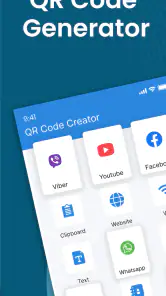
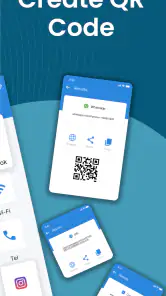
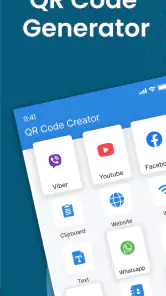
First off, let's talk about what the QR Code Reader: QR Code Maker app actually does. As the name suggests, it’s your go-to app for not just scanning QR codes but also creating them. You can whip up a QR code for just about anything—your Wi-Fi password, a website link, or even your contact information. It's like having a digital Swiss Army knife in your pocket!
Setup checks before a scan
The app is listed at version 5.5 and requires Android 7.0 or later, so I would check the phone’s Android version before installing rather than troubleshooting an incompatible device afterward. Since scanning relies on aiming the phone at a code, good lighting and a clean camera lens are sensible first checks if results are inconsistent. I also make sure the whole code is visible in the camera view; cropping off a corner can make a scan harder to read.
If you are deciding whether to install another scanner, consider what you already use. Many phones offer QR scanning through the built-in camera, which is convenient for an occasional link. This app makes more sense if you also want a dedicated place to scan and create codes. It is less compelling if your camera already handles every task you need and you rarely make codes yourself.
User Experience
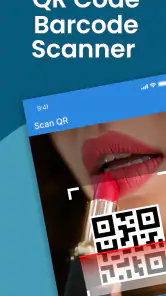
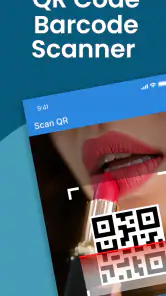
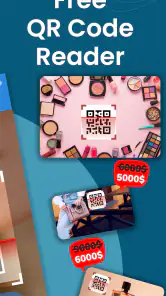
The user interface is clean and straightforward. Whether you’re tech-savvy or a complete novice, you’ll find yourself navigating through the app with ease. Point your phone's camera at any QR code, and voilà! The app reads it instantly. It's as simple as snapping a photo. Creating a QR code is just as easy—just input your data, and the app does the rest.
More From Our News Desk

Clash of Clans Is Won Between the Battles

Android Auto Makes the Case for Quieter Car Software

MobiOffice: Transforming Mobile Productivity with Seamless Integration

EA SPORTS FC™ Mobile Soccer: Redefining Mobile Sports Gaming

How Microsoft OneDrive Became a Mobile Productivity Giant

How Google Translate Breaks Language Barriers Effortlessly
For a practical example, imagine a friend asking for your Wi-Fi details while visiting. Instead of reading out a long password, you can create a code to share. Before displaying or sending it, I would double-check the entered details: a typo in the network name or password makes the code neat but not useful. The same habit helps with a contact card or a web address, where one incorrect character can send someone to the wrong place.
Features That Stand Out
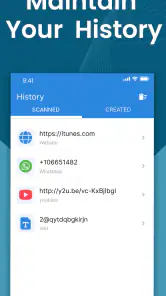
Let's dive into some of the standout features. One of the things I love is the app's ability to store scanned QR codes. Ever scan a code and then think, "Oh shoot, what was that link again?" Not a problem here! This app keeps a history of all your scans for easy access later on.
That history is most valuable when a scan is useful but not urgent. I might scan a product label while shopping, then revisit the saved result later when I have time to compare details. It can also help if I need to reopen a link after leaving a display or event. I would still avoid treating scan history as a permanent filing system; for anything important, save the information somewhere I already use for long-term notes.
Another highlight is the customization options. You can tweak the color and design of your QR codes, making them not only functional but also aesthetically pleasing. It’s a fun way to add a personal touch, whether you’re using it for business or just sharing your social media links with friends.
There is a practical trade-off with decoration: a code needs to remain easy for other cameras to read. If I customize one for a flyer or a small card, I would test it with another phone before sharing or printing it widely. A simple-looking code is often the safer choice when reliability matters more than appearance, particularly if the code will be printed small or viewed in dim light.
Recovering a workflow—and spotting the real cause
If a scan does not work, I would first try the basic fixes that do not depend on changing app settings: steady the phone, improve the light, wipe the lens, and adjust the distance. If the code is on another screen, reducing glare or increasing its display brightness may help. For a code printed on paper, flattening a fold or moving away from a shiny surface can make a real difference.
If the same code also fails with another scanner, the code itself or its display is a more likely obstacle than this particular app. Conversely, if other QR codes work but one does not, check whether that single code is damaged, incomplete, or too small to focus on. These checks help avoid reinstalling an app when the underlying problem is simply a poor scan target.
The app’s offline scanning is useful when a connection is unavailable, but opening a web result still depends on having access to the internet. I see that distinction as important: reading the code and loading what it points to are separate steps. A saved scan can preserve a result for later, but it cannot make an unreachable website load on the spot.
A few useful habits for making codes
Code creation is most useful when it removes a small point of friction for someone else. For a temporary event sign, a web address may be more convenient than asking visitors to type it. For a guest Wi-Fi code, though, think about who can see the screen or printed copy: anyone who can scan it may be able to use the details. I would share that kind of code only in a setting where the access is meant to be shared.
Before using a created code in a lasting place, scan it from the actual material and distance people will encounter. A code that works on a bright phone screen may be less forgiving on a small printout or under indoor lighting. Testing with a second device is a simple way to catch an entry mistake or a design choice that makes scanning awkward before guests, customers, or coworkers have to deal with it.
For changing information, a QR code also has a practical limit: its content reflects what was entered when it was made. If a link or contact detail changes, an old printed code can continue sending people to the previous destination. I would use a durable print only for information I expect to stay valid, and keep short-lived codes on a screen or replaceable notice.
Who will get the most from it
If you’re someone who frequently attends events, travels, or works in marketing, this app is a must-have. It's incredibly handy for sharing information quickly and efficiently. Plus, it’s a real time-saver. No more fumbling with URLs or social media handles.
I would also consider it for someone who regularly creates codes for small, practical jobs: sharing a Wi-Fi password with guests, putting a contact detail on a handout, or making a link easier to reach at a community event. It is probably unnecessary for someone who scans a code only once in a while and is already happy with the phone’s camera. Likewise, anyone who needs a full campaign or analytics workflow should look for a more specialized service rather than expecting a basic reader-and-maker to cover that work.
The app is free to install, with optional in-app purchases ranging from $2.99 to $49.99 per item. I would check the purchase details in the app before committing, especially if all I need is occasional scanning. It has been available since June 1, 2020, and its current version is 5.5; those details make it easier to identify the app, but the real decision is whether its combined scanning and creation tools fit your habits.
For a simple everyday routine, I can see it helping at a shared workspace: scan a notice to open a menu or sign-up page, keep the result for later, then make a code for a temporary handout. If I only need to open links, the built-in camera is likely quicker because it avoids switching apps. If I need to produce a polished batch of codes for a larger campaign, a specialist tool is the better fit. This app sits between those cases: handy for occasional creation alongside ordinary scanning, without replacing a more complete publishing setup.
Privacy, safety, and sensible expectations
And let's not forget about the security aspect. The app doesn’t require an internet connection to scan QR codes, which means your data privacy is always protected. You can scan away without worrying about where your information might end up.
I would put that reassurance in practical terms: offline scanning means a connection is not needed just to read a code, but it does not by itself tell me how every result will behave or what a linked website may do. I still inspect unfamiliar links before opening them and avoid sharing sensitive details in a code unless I am comfortable with everyone who can see it having access.
When a scan seems to produce no useful next step, I separate the stages instead of assuming the reader failed. First check whether the code has been recognized and what kind of information it contains; then consider whether the destination needs a connection or a compatible action. A Wi-Fi detail, contact card, and web address do not lead to the same kind of follow-up, so a result that does not open a page is not automatically a scanning error.
My practical verdict
In conclusion, the QR Code Reader: QR Code Maker app is a versatile tool that combines functionality with ease of use. Whether you need to scan or create QR codes, this app has got you covered. Give it a try, and you might find yourself wondering how you ever managed without it!
My recommendation is more measured: I would try it if I wanted both a scanner and a straightforward way to make shareable codes, and I would keep the built-in camera as the simpler choice for occasional scans. Its useful edge is the combination of creation, scan history, and customization; its limits matter if you need campaign-level control, dependable results from damaged codes, or a reason to replace a camera that already does the job. For everyday code tasks, that is a sensible balance.
QR Code Reader: QR Code Maker Frequently Asked Questions
Is QR Code Reader: QR Code Maker free to download?
The app is free to download, so you can try its QR code tools without paying upfront. It also offers in-app purchases, with items priced from $2.99 to $49.99. Review the purchase details shown in the app before confirming anything, particularly if you only want to use its basic scanning or code-making options.
What Android devices can run QR Code Reader: QR Code Maker?
QR Code Reader: QR Code Maker is an Android app from Technoline Apps, and it requires Android 7.0 or later. Check your device’s Android version before downloading; an older version may not meet the minimum requirement. The app is listed for all ages, making it suitable for a general audience, though children should follow a parent’s guidance when scanning unfamiliar codes.
What features does the QR Code Reader: QR Code Maker app offer?
The QR Code Reader: QR Code Maker app offers a variety of features including scanning QR codes quickly and efficiently, creating custom QR codes, and sharing them easily. It also supports barcodes and has a user-friendly interface that makes the process seamless. Additionally, it provides history logs and customization options for different types of QR codes.
Is QR Code Reader: QR Code Maker available for both Android and iOS?
Yes, the QR Code Reader: QR Code Maker is available on both Android and iOS platforms. Users can download the app from Google Play Store for Android devices or the Apple App Store for iOS devices. The app ensures compatibility with a wide range of smartphones and tablets.
Does the QR Code Reader: QR Code Maker app require internet access to function?
The QR Code Reader: QR Code Maker app does not require an internet connection for scanning QR codes. However, an internet connection might be necessary to access certain features like sharing QR codes online or accessing web links embedded within QR codes. Offline scanning ensures users can utilize the app anywhere.
Pros
- Fast QR code scanning and generation
- User-friendly interface
- Supports multiple QR code formats
- Offline functionality available
- Customizable QR code designs
Cons
- Contains ads in the free version
- Limited features without premium upgrade
- Occasional scanning errors
- Requires camera permission
- No batch scanning feature
- Category
- Shopping
- Version
- 5.5