

ProTool
- 325.00
- 4.4
- Installs
- 100.00K
- Price
- Free
Screenshots
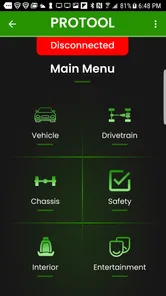
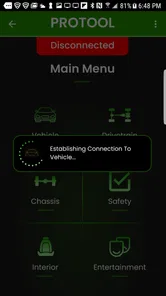
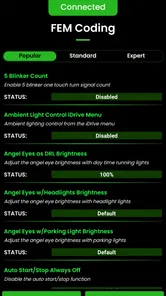
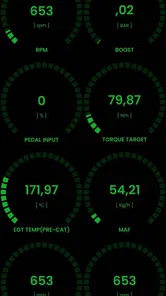
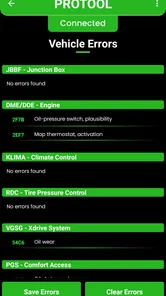
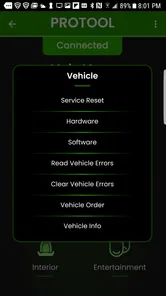
Analysis by Reviewed
BMW ownership often reaches a point where a basic code reader is no longer enough. A warning light may tell you that something is wrong, but it rarely explains the wider picture or gives you much control over the car’s electronic systems. That is where ProTool becomes interesting. It is a free Auto & Vehicles app from BimmerGeeks ProTool LLC, built around advanced BMW diagnostics and coding rather than general-purpose vehicle scanning.
I see it as a decision tool as much as a diagnostic tool. The important question is not simply whether it can read faults. The better question is whether you want to understand and adjust BMW-specific systems yourself, or whether you would rather leave that work to a workshop or use a simpler reader. In my experience, ProTool makes the most sense for an owner who is comfortable following procedures, recording the original settings, and taking responsibility for each change.
The app has been available since August 14, 2018, and its current version is 2.52.7. It is free to install, carries an Everyone age rating, and supports Android from version 4.1 onward. Its average rating is 4.4 from around 1.1 thousand ratings, with over 100 thousand installs, so it has clearly found a practical audience among BMW drivers rather than remaining a niche experiment.
How I would decide whether ProTool fits
I’d judge ProTool by whether it can become part of a useful BMW maintenance routine, not by how much it can do in a first session. In the next section, I’ll look at what makes the app compelling when it’s new and how to tell whether that early curiosity is likely to turn into lasting value.
Start with your actual BMW problem
If your goal is only to erase a generic engine warning once, ProTool may be more capability than you need. A simple OBD reader is often easier for that narrow job. It usually involves fewer choices, less preparation, and less risk of changing something unrelated. ProTool earns its place when the problem is BMW-specific, when several control modules may be involved, or when you want more than a single generic fault code.
I would also separate diagnosis from coding in my decision. Diagnosis is about finding evidence: stored faults, system behavior, and clues that help explain a symptom. Coding is about changing how the vehicle is configured. Those activities are related, but they do not carry the same responsibility. A careful owner can use the first to investigate a problem and approach the second much more slowly.
The app’s BMW focus is its defining advantage. A universal scanner has to serve many brands, so its interface and explanations tend to be broad. ProTool is aimed at the BMW ecosystem, which makes it a more logical choice for someone who regularly works on one or more BMW vehicles and wants a tool that speaks in the language of that manufacturer’s modules.
More From Our News Desk

 Gmail
GmailGmail in a Busy Inbox: Who Benefits Most?
From first account to crowded workday, Gmail earns its place through dependable search and flexible sorting—but its best fit depends on how much inbox maintenance you can tolerate.

 Prime Video
Switching to Prime Video: What Changes in Your Viewing Routine
Prime Video can make a compelling second home for streaming, but switching means learning a different catalog, rental layer, and route from browsing to playback.

 Universal TV Remote Control
Universal TV Remote Control Works Best as a Reliable Backup
A phone remote earns its place through quick setup and reliable habits. Here is how to get more from Universal TV Remote Control—and where its limits show.

 Weather - By Xiaomi
Weather by Xiaomi Review: Clear at a Glance, Less Clear Up Close
Xiaomi’s weather app makes everyday forecasts quick to scan, but its calm surface can leave useful details and recovery paths harder to find than they should be.

 X
XX Under Pressure: Can It Recover When Posting Goes Wrong?
A resilience-focused review of X, examining setup, mistaken posts, interruptions, weak connections, and the gaps that matter when recovery needs to be dependable.

 Clash of Clans
Clash of Clans Is Won Between the Battles
Its raids are quick; its community is a long-term project of coordination, teaching, rivalry, and shared responsibility—with all the friction that entails.
Latest News



Think about your comfort with vehicle electronics
ProTool is not the sort of app I would recommend to someone who expects a guided, one-button repair. The phone is only one part of the setup. You still need the correct connection hardware, a compatible vehicle, a stable connection, and enough understanding to interpret what appears on screen. The app can expose information, but it cannot replace mechanical inspection or sound diagnosis.
That distinction matters when a fault code is only a symptom. A code connected with a sensor does not automatically prove that the sensor itself has failed. Wiring, power supply, connectors, software state, or another related component may be involved. The useful workflow is to treat the app’s results as evidence, then confirm them with inspection and testing instead of ordering parts immediately.
I would keep a simple record before changing anything: the vehicle details, the original coding values, the date of the scan, and the exact faults shown. This is one of the least glamorous but most valuable habits with a coding tool. If a change produces an unexpected result, a written baseline gives you a route back instead of relying on memory.
Check the practical setup before you need it
A roadside emergency is a poor time to discover that your phone, adapter, or connection method is unsuitable. I would install the app in advance, connect it while the car is parked safely, and learn the basic navigation without changing settings. That test can reveal whether your phone works comfortably with the setup and whether you understand the difference between reading information and writing a change.
Because the app is free, the financial barrier to trying it is low. The real cost is attention. You may spend time learning BMW terminology, checking procedures, and deciding whether a result points to a repair or merely records an old event. For a hands-on owner, that time can be worthwhile. For someone who wants instant reassurance with no learning curve, a professional diagnostic visit may be the better purchase even when the app itself costs nothing.
Where the BMW focus makes a real difference
The strongest case for ProTool is the owner who wants one BMW-oriented workspace for investigation and configuration. Instead of treating the car as a black box that produces a warning symbol, you can approach it as a collection of electronic modules that need to be understood in context. That mindset is more useful than simply counting how many buttons an app has.
For example, imagine a warning appearing after a battery replacement or after electrical work. A generic reader may give you a starting point, but a BMW-focused tool can be more relevant when the issue involves vehicle configuration or communication between modules. I would still verify the battery, connections, and charging system physically, but the app can help me decide whether the next step is electrical testing, clearing a genuinely resolved fault, or seeking specialist help.
Another useful scenario is buying a used BMW. Before committing to a vehicle, I would rather inspect its electronic history and current faults than rely only on a seller’s verbal explanation. A scan cannot certify the entire car, and it cannot replace a mechanical inspection, but it can add a layer of evidence. Multiple unrelated faults, recurring communication problems, or recently cleared warnings would make me ask better questions before buying.
Small coding changes require a large amount of care
The appeal of coding is understandable. Owners often want to adjust convenience behavior or make the car feel more suited to their habits. The trade-off is that a setting that looks harmless can affect how the vehicle behaves, how another module communicates, or how future troubleshooting is performed. I would never begin by changing several options at once.
A safer personal workflow is deliberately slow:
Read the vehicle and note the original state before touching a coding option.
Change one setting only, using a procedure you understand rather than guessing from a vague label.
Test the result with the vehicle stationary whenever possible.
Record what changed and restore the previous value if the behavior is unexpected.
This approach is especially important for a first session. If five changes are made together and one causes a problem, the app cannot tell you which decision was responsible. The convenience of finishing quickly is not worth losing a clear diagnostic trail.
What I would use it for in everyday ownership
My favorite use case is not dramatic coding. It is building a better maintenance conversation. If a BMW develops an intermittent warning, I can scan it when the symptom is fresh, record what the car reports, and take that information to a technician. That does not mean I am trying to replace the technician. It means I arrive with more useful observations than “the light came on yesterday.”
It can also help separate an active concern from an old stored event, provided I interpret the results carefully. After a repair, checking whether the original issue returns can be more informative than clearing everything and assuming the job is finished. I would use the app as part of a before-and-after process, not as a substitute for confirming that the vehicle works correctly on the road.
For a family member who owns a BMW but does not work on cars, I would recommend using ProTool mainly for reading and documenting information, with coding left to someone experienced. The app’s accessibility should not be confused with simplicity. A free download can put advanced controls within reach, but it does not remove the consequences of an uninformed change.
Where a simpler reader is the better alternative
The usual alternative is a basic universal OBD scanner. That option wins when the user wants a quick engine-related check, broad compatibility across different car brands, or a tool that can be handed to several drivers in a household. It may not offer the BMW-centered depth that attracts me to ProTool, but its limited scope can be a benefit when the task is limited too.
A workshop diagnostic system is another category altogether. A professional has equipment, repair experience, access to physical inspection, and the ability to connect a code to a larger service process. If the car will not start, has a serious drivability problem, shows multiple electrical faults, or needs a safety-related repair, I would not let an app delay expert help. ProTool can support the conversation, but it should not become an excuse to continue experimenting with an unsafe vehicle.
There is also a middle ground: a BMW specialist who performs diagnostics and coding for customers. That is the better fit for an owner who wants BMW-specific work but does not want to learn the software, maintain records, or accept the responsibility of writing changes. Paying for that service may be more efficient than spending an evening trying to understand a setting that will only be changed once.
The hidden cost of switching from a workshop
Moving from professional help to self-diagnosis can save time and give you more control, but it also transfers the work to you. You become responsible for identifying the right vehicle, choosing the right procedure, protecting the connection during a change, and deciding when the result is trustworthy. The app’s free price makes the first step easy; the learning curve is the part that determines whether the switch is genuinely worthwhile.
I would also avoid treating a successful scan as proof that the car is healthy. Electronic diagnostics can reveal valuable information, yet a vehicle can have worn suspension, weak brakes, leaks, poor tires, or mechanical damage without presenting a convenient app-based answer. ProTool is strongest when paired with ordinary maintenance discipline, not when used as a replacement for it.
Before coding, I would make sure the car is stable, the phone is charged, and interruptions are unlikely. I would not perform a first experiment immediately before a long trip. If a change affects a convenience feature, test it in a quiet, controlled place. If the change relates to lighting, locking, starting, or another function with safety implications, I would be even more conservative and use professional assistance when unsure.
What the current app profile tells me
The fact that ProTool has remained available across several Android generations is useful for owners of older phones, since its minimum operating system is Android 4.1. At the same time, compatibility with an old Android version does not automatically guarantee a smooth experience on every modern device or with every vehicle connection. I would test the complete setup before depending on it for an important diagnosis.
The app’s free availability and Everyone rating make it approachable, but those details should not lower your expectations about the subject matter. This is still an advanced BMW diagnostic and coding tool. The content may be suitable for a general audience in the store sense, while the practical decisions it enables require adult judgment, patience, and respect for the vehicle’s electronics.
BimmerGeeks ProTool LLC has clearly positioned the app for owners who want more BMW-specific control than a generic reader normally provides. The rating and install history suggest that many people find that purpose useful, but popularity is not a guarantee that it will match your exact car, adapter, phone, or level of experience. I would use those figures as reassurance that the app is established, not as a reason to skip preparation.
My recommendation for different types of BMW owners
I recommend ProTool to the curious BMW owner who enjoys learning how the car works, wants to investigate faults before visiting a workshop, and is willing to document every change. It is particularly appealing if you maintain an older BMW yourself, manage more than one BMW, or frequently need manufacturer-focused information rather than generic engine codes.
I would recommend it more cautiously to a first-time DIY user. Begin with reading and recording, not coding. Learn how the connection behaves, understand the terminology, and use a real repair manual or qualified advice when the fault points to a physical problem. Once you can explain what you are changing and why, the app becomes much more useful.
I would tell a different person to skip it if they want a universal tool for several vehicle brands, need a simple check-engine-light reader, or have no interest in learning BMW electronic systems. In those cases, a basic scanner or a workshop visit is likely to be less frustrating. The extra capability is not automatically extra value when you will never use it.
My final view is favorable, with one condition: treat ProTool as a serious instrument rather than a toy. It gives BMW owners a practical way to investigate electronic issues and explore coding, and its free entry point makes that opportunity unusually accessible. Its limitations come from the same place as its strengths: the app can put advanced control in your hands, but it cannot supply the judgment, mechanical inspection, or careful procedure that responsible use requires.
If that balance suits you, I think installing ProTool is worthwhile. Start by scanning without changing anything, keep a record of the original state, and let each result guide the next sensible step. Used that way, it can make ownership more informed and workshop conversations more productive. Used casually, it can create confusion where a simple diagnostic check would have been enough.
ProTool Frequently Asked Questions
What should I know about ProTool’s BMW focus before downloading?
ProTool is an Auto & Vehicles app from BimmerGeeks ProTool LLC, described as an advanced BMW diagnostic and coding tool. That focus makes it relevant to people looking for BMW-related diagnostics or coding rather than a general-purpose phone utility. Before downloading, consider whether you specifically need an app for BMW vehicles and whether its intended use fits your needs.
What is ProTool and what can I use it for?
ProTool is a utility-focused application designed to bring several practical tools together in one place. Depending on the version and platform, it may help with tasks such as device management, file handling, system information, productivity, or other technical functions. Before downloading, check the official app description carefully because available features can differ between Android and iOS versions, as well as between free and premium editions.
Is ProTool free to download and use?
ProTool is free to download. Check the app’s current store page before installing to review how its features are offered and whether any optional purchases or other charges apply. The free price makes it possible to try the app without an upfront download cost, but you should still make sure its available tools suit your needs before relying on it.
Is ProTool safe for my phone and personal information?
As with any utility app, ProTool should only be downloaded from a trusted official store or the developer’s verified website. Review the permissions requested during installation and consider whether they match the app’s advertised functions. Avoid unofficial modified versions, since they may contain malware or unwanted software. It is also worth reading the privacy policy to understand what diagnostic, device, account, or usage data may be collected.
Does ProTool work on both Android and iPhone?
Compatibility depends on the specific ProTool release. Some versions may be developed exclusively for Android, while others may offer a separate iPhone or iPad application with a different feature set. Before downloading, check the supported operating systems, minimum Android or iOS version, and device requirements listed on the official store page. Older phones and tablets may not support every feature or may experience reduced performance.
Pros
- Simple interface makes common tools easy to find and use.
- Useful for quick tasks without needing advanced technical knowledge.
- Lightweight design should be suitable for many Android devices.
- Practical features can save time during routine activities.
- Clear controls make the app approachable for first-time users.
Cons
- Some tools may feel limited compared with dedicated professional apps.
- The experience may vary depending on your device and Android version.
- Advanced users may want more customization and control.
- Certain features could require permissions that some users may avoid.
- The app may not replace specialized tools for complex professional tasks.











