

PowerFlex
- 226.00
- 4.7
- Installs
- 50.00K
- Price
- Free

Screenshots
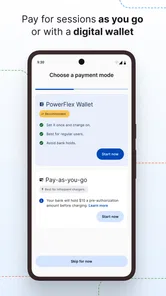
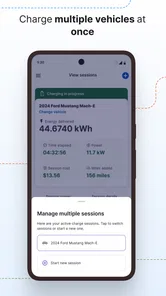
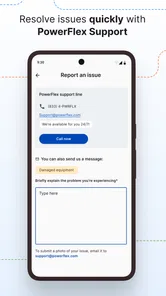
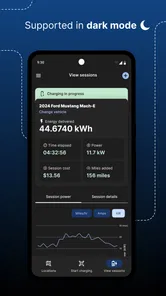
Analysis by Reviewed
PowerFlex is an Auto & Vehicles app built around charging cars at PowerFlex Adaptive Charging Stations. I approached it as the kind of tool you open when you are already parked, your battery is getting low, and you want the charging process to be straightforward rather than another chore. That context matters: this is not a general electric-vehicle encyclopedia or a replacement for every charging network. Its usefulness depends heavily on whether the station you are using belongs to the PowerFlex system and whether the location is ready to accept your session.
My overall impression is positive, but practical. The app can make charging easier when the station, account, phone, and vehicle are all cooperating. When something goes wrong, however, the source of the problem is not always the app. A charger may be occupied, the vehicle may not be ready, the connector may not be seated properly, or the station itself may need attention. Understanding that distinction is the key to getting value from this download.
Where the charging experience usually gets stuck
The most common frustration with a charging app is expecting one tap to solve every part of the process. In real use, there are several separate steps: finding an appropriate PowerFlex station, arriving at the correct connector, preparing the car, starting the session, and checking that charging has actually begun. If any one of those steps is unclear, it can feel as though the application has failed even when the issue is elsewhere.
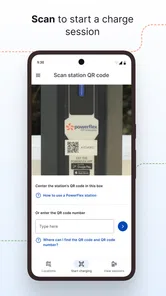
I would begin by treating the screen as one part of a larger workflow. Before attempting to start a session, I would confirm that the station identifier matches the location where the car is parked. Shared parking areas can contain several chargers, and selecting the wrong station can create a confusing mismatch between what appears in the app and what is physically in front of you. This is a small check, but it prevents a surprisingly avoidable error.
Another point of friction is the difference between being connected and actually charging. Plugging the cable into the car does not always mean energy is flowing immediately. The vehicle may need to be unlocked, placed in the correct state, or left with its charging port properly secured. Some cars also have their own scheduled-charging settings. If those settings are active, the car may wait even though the station and app appear ready.
The useful habit is to verify the physical connection before repeatedly tapping the start control. Look at the connector, make sure it is fully inserted, and check the vehicle’s own charging indicator. Repeating the same command without checking those basics rarely improves the result and can make it harder to tell what changed.
Location access and network reliability can also affect the experience. A phone with a weak connection may take longer to refresh station information or confirm a session. That does not automatically mean the station is unavailable. I would give the screen a moment to update, avoid switching rapidly between pages, and keep the phone awake while completing the initial process. If the application returns to a previous screen, I would first check the charger and vehicle rather than assuming the session has been cancelled.
More From Our News Desk

 Gmail
GmailGmail in a Busy Inbox: Who Benefits Most?
From first account to crowded workday, Gmail earns its place through dependable search and flexible sorting—but its best fit depends on how much inbox maintenance you can tolerate.

 Prime Video
Switching to Prime Video: What Changes in Your Viewing Routine
Prime Video can make a compelling second home for streaming, but switching means learning a different catalog, rental layer, and route from browsing to playback.

 Universal TV Remote Control
Universal TV Remote Control Works Best as a Reliable Backup
A phone remote earns its place through quick setup and reliable habits. Here is how to get more from Universal TV Remote Control—and where its limits show.

 Weather - By Xiaomi
Weather by Xiaomi Review: Clear at a Glance, Less Clear Up Close
Xiaomi’s weather app makes everyday forecasts quick to scan, but its calm surface can leave useful details and recovery paths harder to find than they should be.

 X
XX Under Pressure: Can It Recover When Posting Goes Wrong?
A resilience-focused review of X, examining setup, mistaken posts, interruptions, weak connections, and the gaps that matter when recovery needs to be dependable.

 Clash of Clans
Clash of Clans Is Won Between the Battles
Its raids are quick; its community is a long-term project of coordination, teaching, rivalry, and shared responsibility—with all the friction that entails.
Latest News



For drivers who use workplace, residential, or shared parking, access rules can be just as important as the software. A station may be physically visible but restricted by the property’s parking arrangements. The app can be ready while the location still requires a permitted space, an open access period, or a particular parking position. This is one reason I would not judge the application solely by how quickly it opens or displays a station.
What to check before blaming the app
When a session does not begin, I use a simple sequence. First, I confirm that the car is parked in the correct bay and that the cable reaches without tension. Next, I inspect both ends of the connector and make sure the car recognizes the plug. Then I check whether the station shows an active state or a clear indication that it is ready. Only after those checks do I restart the app or retry the session.
This order is useful because it separates physical problems from account or screen problems. If the vehicle does not acknowledge the connector, a reinstall will not fix the immediate issue. If the vehicle does acknowledge it but the app cannot complete the start process, then the phone connection, session selection, or station communication deserves more attention.
I also recommend keeping the vehicle in a stable state while starting. Opening doors, moving the car, disconnecting the cable, or changing several settings at once makes troubleshooting harder. I prefer to leave the car parked, keep the connector in place, and make one change at a time. That approach is slower by seconds but much faster than guessing.
Setting up PowerFlex without unnecessary confusion
PowerFlex is free to install and is suitable for Everyone, which makes it approachable for households with different levels of technical confidence. It comes from PowerFlex, a developer focused on this charging service rather than a broad collection of unrelated vehicle tools. The application first appeared on January 11, 2018, and its current version is 4.5.15 for devices running Android 8.0 or later. Those details are worth checking before installation, especially if the phone is older and has not received recent system updates.
I would set it up before arriving at a charger, not while sitting in a busy parking area with a low battery. Installing the app at home gives you time to open it, review the available screens, and make sure the phone is connected properly. It also lets you discover whether your device meets the minimum operating-system requirement without turning a charging stop into a software-maintenance session.
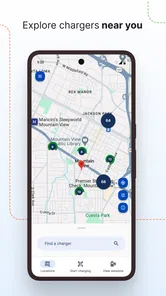
After installation, I would keep the first test uncomplicated. Open the app while you have a reliable connection, look for the relevant PowerFlex charging location, and become familiar with how the station is identified. You do not need to explore every screen at once. The important preparation is knowing where to begin when the car is parked and the cable is ready.
If the app asks you to sign in or complete an account step, do that before travel. Typing passwords or handling account recovery beside a charger is inconvenient, particularly in poor weather or a crowded car park. I would also make sure the phone can receive normal notifications and that battery-saving settings are not aggressively closing the application during a session. I am not suggesting that every phone behaves the same way, but keeping the app available makes it easier to check the charging state.
A useful setup check is to compare the vehicle’s charging connector with the equipment at the destination. PowerFlex may be the right service for the location while the particular connector still does not suit your car. The application cannot change the physical compatibility between a vehicle and a cable. If you normally carry an approved adapter for your car, keep it accessible rather than buried beneath luggage.
I would also think about the parking duration. A short stop, an overnight stay, and a full working day create different expectations. The app helps with the charging interaction, but it does not remove the need to plan around the time the car will remain in the space. If you need a rapid turnaround and the location does not meet that need, another charging option may be more appropriate even if PowerFlex is available.
A safer first-session routine
For a first visit, I would arrive with enough battery to leave room for troubleshooting. I would park carefully, identify the station, connect the car, and watch for confirmation from both the vehicle and the application. I would not drive away immediately after starting. A brief check that the car displays charging is more reliable than assuming the process worked because the app accepted an action.
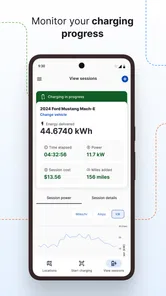
When the session is underway, I would avoid making unnecessary changes in the app. If the screen appears slow, wait for it to settle before closing and reopening it. If you must leave the car, note the station location and the time you started. That simple record helps distinguish a session that never began from one that started and later stopped.
One non-obvious advantage of this routine is that it gives you a repeatable baseline. If the same charger works consistently after the same steps, you know what normal looks like. If one location behaves differently, you have a useful comparison instead of a vague feeling that the whole service is unreliable.
Recovering a session when something goes wrong
When a charging attempt fails, I would recover in stages rather than immediately deleting the app or disconnecting everything. First, check the vehicle display and the station itself. If the car reports an error, follow the vehicle’s safe instructions. If the station shows a fault or does not respond, repeating commands from the phone is unlikely to help.
If the physical connection looks normal, return to the app and give it time to refresh. A temporary network delay can make the screen appear behind the real state. I would avoid starting a second session while the first one may still be pending. Duplicate attempts can create uncertainty about which action succeeded, whereas a short pause followed by a single refresh keeps the situation clearer.
If the app closes or becomes unresponsive, I would reopen it and check the current station state before touching the cable. The goal is to preserve the existing physical connection until I know whether charging is active. Disconnecting first may interrupt a session that was already working. If the vehicle confirms that energy is flowing, I would leave the connection alone and use the app only to verify what it can show.
Another practical recovery step is to move from a weak mobile signal to a more reliable connection when safe and convenient. I would not walk away from the car simply to chase a better signal, but if the location offers dependable Wi-Fi or the phone regains service after moving a short distance, that may help the app update. The important point is not to confuse a communication delay with a charging failure.
If a restart is necessary, I would restart only one element at a time. Close and reopen the app first. If that does not help, check the phone connection. Then inspect the car and station again. Rebooting the phone, unplugging the vehicle, and changing account details all at once removes the clues that would tell you which part caused the problem.
For a session that stops unexpectedly, I would examine the car’s charging settings and the connector before trying to begin again. A scheduled limit, a full battery target, a loose plug, or a vehicle warning can all look similar from a distance. The most helpful evidence usually comes from the car’s own display and the station’s physical indicators, not from repeatedly pressing the same button.
When a different charging option makes more sense
PowerFlex is a sensible choice when you regularly use PowerFlex Adaptive Charging Stations and want one app for that environment. It is less compelling if your driving takes you across many unrelated networks and you need a single tool that manages every provider equally. In that situation, a broad roaming or multi-network application may reduce the number of apps on your phone, even if it offers less direct control at a particular PowerFlex location.
I would also look elsewhere if your main need is route planning, battery forecasting, or detailed vehicle diagnostics. This app belongs to the charging workflow, not to every part of electric-car ownership. A dedicated route planner can be better for long journeys, while the manufacturer’s application may provide deeper information about the car itself. Using the right tool for each job is more practical than expecting one charging app to replace an entire vehicle ecosystem.
There is a trade-off here. A focused service can feel simpler because it is tied to a particular charging environment. The same focus can feel restrictive when your routine changes. If most of your charging happens at PowerFlex locations, that limitation may barely matter. If you spend much of your time away from them, the convenience advantage becomes smaller.
Who will benefit from it in everyday driving?
I think the strongest audience is a driver who repeatedly parks at a location equipped with PowerFlex stations. That could be someone charging at a regular workplace, apartment community, or other familiar destination. For that person, the value is not discovering every charger in existence; it is making a recurring stop less awkward and more predictable.
Imagine leaving work with a low battery and returning to the same parking area the next morning. I would open the app before walking away, select the correct station, connect the car, and confirm that the vehicle has started charging. On the next visit, the process should feel more familiar because the physical layout and station identity are already known. That repeatability is more valuable than a large collection of rarely used features.
It can also suit a new electric-car owner who wants a focused starting point. The free price removes a purchase barrier, and the Everyone age rating makes it appropriate for a broad household audience. Still, I would pair it with a basic understanding of the car’s own charging controls. The app is easier to use when you know how your vehicle indicates a successful connection and where its scheduled-charge settings live.
I would be more cautious about recommending it to someone who charges only occasionally at unfamiliar locations. That driver may spend more time learning whether a station belongs to the supported network than actually using the service. A multi-network solution or the vehicle maker’s charging tools may be more convenient for a scattered travel pattern.
What the adoption figures suggest, and what they do not
The app has an average rating of 4.8 from around 1.1 thousand ratings, with more than two hundred written reviews and over 50 thousand installs. Those figures indicate that it has found a real audience and that many users are satisfied, but I would not interpret them as a guarantee that every station visit will be smooth. Charging reliability depends on the car, cable, phone connection, parking site, and station condition as well as the application.
The rating is most useful as a signal that the basic experience is working for many people. My own judgement is more qualified: the app is worthwhile when it matches your charging routine, but its usefulness drops sharply when you need broad network coverage or advanced vehicle information. That is a more realistic way to read any charging-app rating.
My practical verdict after weighing the friction
I see PowerFlex as a focused, free charging companion rather than an all-purpose electric-vehicle control centre. Its best quality is that it concentrates on the moment that matters: connecting a car to a PowerFlex Adaptive Charging Station and keeping track of that interaction. For drivers who use those stations regularly, that focus can make charging feel like a normal part of the day instead of a technical project.
The main weakness is not necessarily a missing feature; it is the number of things outside the app that can interrupt the process. A wrong bay, incompatible connector, sleeping vehicle, poor signal, scheduled charging setting, or faulty station can all produce similar frustration. The app is easier to judge fairly when you check those conditions in a deliberate order.
My recommendation is to install it before your first charging visit, test your account and phone connection in advance, and learn the difference between the app’s status and the car’s own charging indicator. Keep a multi-network alternative in mind if your travel is varied. For a regular PowerFlex user, I would choose it confidently as a practical part of the routine; for a driver seeking one universal charging solution, I would look for a broader companion alongside it.
In short, PowerFlex is most valuable when consistency matters more than coverage. It will not remove every piece of charging friction, but it can give a familiar PowerFlex stop a clear, repeatable workflow. That is enough to make it a worthwhile download for the right driver, especially when used with sensible setup checks and a willingness to confirm what the vehicle and station are actually doing.
PowerFlex Frequently Asked Questions
What is PowerFlex and what can I use it for?
PowerFlex is an Auto & Vehicles app from PowerFlex for smartly charging your car with PowerFlex Adaptive Charging Stations. It is free to download and has an Everyone content rating. Before installing, make sure the app fits your needs and that you have access to a compatible PowerFlex Adaptive Charging Station.
What devices can run PowerFlex?
PowerFlex is available for Android devices running version 8.0 or later. Check your device’s operating system before downloading so you can avoid compatibility issues. The app is designed around PowerFlex Adaptive Charging Stations, so its usefulness depends on whether you can use one. Its store description focuses on smart car charging rather than general vehicle maintenance or unrelated automotive tools.
Is PowerFlex suitable for beginners, or is it designed for experienced athletes?
PowerFlex may be useful for different fitness levels, but beginners should check whether the available routines include clear instructions, demonstrations, adjustable intensity, and rest recommendations. More advanced users may prefer stronger customization and progress-tracking options. The application should complement, rather than replace, professional guidance. If you have an injury, medical condition, or have not exercised recently, consult a qualified professional before starting a demanding plan.
Does PowerFlex require a subscription or include in-app purchases?
Before installing PowerFlex, check its current store listing for pricing details. Fitness applications commonly offer free downloads with optional premium plans, paid training programs, advertisements, or subscriptions that unlock additional workouts and tracking tools. Read the trial and renewal terms carefully, especially if a free trial is offered. Deleting the application usually does not cancel an active subscription, so cancellation must be completed through Google Play or the App Store.
What permissions and personal information does PowerFlex request?
PowerFlex may request access to information needed for fitness features, such as activity data, notifications, device sensors, or health-platform integration. The exact permissions depend on your phone, operating system, and enabled features. During setup, review each request and allow only what is necessary. It is also worth reading the privacy policy to understand how workout history, account details, and any connected health data are collected, stored, and shared.
Pros
- Simple interface makes workouts easy to start and follow.
- Supports structured training for users with different fitness levels.
- Exercise demonstrations help improve form and technique.
- Can make home workouts more convenient and accessible.
- Progress tracking may encourage users to stay consistent.
Cons
- Some features may require a paid subscription or in-app purchase.
- Workout variety may feel limited for advanced athletes.
- Results depend heavily on accurate exercise and progress tracking.
- Requires enough space and suitable equipment for certain routines.
- Personalized guidance may not replace advice from a qualified trainer.











