Police Scanner X
- 10.61K
- 4.3
- Installs
- 1.00M
- Price
- Free
Screenshots
Analysis by Reviewed
I find Police Scanner X most useful as a way to listen in on public-safety radio feeds, rather than as a conventional news app. That distinction matters: it offers a direct audio window into activity, not a polished summary with context. If you’re curious about how emergency radio sounds or want to follow a feed in a place you care about, the appeal is immediate. If you need confirmed updates or instructions during an emergency, I’d turn to official alerts and local news instead.
Listening is the point, not a complete news report
BEROBO, known for its police scanner apps, positions this as an experimental entry in its lineup. In practice, the key idea is simple: choose a broadcast and listen. That can make events feel immediate, but radio chatter is not written for a general audience. Names, abbreviations, clipped exchanges, and incomplete information can be hard to interpret, and a feed may not explain what happened before you tuned in.
That’s the main trade-off I’d keep in mind. Scanner audio can help you notice activity, but it does not tell the whole story or establish whether a report is accurate. I treat it as something to listen to out of interest, not as a source for making decisions about safety. For urgent information, use emergency services and trusted local channels; don’t rely on a scanner stream to tell you what to do.
How I’d use it in an ordinary week
Imagine hearing sirens nearby while you’re at home and wondering whether there is anything you need to know. I might open the app and check a relevant local feed, then use an official alert or local reporting for confirmation if the situation affects me. The scanner can add a sense of what responders are communicating, while the other source supplies the context that radio traffic often lacks.
It also suits quieter curiosity: listening to a feed from another area can give you a feel for the pace and nature of dispatch traffic without turning it into a personal safety tool. I’d use headphones and keep the volume low enough to remain aware of my surroundings. If the audio is difficult to follow, switching to a more familiar feed or simply leaving it for later is more useful than trying to decode every fragment.
A practical listening routine
There’s a useful difference between checking a feed and keeping it on in the background. For a quick check, I’d pick one area, listen long enough to decide whether the stream is relevant, and then close the app rather than hopping between channels without a reason. That makes the experience less distracting and avoids mistaking a burst of radio traffic for a complete account of what is happening nearby.
If I were listening while doing chores, I’d treat the sound as background rather than as something I could reliably monitor while concentrating elsewhere. Dispatch exchanges can be brief, and missing a line may make the next one harder to understand. When a broadcast catches my attention, pausing what I’m doing and listening for a moment is more sensible than assuming I can reconstruct the exchange later.
More From Our News Desk

Weather by Xiaomi Review: Clear at a Glance, Less Clear Up Close

X Under Pressure: Can It Recover When Posting Goes Wrong?

Clash of Clans Is Won Between the Battles

Android Auto Makes the Case for Quieter Car Software

MobiOffice: Transforming Mobile Productivity with Seamless Integration

EA SPORTS FC™ Mobile Soccer: Redefining Mobile Sports Gaming
Getting Started with Ease
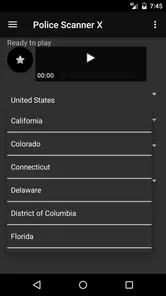
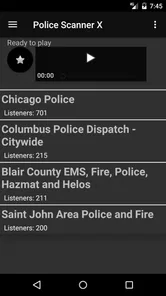
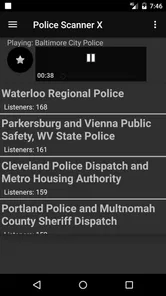
Installing Police Scanner X was a breeze, and the interface is pretty intuitive. When you first open the app, you’re greeted by a sleek design that doesn’t overwhelm you with options. You can quickly search for local channels or browse through a list of popular feeds. I found it quite user-friendly, even for someone who’s not particularly tech-savvy.
Exploring the Features
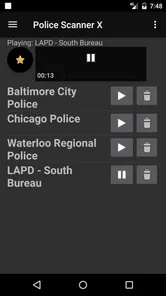
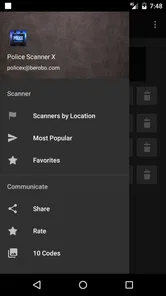
The app offers a wide array of features that keep you engaged. You can bookmark your favorite channels for easy access, which is a handy feature if you want to stay updated on specific areas. The app also provides a history of recently played channels, so if you hear something interesting, you can easily go back and listen again.
Another neat feature is the sleep timer. If you’re like me and enjoy falling asleep to the sound of radio chatter, this function is a godsend. Set the timer, and the app will automatically shut down, ensuring your phone’s battery doesn’t drain overnight.
A practical habit is to bookmark a small set of feeds you genuinely care about rather than relying on a long, unfocused list. That keeps routine listening quick: open a saved channel, see whether it’s relevant, and move on. The recently played list is better for retracing a feed you just sampled than for treating past audio as a reliable record; it helps you find the channel again, but it shouldn’t replace a written report or official update.
Making the tools work for you
Bookmarks are most useful when they represent a deliberate shortlist, not every feed that looks interesting. I’d save a channel only after listening long enough to decide that its area or subject is worth returning to. That small bit of curation makes the next visit easier and reduces the chance of confusing a feed you sampled once with one you actually follow.
The sleep timer also has a narrower role than its convenience might suggest. It can make a listening session easier to end when you’re winding down, but I wouldn’t use radio chatter as a substitute for a calm audio track if emergency-related conversation is likely to keep me alert. If I find myself listening closely instead of resting, I’d turn it off rather than leave it playing just because a timer is available.
Performance and Reliability
Performance-wise, Police Scanner X runs smoothly, with minimal buffering and interruptions. I was impressed by the clarity of the audio streams. It almost feels like you’re right there in the dispatch center. However, the performance can vary depending on your internet connection, so a stable Wi-Fi or data connection is recommended.
The reliability is top-notch. I’ve used it in different locations and found the app consistently delivers what it promises. It’s like having a window into the world of emergency services, providing insights and updates that are both fascinating and, sometimes, quite alarming.
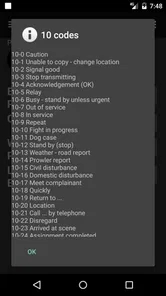
Even a clear stream does not guarantee that every exchange will be easy to follow. Audio quality and meaning are different things: a transmission can sound crisp while still relying on shorthand or references that make sense only to the people involved. I’d judge the listening experience by whether I can follow the general flow, not by expecting to understand every word or infer the full situation.
For practical planning, I’d also separate “the app is working” from “this feed answers my question.” A stream may play normally and still have little relevant traffic at the moment I check. If I’m trying to understand a specific local event, a quiet or confusing feed is a cue to consult written reporting or official communications, not to keep refreshing the scanner in the hope that it will become a complete update.
Where it fits among other options
Compared with a regular news app, this is a very different experience: news apps turn events into readable stories, while scanner listening leaves you with the raw rhythm of radio communication. Compared with checking official alert channels, it is less suitable for clear guidance but can be more immediate as an audio experience. I’d keep those tools side by side rather than expect one to do the other’s job.
One useful trade-off to consider is attention. A live feed can keep pulling you back to listen, even when nothing relevant is happening. I’d choose a specific reason to tune in—checking a familiar area briefly, for instance—and stop when that purpose is met. If you want concise headlines, searchable written coverage, or dependable emergency instructions, a news service or official alert source is the better fit.
Choosing the right source for the question
When I want to know what has been confirmed, I prefer a written news report because it can organize events and explain what is known. When I need instructions that apply to me, I look to official alerts. A scanner feed serves a different purpose: it gives me an unfiltered listening experience that may make activity feel immediate, but requires me to accept uncertainty and supply context from elsewhere.
That distinction is especially useful when deciding whether to keep the app open. If I’m simply interested in radio communication, listening is the point and there’s no need to turn it into research. If I’m checking because I’m worried about a nearby incident, I’d set the scanner aside once I’ve checked authoritative sources. The feed should not become the basis for a guess about whether it is safe to travel, go outside, or approach an incident.
Why You Might Love It
Whether you’re a news junkie, a concerned citizen, or just someone with a curious mind, this app has something for everyone. It’s a great way to stay informed about what’s happening around you without having to wait for the nightly news. Plus, it can be quite entertaining to tune into other areas and hear what’s going on across different cities and states.
As a free app in the News & Magazines category, it has reached over a million installs and averages 4.3 stars from around 40,000 ratings. It is rated Everyone 10+, and its current version is 3.0; it first appeared on January 19, 2017. Those figures suggest a substantial audience, but they don’t change the basic question of fit: do you want live audio, or do you want a clear written account?
I think the best match is someone who enjoys radio, follows a particular area out of curiosity, or wants a quick way to revisit channels they listen to often. It is less suited to anyone seeking a dependable emergency-notification system, a narrated explanation of events, or a quiet, structured news briefing. The audio may be unsettling, and understanding dispatch talk takes patience; listening casually is not the same as being informed enough to act.
Who gets the most from it
The strongest fit, in my view, is a curious listener who already understands that scanner audio is raw material rather than a finished report. If you enjoy hearing how radio exchanges unfold, want to compare the pace of activity across places, or have a particular feed you like to revisit, the simple listen-and-bookmark routine has a clear purpose. The app can also suit someone who follows local affairs but is willing to check a separate source whenever context or confirmation matters.
I’d be more cautious about recommending it to someone who is anxious about emergencies or likely to treat every transmission as a personal warning. A feed can contain serious or unsettling traffic, and fragments can sound more alarming without the surrounding details. Likewise, if you prefer to skim headlines silently, search for a specific confirmed story, or get clear next steps, a conventional news app or official alert service is a better everyday tool.
For a first session, I’d start with one feed rather than trying to understand several at once. Listen for a few minutes, notice whether the audio and terminology are comfortable for you, then decide whether it deserves a bookmark. That modest approach gives you a fair sense of the app’s central appeal without turning an unfamiliar broadcast into an obligation to monitor it.
In conclusion, Police Scanner X offers an engaging experience for anyone interested in real-time broadcasts. With its user-friendly design, robust features, and reliable performance, it’s definitely worth checking out if you want to keep your finger on the pulse of what’s happening in the world around you.
Police Scanner X Frequently Asked Questions
Is Police Scanner X suitable for beginners who have never used a scanner app?
Police Scanner X is designed around listening to police and emergency-service audio, so the basic idea is straightforward: choose a feed and listen. If you are new to scanner apps, take a little time to browse the available feeds and settings before relying on one. The app’s usefulness will depend on which feeds are available and whether they match your interests.
Can I listen to Police Scanner X while traveling or away from home?
You can use Police Scanner X away from home as long as you have an internet connection and can access a feed you want to hear. Since the app streams audio rather than relying on an offline recording, a stable connection helps keep listening smooth. Feed availability can vary by location, so check the app for options relevant to where you are.
What kind of app is Police Scanner X?
Police Scanner X is a News & Magazines app from BEROBO (Police Scanner Radio). Its store summary describes it as the latest Police Scanner from BEROBO Inc., with the short description “Police Scanner.” It is intended for people interested in listening to police and emergency-service audio, so check the available app features and feeds to see whether they suit what you want.
What is Police Scanner X and how does it work?
Police Scanner X is an app that allows users to listen to live audio from police, fire, and emergency medical services (EMS) across the country. The app streams live communication feeds from these agencies, providing real-time updates on incidents and emergencies. Users can select feeds from various locations to stay informed about specific areas of interest.
Is Police Scanner X legal to use?
Yes, using Police Scanner X is legal in most areas; however, it is important to be aware of the laws regarding scanner usage in your location. Some states or regions might have restrictions on listening to live police communications. Always ensure you comply with local regulations when using this app to avoid any legal issues.
Pros
- Real-time police radio feeds.
- User-friendly interface.
- Wide range of channels.
- Fast streaming with minimal lag.
- Customizable alert notifications.
Cons
- Contains ads in free version.
- Limited features without subscription.
- Requires stable internet connection.
- Occasional streaming interruptions.
- Battery drain on prolonged use.











