

Plate Lookup
- 175.00
- 4.4
- Installs
- 50.00K
- Price
- Free
Screenshots
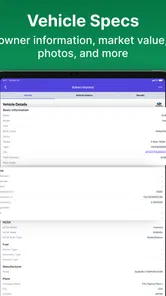
Analysis by Reviewed
I tested Plate Lookup as a practical vehicle-information app rather than treating it like a novelty search tool. Its purpose is straightforward: you enter a license plate or a VIN and use the result to learn more about a vehicle’s history and owner data. That makes it most relevant when you are checking a used car, trying to organize information about a vehicle, or simply want a faster alternative to searching through scattered records.
The app comes from PlateLookup.app and sits in the Auto & Vehicles category. It is free to install, available to everyone, and has built a noticeable user base with over 50 thousand installs. Its average rating is 4.4 from around 1.1 thousand ratings, which suggests that many people find the basic idea useful, although a rating alone cannot tell you whether every lookup will be equally detailed or equally helpful.
How Plate Lookup works in everyday use
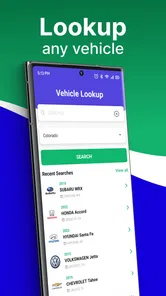
The first thing I like about the app is that it focuses on two identifiers people actually have in front of them: a license plate and a VIN. That gives the workflow a practical starting point. If I am standing near a car, a plate may be the quickest detail to enter. If I am reviewing a seller’s paperwork or a vehicle listing, the VIN is usually the more precise route.
That distinction matters. A plate is convenient, but it can be less useful when I want to compare a specific vehicle across records or avoid confusion between similar cars. A VIN is longer and more tedious to type, yet it is the better choice when I am evaluating a purchase and need to keep the search tied to one vehicle. My advice is to use the plate for a quick first check and the VIN for a more deliberate review whenever both are available.
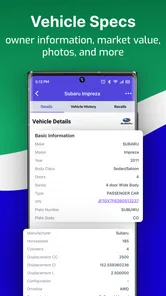
The app’s store summary points to vehicle history and owner data, so I would approach each result as research rather than as a final decision. A lookup can help me ask better questions, spot information worth investigating, and decide whether a seller’s description deserves closer attention. It should not replace a physical inspection, a test drive, or a qualified mechanic’s opinion.
One useful habit is to run the search before becoming emotionally attached to a car. Buyers often spend time imagining ownership and only later investigate the vehicle’s background. Plate Lookup is more valuable when used early, while I still have the patience to compare alternatives. If the result raises concerns, I can walk away before spending money on travel, inspections, or paperwork.
Using a plate search without overreading it
A plate-based lookup is especially convenient in situations where the vehicle is visible but the paperwork is not. For example, I might see a used car parked at a seller’s location, note the plate, and perform an initial check before arranging a viewing. That saves time, but I would still confirm the VIN directly from the vehicle and its documents before treating the search as part of a buying decision.
More From Our News Desk

 Gmail
GmailGmail in a Busy Inbox: Who Benefits Most?
From first account to crowded workday, Gmail earns its place through dependable search and flexible sorting—but its best fit depends on how much inbox maintenance you can tolerate.

 Prime Video
Switching to Prime Video: What Changes in Your Viewing Routine
Prime Video can make a compelling second home for streaming, but switching means learning a different catalog, rental layer, and route from browsing to playback.

 Universal TV Remote Control
Universal TV Remote Control Works Best as a Reliable Backup
A phone remote earns its place through quick setup and reliable habits. Here is how to get more from Universal TV Remote Control—and where its limits show.

 Weather - By Xiaomi
Weather by Xiaomi Review: Clear at a Glance, Less Clear Up Close
Xiaomi’s weather app makes everyday forecasts quick to scan, but its calm surface can leave useful details and recovery paths harder to find than they should be.

 X
XX Under Pressure: Can It Recover When Posting Goes Wrong?
A resilience-focused review of X, examining setup, mistaken posts, interruptions, weak connections, and the gaps that matter when recovery needs to be dependable.

 Clash of Clans
Clash of Clans Is Won Between the Battles
Its raids are quick; its community is a long-term project of coordination, teaching, rivalry, and shared responsibility—with all the friction that entails.
Latest News



This is also where owner data requires restraint. Information connected with a vehicle can be sensitive, and a result should be handled responsibly. I would use it for a legitimate vehicle-related purpose, not to identify, contact, or investigate a private person out of curiosity. The app’s ability to search by a plate does not make every possible use appropriate.
Another practical tip is to double-check every character before searching. Plates can be difficult to read in poor light, and a single mistaken letter can send the lookup toward the wrong vehicle or produce an unhelpful result. When a result looks inconsistent with the car in front of me, I would not assume the vehicle is suspicious immediately. I would first re-enter the plate and then verify the VIN.
Why the VIN option changes the workflow
VIN lookup is more useful when I am comparing several cars or reviewing a listing from home. I can keep the vehicle identity consistent while I examine the available history, then compare what I find with the seller’s claims. This is more disciplined than searching by a model name, because a model-level search tells me about a type of car, not the particular example I may buy.
For a serious purchase, I would save the result mentally as one part of a checklist: confirm the VIN, inspect the body and interior, check maintenance paperwork, arrange a mechanical inspection, and compare the history with the current condition. Plate Lookup fits neatly into that sequence, but it cannot perform the inspection steps for me.
The app is also useful for narrowing questions before speaking with a seller. Instead of asking broad questions such as whether the car has “a clean history,” I can ask about a specific event or inconsistency that deserves clarification. That makes the conversation more productive. At the same time, I would give the seller an opportunity to explain discrepancies, since records and current condition do not always tell the whole story by themselves.
Cost, value, and the limits of a free download
Plate Lookup is free to install, which makes trying the basic experience relatively easy. The app has in-app purchases ranging from $7.99 to $49.99 per item. That is the part I would examine carefully before committing to repeated searches. A free download is not the same as unlimited free research, and the usefulness of a paid lookup depends heavily on how important the vehicle decision is and how much detail the individual result provides.
For a one-time buyer, the sensible question is not simply whether the app costs money. It is whether the information gained could prevent a much larger mistake. If I am considering an expensive used vehicle, paying for a relevant report may be reasonable as part of due diligence. If I am only curious about a random car or checking several vehicles with no intention of buying, the purchase may be harder to justify.
I would also avoid buying anything until I know exactly what the selected purchase covers. The available price range shows that different purchase options exist, but it does not by itself tell me which option is best for a particular search. I would read the in-app wording closely, confirm whether the result is for one lookup or a broader allowance, and make sure I am searching the correct vehicle first. That small pause can prevent paying for the wrong plate or an accidental duplicate.
The free access still has value even when I do not purchase anything. It lets me judge whether the interface suits my workflow, whether entering a plate or VIN feels convenient, and whether the app is a realistic fit for the kind of research I do. I would treat that initial experience as a trial of the process, not as proof that every vehicle will return the same depth of information.
Compared with the usual alternatives, the app’s advantage is concentration. Instead of opening a browser, searching through unrelated pages, and manually organizing a plate or VIN, I can begin in a tool built around vehicle lookups. That is useful on a phone, particularly when I am already at a dealership, viewing a private listing, or standing beside a car.
The trade-off is that a specialized app is not automatically a complete vehicle-history solution. A browser search may be better when I need to compare several sources, read official guidance, check recalls, or investigate a wider ownership question. A mechanic is better for judging mechanical condition. A seller’s documents may provide maintenance context that a database cannot. Plate Lookup is strongest as a focused first step, not as a replacement for every other source.
Three ways I would get more from it
- Search before arranging the appointment: I would use the plate or VIN while still comparing listings, so a questionable result can save me an unnecessary trip.
- Use both identifiers when possible: I would begin with the plate for convenience, then confirm the same vehicle with its VIN before paying for a report or making an offer.
- Turn results into questions: I would compare the lookup with the seller’s description and inspection notes, then ask about specific differences instead of relying on a vague overall impression.
There is a fourth habit I find particularly important: keep the result in perspective when the vehicle has changed hands or circumstances over time. A history record can explain that something happened, but it may not explain how well the repair was completed or how the car has been maintained since then. I would use the result to decide where to look more closely, not to make a mechanical judgment from a screen.
Where the app may frustrate careful buyers
The biggest limitation is the natural uncertainty around lookup results. Vehicle information is only as useful as the records available for that particular search. A thin result does not necessarily mean the car is excellent, and a concerning entry does not automatically mean the car is unsafe today. Anyone expecting one tap to deliver a complete buying decision may find the experience less conclusive than hoped.
There is also friction in entering long VINs accurately, especially on a phone. I would check the characters twice and avoid copying a VIN from an untrusted message without comparing it with the vehicle itself. This is not a glamorous part of the process, but accuracy matters more than speed when a paid lookup is involved.
People who need broad automotive research may prefer a general web browser and several established sources. Someone who already has a trusted inspection process might use Plate Lookup only as a quick screening layer. And anyone looking for live mechanical diagnostics, repair instructions, insurance advice, or a full marketplace experience should choose a different kind of app because this tool is centered on identification and history lookup.
Privacy-conscious users should also think about the purpose of their search before entering information. I would keep searches tied to a legitimate vehicle decision and avoid treating owner data as entertainment. That approach makes the app more useful and keeps the lookup within a sensible boundary.
Who should use it, and who should skip it?
I think Plate Lookup is a good match for used-car shoppers who want a fast screening step before spending serious time on a vehicle. It is also useful for people who regularly compare private listings, fleet vehicles, or cars they may acquire for work. The plate option helps when speed matters, while the VIN option gives a better anchor for a careful comparison.
It can be particularly helpful for a cautious friend who tends to rely too heavily on a seller’s description. I would recommend using it before a deposit, not after. If a result changes my confidence, I can ask for documents, arrange an inspection, negotiate from a more informed position, or move on to another car.
I would be less enthusiastic for someone who only wants casual information about vehicles. The possibility of in-app purchases means curiosity searches can become poor value quickly, especially when there is no planned purchase behind them. It is also not the right choice for a person who expects a report to replace a mechanic or guarantee that a car will be reliable.
The app is available for devices running Android 8.0 or later, and the current version is 6.3.0. That makes compatibility worth checking before installation if I am using an older phone. Its Everyone content rating also makes it broadly accessible, although the responsible handling of owner-related information still matters regardless of age rating.
Plate Lookup was released on May 7, 2021, and the continuing presence of a 4.4 average from roughly 1.1 thousand ratings indicates that it has attracted sustained attention from users. I would read that as a reason to try the workflow, not as a promise that every search will be equally detailed. The app’s real value is personal: it depends on whether I need focused vehicle research and whether the result helps with a decision that matters.
My buy-or-skip verdict
I would recommend trying Plate Lookup if I were shopping for a used vehicle and wanted a convenient first filter on my phone. Its free installation lowers the barrier to testing the process, and the combination of plate and VIN searches gives it more practical flexibility than a tool limited to one identifier. The app is most convincing when it helps me reject a poor candidate early or prepare sharper questions for a seller.
I would not treat it as a complete vehicle-buying service. The strongest workflow combines the lookup with direct VIN verification, paperwork, a physical inspection, and an independent mechanical check. If I need broad research or official information from several sources, a browser-based approach may be better. If I am only curious, I would probably skip paid searches unless the result has a clear purpose.
My final view is that Plate Lookup earns its place as a focused research companion, provided I understand what I am paying for and keep the findings in context. The best value comes from using it before commitment, not as a last-minute substitute for proper inspection. For a serious buyer, that early warning and better preparation can justify exploring the free experience and considering a relevant purchase. For casual browsing or guaranteed mechanical certainty, I would choose another route.
In short, I see Plate Lookup as a practical starting point: simple enough for a quick plate check, useful enough to support VIN-based research, and limited enough that it should remain one part of a larger decision. That balance makes it worth trying for the right situation, while also making the skip decision easy for anyone who does not have a real vehicle-related question to answer.
Plate Lookup Frequently Asked Questions
What information should I have ready before using Plate Lookup?
You can search with a vehicle’s license plate or VIN, so have the relevant identifier available before opening the app. Enter it carefully, since a mistyped character can lead to an incorrect or empty result. The app is intended for vehicle research, and the information returned can depend on the identifier and the records available for that vehicle.
What is Plate Lookup, and what can I use it for?
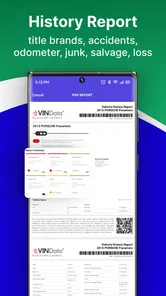
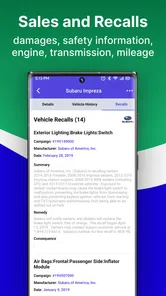
Plate Lookup is an app designed to help users search vehicle-related information by entering a license plate number or VIN. Depending on the region and available databases, it may provide details such as vehicle specifications, registration-related information, recalls, or a basic history report. It is best used as a preliminary research tool rather than a complete replacement for official government records or a professional vehicle inspection.
Is Plate Lookup available for every country, state, or license plate?
Coverage can vary considerably depending on where you live. Plate Lookup may support only selected countries, states, or regions, and the information available can differ from one location to another. Before relying on the app, check whether your local plates are supported and review the search results carefully. Some plates may return limited information or no result at all because of database restrictions.
Does Plate Lookup show the personal information of a vehicle owner?
Users should not expect Plate Lookup to reveal private owner details such as a person’s name, home address, phone number, or other sensitive information. Privacy laws and database policies generally restrict access to this type of data. The app is more likely to focus on vehicle-related records, when available. Always use the service responsibly and never attempt to identify, contact, or monitor someone without a legitimate reason.
Is the information provided by Plate Lookup accurate and up to date?
The accuracy of a Plate Lookup result depends on the source, location, and date of the underlying records. Information may be incomplete, delayed, or unavailable, particularly for recently changed registrations, imported vehicles, or plates from unsupported areas. Treat the results as useful background information, not definitive proof. For a purchase, legal matter, or ownership transfer, confirm important details through official agencies or a trusted vehicle-history provider.
Pros
- Quickly retrieves vehicle details using a license plate number.
- Simple interface that is easy for first-time users to navigate.
- Useful for checking basic vehicle information before a purchase.
- Search results are presented in a clear
- readable format.
- Convenient mobile access without needing a desktop browser.
Cons
- Coverage and accuracy may vary by state or country.
- Some vehicle details may require a paid lookup or subscription.
- Results can be outdated if registry records are not current.
- A license plate alone may provide only limited vehicle information.
- Privacy policies should be reviewed before submitting plate numbers.











