Pixelix - A Pixelfed Client
- 8.00
- 4.4
- Installs
- 1.00K
- Price
- $1.99

Screenshots

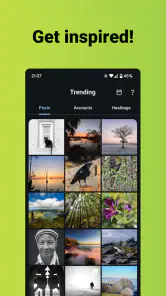
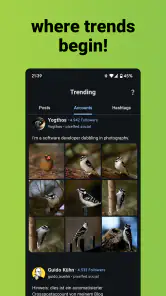
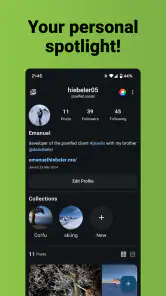
Analysis by Reviewed
I think the clearest way to judge Pixelix is to start with the connection it depends on: this is a way into Pixelfed, a social network for sharing photos, rather than a general-purpose gallery or a standalone camera app. That makes it most appealing if you want to browse and share visual work with a community, and less compelling if you mainly need to edit pictures or keep them available without a network.
What a connection changes
When you open a social feed, your experience is tied to whether posts and conversations can load. I’d treat Pixelix as a place to check in when you have a reliable connection, not as a guaranteed way to catch up while offline. A practical habit is to finish writing a caption and choosing your image before starting a post, so a slow connection is less likely to turn a quick share into a fiddly task.
That network dependence is also part of the appeal: the point is seeing other people’s photos and responding to them, not simply browsing files already on your phone. If you’re heading somewhere with unreliable service, it makes sense to save your photo work locally first and share later through the app when you’re connected.
Where it fits into a mobile day
For a casual routine, Pixelix can suit a short break: look through photo posts, leave a thoughtful comment, or share a moment from a walk. It’s a different rhythm from broad social apps where photos compete with many kinds of updates. If your main interest is photography and you want the social space to reflect that, the narrower focus can feel refreshing.
It is not the right pick for everyone, though. If most of your friends and conversations are elsewhere, you may find the community side less useful until the people you want to follow are active on Pixelfed. A mainstream social network may be more convenient for keeping up with a large existing circle; a dedicated photo editor is a better choice if your priority is detailed editing rather than sharing.
When loading or posting feels slow
Social apps can feel uneven when a connection is weak: a feed may take longer to refresh, and a post may need another try. I’d avoid tapping repeatedly when an action seems stalled; give it a moment, check whether the connection has returned, and then see whether the post or interaction went through before repeating it. That simple pause can help prevent duplicate effort.
Pixelix is a client for Pixelfed, so it’s useful to think of the app and the wider network as related parts of the experience. If something is unavailable, checking your connection first is a sensible step before assuming the app itself is at fault. That distinction matters when you’re deciding whether to retry now or come back later.
More From Our News Desk

Weather by Xiaomi Review: Clear at a Glance, Less Clear Up Close

X Under Pressure: Can It Recover When Posting Goes Wrong?

Clash of Clans Is Won Between the Battles

Android Auto Makes the Case for Quieter Car Software

MobiOffice: Transforming Mobile Productivity with Seamless Integration

EA SPORTS FC™ Mobile Soccer: Redefining Mobile Sports Gaming
Mindful sharing and data use
Photo-heavy browsing can use more mobile data than reading text, so I’d save extended browsing for Wi-Fi if your plan is limited. You can also make your time in the app more intentional: open it to share a particular image or respond to a few posts, rather than leaving a feed running while you’re out. This is a useful trade-off if you want the social connection without unnecessary background browsing.
Before sharing, take a moment to check the image and caption you intend to post. That small pause is especially helpful when you are uploading from a busy place or on a limited connection; it reduces the chance of needing to redo a post just because you selected the wrong photo or missed a detail.
Why Pixelix Stands Out
Let's dive into what makes this app a go-to for creatives. First off, Pixelix brings Pixelfed's decentralized photo-sharing network right to your fingertips. No more ads and algorithms deciding what you should see! It's all about organic engagement here. I was genuinely thrilled by how it prioritizes user content over commercial interests.
Seamless User Experience
The user interface is as smooth as silk. Navigating through the app feels intuitive, with a minimalistic design that keeps the focus squarely on your photos. Uploading pictures is a breeze, and the editing tools are pretty robust. You’ve got your basics like cropping and rotating, but also some cool filters and adjustments to make your photos pop.
Community and Interaction
One of the standout features for me is the sense of community. Being a part of Pixelfed means you're engaging with a network of photographers who share your passion for visual storytelling. The interaction feels genuine; it's less about likes and more about appreciation. Comments and feedback are constructive, making it a perfect space for budding photographers to grow.
Privacy and Control
In a world where data privacy is increasingly a concern, Pixelix gives you full control over your content. You decide who sees what, and there’s no hidden agenda in how your data is used. It’s refreshing to feel like you’re in the driver’s seat of your digital footprint.
Open Source Love
For the tech-savvy, Pixelix being open source is a huge plus. It means transparency and the ability to contribute to its development. You can even customize the app if you know your way around code – talk about personalization!
A practical fit, not an automatic switch
For example, after a weekend walk, I might pick one image, write a caption while I still remember the moment, then post when I have a steady connection. That deliberate workflow suits a photo community better than quickly scattering snapshots across several feeds. If you prefer to share many kinds of updates with the broadest possible audience, though, a larger general social network will probably remain more convenient.
Pixelix is made by daniebeler and costs $1.99, so I’d consider both the one-time app choice and whether Pixelfed itself fits the people and photography I want to follow. It is rated Teen, and its current version is 4.2.0; the app was released on March 15, 2024, and requires Android 8.0 or later. Its average rating is 4.4 from around 74 ratings, with 1K+ installs and 8 reviews. Those figures suggest a small, focused audience rather than a mass-market network, which may be a plus if you want a more specialized corner of social media.
My bottom line is that I’d recommend it to someone who enjoys sharing photographs and is willing to build their social routine around Pixelfed. I’d skip it if offline browsing is essential, if I need a full-featured editing suite, or if my friends are firmly tied to another platform. For the right person, its best quality is not a long list of tools but the choice to spend time in a photo-centered network; just plan around connectivity and keep expectations tied to that community.
All in all, if you're looking for a photography-first social media experience that respects your data and encourages your creativity, Pixelix is a must-try. Whether you're a pro photographer or someone who simply loves sharing life’s moments through pictures, this app offers a refreshing take on social networking. Give it a shot, and you might just find it becoming your new favorite pastime.
Choosing a good first session
If you are new to Pixelfed, I would make the first visit about finding people whose images you genuinely want to see, rather than judging the app by how busy its feed looks immediately. A smaller community can feel quiet until you follow accounts that match your interests. Try searching by the kinds of photographs you enjoy—street scenes, landscapes, food, or portraits—and give yourself time to see whether the mix feels worth returning to.
This is also a sensible way to judge whether a client for a photo network fits your habits. If you normally open a social app to message friends or follow breaking news, a photo-focused feed will not replace those routines. If, instead, you like pausing over an image and leaving a specific response, the slower, more visual pace may be exactly what you wanted.
Make sharing less error-prone
A useful workflow is to treat the phone’s camera roll as the preparation space and the social app as the publishing space. Choose the strongest frame first, check that it is the image you meant to share, and draft a caption that gives viewers a little context. Then open Pixelix when you are ready to post. This keeps the creative decision separate from the network-dependent part of the task, which is handy when you are moving between Wi-Fi and mobile service.
I would also think about the audience before posting a personal moment. A photograph can travel farther than the moment in which it was taken, so it is worth checking the caption and intended visibility rather than sharing on autopilot. This is not a special technical trick; it is a practical habit that makes any photo-sharing community feel more deliberate and comfortable.
What the alternatives do better
Compared with a broad social network, Pixelfed’s photo-first focus can make browsing feel less scattered, but it also means you should not expect the same usefulness for every kind of conversation. A general platform is usually the easier choice when your main goal is reaching an established group of friends across many subjects. A gallery app is better for sorting and revisiting private pictures, while an editor is the right tool when careful retouching is the point. Pixelix makes the most sense when the activity you want is publishing and discussing photographs within Pixelfed.
That distinction helps answer whether paying for the app is worthwhile: I would decide based on how often I expect to use this particular route into Pixelfed, not on the assumption that it will replace every social or photography tool on my phone. If you are still unsure about the network’s community, it is worth first considering whether the people and work you want to follow are there. The client can make access convenient, but it cannot make an inactive circle engaging by itself.
Who will get the most from it
I see Pixelix working best for someone who enjoys sharing a considered selection of photographs, follows visual creators, and is comfortable with a community that may be more specialized than the biggest social platforms. It can also suit someone who wants to keep photo sharing separate from the constant mix of links, arguments, and unrelated updates found elsewhere. The key is enjoying the act of looking and responding, not measuring the experience by how many people see every post.
I would be more cautious if you need dependable access while commuting through patchy coverage, have a tight mobile-data allowance, or mainly want a fast way to distribute pictures to a large group that already uses another service. In those cases, waiting for Wi-Fi, using the platform your contacts already check, or keeping an editor and gallery app for separate jobs may be more practical. Those are not flaws that a client can solve; they are questions of fit.
My connectivity verdict
The most useful way to approach Pixelix is as a connected window into a photo community, not as a camera roll, editing workstation, or guaranteed offline reading tool. I would browse deliberately, prepare posts before uploading, and pause before repeating an action that seems stuck. Those small choices make the experience smoother without pretending that every connection will be reliable.
For me, the recommendation comes down to whether Pixelfed’s style of photo sharing matches what I want from social media. If it does, Pixelix offers a focused way to spend time with images and the people behind them. If I need broad reach, extensive editing, or access regardless of service, I would choose a different tool for that job and keep this one for the moments when a thoughtful visual community is the point.
Pixelix - A Pixelfed Client Frequently Asked Questions
Do I need a Pixelfed account to use Pixelix?
Pixelix is a client for Pixelfed, the social platform for sharing photos, so its purpose is to let you access and interact with a Pixelfed account. If you are new to the platform, you may want to learn about Pixelfed and choose an account before relying on Pixelix as your social feed. The app is a way to use that platform, rather than a separate photo-sharing network.
What is Pixelix and how does it work?
Pixelix is a third-party client for Pixelfed, an open-source, federated social media platform focused on photo sharing. The app allows users to access and interact with their Pixelfed accounts, enabling them to upload, edit, and share images, follow other users, and engage with content through likes and comments. It offers a user-friendly interface tailored for seamless navigation and enhanced photo browsing experience.
Is Pixelix available for both Android and iOS devices?
Yes, Pixelix is designed to be compatible with both Android and iOS operating systems. It is available for download on the Google Play Store for Android users and the Apple App Store for iOS users. This cross-platform availability ensures that users can enjoy the benefits of Pixelix regardless of their device preference, making it accessible to a wider audience.
What should I check before installing Pixelix on my device?
Check that your device meets Pixelix’s operating-system requirement before downloading: the app supports Android 8.0 and later. It is a social app with a Teen content rating, which may help families decide whether it is suitable for a particular user. You can also consider whether you already use Pixelfed, since Pixelix is a client for that photo-sharing platform rather than a stand-alone social network.
Are there any costs associated with using Pixelix?
Pixelix is typically available as a free application, allowing users to access its core features without any initial cost. However, there might be in-app purchases or optional premium features available for users who are looking for enhanced functionalities or a more personalized experience. It's advisable to check the app's store listing for detailed information on pricing and features.
Pros
- User-friendly interface for easy navigation
- Efficient photo-sharing with high-quality uploads
- Open-source with regular updates
- Customizable themes for personalized experience
- No ads for a distraction-free environment
Cons
- Limited features compared to other photo apps
- Occasional bugs can disrupt usage
- No offline mode available
- Requires stable internet connection
- Limited editing tools for photos
- Category
- Social
- Version
- 4.2.0











